
Dash AI Teammate for Slack and Microsoft Teams Assistant

What is Dash
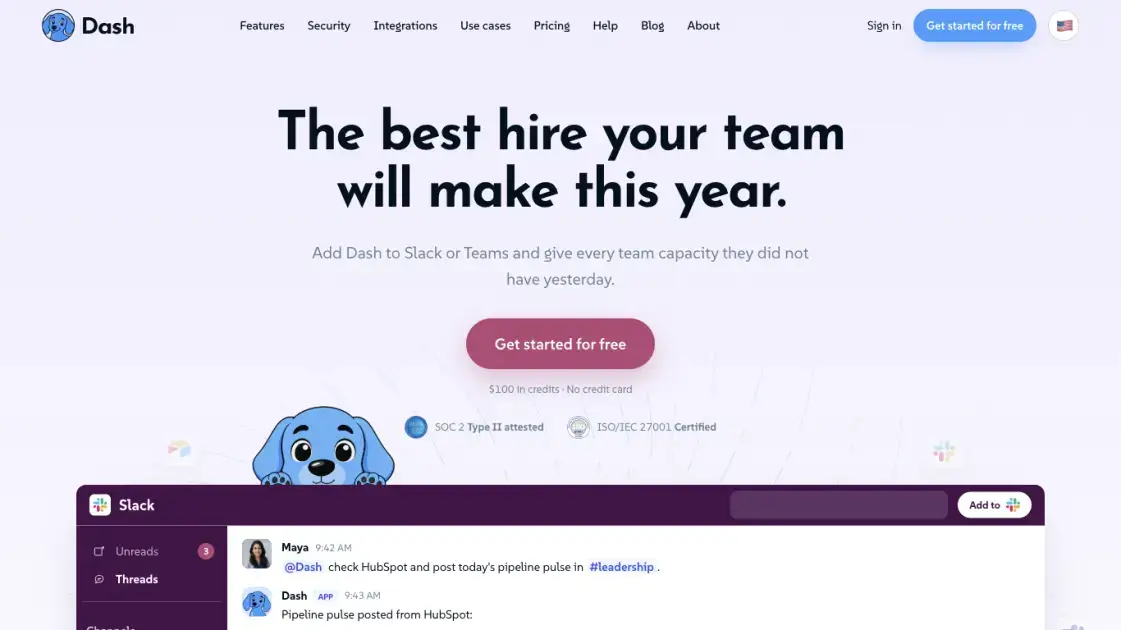
Dash is an AI teammate that lives inside Slack and Microsoft Teams, two messaging platforms most teams already use every day. Instead of opening a separate app or learning a new interface, users tag @Dash in a channel and the work comes back in the thread. The tool connects to more than 3,000 business applications through OAuth, including CRM, accounting, support, engineering, and analytics software, and can research the open web when an answer is not stored in any connected system. Dash reads across the systems where information tends to be scattered, drafts documents, generates reports, and completes multi-step workflows, then shows what it intends to do and waits for approval before it writes, sends, or posts anything. Skills let a team capture a recurring job once and reuse it with one command, while workspace-level isolation, no-training-on-data defaults, SOC 2 Type II attestation, and ISO/IEC 27001 certification address security concerns. Setup takes about 30 seconds with OAuth, no API keys, and no IT ticket.
How does Dash work
Dash is installed into Slack or Microsoft Teams in about 30 seconds through OAuth, with no API keys or IT tickets. Each tool connection is created individually, and the user approves every connection before it is enabled. When a team member tags @Dash or sends a direct message, the request runs inside a dedicated server-side sandbox that keeps the workspace isolated and limits where information can move. Reads, such as fetching or searching tools and the web, run automatically by default. Writes, which include creating, updating, sending, or posting, pause for human approval and show exactly what will be done first. Destructive operations stay disabled until deliberately enabled. Results are posted back in the thread, and every action leaves an audit trail.
Benefits of Dash
Dash reduces the time teams spend moving information between tools and chasing follow-ups. Asking in a channel that already exists removes the need to open a separate application, and the same tools, skills, and context are shared across the team, so one person's setup benefits everyone. Recurring jobs, such as Monday business updates, monthly owner statements, or competitor scans, can be taught once as a skill and rerun by any member. Because Dash asks before sending, posting, or spending, mistakes are caught before they happen, which suits teams that handle client communications or regulated data. The product is priced per workspace rather than per seat, which keeps cost predictable as teams grow, and unused credits roll over.
Pros and Cons of Dash
Pros
- Works inside Slack and Microsoft Teams
- Connects to 3,000+ tools via OAuth
- Approval gates on every write action
- Reusable skills for recurring jobs
- Workspace-isolated, no training on data
Cons
- Free credits are limited, not indefinite
- Requires approval wait before every write
- Tied to Slack or Teams environments
- Credits expire if work is not planned
- Cost grows with large monthly workloads
Core Features of Dash
Channel-based work
Users ask in the Slack or Teams channel the team already uses, and the finished work lands in the thread, so there is no new app to open and no second place to check.
Cross-system answers
Dash reads every system where an answer may be buried, including CRM, email, spreadsheets, and helpdesk, then posts one consolidated answer instead of making the user check five tools.
Web research with citations
Dash searches the open web and returns a one-page brief, bottom line first, with every claim linked to its source, so a user can verify the research before a call or a decision.
Document and report generation
Monthly reports, owner statements, and product copy are drafted from real connected numbers, formatted into docs, sheets, and PDFs, and held for approval before anything is sent.
Reusable skills
A job done every week, such as a Monday business pulse or a competitor scan, is taught to Dash once and can be run by any team member afterward without anyone relearning the steps.
Approval-gated actions
Every write action, from sending an email to publishing a Shopify listing, is gated behind an in-thread approval prompt, with an audit trail of what Dash did and who approved it.
Use Cases of Dash
- Property management: Prioritize maintenance repair work orders, draft rent reminders and arrears letters, and prepare monthly owner statements from the property system and books.
- Agencies and marketing services: Pull a client account together before a call with sources under each line, prepare campaign audits, and deliver client reporting with everything ready for review.
- Accounting and bookkeeping: Track every client's month-end close in one answer, draft reconciliation notes, and chase missing documents with draft emails held until approval.
- E-commerce and retail: Watch stock levels, prepare reorders, answer order questions, and chase suppliers with nothing reaching a supplier without approval.
- Media and conferences: Track sponsor deliverables against the run of show, draft follow-ups from the record, and distribute content with each item signed off.
FAQs of Dash
What is a credit and how much does Dash cost?
A credit tracks the model, tools, and compute Dash uses to finish a job. Quick tasks cost a few hundred credits, workflows cost around a thousand, and larger projects cost a few thousand. New workspaces start with $100 in free credits and no credit card, and a Team plan costs $50 per month for 20,000 monthly credits with no per-seat fees.
Do unused credits roll over?
Yes. On the Team plan, unused credits roll over month to month, so a team can save them for bigger projects instead of losing them at the end of a billing cycle.
What happens if Dash runs out of credits?
When the credit balance is used up, Dash stops executing paid work until the workspace tops up through the billing page or the credit pool is refilled, so there is no surprise spend.
Are there per-seat fees?
No. One shared workspace plan covers the entire team, and every member can use Dash from the same credit pool, which keeps the cost predictable as the team grows.
Do I need a credit card to start?
No. The first $100 of credits is free and requires no card, so a team can try the full product with every feature and all integrations before deciding on a plan.
How is Dash different from ChatGPT?
Dash is built to work inside Slack or Teams with connected business tools, gated approvals, and reusable skills, while ChatGPT is a general chat assistant; Dash executes work in your systems rather than only answering.
Can Dash delete data by default?
No. Destructive operations, such as deletion, purge, or force-push, are disabled by default and must be deliberately enabled by a workspace member before they can run.
How to use Dash
- Open the Dash website and click Get started for free, then choose Slack or Microsoft Teams to begin installation.
- Authorize the install with OAuth in one click; no API keys, credit card, or IT ticket are required to start.
- Connect the tools a job needs, one at a time, and approve each connection before it becomes active in the workspace.
- Tag @Dash in any channel or send a direct message with a task, such as summarizing a thread or drafting a follow-up.
- Review the reply in the thread, and approve the action when Dash asks before sending, posting, or spending.
- Teach Dash a recurring job as a skill once, so any team member can run it later with a single command.
Dash Alternatives
Free invoice maker for freelancers and small businesses on Web, iOS and Android. Create unlimited PDF invoices, manage clients and companies, and bill from AI assistants via MCP.

Relay App turns plain-language instructions into AI workflows that connect 200+ apps, run reliable automations, and pause for human approval.
AtAt runs Claude Code, Codex, or local models in the text field you are typing in, no app-switching. It adds TabTab autocomplete, screenshots, and clipboard history.
Always free browser that shares your logged-in Chrome state with AI agents like Claude Code and Codex, running browser automation up to 3.45x faster.
Ritto AI learns from one real demonstration of your work, finds the repeated tasks, and completes them the same way. Join the beta for early access.
Aldena creates isolated rooms where AI agents handle client work with real roles, shared memory, and human approval gates.
Referent uses AI agents to automate legal practice operations - client intake, matter management, document filing, and billing prep. Built for solo and small law firms.
Loop Engineering is an AI-powered platform that automates SaaS maintenance through verified agent workflows, memory persistence, and independent verification for every product run.
Taskly is an AI-native task manager where teams describe work in plain English and Otto drafts, prioritizes, and organizes tasks with your approval every step.
Ottermind is an AI workspace where you describe your vision and it builds the architecture, code, and deployment. Work with files, memory, and tools across devices.
Convert PPT to Keynote-ready PPTX online. Free PPT to Keynote converter for Apple Keynote imports with secure processing and no installs.
Tenderbolt uses AI to automate RFP and tender responses. It analyzes documents, completes security questionnaires, and generates tailored proposals.