
Ritto AI – Automate Repeated Work by Showing It Once

What is Ritto
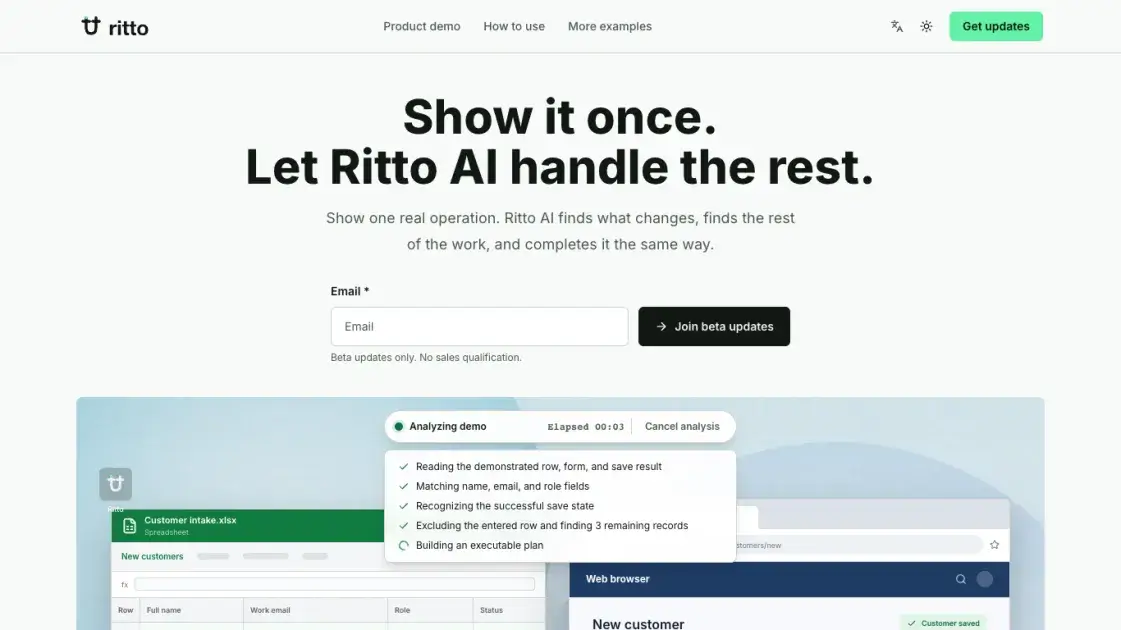
Ritto is an AI assistant that automates repeated work from a single real demonstration. Instead of describing a workflow, the user performs one operation normally — entering a spreadsheet row into a customer portal, for example — while Ritto records the steps. Ritto then identifies what changes each time, such as names, work emails, and roles, against what stays fixed, like the form and the Save action. It locates the remaining items in the same batch, asks only what the work needs when anything is unclear, and completes each item with the same steps. Nothing runs until the user reviews the scope and actions and approves. The result is that repetitive manual work — customer intake, resume review, order checks — becomes a clear, reusable routine the user can confirm anytime. Ritto is currently in beta, with updates delivered by email.
How does Ritto work
Ritto begins with one real demonstration: the user performs the work once, normally, while Ritto records the steps. Ritto then identifies what changes between repetitions — variable fields such as names, work emails, and roles, versus the fixed form and actions — and finds the remaining items in the same batch. If anything is unclear, Ritto asks only what the work needs. Before running, the user reviews the scope, field mapping, and planned actions, and approves. Ritto then completes each item the same way and confirms success before moving on to the next.
Benefits of Ritto
Ritto AI learns a task from a single real demonstration: a user enters one spreadsheet row into a customer form, and the tool records the steps as it happens, so no configuration or complex setup is needed. It identifies what changes between rows — names, emails, roles — and what stays the same, then finds the remaining batch items automatically. Before running, it presents the scope and key actions for approval, leaving the user in control. The same workflow is reusable next time. The product is still in beta, with progress updates delivered through a newsletter.
Pros and Cons of Ritto
Pros
- Learns from one real demonstration of the work.
- No configuration or complex setup required.
- Identifies what changes and what stays the same.
- Finds the remaining batch items automatically.
- Confirms scope and actions before running.
Cons
- Still in beta.
- No pricing page published.
- Access limited to beta subscribers.
- Updates delivered only via newsletter.
Core Features of Ritto
Records one real demonstration of the work
Work as usual while Ritto records the steps; one completed example, such as a spreadsheet row entered into a portal, becomes the demonstration the routine is built from.
Identifies what changes between repetitions
Ritto separates variable fields — Full name, Work email, Role — from fixed parts like the form and the Save action, and uses that mapping to understand each new item.
Finds the rest of the same batch
After the demonstrated example, Ritto recognizes the remaining entries as the same job. In the customer example, three more spreadsheet rows were matched as the same customer-entry batch.
Confirms scope and actions before running
Ritto states the data scope, field mapping, and planned actions, and the user reviews and approves before anything executes. Nothing runs without that confirmation.
Completes each item the same way
Each remaining item is read, filled into the matched form fields, and saved before Ritto moves on, with a success confirmation preceding the next item.
Use Cases of Ritto
- Customer operations teams: Enter new customers from a spreadsheet into a CRM portal in one pass.
- Recruiting teams: Read each candidate file and organize what needs review.
- Outreach teams: Check each contact and prepare content for confirmation before sending.
- E-commerce teams: Check each order by the same rules and flag exceptions that need attention.
- Back-office teams: Process files and spreadsheets one by one, then summarize the results.
FAQs of Ritto
What is Ritto and who is it for?
Ritto is an AI tool that turns one real demonstration of a task into a repeatable routine. It is aimed at people whose work involves repeated operations with fairly fixed steps — entering spreadsheet rows into portals, reviewing resumes, checking orders — where a human currently performs the same sequence over and over.
How does Ritto learn a task?
The user performs the task once, normally, while Ritto records the steps. Ritto then identifies which parts change each time — in the site's example, Name maps to Full name while the form and Save action stay the same — and finds the remaining items that belong to the same batch of work.
Does Ritto need configuration or setup?
No. The site describes a setup-free flow: pick work you repeat often with fairly fixed steps, do it once yourself, and Ritto handles the rest. Where something is unclear, Ritto asks only what the work needs rather than requiring the user to define rules in advance.
What kinds of work can Ritto handle?
The site lists recruiting and resume review, direct customer outreach, commerce order checks, and file or spreadsheet batches. The common thread is repeated work with fairly fixed steps; Ritto processes items one by one and can summarize the results at the end.
Is Ritto available now, and what does it cost?
Ritto is in beta. The site invites users to subscribe for meaningful beta progress and early product updates by email, noting that it is beta updates only with no sales qualification. Pricing is not disclosed on the site, so public costs are not available yet.
How is data handled and where can questions be sent?
The site does not describe its data-handling practices in detail. It does link a Privacy Policy and Terms of Service in the footer, which are the appropriate places to check for specifics, and the contact address contact@ritto.ai is listed for direct inquiries.
How to use Ritto
- Do it once: Work as usual through a real operation, such as entering one spreadsheet row into a customer form, while Ritto AI records the steps silently.
- Fill in the gaps: Where something is unclear, Ritto AI asks only what the work needs — no extra setup, no configuration, no questions beyond the task itself.
- Confirm before it starts: The tool shows the identified data scope, field mapping, and key actions; the user reviews and approves before any run starts.
- Use it again next time: Open the recorded work again, confirm what changed in the current batch, and Ritto AI completes the rest the same way.
- Join the beta: Subscribe to the "Join beta updates" newsletter form on the site, which delivers beta progress and early product updates only.
Ritto Alternatives
Open-source AI coworker for Slack and Lark that runs Claude Code, Codex or Pi on your own machine with the plan or API key you already pay for.
Wery is a virtual AI studio that routes one goal to specialist agents for video, images, music and documents, keeping characters and project assets consistent.

Free invoice maker for freelancers and small businesses on Web, iOS and Android. Create unlimited PDF invoices, manage clients and companies, and bill from AI assistants via MCP.
Relay App turns plain-language instructions into AI workflows that connect 200+ apps, run reliable automations, and pause for human approval.
AtAt runs Claude Code, Codex, or local models in the text field you are typing in, no app-switching. It adds TabTab autocomplete, screenshots, and clipboard history.
Dash is an AI teammate in Slack and Microsoft Teams that connects 3,000+ tools, automates workflows and completes tasks in your channel.
Always free browser that shares your logged-in Chrome state with AI agents like Claude Code and Codex, running browser automation up to 3.45x faster.
Aldena creates isolated rooms where AI agents handle client work with real roles, shared memory, and human approval gates.
Referent uses AI agents to automate legal practice operations - client intake, matter management, document filing, and billing prep. Built for solo and small law firms.
Loop Engineering is an AI-powered platform that automates SaaS maintenance through verified agent workflows, memory persistence, and independent verification for every product run.
Taskly is an AI-native task manager where teams describe work in plain English and Otto drafts, prioritizes, and organizes tasks with your approval every step.
Ottermind is an AI workspace where you describe your vision and it builds the architecture, code, and deployment. Work with files, memory, and tools across devices.