
Scan PDF Online Free - AI PDF Scanner with OCR & Receipt
| Added on: | Sep 26, 2026 |
| Monthly Visits: | -- |
| Social & Email: | -- |

What is ScanPDF AI
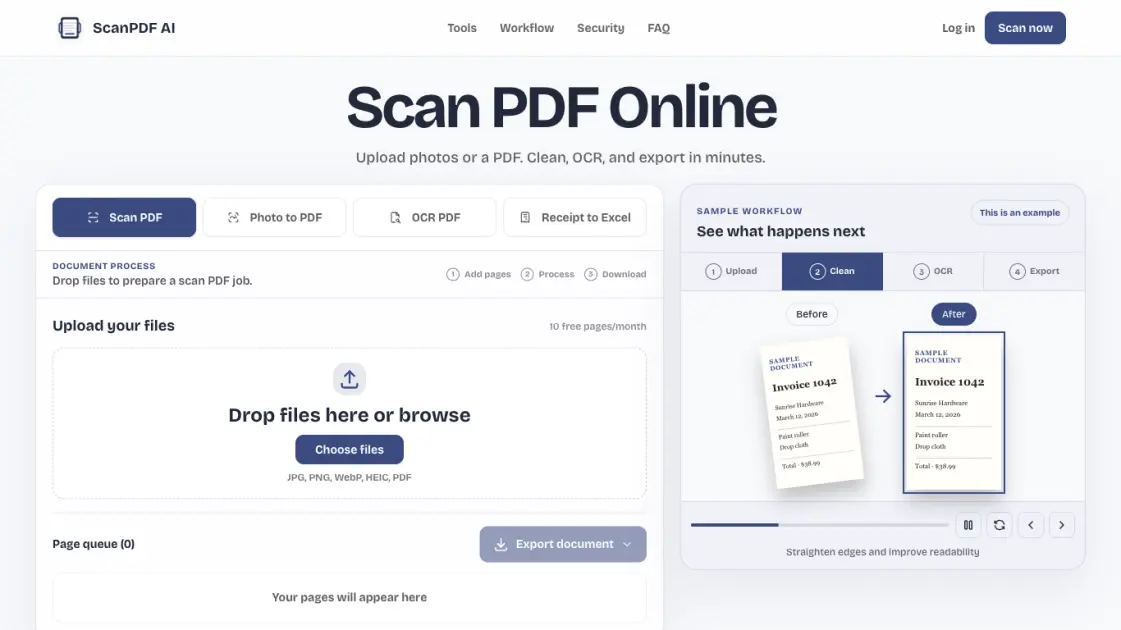
ScanPDF AI is a free, browser-based PDF scanner that turns document photos and scanned PDFs into clean, usable files. It replaces the need to install scanner software: upload photos or PDFs, let AI cleanup straighten and crop each page, then export a polished PDF. The platform also adds an OCR PDF workflow that extracts machine-readable text from image-based pages, producing searchable PDF, TXT, or DOCX output. For expense handling, Receipt to Excel reads receipts and invoices, organizes merchant, date, tax, and total into reviewable fields, and exports CSV rows for spreadsheet use. Designed around a Cloudflare-native job model, ScanPDF AI keeps documents account-scoped, lets users manage history, and offers a free tier of 10 pages per month, making it a practical online scan tool for students, freelancers, and small teams.
How does ScanPDF AI work
ScanPDF AI runs documents through a Cloudflare-native job model. Uploaded JPG, PNG, WebP, HEIC, or PDF files land in a browser page queue, where pages can be reordered and rotated. The AI cleanup profile then detects page edges, applies auto crop, and adjusts contrast, grayscale, or black-and-white settings to remove shadows and skew. For OCR tasks, a recognition step converts image-based text into machine-readable content and embeds a searchable layer, with results queued for review before export. Receipt to Excel runs a structured extraction pass that pulls merchant, date, tax, and total fields into a review table. The finished job can be downloaded as PDF, TXT, CSV, or DOCX, with files stored under the account for later download or deletion.
Benefits of ScanPDF AI
ScanPDF AI removes the need for installed scanner apps, since the whole workflow runs in the browser from any phone or desktop. The free tier covers 10 pages per month, which suits light document work, while AI cleanup straightens and crops photos automatically so exports look clean. OCR output makes scanned pages searchable and copyable, and receipt extraction saves manual data entry by turning receipts into reviewable CSV rows. Files stay account-scoped, with saved history that can be deleted, so documents remain under the user's control. One limitation: the monthly page limit can feel tight for heavy batch scanning, and OCR accuracy drops with blurry or handwritten originals.
Pros and Cons of ScanPDF AI
Pros
- No scanner app installation required
- Free tier covers 10 pages monthly
- OCR turns scans into searchable text
- Receipts become reviewable CSV rows
- Files stay account-scoped and deletable
Cons
- Monthly page limit caps heavy scanning
- OCR accuracy drops on blurry handwriting
- Requires internet and a modern browser
- No desktop app for offline work
Core Features of ScanPDF AI
OCR PDF text extraction
The OCR PDF workflow reads image-based pages, recognizes printed text, and adds a searchable layer so content can be searched, copied, or reused. Output covers PDF, TXT, and DOCX.
AI cleanup and auto crop
Page detection, crop handles, contrast presets, and grayscale or black-and-white modes fix crooked or shadowed photos. Review each page before export to avoid cut-off signatures or totals.
Multi-format document export
Exports stay flexible with PDF, TXT, CSV, and DOCX options. Choose the format a task needs, from a polished PDF for sharing to TXT or DOCX for reusing text.
Receipt to Excel extraction
Receipts and invoices are turned into structured fields for merchant, date, tax, total, and currency. Review extracted values against the source image, then export CSV for spreadsheet workflows.
Browser page queue
Upload JPG, PNG, WebP, HEIC, or PDF files and assemble them in a page queue. Reorder, rotate, and clean pages before producing one combined document without extra apps.
Account-scoped document storage
Saved files are linked to the account and history can be deleted at any time. Processing and download run through a Cloudflare-native job model that keeps documents under user control.
Use Cases of ScanPDF AI
- Students and freelancers: Scan lecture notes, forms, contracts, and IDs in a browser for quick archiving and searchable copies.
- Small business operations: Organize invoices, tax files, expense receipts, and signed agreements into clean PDFs without desktop software.
- Accountants and finance teams: Turn receipt photos into reviewable expense rows and export CSV for Excel or Sheets.
- Personal paperwork: Convert bills, statements, and certificates to clean multi-page PDFs that are ready to share or archive.
- Document-heavy teams: Assemble multi-page PDFs from phone photos and keep processing history manageable under account storage.
FAQs of ScanPDF AI
Can I scan PDF online without installing an app?
Yes. ScanPDF AI is designed as a web-first PDF scanner. You can upload photos or PDFs, assemble pages, preview cleanup settings, and export from the browser. No desktop scanner software is needed, and the workflow runs on any phone or desktop with a modern browser.
Does OCR PDF create a searchable PDF?
Yes. The OCR PDF workflow extracts machine-readable text from image-based pages and embeds a searchable layer, so recognized words can be searched, copied, or reused. The searchable PDF is a core workflow, not a hidden premium extra, and results can also be exported as TXT or DOCX-ready text.
How does receipt to Excel work?
Receipt to Excel organizes merchant, date, tax, total, and currency fields into a structured review table instead of returning raw OCR text. Users confirm each field against the source image, then export CSV rows for Excel or Sheets, which fits expense tracking without retyping every line.
Is ScanPDF AI private enough for contracts and IDs?
ScanPDF AI keeps saved files linked to the user's account, stores originals and exports only for processing and download, and lets users delete saved documents from history. Documents stay under the user's control, with the details of processing and storage covered in the Privacy Policy.
Will there be an OCR API?
The platform is built on a Cloudflare-native job model with uploads, PDF assembly, OCR, extraction, quotas, and webhooks mapped to Workers, R2, D1, Queues, and Workflows. That architecture is designed so the scanner can grow from a free tool into an API product.
What file formats does ScanPDF AI accept?
The scanner accepts JPG, PNG, WebP, HEIC, and PDF files for the Scan PDF workflow. Photo to PDF uses JPG, PNG, WebP, and HEIC, while OCR PDF handles PDF, JPG, PNG, and WebP, and Receipt to Excel takes receipt photos, invoices, and PDFs.
Who is ScanPDF AI best suited for?
ScanPDF AI targets students and freelancers who scan notes, contracts, and IDs, plus small business operations that organize invoices, tax files, and signed agreements. Accountants and finance teams also use the receipt extraction path to build CSV expense records for spreadsheets.
How to use ScanPDF AI
- Open the website and pick a workflow. Choose between Scan PDF, Photo to PDF, OCR PDF, or Receipt to Excel depending on the task.
- Drop files onto the upload area. JPG, PNG, WebP, HEIC, and PDF files are accepted into the browser page queue.
- Review and arrange pages. Check order, rotation, and cleanup settings, and make sure important details reach the edge of the frame.
- Run the job. The AI cleanup profile crops edges, adjusts contrast, and queues OCR results for review before the export step.
- Review extracted data for receipts, then export. Download the finished document as PDF, TXT, CSV, or DOCX, or move CSV rows into Excel.
ScanPDF AI Alternatives
Free invoice maker for freelancers and small businesses on Web, iOS and Android. Create unlimited PDF invoices, manage clients and companies, and bill from AI assistants via MCP.

Gamma AI is an AI presentation generator that turns text, PDF, and Word into slides with structured outlines, in-browser editing, and editable PPTX export.
Fuu AI is an AI presentation maker that turns text, PDFs, and documents into professional PPT slides in minutes, powered by Claude Opus 4.7.
AI-powered PDF to Markdown converter with OCR for scanned pages. Get clean, structured Markdown from any PDF in seconds online.
Tenderbolt uses AI to automate RFP and tender responses. It analyzes documents, completes security questionnaires, and generates tailored proposals.
1Scholar is an AI academic toolbox for scholars and researchers, offering citation verification, source discovery, and AI‑generated text humanization to streamline manuscript preparation and reduce errors.
PixPin is a cross‑platform app for capturing screenshots, recordings and extracting text via OCR, with pinning and annotation features for developers, designers and support teams.
PDF Translate is an AI PDF translator for professionals and students, providing free, fast multilingual translation of PDFs while keeping fonts, tables and images intact.
PDF2Word is an online PDF to Word converter that creates editable DOCX files, preserves layout, supports scanned PDFs, and processes files securely with size limits for free and paid users.
MiroFish is an AI simulation chat platform that converts text, PDF, MD or TXT inputs into graph building, scenario simulation, and structured reports, offering continuous chat‑driven prediction for analysts and decision‑makers.
EZ-Estimates uses AI to generate line-item quotes, manage change orders, and collect e-signatures, helping contractors build professional estimates in under 60 seconds.
eety.ai is an AI-powered patent drafting assistant that works like a brilliant colleague, amplifying your expertise through a 10-phase pipeline that analyzes disclosures, drafts claims, generates drawings, and maintains your unique writing style.