
Muvio: AI Music Video Maker & Song Generator Online

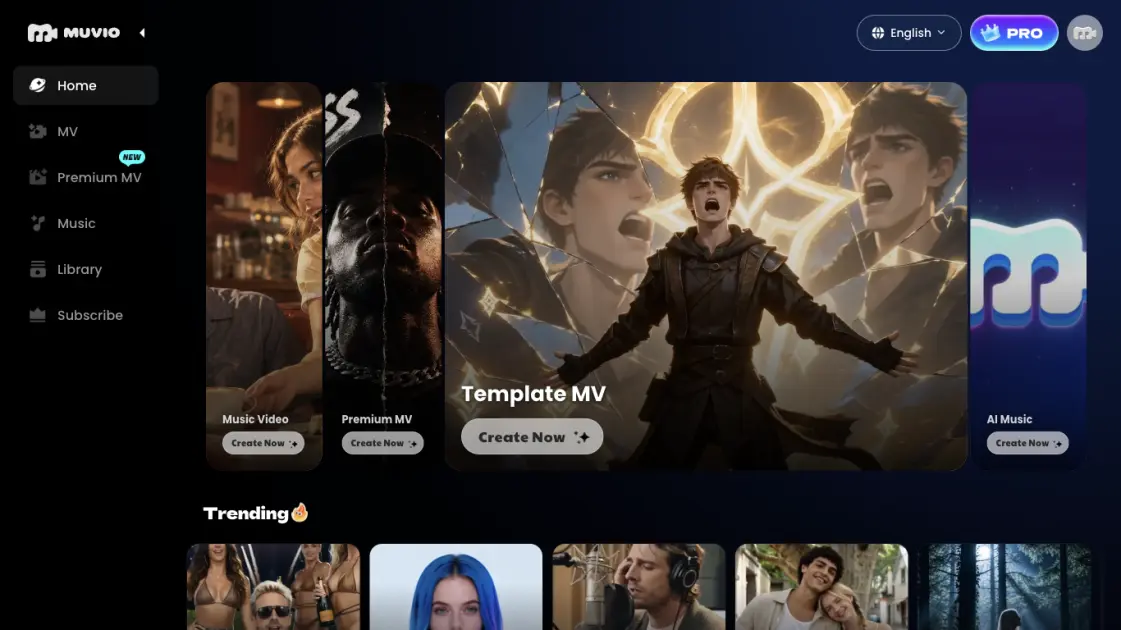
What is Muvio
Muvio combines a music video studio and a song creator in one browser-based workspace. Users supply an existing track by upload or Suno link and receive a video that spans the entire song, with visual style and characters chosen by the creator. When no audio is available, the song generator writes a piece from a short description or supplied lyrics and passes it straight into the video workflow. The service targets independent musicians, Suno users, short-form creators and labels that need release visuals without a film crew. Output supports both landscape YouTube videos and vertical clips for TikTok, Reels and Shorts.
How does Muvio work
The video engine reads the supplied track and shapes scenes and cuts around its mood and structure rather than placing generic footage over the audio. A creator first supplies the song and a front-facing character image, then selects a visual direction and optionally writes a short plot description. The system renders a preview that can be reviewed before committing to the full render, which extends across the whole song. Full renders consume credits according to audio duration and chosen quality, roughly seven credits per second in SD and fourteen in HD. Songs made in the built-in generator move into the same studio without a download or re-upload step.
Benefits of Muvio
Keeping composition and visuals inside one product removes the export-and-reimport loop between separate audio and video tools. Because the rendering process follows the track's own mood and structure, the finished clip is tied to the music instead of feeling like unrelated stock footage. Creators can place their own face or a chosen character at the centre of the result, which matters for artists building a recognisable visual identity. The same account can produce widescreen and portrait versions for different platforms, and the interface is localised into nine languages. A preview step keeps experimentation cheap before credits are spent on a complete render.
Pros and Cons of Muvio
Pros
- Song creation and video production in a single workflow
- Full-song coverage up to five minutes
- Lead and supporting character photos supported
- Landscape and vertical output ratios
- Preview render before the full job
Cons
- Full videos require a paid subscription
- Credits scale with song length and quality
- SD and HD renders take several minutes
- Character photos must be front-facing and well lit
- Commercial rights limited to active PRO subscribers
Core Features of Muvio
Custom MV
Uploads an audio file or accepts a Suno link, then builds a full-length music video around a lead character photo and an optional supporting character. Narrative, Anime and Performance directions can be guided by a story prompt of up to 1,500 characters.
Template MV
Starts from a preset visual look such as Recording Studio, Concert, Stylized 3D, Legends or 1980s Film Nostalgia. The creator still supplies a song and character photo, but skips writing a description.
Premium MV
A separate cinematic workflow that accepts up to six character photos and six background images. It exposes MV Story, style selection, aspect ratio, lyric captions and logo controls, plus promotion targets including YouTube, TikTok, Instagram and Discord.
AI song generator
Basic mode writes lyrics, melody and accompaniment from a description of up to 200 characters, with an Instrumental switch and a Random idea button. Advanced mode sets user-supplied lyrics of up to 3,000 characters to music using genre tags of up to 190 characters and a 30-character title, with a Refine option for the wording.
Video settings
Both SD and HD quality are offered, alongside a 16:9 or 9:16 output ratio and on/off toggles for lyric captions and the watermark. A five-minute song is the upper limit for Custom MV, and the service exposes credit estimates before generation.
Use Cases of Muvio
- Independent artists: give each single a visual release piece without booking a crew or editor.
- Suno users: turn shared Suno links into character-driven videos instead of posting bare audio.
- Short-form creators: cut vertical music clips for TikTok, Reels and YouTube Shorts from one track.
- Songwriters: hear personal lyrics set to music in Advanced mode, then open the result in the video studio.
- Labels and marketers: produce cinematic campaign videos through Premium MV with multiple character and background references.
FAQs of Muvio
Can a whole song be turned into a video?
Yes. Custom MV accepts tracks of up to five minutes and produces a video covering the complete song from audio files no larger than 50 MB.
Is a Suno link accepted?
Yes. Paste the Suno URL at the audio step, add a character image and pick a style. An uploaded MP3, WAV or M4A that the creator has rights to also works.
What does generation cost?
A preview uses ten credits. A complete render is estimated at about seven credits per second in SD or fourteen in HD, so a three-minute song is roughly 1,260 or 2,520 credits; the site labels these as estimates rather than fixed prices.
Can the videos be used commercially?
PRO subscribers may use generated videos commercially while the subscription is active, provided the required rights to the song and images are held. Personal, non-commercial use is the limit for free accounts.
What can be done about the character in the video?
A clear front-facing photo is required for the lead. An optional supporting character can appear in story scenes, and Premium MV accepts up to six photos and six background references.
Who owns the material?
Creators keep ownership of the files they upload. The service does not promise copyright eligibility for AI-generated output, and commercial use is governed by the Terms of Service.
How to use Muvio
- Supply audio — upload an MP3, WAV or M4A file up to 50 MB, pick a saved track, or paste a Suno URL.
- Add characters — provide a clear front-facing lead photo and, if the story needs a second person, a supporting image.
- Set the direction — choose Narrative, Anime or Performance, then optionally describe the setting or plot in up to 1,500 characters.
- Configure output — pick a title and artist name, select 16:9 or 9:16, choose SD or HD, and toggle lyric captions and the logo.
- Render a preview — spend ten credits on a short preview and check the result before the full video.
- Generate the full video — run the complete render once the preview looks right; this stage requires a paid plan.
Muvio Alternatives
MV Creator turns songs, photos and lyrics into downloadable music videos with lip-sync, slideshow, lyric, karaoke and visualizer tools for musicians.

Browser studio for AI video, image and music generation with Grok Imagine, Kling and GPT Image models. Free daily credits, no sign-up required.
Kinovi is a REST API that runs published video, image, and audio AI models from one endpoint. Send a model ID to createTask, poll recordInfo, and pay per use from one shared credit balance.
SongScene turns any MP3, Suno, or Spotify track into an AI music video with beat-synced cuts and auto lyric captions, exporting 9:16, 16:9, or 1:1 clips.
SongFor creates AI-powered personalized songs with custom lyrics and studio-quality production for birthdays, anniversaries, weddings and more. Free preview, pay only if you love it.
MelodyCraft is an AI music generator that turns lyrics into songs, creates AI covers, and offers various music styles for content creators.
Viblo AI offers AI video generation, image creation, voice, and music tools with 250+ models. Compare quality and credit costs, then start free.
Invideo AI provides video, image, and audio generation through 200+ AI models with free credits and a unified workspace for content creators.
Musicaura turns mood, scene, or lyric prompts into original songs and background tracks for creator videos, podcasts, and games.
Create royalty-free AI music from text or lyrics with Free Music Creator. Generate songs and download high-quality audio for personal and commercial use.
CraftMusic AI, an AI music generator for creators, lets users write lyrics, generate songs or instrumentals from prompts, fine‑tune genre and mood, then download royalty‑free tracks for videos, podcasts, games or ads.
CAVN AI is an AI music platform for creators, offering text‑to‑song, voice cloning, stem separation, mastering and 4K video creation, free for commercial use.