
Singing Photo: AI tool that turns photos into singing videos

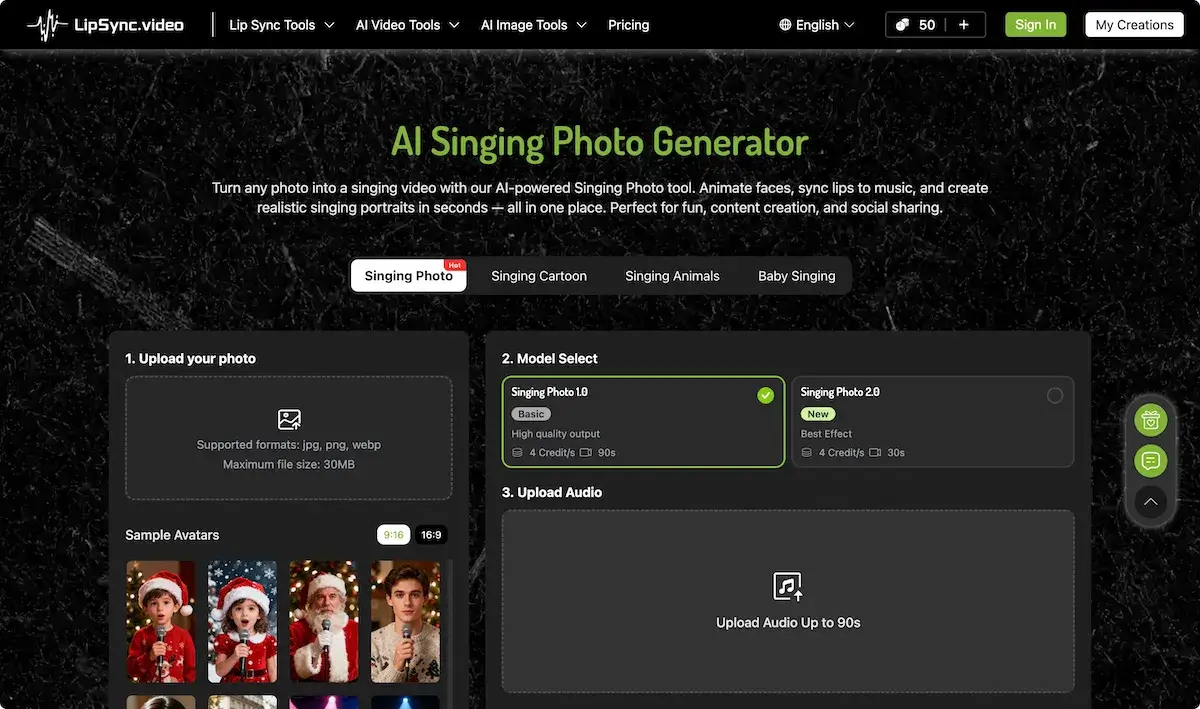
What is Singing Photo
SingIng Photo is an AI‑driven application that transforms static images into animated singing portraits. By uploading a front‑facing photo and an audio file, the tool applies real‑time lip‑sync and facial expressions, supporting up to 90 seconds of audio. The interface offers two model tiers—Basic and High‑Quality—each delivering realistic mouth movements while keeping rendering fast. Supported formats include JPG, PNG, WebP, and the output is a downloadable MP4 suitable for sharing on TikTok, Instagram, and other social platforms. The service is free to try with trial credits and allows users to create custom memes, cartoon adaptations, or multilingual singing content without requiring video‑editing expertise. The app also supports meme creation and offers a free tier for casual users. Output files can serve as animated wallpapers or frames for desktop or mobile use.
How does Singing Photo work
Singing Photo is an AI‑driven tool that transforms a single‑face image into a singing video by detecting facial landmarks and synchronizing lip movements with an uploaded audio track. Users upload jpg, png or webp files; the system selects a model (Singing Photo 1.0 or 2.0) and generates a 30‑to 90‑second clip containing realistic expressions, head tilts, and multilingual phoneme mapping. The process requires no video‑editing skills, produces MP4 outputs, and supports free trial credits, making the singing photo app accessible for creators, educators, and social‑media marketers. The singing photo ai engine further supports wallpaper‑style clips.
Benefits of Singing Photo
The Singing Photo app uses AI to turn any front‑facing image into a realistic singing video. By uploading a photo and a music track, the tool synchronizes lip movements and facial expressions with the audio without requiring editing skills. Users can choose multilingual tracks, add subtitles, or produce singing memes and cartoons. Free trial credits let students experiment, while paid credits give unlimited uses. The result is a high‑definition, shareable MP4 that works as a birthday singing card, a festive frame, or a viral meme. The platform respects privacy by deleting uploads after processing, ideal for custom singing photo wallpapers.
Pros and Cons of Singing Photo
Pros
- Realistic lip sync and expressions.
- Supports multiple languages and accents.
- No video editing required.
- Free trial credits on signup.
- Works with pets, cartoons, and portraits.
Cons
- One face image only per upload.
- Requires clear front‑facing photo.
- Audio limited to 90 seconds.
- Generates cost in credits per video.
- Max file size 30 MB.
Core Features of Singing Photo
Photo Upload & Image Validation
Users upload a single‑face image in JPG, PNG, or WEBP format; the tool automatically validates lighting, orientation, and face clarity before proceeding to animation.
Audio Upload and Subtitle Enablement
An audio file up to 90 seconds can be uploaded, with optional automatic subtitle generation added to the resulting video for enhanced accessibility and sharing.
Model Selection and Quality Control
Two models, Singing Photo 1.0 (basic‑quality) and 2.0 (high‑quality), allow users to choose output length and resolution while balancing credit consumption.
Automatic Lip Sync and Facial Animation
The system synchronizes lip movements, blinks, and head tilts to the chosen audio, producing a realistic, expressive singing portrait in seconds.
Exportable Video Download and Sharing
Generated videos are exported as MP4 files, ready for direct download and easy sharing across TikTok, YouTube, Instagram, and other social platforms.
Use Cases of Singing Photo
- Students: Use singing photo AI to create multilingual singing portraits, synchronizing audio with realistic lip movements.
- Content Creators: Produce engaging birthday singing cards—upload photos, add songs, generate instant shareable clips via free singing photo app.
- Educators: Employ singing photo AI to demonstrate pronunciation across languages, turning iconic figures into singing performers for lessons.
- Social Media Influencers: Create viral singing memes—transform pet photos into singing cartoons using the free singing photo app.
- Graphic Designers: Generate HD singing photo wallpapers with dynamic lip sync animations for interactive desktop backgrounds.
FAQs of Singing Photo
What is Singing Photo?
Singing Photo is an AI‑powered singing video generator that animates static images—people, pets, cartoons, or artwork—by adding realistic lip movements and facial expressions in sync with an audio track.
How does the Singing Photo tool work?
The software detects facial landmarks in the uploaded photo and employs neural animation models to generate lip‑sync and expressive gestures that match the rhythm, melody, and lyrics of the chosen audio.
What types of images can I use with Singing Photo?
Any clear front‑facing image with a single visible face is eligible: portrait photographs, pet pictures, cartoon characters, line drawings, or any artwork where facial features are discernible.
Does Singing Photo support multiple languages?
Yes. The AI automatically adapts mouth shapes and timing for lyrics in English, Spanish, Japanese, Korean, Chinese, Arabic, and other supported languages, ensuring natural pronunciation.
Do I need video editing skills to use Singing Photo?
No. After the photo and audio are uploaded, the AI handles all animation and synchronization; users simply preview, download, and share the resulting MP4 file.
Is Singing Photo free to use?
The service offers a 50‑credit free trial. Users can purchase credit packs that last forever; each video consumes a fixed number of credits based on model choice and duration.
Is Singing Photo safe and secure?
All uploads are processed in an encrypted environment. Files are automatically deleted shortly after generation; no user data is stored or shared with third parties.
Can animals or cartoon images sing too?
Absolutely. The AI adapts lip‑sync and expression styles for non‑human faces, making pets, fictional characters, and stylized drawings appear to sing convincingly.
Where can I share the generated videos?
Videos are exported as MP4 files, ready for immediate sharing on TikTok, YouTube, Instagram, Facebook, LinkedIn, or any other platform that supports standard video formats.
Can I upload my own song or voice recording?
Yes. Supported audio formats include MP3 and WAV, up to 90 seconds in length. The AI matches the audio exactly, whether it’s a full song or a brief voice‑over.
How many credits are required for a typical Singing Photo video?
A basic 90‑second video with the “Singing Photo 1.0” model consumes 4 credits; the newer “Singing Photo 2.0” version, which provides higher visual fidelity, also uses 4 credits per 30‑second clip.
Are the generated videos commercially licensed?
Videos are licensed for personal and commercial use. The source image and any uploaded audio must already be licensed for commercial distribution if the final video will be monetized.
How long does the video generation process take?
Generation usually completes within 2–5 minutes, depending on server load and the resolution of the input image. Users can preview the result before final download.
What file format is the output video?
All outputs are in MP4 (H.264) format, ensuring broad compatibility across mobile devices, web browsers, and video hosting platforms.
Can I edit the generated video further after download?
Yes. The exported MP4 files can be imported into any standard video editor (e.g., Adobe Premiere Pro, Final Cut Pro, DaVinci Resolve, or free alternatives) for additional effects, transitions, or branding.
How to use Singing Photo
- Singing Photo is an AI singing photo app that animates a single face in a photo, synchronizing lip movements to music or voice, producing realistic singing videos in seconds.
- Upload a clear, front‑view portrait (jpg, png, webp) not exceeding 30 MB; the interface highlights the single face, ensuring the AI can detect facial features accurately.
- Select either Singing Photo 1.0 or 2.0 in the Model Select panel; then upload an audio file up to 90 s, or record directly with the built‑in recorder.
- Press Generate, observe the working animation in the preview; once rendering completes, you can trim, add subtitles, and download the final MP4 for sharing.
- Evaluate the lip‑sync alignment, facial expressions, and language adaptation; correct any mismatches by re‑uploading audio or choosing a different model to improve realism.
- Share the MP4 on TikTok, Instagram, or YouTube, or embed it in presentations; the realistic singing photo enhances engagement and conveys mood effectively.
- Track remaining credits in the dashboard; purchase credit packs with a one‑time payment to keep them valid forever, ensuring uninterrupted access to Singing Photo.
Singing Photo Website Traffic Analysis
Latest traffic information
- Monthly Visits637.1K
- Bounce Rate48.14%
- Pages Per Visit3.82
- Visit Duration00:01:48
- Global Rank70.98K
- Country/Region Ranking13.73K
Visits Over Time
Traffic Sources
- Direct: 48.07%
- Organic Search: 36.57%
- Referrals: 7.72%
- Organic Social: 5.36%
- Generative AI: 1.57%
- Mail: 0.52%
Top Keywords
| Keyword | Traffic | Volume | Cost Per Click |
|---|---|---|---|
| ai image editor | 10.07K | 154.56K | $0.64 |
| lipsync | 9.09K | 19.88K | $0.66 |
| lip sync | 8.25K | 21.83K | $0.81 |
| lip sync ai | 5.71K | 10.86K | $0.58 |
| lipsync ai | 4.92K | 7.13K | $0.5 |
Top Regions
| Region | Percentage |
|---|---|
| United States | 14.42% |
| Thailand | 7.86% |
| India | 6.75% |
| Brazil | 5.69% |
| Ireland | 5.27% |
