
Lipsync AI Baby Podcast Generator: Create Viral Baby Videos

What is AI Baby Podcast
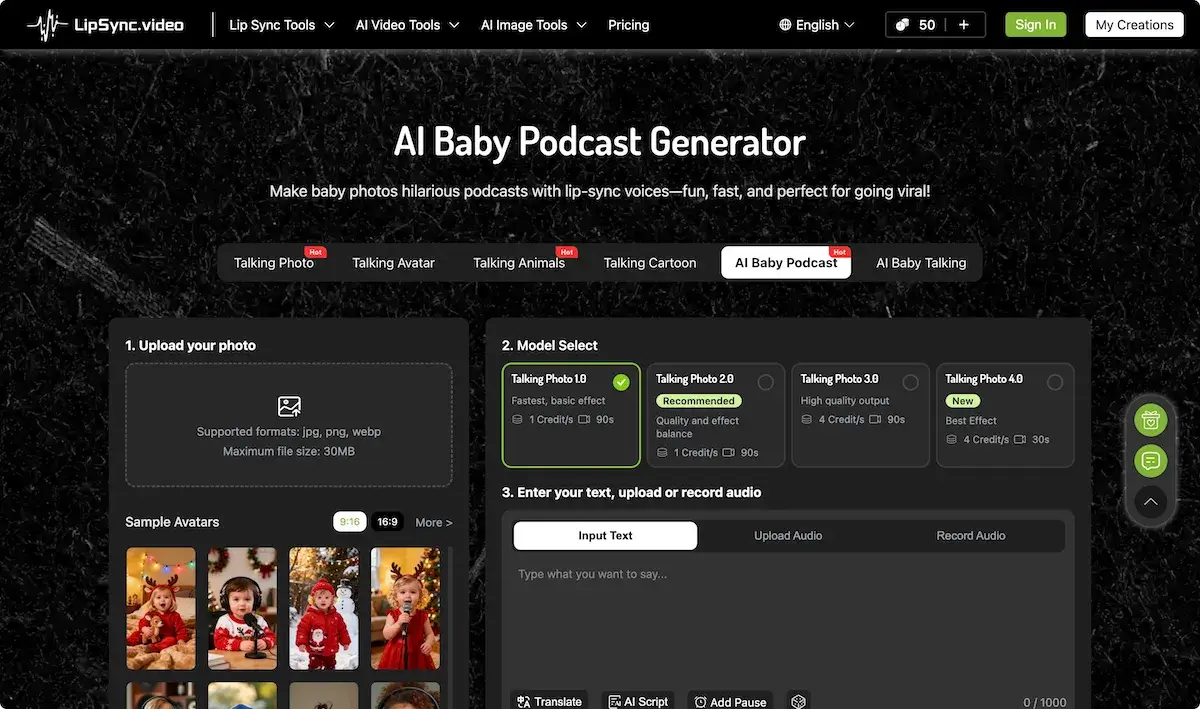
AI Baby Podcast is a community‑focused AI tool that converts baby photographs into engaging podcast videos. A single frontal face is required, and image files up to 30 MB are accepted. Users may input dialogue, upload pre‑recorded audio, or invoke the AI Script feature; the system then produces a 90‑second video with lip‑synced mouth movements. Production tiers range from basic to high‑quality, all billed in credit units that stay valid forever. A current Christmas promotion offers up to 300 bonus credits, enabling users to experiment with the AI baby podcast generator free option before committing to paid credits. The resulting videos are optimized for rapid sharing on TikTok, Instagram, and YouTube Shorts, making the service ideal for educators, marketers, and viral content creators seeking AI baby podcast video generator functionality.
How does AI Baby Podcast work
AI Baby Podcast is a web-based AI service that converts a single‑face baby image into a short talking video. Users upload a JPG, PNG or WebP photo, enter or record a script, and choose a child‑like voice from the built‑in library or upload their own audio. The platform applies a facial landmark detector and neural rendering pipeline to synchronize lip movements with the chosen audio, producing a 30‑second clip that can be previewed and downloaded in high‑resolution format. The tool operates on a credit system, with free trial credits available, and is intended for social‑media content creation and creative projects.
Benefits of AI Baby Podcast
AI Baby Podcast generates talking videos from baby photos using AI lip‑sync. Users simply upload a front‑facing photo, choose a child‑like voice or record audio, and generate a 30‑second clip in minutes. The tool supports jpg, png, and webp files, offers multiple voice styles, and lets creators add subtitles. With affordable credit packs and a free trial, users can produce shareable content for TikTok, Instagram, YouTube Shorts, and other platforms. The system is user‑friendly, requires no editing skills, and supports commercial use, making it a practical solution for creators and educators.
Pros and Cons of AI Baby Podcast
Pros
- No technical skills required.
- Generates videos in minutes.
- Commercially usable content.
- Boosts audience engagement.
- Multiple child‑like voice options.
Cons
- Limited free credits, need purchases.
- Requires single bright‑faced photo.
- Baby image copyright not covered.
- Only supports baby photo uploads.
- Quality varies with credit tier.
Core Features of AI Baby Podcast
Photo Upload and Eligibility
Upload a single, front‑facing baby photo with proper lighting; the tool verifies file format and size, providing a quick preview before processing.
Voice and Script Input
Enter dialogue manually, use AI‑generated script, upload a pre‑recorded voice, or record live; supports subtitles, pauses, and multiple emotional tones.
AI Lip‑Sync Generation
Select model version for quality, pay credits, then the AI animates the baby's mouth to match the audio, producing a high‑definition talking video.
Video Export and Sharing
Preview the finished video, download in HD, and share directly on TikTok, Instagram, or YouTube Shorts for immediate viral distribution.
Customization and Subtitles
Choose from various AI baby voices, set emotional tones, add pauses, and auto‑generate subtitles to tailor content for audience engagement.
Use Cases of AI Baby Podcast
- Influencers: Generate short ai baby podcast videos for TikTok and Instagram to drive viral engagement using AI baby podcast generator.
- Educators: Create simple science explanations with AI baby podcast image and video for classroom, enhancing learning via engaging persona.
- Marketers: Use AI baby podcast free to produce branded series, featuring product demos in a cute speaking baby avatar.
- Parents: Upload newborn photo, generate AI baby podcast prompt content to share milestones with family via social platforms.
- Content creators: Incorporate AI baby podcast 3d image templates to produce recurring comedic episodes for YouTube Shorts.
FAQs of AI Baby Podcast
What is AI Baby Podcast Generator?
AI Baby Podcast Generator is a web‑based AI tool that transforms a baby photo or an AI‑generated baby image into a talking baby video. By aligning lip movements with supplied audio or text, it creates engaging, shareable content suitable for social media, marketing, or educational projects.
Do I need any technical background or editing experience to use AI Baby Podcast Generator?
No. The platform is designed for beginners. Users simply upload a suitable baby photo, input or record dialogue, and click “Generate.” No video editing expertise or technical setup is required to produce a polished baby podcast video.
Can I customize the baby image and voice?
Yes. Users may upload their own baby photo or choose from the AI‑generated templates. Voices are selectable from various child‑like options, and users can also upload or record their own audio, giving full creative control over the final video.
How long does it take to generate an AI Baby Podcast video?
Video generation typically completes within a few minutes—usually between one to five minutes—depending on system load and selected model quality. After completion, the video can be previewed and downloaded directly from the platform.
Can I use generated AI baby podcast videos commercially?
Yes. The videos can be used for commercial purposes such as brand promotion, sponsorships, or monetized social media content. However, the user must ensure that the baby image is not a copyrighted character, as the service does not provide copyright licenses for images.
Are the uploaded photos and data safe?
The platform employs secure encryption for photo uploads. Images are processed solely for video creation, and users can have them deleted after use. For detailed privacy practices, users should consult the platform’s privacy policy.
What topics can be discussed on AI Baby Podcast?
The tool supports any content area, from comedy sketches and pop‑culture commentary to educational lessons and tech trends. The contrast between an infant face and adult dialogue often adds a humorous or engaging element to the video.
Can I make money with AI Baby Podcast Generator?
Yes. By creating eye‑catching, shareable videos, creators can monetize through platform ads, sponsorship deals, or subscription models. Success depends on platform rules for AI‑generated content and the creator’s audience engagement.
What credits are required to generate a video and how do credits work?
Each video consumes AI credits that vary by the chosen model: basic models use 1 credit per second, while higher‑quality options can use up to 4 credits per second. Credits are persistent after purchase and can be accumulated for future projects, ensuring users are not penalized for exceeding one‑time limits.
Is there a free tier or trial available for new users?
New users begin with 50 trial credits, allowing them to produce several videos at no cost. For larger projects or sustained use, users can purchase additional credit packs, benefiting from Christmas sale bonuses that may add up to 300 extra credits.
Can I use third‑party audio or scripts with the AI Baby Podcast Generator?
Yes. The platform accepts uploaded audio files or recorded input, enabling creators to incorporate existing podcasts, interview clips, or soundbites. Users can also type or paste scripts, which the AI will render into audio during video creation.
What languages can the AI voice support, and can the audio be translated?
The AI voice library currently offers English, Spanish, French, German, Italian, Japanese, Korean, Arabic, and Turkish. The tool also includes an integrated translation feature, allowing users to translate scripts into multiple languages before generating the final video.
Are there any copyright restrictions on images or voices used in the AI Baby Podcast videos?
Users must provide images and voices that they have rights to use; the service does not hold copyright over uploaded content. For commercial or public use, it is recommended to use royalty‑free or self‑created imagery and audio to avoid infringement.
How to use AI Baby Podcast
- AI Baby Podcast converts baby photos into animated podcast videos using AI voices, enabling creators to produce engaging, shareable content for social platforms and viral marketing.
- Users sign into lip-synced.video using existing credentials or create a new account, ensuring secure credit management and access to the AI Baby Podcast generator interface.
- Within the dashboard, click the upload button; supported formats are jpg, png, webp up to 30 MB, with a single, well‑lit front‑face focus.
- Choose the desired Talking Photo version (1.0–4.0) or upload a custom voice; higher quality models consume more credits but deliver better synchronization.
- Type a concise script (≤1000 characters) or upload/record audio; optional AI Script or translation features automatically generate dialogue in the chosen tone.
- Press Generate; the algorithm processes the photo, voice, and script, producing a 90‑second lip‑synced video; preview is available upon completion.
- Review the output in the preview panel; assess lip‑sync accuracy, voice tone, and visual appeal; adjust script or model if necessary to align with brand objectives.
- Download the final high‑definition video, then upload to TikTok, Instagram, YouTube or embed in marketing materials; monitor engagement metrics to evaluate content performance.
- Track credit usage in the dashboard; buy additional packs during the Christmas promotion to gain up to 300 bonus credits, ensuring continuous content creation without interruptions.
AI Baby Podcast Website Traffic Analysis
Latest traffic information
- Monthly Visits637.1K
- Bounce Rate48.14%
- Pages Per Visit3.82
- Visit Duration00:01:48
- Global Rank70.98K
- Country/Region Ranking13.73K
Visits Over Time
Traffic Sources
- Direct: 48.07%
- Organic Search: 36.57%
- Referrals: 7.72%
- Organic Social: 5.36%
- Generative AI: 1.57%
- Mail: 0.52%
Top Keywords
| Keyword | Traffic | Volume | Cost Per Click |
|---|---|---|---|
| ai image editor | 10.07K | 154.56K | $0.64 |
| lipsync | 9.09K | 19.88K | $0.66 |
| lip sync | 8.25K | 21.83K | $0.81 |
| lip sync ai | 5.71K | 10.86K | $0.58 |
| lipsync ai | 4.92K | 7.13K | $0.5 |
Top Regions
| Region | Percentage |
|---|---|
| United States | 14.42% |
| Thailand | 7.86% |
| India | 6.75% |
| Brazil | 5.69% |
| Ireland | 5.27% |
