
Test Kling 5 Video Generation with Text and Image Prompts
| Added on: | Mar 22, 2026 |
| Monthly Visits: | -- |
| Social & Email: | -- |

What is Kling 5
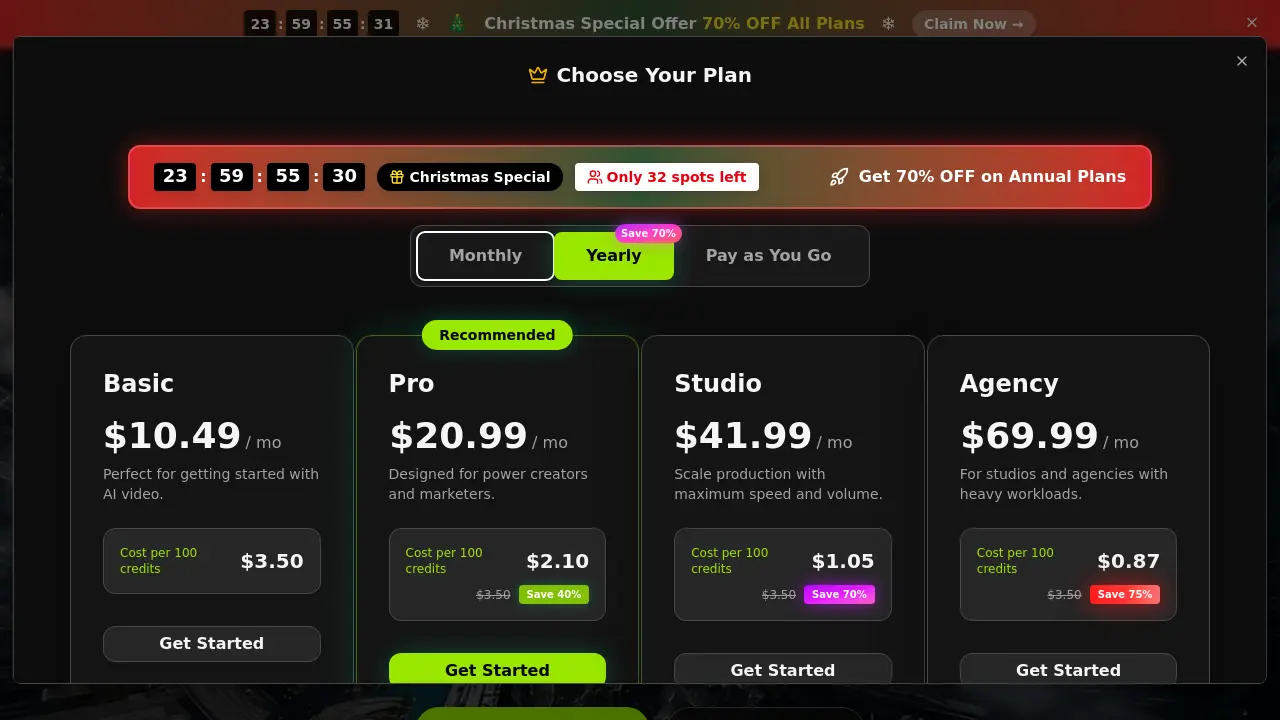
Kling 5 is an unofficial, browser-based video generator that provides accessible testing for AI-powered text-to-video and image-to-video workflows. The tool integrates currently available models, specifically Kling 5 and Kling 2.5 Turbo, allowing users to generate short-form clips for concept validation. Key features include selectable aspect ratios (16:9, 9:16, 1:1), resolution options up to 1080p, and a straightforward credit-based system. It is tailored for rapid prototyping of advertisements, social media content, and storyboards, though image-to-video functions may reject photorealistic people. Limited free testing is offered, with structured paid plans (Basic, Pro, Studio, Agency) providing increased credits, commercial rights, and priority processing. This independent workspace enables evaluation of AI video generation capabilities without requiring an official API key.
How does Kling 5 work
The Kling 5 Free Video Generator is an unofficial, browser-based workspace for testing Kling-powered video generation workflows. It operates by allowing users to input text prompts or upload reference images to produce short-form videos. The tool provides a choice between the Kling 5 and Kling 2.5 Turbo models, with configurable output settings including aspect ratio (16:9, 9:16, 1:1), duration (5s or 10s), and resolution (720p or 1080p). Video generation consumes credits from a user's plan, with limited free tests available and paid upgrades for higher volume. This setup supports rapid iteration for concepts like ads and social clips, though output rights and model availability depend on the selected subscription plan.
Benefits of Kling 5
The Kling 5 Free Video Generator is an unofficial, browser-based workspace for testing Kling-powered video workflows. It enables rapid prototyping through both text-to-video and image-to-video generation, with immediate access to models like Kling 5 and Kling 2.5 Turbo. Users can create short-form clips (5-10 seconds) in 720p or 1080p, using common aspect ratios for social media and ads. Limited free generations allow initial concept validation, while paid plans (starting at $10.49/month) provide increased credits, commercial rights, no watermarks, and priority processing. This tool is designed for creators needing quick, low-commitment trials before deeper production.
Pros and Cons of Kling 5
Pros
- Browser-based Kling video generator with no API key needed.
- Supports both text-to-video and image-to-video inputs.
- Access to current Kling models including Kling 5.
- Commercial use allowed with no watermarks on exports.
- Free credits available for initial testing and iteration.
Cons
- Not the official Kling website; unofficial tool.
- Image-to-video may fail with photorealistic people images.
- Limited free generations; paid plans for higher usage.
- Credit-based pricing could be expensive for large projects.
- Maximum video duration is only 10 seconds.
Core Features of Kling 5
Text-to-Video Generation
Converts natural language prompts into short video clips. Users describe a scene, and the tool renders motion, enabling quick validation of creative concepts for ads and social content.
Image-to-Video Conversion
Animates uploaded still images or reference frames into motion. Supports optional tail frames for directed endings, facilitating product shot animation and storyboard testing.
Model Selection
Allows choice between currently available Kling models, specifically Kling 5 and Kling 2.5 Turbo. This lets users compare output styles and performance based on the specific AI backend exposed.
Output Customization
Provides controls for aspect ratio (16:9, 9:16, 1:1), duration (5s, 10s), and resolution (720p, 1080p). These presets align generated videos with common publishing formats for rapid iteration.
Credit-Based Usage System
Operates on a credit model where each generation consumes a set number of credits. Users start with limited free tests and can upgrade to paid monthly plans for higher credit volumes and features.
Tiered Plan Access
Offers structured subscription plans (Basic, Pro, Studio, Agency) that determine monthly credit allowances, processing priority, and commercial usage rights, scaling for individual creators to agencies.
Browser-Based Workflow
Functions entirely within a web browser, requiring no API key or local software installation. This setup allows immediate testing of Kling-powered video generation with minimal setup overhead.
Use Cases of Kling 5
- Social media creators: Generate TikTok and Reels content using text-to-video with 9:16 aspect ratios for quick platform deployment.
- E-commerce businesses: Produce product demo videos by uploading images to the image-to-video tool, enabling dynamic product showcases.
- Marketing agencies: Test multiple ad variations through rapid prompt iteration and model selection before final production.
- Content developers: Prototype storyboard sequences with short video clips derived from narrative prompts or visual references.
FAQs of Kling 5
What is this Kling 5 free video generator?
This homepage is an independent browser workspace for people searching for a Kling 5 free video generator. It does not claim to be the official Kling site. Instead, it gives you a simple way to test currently available Kling-powered video workflows, compare prompt ideas, and move from concept to short render without extra setup. The tool supports both text-to-video and image-to-video inputs within a single interface.
Is this Kling 5 free video generator really free?
The generator offers limited free testing to allow users to evaluate Kling-powered video workflows. However, the free tier is not unlimited and is intended for initial experimentation. Extended usage, higher credit volumes, and additional features require upgrading to a paid plan. The site does not guarantee permanent free access beyond the initial trial credits.
Does it support both text to video and image to video?
Yes, the Kling 5 generator supports both text-to-video and image-to-video workflows. Users can enter a natural language prompt to generate a video from scratch or upload a reference image to guide the motion. This flexibility accommodates different creative needs, from concept visualization to extending existing still frames into motion sequences.
Do I need an API key to use it?
No API key is required. The Kling 5 generator operates as a browser-based tool, allowing users to test video generation directly in the web interface without any additional setup or credentials. This design simplifies access for quick creative tests and lowers the barrier to entry for evaluating Kling models.
Can I use generated videos for commercial projects?
Commercial use rights are included with paid plans, such as the Basic, Pro, Studio, and Agency tiers. The free testing tier may have restrictions on commercial usage. Users should review the specific plan terms on the pricing page to understand the scope of commercial rights, watermark policies, and any usage limitations before employing outputs in client work or monetized content.
What video scenarios work best here?
The generator is optimized for short-form video testing, including advertisements, social media clips, product demos, and storyboard exploration. Its presets for aspect ratios like 16:9, 9:16, and 1:1 align with common publishing formats for platforms such as TikTok, Instagram Reels, and YouTube Shorts. Rapid prompt iteration helps validate visual concepts before full production.
Which models and output settings are available on the homepage?
The homepage currently exposes the Kling 5 and Kling 2.5 Turbo models. Output settings include resolution options of 720p and 1080p, aspect ratios of 16:9, 9:16, and 1:1, and duration presets of 5 or 10 seconds. The available models and controls are limited to what is integrated into this unofficial workspace and may not reflect the full official Kling ecosystem.
Is this the official Kling website?
No, this is not the official Kling website. It is an independent, unofficial browser workspace that provides access to certain Kling-powered video generation workflows. The site clarifies its unofficial status and directs users to official channels for comprehensive features, support, and announcements from the Kling development team.
What resolutions and aspect ratios are available in the Kling 5 generator?
The generator offers 720p and 1080p resolution options alongside aspect ratios of 16:9, 9:16, and 1:1. These settings cater to various publishing needs, from widescreen presentations to vertical mobile formats. Users select these parameters before generation to ensure the output matches their target platform's specifications, such as social media feeds or presentation slides.
How does the credit system work for video generations?
Credits are deducted per video generation based on factors like duration, resolution, and the chosen model. For example, a standard 5-second video at 720p using Kling 2.5 Turbo consumes 100 credits. Longer durations or higher resolutions increase credit costs. Paid plans provide a monthly credit allowance, while the free tier includes a limited number of test credits. Exact consumption rates are displayed in the generator interface before rendering.
Why might an image-to-video generation fail on Kling 5?
Image-to-video workflows may reject uploads containing photorealistic people due to policy restrictions or technical limitations. For the most reliable results, users should employ non-identifiable or non-photorealistic source images, such as illustrations, product shots, or stylized scenes. Paid plans may include credit protections for failed jobs, as detailed in the respective plan terms.
What are the differences between Kling 5 and Kling 2.5 Turbo models?
Kling 5 represents the newer model, generally expected to deliver higher quality and more coherent motion in generations. Kling 2.5 Turbo prioritizes faster rendering speeds, making it suitable for rapid iteration during early-stage testing. Users can compare both models on the homepage to determine which best suits their balance of quality and speed requirements for a given project.
Are there any usage limits on the free tier of Kling 5?
The free tier provides a limited number of credits for initial testing, typically allowing a few short video generations. Specific limits, such as the exact credit count or monthly refreshes, are not permanently guaranteed and may be adjusted by the site operators. Users seeking higher volume, longer durations, or commercial rights must subscribe to a paid plan for sustained access.
How to use Kling 5
Kling 5 Free Video Generator is a browser-based tool for testing Kling-powered text-to-video and image-to-video generation workflows. It provides limited free access to Kling 5 and Kling 2.5 Turbo models for short-form video prototyping.
- Navigate to the Kling 5 homepage and locate the generator interface to begin.
- Select the desired Kling model, either Kling 5 or Kling 2.5 Turbo, for your test.
- For text-to-video, enter a descriptive natural language prompt in the input field.
- For image-to-video, upload a reference image, avoiding photorealistic people for reliability.
- Configure the video settings, choosing an aspect ratio, duration, and resolution.
- Initiate the generation process, which consumes credits based on the selected parameters.
- Preview the generated short video directly in the browser interface after processing.
- Download the output file if the result meets your testing objectives.
- Review your remaining credit balance on the plan to monitor usage for subsequent tests.
- Upgrade to a paid plan via the pricing page for higher credit volumes and commercial usage rights.
- Use the generated clips for rapid validation of ad concepts, social media posts, or storyboards.
- Interpret results by assessing motion quality, prompt adherence, and suitability for your target format.
- Iterate by adjusting prompts or settings to refine the video output for your specific use case.
- Access the prompt inspiration gallery on the homepage for examples of effective text-to-video queries.
- Remember this is an unofficial tool; official vendor support and terms differ from those shown.
- Commercial use rights are granted per the selected subscription plan's terms and conditions.
