
ImagePrompt.co FAQs
This AI converter transforms images into detailed prompts for Midjourney, FLUX, and Stable Diffusion, providing professional image analysis and instant visual descriptions.

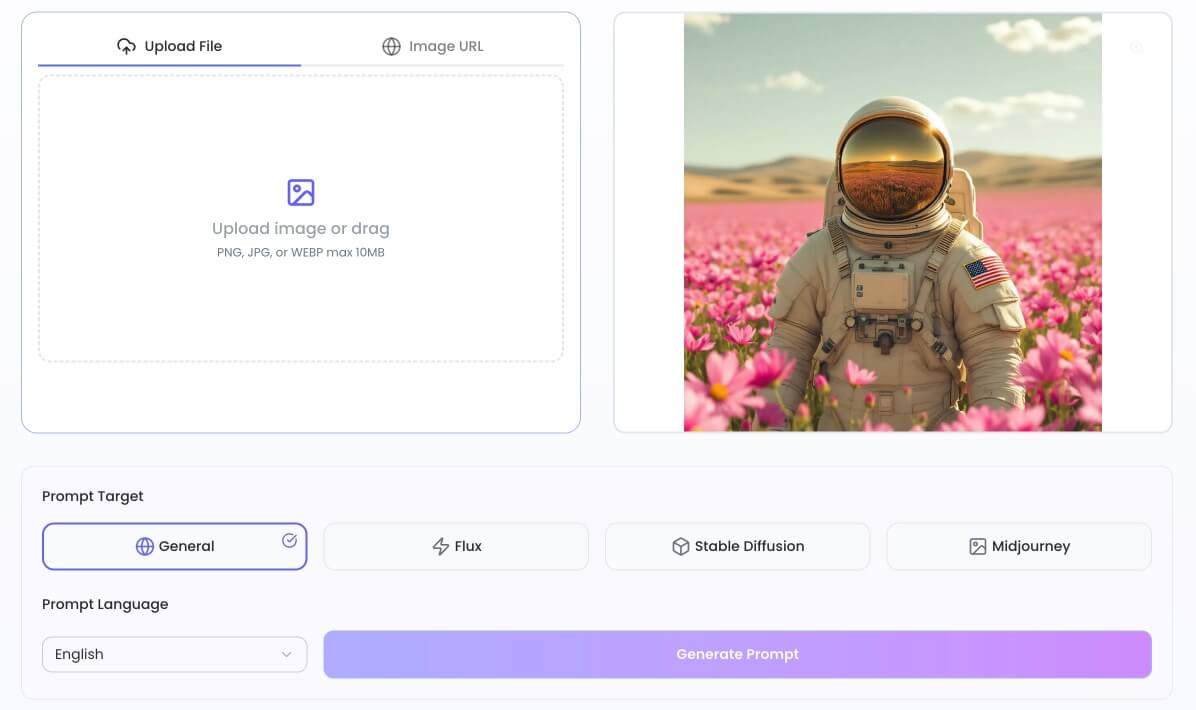
FAQs of ImagePrompt.co
What is ImagePrompt.co?
ImagePrompt.co is an online platform that provides a free AI-powered image to prompt generator. This tool allows users to transform any image into detailed AI art descriptions or prompts, which can then be used with various AI image generation models like Midjourney, Stable Diffusion, or FLUX.
How does the AI generate accurate prompts from images?
The platform utilizes advanced AI algorithms to analyze uploaded images. These algorithms meticulously interpret visual elements, capturing essential details and nuances within the content, to generate accurate and comprehensive AI image prompts. This process ensures the generated prompt precisely reflects the original visual for subsequent AI art creation.
Which AI image generators are supported by the image to prompt tool?
ImagePrompt.co supports a range of popular AI image generators. Users can generate prompts optimized for models such as FLUX, Midjourney, and Stable Diffusion. The tool is designed to create tailored results for each specific model, ensuring compatibility and effective prompt utilization.
Can I generate image prompts in languages other than English?
Yes, ImagePrompt.co offers multilingual capabilities. Users can generate image to text prompts in various languages beyond English, accommodating diverse user bases and specific project requirements. This feature broadens the accessibility and utility of the prompt from image tool for global creators.
How can I use the generated prompts in my creative workflow?
After generating an AI image prompt, users can immediately integrate it into their creative workflow. The platform allows for direct copying of the prompt or immediate use within its integrated image generator, streamlining the process of creating new AI images based on the extracted descriptions. This enhances the overall creative process.
Is the ImagePrompt.co tool really free to use?
Yes, ImagePrompt.co offers a free tier for its image to prompt conversion tool. This free service provides a generous daily allowance of conversions, enabling users to transform images into detailed AI prompts without any cost. Premium plans are available for users requiring higher conversion volumes or additional advanced features.
How do I create Midjourney prompts from my images?
To create Midjourney prompts, users simply upload their desired image and then select 'Midjourney' as the prompt target. The image prompt extractor will analyze the uploaded image and generate an optimized prompt specifically formatted for Midjourney, incorporating relevant style parameters, lighting details, and compositional elements for effective use.
Can I see examples of image prompts created by ImagePrompt.co?
Yes, ImagePrompt.co features an image comparison section that showcases real examples. This section displays original images alongside the AI-generated prompts derived from them by the tool. These image prompt examples demonstrate the system's accuracy in capturing visual elements and converting them into powerful prompts.
Can I turn the generated prompts back into images?
Absolutely. After ImagePrompt.co's AI generates a detailed prompt from an image, users have the option to use a 'Generate Image' button. This functionality sends the extracted prompt directly to an AI image generator, facilitating the creation of new variations or enhanced versions of the original image based on the AI-generated description.
How can ImagePrompt.co assist with AI image editing using prompts?
ImagePrompt.co acts as an AI image editor by enabling users to extract a detailed descriptive prompt from an existing image. Users can then modify this textual prompt to alter specific elements or add new details. Subsequently, a new image can be generated with these revised prompt changes applied, simplifying complex image editing through text manipulation.
How to use ImagePrompt.co
ImagePrompt.co provides a free image to prompt generator, transforming images into AI art descriptions. It analyzes visual content to create detailed prompts for various AI models, enhancing AI image generation workflows.
- Access the ImagePrompt.co website to utilize the AI image prompt copy tool.
- Upload your image file by dragging and dropping or selecting the "Upload File" button.
- Choose your desired prompt target (e.g., Midjourney, Stable Diffusion) from the available options.
- Select the preferred prompt language for your AI art description.
- Click "Generate Prompt" to initiate the AI analysis and prompt creation process.
- Copy the generated AI prompt for use in your chosen AI image generator.
- Optionally, use the "Generate Image" button to immediately create a new image from the prompt on the platform.
