
ImagePrompt.co
ImagePrompt.co: Convert Images to AI Prompts Instantly

What is ImagePrompt.co
ImagePrompt.co offers a free AI-powered tool to transform images into detailed AI art descriptions. Users can upload PNG, JPG, or WEBP files up to 10MB to generate prompts for various AI models, including Flux, Stable Diffusion, and Midjourney. The platform supports prompt generation in multiple languages, allowing for versatile creative workflows. It also provides a batch conversion feature for processing multiple images simultaneously. This tool streamlines the process of extracting and interpreting visual elements for AI image generation.
How does ImagePrompt.co work
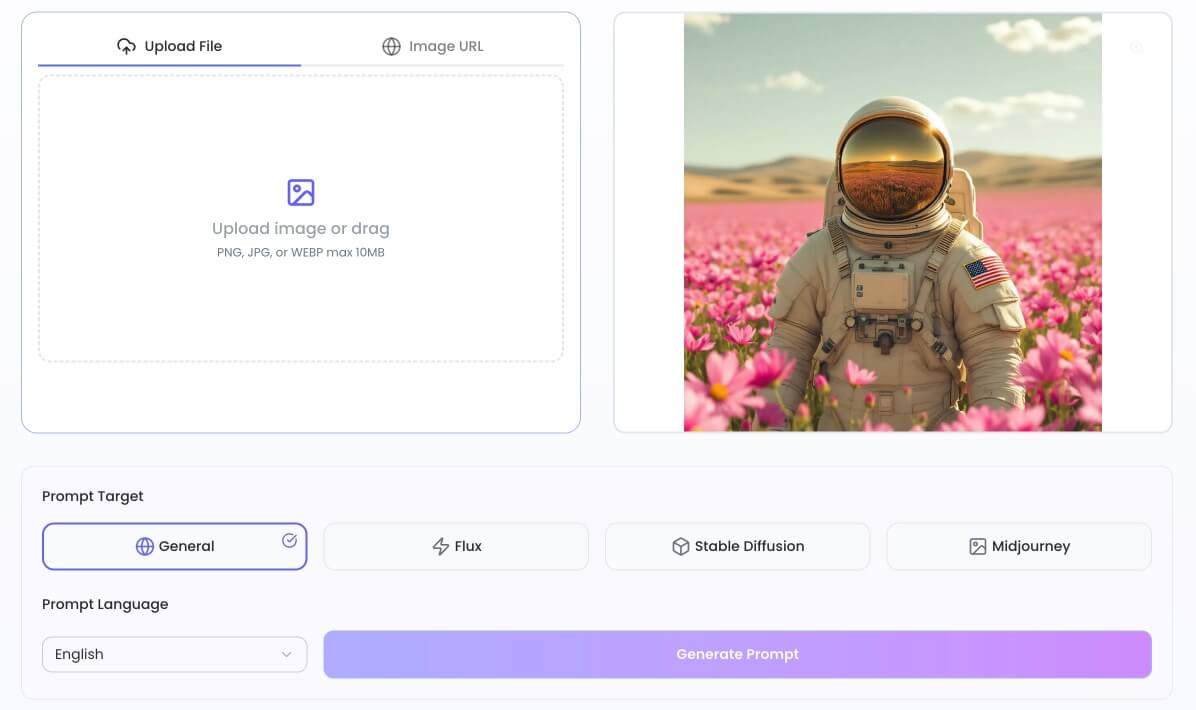
ImagePrompt.co functions as an AI-powered image prompt generator, converting uploaded image files or URLs into textual descriptions suitable for various AI image generation models. Users upload PNG, JPG, or WEBP images (max 10MB), then select a target AI model, such as Midjourney, Flux, or Stable Diffusion, and their preferred prompt language. The system's advanced AI algorithms analyze visual elements within the input, generating detailed and accurate text prompts. These prompts can then be copied, used within ImagePrompt.co's integrated image generator to create new images, or modified for AI image editing, offering an efficient workflow for digital artists and creators seeking precise image prompt output from existing visuals.
Benefits of ImagePrompt.co
ImagePrompt.co offers a free AI image to prompt generator, transforming images into detailed AI art descriptions instantly. This tool supports various AI models like Flux, Midjourney, and Stable Diffusion, and can generate prompts in multiple languages, streamlining creative workflows. Users can extract and interpret visual elements, creating optimized AI image prompts from any reference image. The platform also features batch conversion and allows users to directly generate new images from the created prompts, enhancing AI image editing capabilities.
Pros and Cons of ImagePrompt.co
Pros
- Converts images to AI art prompts.
- Supports multiple AI models and languages.
- Offers a free tier with daily conversions.
- Provides a batch conversion tool.
- Enables prompt editing for image variations.
Cons
- Free tier has daily conversion limits.
- Max image upload size is 10MB.
Core Features of ImagePrompt.co
AI Prompt Generation from Images
This function transforms uploaded images into detailed AI art descriptions or prompts, analyzing visual elements to create suitable text for AI image generation models.
Batch Image-to-Prompt Conversion
Enables users to process multiple images simultaneously, converting them into AI prompts efficiently, which streamlines workflows for higher volumes of visual content.
Model-Specific Prompt Optimization
Generates prompts tailored for various AI image generators, including Flux, Midjourney, and Stable Diffusion, ensuring compatibility and optimized results for different platforms.
Multilingual Prompt Generation
Supports the creation of AI image prompts in multiple languages, accommodating diverse user needs and global audiences, enhancing accessibility and utility.
AI Image Generation from Prompts
Allows users to directly convert the generated prompts back into new AI-generated images, facilitating iterative creative processes and variations of original visuals.
Use Cases of ImagePrompt.co
- Digital Artists: Generate accurate AI image prompts for Midjourney, Stable Diffusion, or Flux from reference images.
- Content Creators: Transform visual content into detailed AI image prompts for enhanced brand storytelling.
- Developers: Utilize the ImagePrompt.co API to integrate AI image prompt copy functionality into applications.
- Researchers: Employ image prompt tools to extract comprehensive descriptions from images for analysis.
- Businesses: Streamline AI image editing workflows by generating and modifying prompts from existing visuals.
FAQs of ImagePrompt.co
What is ImagePrompt.co?
ImagePrompt.co is an online platform that provides a free AI-powered image to prompt generator. This tool allows users to transform any image into detailed AI art descriptions or prompts, which can then be used with various AI image generation models like Midjourney, Stable Diffusion, or FLUX.
How does the AI generate accurate prompts from images?
The platform utilizes advanced AI algorithms to analyze uploaded images. These algorithms meticulously interpret visual elements, capturing essential details and nuances within the content, to generate accurate and comprehensive AI image prompts. This process ensures the generated prompt precisely reflects the original visual for subsequent AI art creation.
Which AI image generators are supported by the image to prompt tool?
ImagePrompt.co supports a range of popular AI image generators. Users can generate prompts optimized for models such as FLUX, Midjourney, and Stable Diffusion. The tool is designed to create tailored results for each specific model, ensuring compatibility and effective prompt utilization.
Can I generate image prompts in languages other than English?
Yes, ImagePrompt.co offers multilingual capabilities. Users can generate image to text prompts in various languages beyond English, accommodating diverse user bases and specific project requirements. This feature broadens the accessibility and utility of the prompt from image tool for global creators.
How can I use the generated prompts in my creative workflow?
After generating an AI image prompt, users can immediately integrate it into their creative workflow. The platform allows for direct copying of the prompt or immediate use within its integrated image generator, streamlining the process of creating new AI images based on the extracted descriptions. This enhances the overall creative process.
Is the ImagePrompt.co tool really free to use?
Yes, ImagePrompt.co offers a free tier for its image to prompt conversion tool. This free service provides a generous daily allowance of conversions, enabling users to transform images into detailed AI prompts without any cost. Premium plans are available for users requiring higher conversion volumes or additional advanced features.
How do I create Midjourney prompts from my images?
To create Midjourney prompts, users simply upload their desired image and then select 'Midjourney' as the prompt target. The image prompt extractor will analyze the uploaded image and generate an optimized prompt specifically formatted for Midjourney, incorporating relevant style parameters, lighting details, and compositional elements for effective use.
Can I see examples of image prompts created by ImagePrompt.co?
Yes, ImagePrompt.co features an image comparison section that showcases real examples. This section displays original images alongside the AI-generated prompts derived from them by the tool. These image prompt examples demonstrate the system's accuracy in capturing visual elements and converting them into powerful prompts.
Can I turn the generated prompts back into images?
Absolutely. After ImagePrompt.co's AI generates a detailed prompt from an image, users have the option to use a 'Generate Image' button. This functionality sends the extracted prompt directly to an AI image generator, facilitating the creation of new variations or enhanced versions of the original image based on the AI-generated description.
How can ImagePrompt.co assist with AI image editing using prompts?
ImagePrompt.co acts as an AI image editor by enabling users to extract a detailed descriptive prompt from an existing image. Users can then modify this textual prompt to alter specific elements or add new details. Subsequently, a new image can be generated with these revised prompt changes applied, simplifying complex image editing through text manipulation.
How to use ImagePrompt.co
ImagePrompt.co provides a free image to prompt generator, transforming images into AI art descriptions. It analyzes visual content to create detailed prompts for various AI models, enhancing AI image generation workflows.
- Access the ImagePrompt.co website to utilize the AI image prompt copy tool.
- Upload your image file by dragging and dropping or selecting the "Upload File" button.
- Choose your desired prompt target (e.g., Midjourney, Stable Diffusion) from the available options.
- Select the preferred prompt language for your AI art description.
- Click "Generate Prompt" to initiate the AI analysis and prompt creation process.
- Copy the generated AI prompt for use in your chosen AI image generator.
- Optionally, use the "Generate Image" button to immediately create a new image from the prompt on the platform.
ImagePrompt.co Website Traffic Analysis
Latest traffic information
- Monthly Visits201
- Bounce Rate34.37%
- Pages Per Visit1.15
- Visit Duration00:00:00
- Global Rank--
- Country/Region Ranking--
Top Keywords
| Keyword | Traffic | Volume | Cost Per Click |
|---|---|---|---|
| image prompt extractor & generator | 70 | -- | -- |
ImagePrompt.co Alternatives
Browser workspace for AI image generation, reference photo editing, and short video drafts, aimed at creators, marketers, and product teams.
AI design studio for architects and designers: turn sketches, model views, and room photos into rendering concepts, material studies, and staged interiors.
Browser studio for AI video, image and music generation with Grok Imagine, Kling and GPT Image models. Free daily credits, no sign-up required.
Mareel is an all-in-one AI video and image generation workspace giving creators, marketers, and ecommerce teams 40+ leading models and one shared credit balance.
Upload one selfie to preview 120+ cuts, colors and bangs rendered on your own face in about 20 seconds, then take the reference sheet to your barber.
Pet to Art is a free AI pet portrait generator that turns one clear pet photo into custom digital artwork across 170+ styles, canvas ratios, and 2K downloads.

MixVio runs 21 video, image and audio models in one browser workspace, plus 11 creator tools, with exact credit cost shown before every generation.
Create and edit images with Image 2.5 by GPT. Sunburst for precision, Flare for speed, up to 4K, 6 quality modes, and transparent PNG/WebP output.
Generate and edit AI images with Nano Banana Pro. Blend up to 14 images, render crisp text, and create 4K visuals online with studio controls.
Browse curated AI image and video prompts with real results and creator attribution, copy-ready for GPT Image, Nano Banana, Midjourney, and more.
Free unlimited image to prompt generator. Upload any image and get a detailed, accurate AI prompt for Midjourney, Stable Diffusion, FLUX and more in seconds.
Koozee turns a single clothing image into AI product photos, model try-on images, and marketing videos for apparel sellers, cutting costs by up to 99%.