
Happy Horse AI
Happy Horse AI – Browser‑based Text, Image & Video Generation

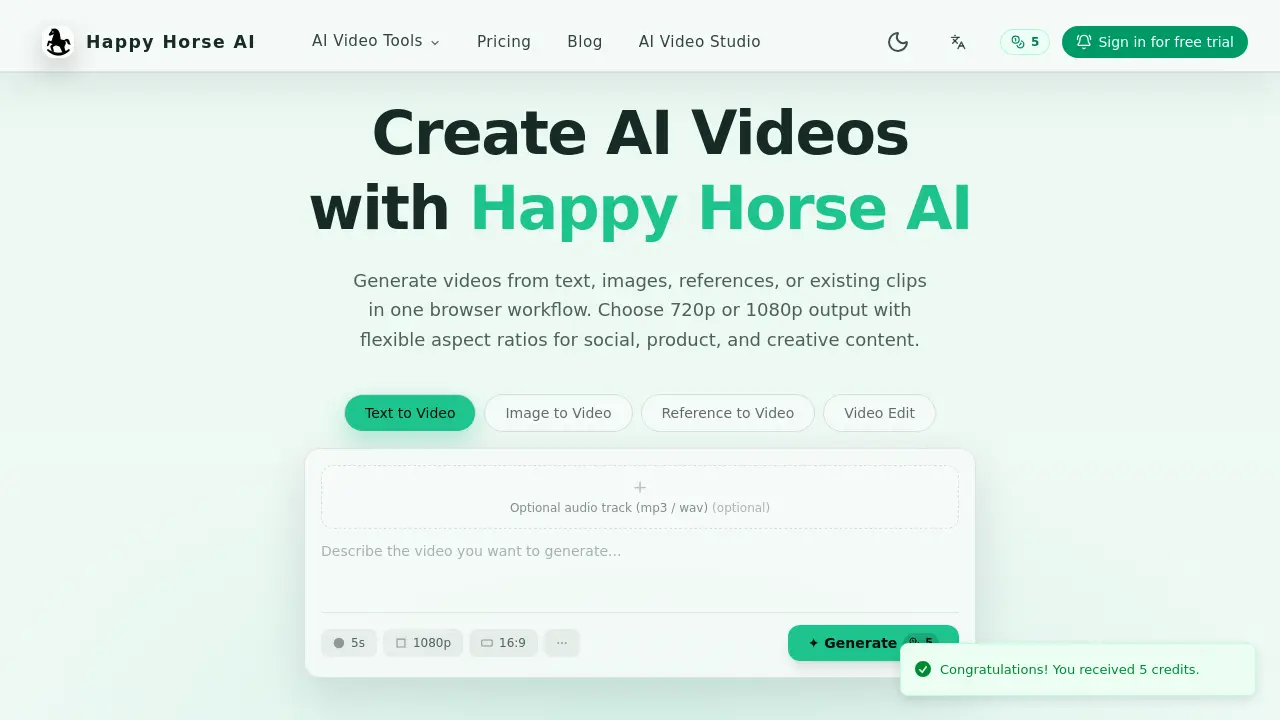
What is Happy Horse AI
Happy Horse AI is a browser‑based platform that consolidates text‑to‑video, image‑to‑video, reference‑guided generation, and video‑edit workflows into a single interface. Users can input written prompts, still images, reference clips, or voice cues to produce short videos with selectable resolutions of 720p or 1080p and flexible aspect ratios (16:9, 9:16, 1:1, 4:3, 3:4). Each workflow exposes task‑specific controls, such as first‑ and last‑frame settings, reference asset handling, and optional audio tracks (MP3/WAV). The credit‑based model allows scalable usage, and the video‑edit mode lets creators upload existing footage, apply AI‑driven edits, and choose between original or generated audio. Designed for social media, product demos, and creative projects, Happy Horse AI streamlines the movement from concept to export without requiring external software.
How does Happy Horse AI work
Happy Horse AI operates as a browser‑based platform that converts text, images, reference media, or existing video clips into short, export‑ready videos. Users select a workflow—text‑to‑video, image‑to‑video, reference‑guided generation, or video edit—then provide prompts, first/last frames, or reference assets; the system applies AI models to synthesize motion, style, and composition, while optional audio tracks can be added or replaced with AI‑generated sound. Output resolution is limited to 720p or 1080p, with adjustable aspect ratios such as 16:9, 9:16, and 1:1. Credit‑based access controls processing capacity, enabling creators to scale usage as needed.
Benefits of Happy Horse AI
Happy Horse AI provides a browser‑based suite for AI video creation that consolidates text‑to‑video, image‑to‑video, reference‑guided generation, and video editing into a single workflow. Users can generate 720p or 1080p clips with flexible aspect ratios (16:9, 9:16, 1:1, 4:3, 3:4), select optional audio tracks, and apply workflow‑specific controls such as frame definitions or reference assets. Credit‑based pricing scales with team size, while the integrated editor allows prompt‑driven edits and audio switching. The platform emphasizes fast idea‑to‑export transitions, making it suitable for social, product, and creative content projects.
Pros and Cons of Happy Horse AI
Pros
- Browser-based interface, no installation required.
- Supports text, image, reference, and video edit workflows.
- 720p and 1080p output with multiple aspect ratios.
- Credit-based pricing scales with usage.
Cons
- Limited free credits may restrict initial testing.
- Processing speed depends on internet connection.
- No native desktop application for offline work.
- Advanced features may require higher credit plans.
Core Features of Happy Horse AI
Text‑to‑Video Generation
Transforms written prompts into short clips, allowing users to set duration, resolution, and aspect‑ratio, facilitating quick creation of scripted visual content.
Image‑to‑Video Animation
Animates a single image or extends motion from an existing clip by defining first and last frames, producing dynamic video from still visuals.
Reference‑Guided Video Production
Uses reference images, video clips, first frames, or voice input to steer style, motion, and subject composition, ensuring output matches specific visual cues.
AI‑Powered Video Editing
Uploads an existing video, applies prompt‑driven edits, and lets users keep original audio or replace it with generated AI audio for refined results.
Flexible Resolution and Aspect‑Ratio Controls
Offers 720p and 1080p output with multiple aspect ratios (16:9, 9:16, 1:1, 4:3, 3:4), adapting videos for various social and marketing channels.
Credit‑Based Access Management
Provides a scalable credit system that aligns usage with project size or team needs, simplifying budgeting and resource allocation for AI video workflows.
Use Cases of Happy Horse AI
- Content marketers: Produce platform‑specific video ads quickly using text‑to‑video with customizable resolution and aspect ratios.
- Social media influencers: Animate static photos into engaging reels via image‑to‑video, selecting first and last frames.
- E‑learning designers: Convert lecture scripts into short instructional clips, adding optional AI‑generated narration.
- Product managers: Generate reference‑guided demos by uploading prototype footage and steering style with voice prompts.
- Video editors: Apply AI‑driven edits to existing footage, swapping original audio for synthetic tracks when needed.
FAQs of Happy Horse AI
What is Happy Horse AI and how does it work?
Happy Horse AI is a browser‑based platform that generates short videos using artificial intelligence. Users provide text prompts, images, reference clips, or existing video footage, and the system synthesizes visual content with optional audio tracks. The workflow runs entirely online, allowing creators to move from idea to export without installing additional software.
Which workflows are available on the homepage?
The homepage showcases four distinct AI video workflows: Text‑to‑Video, Image‑to‑Video, Reference‑to‑Video, and Video Edit. Each workflow presents dedicated controls tailored to its input type, such as duration sliders for text prompts, first‑ and last‑frame selectors for image animation, and reference asset upload options for style guidance.
What resolutions and aspect ratios are supported?
Happy Horse AI supports output resolutions of 720p and 1080p. Aspect ratios are flexible and include 16:9, 9:16, 1:1, 4:3, and 3:4, enabling creators to produce content optimized for platforms ranging from YouTube to Instagram Stories.
Can I upload reference images, videos, or voice?
Yes. In the Reference‑to‑Video workflow, users may upload reference images, full‑length videos, or voice recordings. These assets guide the AI’s style, motion, and subject direction, allowing more precise control over the generated clip’s appearance and narrative flow.
What can I change in the video edit workflow?
The Video Edit workflow lets users upload an existing clip and apply AI‑driven modifications such as scene alterations, visual effects, or re‑timing. Users can also choose to retain the original audio track or replace it with AI‑generated audio in MP3 or WAV format.
How does pricing work?
Happy Horse AI uses a credit‑based pricing model. Each generation or edit consumes a specific number of credits, which are purchased in tiered plans. Higher‑tier plans provide more credits, faster processing, and additional features like saved generations and team collaboration.
How do I start a free trial?
Visitors can click the “Sign in for free trial” button on the landing page, create an account, and receive an initial allocation of five credits. These credits allow users to test any of the four workflows before committing to a paid plan.
Is there a limit to video length?
The platform is optimized for short‑form content; typical outputs range from a few seconds up to one minute. Specific length limits depend on the selected resolution and aspect ratio, with longer durations requiring more credits.
What audio formats are accepted for optional tracks?
Happy Horse AI accepts MP3 and WAV files as optional audio inputs. Users can upload a track during generation or editing, and the system will synchronize it with the visual output, respecting the chosen duration and aspect ratio.
Where can I find technical support if I encounter issues?
Technical assistance is provided via email at support@happyhorse-ai.app. The support team responds to inquiries about workflow usage, credit management, and any platform‑related problems, ensuring users receive timely help to continue their projects.
How to use Happy Horse AI
Identify Happy Horse AI’s purpose: a browser‑based platform that converts text, images, references, or existing clips into short videos, offering 720p/1080p output and flexible aspect ratios.
Choose the appropriate workflow—Text‑to‑Video, Image‑to‑Video, Reference‑to‑Video, or Video Edit—by clicking its tab, ensuring the interface matches the project’s needs.
Provide input sources: enter a text prompt, upload an image, attach reference media, or import an existing clip; optional audio files can be added in MP3 or WAV format.
Adjust workflow‑specific settings such as video duration, resolution, aspect ratio, first/last frames, or reference style controls to tailor the generation parameters.
Press the Generate button; the system processes the request using AI models and displays a preview once rendering completes, allowing quick quality checks.
Review the generated preview, export the final video in the selected resolution, and apply insights from the preview to refine prompts or settings for future iterations.
Happy Horse AI Website Traffic Analysis
Latest traffic information
- Monthly Visits3.36K
- Bounce Rate31.04%
- Pages Per Visit5.37
- Visit Duration00:01:00
- Global Rank3.32M
- Country/Region Ranking978.61K
Visits Over Time
Top Keywords
| Keyword | Traffic | Volume | Cost Per Click |
|---|---|---|---|
| happy horse edit video | 90 | 100 | -- |
| happy horse ai | -- | 34.2K | -- |
| happy horse ai video | -- | 950 | -- |
| happy horse ai 官网 | -- | 420 | -- |
| happyhorse website | -- | 250 | -- |
Top Regions
| Region | Percentage |
|---|---|
| United States | 100% |
