
BidPacto automates RFP drafting, flags missing info, and exports proposals.

What is BidPacto
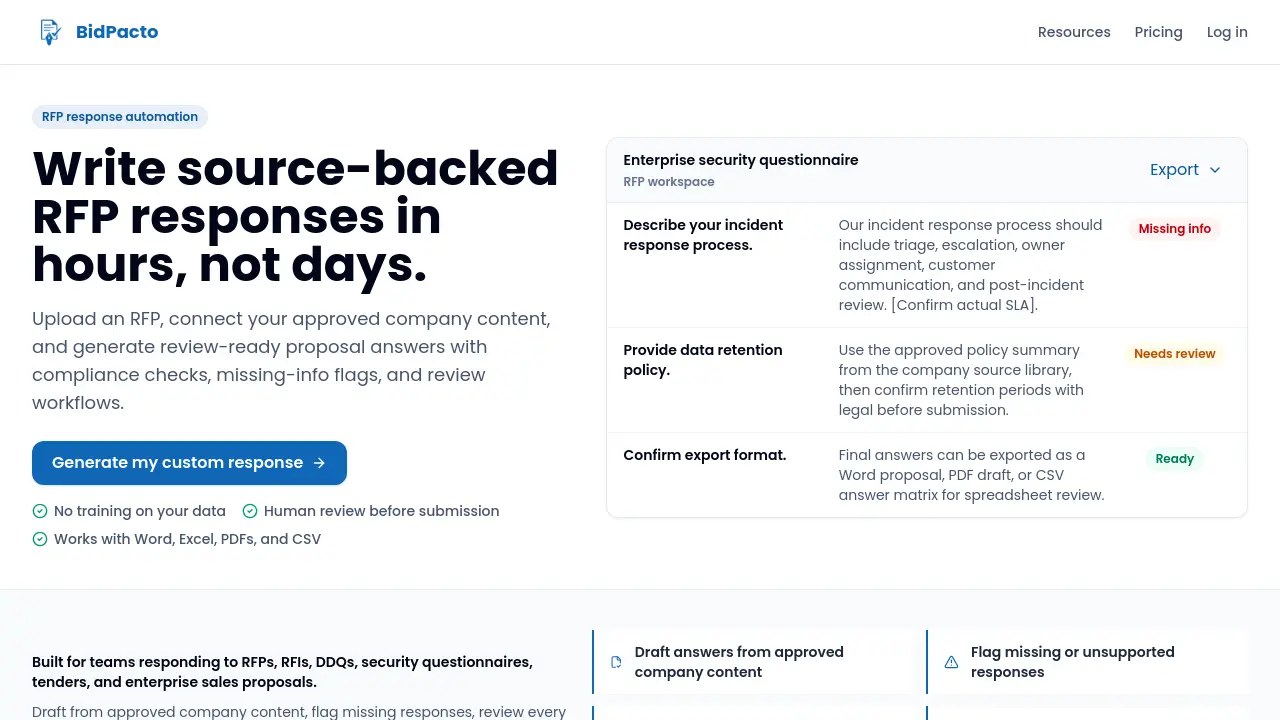
BidPacto is an RFP response automation platform that creates source‑backed proposal drafts in hours rather than days. The workflow begins by uploading an RFP in Word, PDF, Excel, or JSON, after which the AI generates draft answers from a library of approved company content—previous proposals, product documents, security notes, and boilerplate. Generated responses highlight missing facts and compliance gaps, allowing review teams to mark items for approval before final export. The platform supports exporting into Word, PDF, CSV answer matrices, or PowerPoint, and keeps all review status, issue notes, and approvals visible within a dedicated workspace. Designed for proposal managers, sales engineers, legal, and security reviewers, BidPacto streamlines drafting, reduces repetitive work, and maintains strict control over compliance and brand voice.
How does BidPacto work
BidPacto automates RFP response creation by importing the request (Word, PDF, Excel, CSV, JSON, etc.) into a structured workspace, then using AI to draft answers drawn from the company’s approved source library—previous proposals, boilerplates, product documents, security notes, and case studies. The system flags missing or unsupported information, inserts bracketed placeholders, and routes each draft through a human‑in‑the‑loop review stage where reviewers can approve, edit, or add required data. Once all gaps are resolved, the final response is exported as a buyer‑ready Word, PDF, or CSV matrix, enabling faster, compliant proposal delivery.
Benefits of BidPacto
BidPacto streamlines RFP response work by importing the request, generating draft answers from a company’s approved content library, and flagging any missing or non‑compliant information. The platform keeps human review visible, allowing subject‑matter experts to edit, approve, and track gaps before export. Final proposals can be downloaded as Word, PDF, or CSV files, preserving a structured workflow that reduces repetitive drafting and frees sales, legal, and security teams to focus on strategy. Built‑in support for Word, Excel, PDF, and CSV ensures seamless handling of diverse RFP formats while maintaining enterprise‑grade security and auditability.
Pros and Cons of BidPacto
Pros
- Generates source‑backed drafts from existing company content.
- Flags missing information and requires human review before export.
- Supports Word, Excel, PDF, PowerPoint, CSV, Markdown and other file types.
- Exports final responses as Word, PDF or CSV answer matrix.
Cons
- Accuracy still depends on quality of uploaded source material.
- AI may produce hallucinations, requiring thorough reviewer oversight.
- Limited integrations beyond manual file upload and export.
- No built‑in brand‑voice tuning; final copy needs manual editing.
Core Features of BidPacto
RFP Upload and File Processing
Enables users to import RFPs and related documents in multiple formats (Word, Excel, PDF, PowerPoint, CSV, JSON, etc.), converting them into a structured workspace for drafting.
Source‑Backed Answer Generation
Uses AI to draft proposal responses drawn from approved company content—previous proposals, boilerplates, product docs, security notes, case studies—ensuring factual alignment.
Missing‑Info Flagging and Compliance Checks
Automatically identifies gaps, unsupported claims, or compliance requirements, inserting bracketed placeholders and alerts for human verification.
Human‑In‑the‑Loop Review Workflow
Provides editable answer fields, review status tags, issue notes, and approval controls so subject‑matter experts can validate and finalize each response before export.
Export of Buyer‑Ready Deliverables
Outputs completed proposals or answer matrices in Word, PDF, CSV, or plain text formats, ready for submission to the buyer’s portal or email.
Centralized Content Library Integration
Allows teams to upload and maintain a repository of approved source materials (boilerplates, pricing tables, certifications, etc.) that the AI references for consistent drafting.
Use Cases of BidPacto
- Proposal managers: Consolidate scattered answer sources and generate source‑backed drafts to reduce manual research time.
- Sales representatives: Accelerate hot‑deal responses by auto‑filling compliant answers and exporting buyer‑ready proposals.
- Legal and security reviewers: Identify missing compliance details through flagged placeholders and enforce human approval before submission.
- Subject‑matter experts: Focus review efforts on flagged questions that truly require specialist input, avoiding redundant rewrites.
- Revenue leaders: Increase monthly RFP capacity without additional headcount by streamlining drafting, review, and export workflows.
FAQs of BidPacto
Can the AI hallucinate?
BidPacto’s AI can generate draft answers that may contain inaccuracies, but the platform requires human review. Drafts are editable, sourced from the company’s approved content library, and any missing factual information is marked with placeholders, ensuring that only verified responses are submitted.
Is our data used to train public AI models?
BidPacto does not send customer data to train public models. All AI requests are processed through a configurable Gemini‑compatible provider, and data handling follows the provider’s terms and the customer’s contractual agreements, keeping proprietary information confined to the user’s workspace.
What content can the system learn from?
The platform can ingest a wide range of source files, including previous proposals, product documentation, security notes, case studies, boilerplate text, spreadsheets, PDFs, PowerPoint decks, images, Markdown, plain text, HTML, and JSON. These files populate the internal knowledge base used to draft source‑backed responses.
Can it handle Excel‑based RFPs and security questionnaires?
Yes. BidPacto converts Excel and CSV files into structured question‑and‑answer formats. Users can edit the generated answers, and the final response matrix can be exported back to CSV for compatibility with spreadsheet‑based review processes.
Can we approve answers before submission?
Generated answers remain fully editable within the workspace. Reviewers can assign status flags, add comments, and mark each response as approved or requiring further input before any export to Word, PDF, or CSV occurs.
How long does the initial setup take?
Teams can begin by uploading a single RFP and receiving an instant draft. For optimal results, adding the company’s source library—such as boilerplates and prior proposals—takes a few minutes, after which subsequent RFPs benefit from richer, pre‑approved content.
Does BidPacto replace proposal managers?
BidPacto is designed to automate repetitive drafting and tracking tasks, not to eliminate the role of proposal managers. It frees managers from manual extraction and formatting, allowing them to focus on strategy, compliance checks, and quality assurance.
Can the tool match our brand voice?
The AI drafts responses using saved company boilerplate and prior proposal language, which helps maintain brand consistency. Final wording can be refined by the team during the review stage to ensure the voice aligns perfectly with corporate standards.
What integrations are currently supported?
At present, BidPacto supports file‑based integration: users upload Word, Excel, PDF, PowerPoint, image, CSV, Markdown, text, HTML, and JSON files. Export options include Word, PDF, and CSV, enabling seamless hand‑off to existing document management or CRM systems.
Is a trial available before committing to a larger rollout?
Yes. Organizations can upload a single RFP to generate a custom sample response and explore the review workflow. This trial experience helps evaluate the platform’s fit before expanding to broader use across multiple proposals.
How to use BidPacto
The product automates RFP, RFI, and security questionnaire responses by drafting source‑backed answers, flagging missing information, and providing export‑ready Word, PDF, or CSV files.
Begin by uploading the RFP document (Word, Excel, PDF, or CSV) into a dedicated workspace; the system parses questions and extracts requirements automatically.
Invoke the AI‑assisted generation feature, which pulls approved company content—boilerplates, previous proposals, product docs—to produce draft answers for each requirement.
Review the draft responses, using the built‑in missing‑info flags and compliance checks to identify gaps, then edit or approve each answer within the workspace.
Assign review statuses (Needs Review, Approved, or Pending) to maintain visibility of outstanding items before any external submission occurs.
Export the final, review‑ready proposal in the desired format (Word, PDF, or CSV answer matrix) for seamless integration into existing sales or legal workflows.
Interpret the exported results by comparing compliance matrices against the original RFP criteria, confirming that all mandatory fields are addressed and aligned with company policy.
BidPacto Alternatives
Open-source AI coworker for Slack and Lark that runs Claude Code, Codex or Pi on your own machine with the plan or API key you already pay for.
Wery is a virtual AI studio that routes one goal to specialist agents for video, images, music and documents, keeping characters and project assets consistent.

Free invoice maker for freelancers and small businesses on Web, iOS and Android. Create unlimited PDF invoices, manage clients and companies, and bill from AI assistants via MCP.
Relay App turns plain-language instructions into AI workflows that connect 200+ apps, run reliable automations, and pause for human approval.
AtAt runs Claude Code, Codex, or local models in the text field you are typing in, no app-switching. It adds TabTab autocomplete, screenshots, and clipboard history.
Dash is an AI teammate in Slack and Microsoft Teams that connects 3,000+ tools, automates workflows and completes tasks in your channel.
Always free browser that shares your logged-in Chrome state with AI agents like Claude Code and Codex, running browser automation up to 3.45x faster.
Ritto AI learns from one real demonstration of your work, finds the repeated tasks, and completes them the same way. Join the beta for early access.
Aldena creates isolated rooms where AI agents handle client work with real roles, shared memory, and human approval gates.
Referent uses AI agents to automate legal practice operations - client intake, matter management, document filing, and billing prep. Built for solo and small law firms.
Loop Engineering is an AI-powered platform that automates SaaS maintenance through verified agent workflows, memory persistence, and independent verification for every product run.
Taskly is an AI-native task manager where teams describe work in plain English and Otto drafts, prioritizes, and organizes tasks with your approval every step.