
Anyvids.ai: All-in-One AI Video and Image Generator

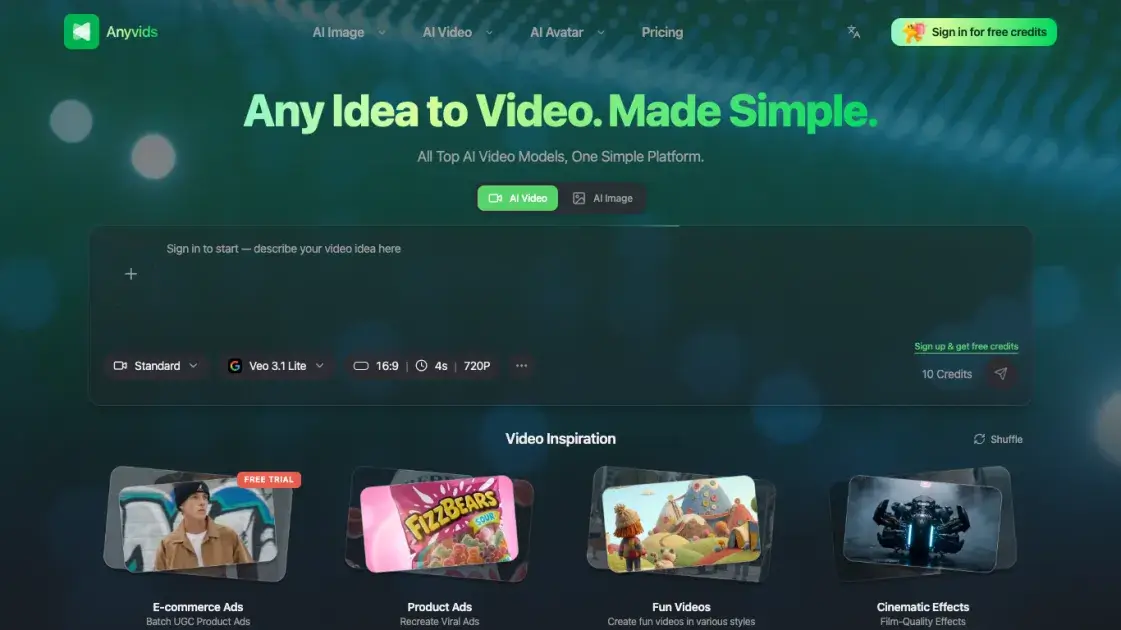
What is Anyvids
Anyvids.ai is a web-based platform that consolidates multiple AI video and image generation models into a single interface. Instead of subscribing to separate tools for text-to-image, text-to-video, or image-to-video tasks, users access 14 models — including GPT Image 2, Flux 2, Veo 3.1, Kling 3.0, and Wan 2.7 — through one dashboard. The platform operates on a credit-based system, where users purchase credits or subscribe to annual plans to generate content. A four-step workflow guides users from tool selection through to downloading or sharing their creations, with no software installation required.
How does Anyvids work
Anyvids.ai operates as a cloud-based platform, meaning all AI processing happens on remote servers rather than on the user's device. When a user selects a creative tool — such as text-to-video or text-to-image — and enters a prompt, the request is sent to the chosen AI model's backend infrastructure. The model interprets the prompt, generates the visual content (a video clip or image), and returns the result to the platform. The user can then preview, download, or share the output directly from their browser. No local installation, GPU, or specialized hardware is needed; the entire workflow runs through a standard web browser with an internet connection.
Benefits of Anyvids
Anyvids.ai eliminates the need to juggle multiple AI subscriptions by centralizing 14 video and image generation models in one place. Users save time by comparing outputs from different models within a single interface, rather than signing up for separate platforms to test each one. The credit-based pricing model means costs scale with actual usage — there are no mandatory monthly fees for users who generate content infrequently. The web-based setup requires no installation or hardware upgrades, making it accessible from any device with a browser. For teams and freelancers, having one tool handle both image and video generation reduces context-switching and simplifies the creative workflow.
Pros and Cons of Anyvids
Pros
- Access to 14 AI models in a single platform
- Credit-based pricing with no mandatory monthly commitment
- No software installation or hardware requirements
- Supports both image and video generation
- Free credits available for initial testing
Cons
- Free tier is limited to a small number of generations
- Support is email-only with no live chat option
- Annual plans require upfront payment for the full year
- Model output quality varies and may require prompt tuning
Core Features of Anyvids
AI Video Generation
Anyvids.ai supports text-to-video generation through models like Veo 3.1, Kling 3.0, and Wan 2.7. Users enter a text prompt describing the desired video, and the selected model produces a video clip. The platform handles rendering and processing server-side, requiring no local GPU or specialized hardware.
AI Image Generation
The platform offers text-to-image creation via GPT Image 2, Flux 2, and other models. Users describe the image they want, and the system generates high-resolution output. Multiple art styles and aspect ratios are supported depending on the chosen model.
Image-to-Video Conversion
Static images can be animated into video clips using the image-to-video tool. Users upload a source image and provide a prompt describing the desired motion or transformation. This is useful for turning product photos, illustrations, or concept art into short animated sequences.
Multi-Model Access
Rather than committing to a single AI model, users can switch between 14 different models within the same interface. Each model has different strengths in terms of image quality, video coherence, style, and generation speed. Users can compare outputs and choose the model that best fits their project.
Credit-Based Pricing
Anyvids.ai uses a credit system where each generation consumes a set number of credits. Users can purchase credit packs or subscribe to annual plans (Lite, Pro, Premium) that include monthly credit allocations. This pay-per-use approach means users only pay for what they generate, without mandatory recurring fees.
Direct Sharing and Export
Generated content can be downloaded in standard formats or shared directly from the platform. There is no need for additional export steps or third-party tools to move content from the platform to social media or client deliverables.
Use Cases of Anyvids
- Content creators: Generate short video clips and images for social media posts without investing in multiple AI tools or learning complex video editing software.
- Marketing teams: Produce product visuals and promotional videos quickly by entering text prompts and selecting from different AI models for varied styles.
- Small business owners: Create advertising content and product images on a budget, paying only for the credits consumed rather than maintaining ongoing subscriptions.
- Freelance designers: Prototype visual concepts and animations for client presentations, using multiple models to explore different creative directions efficiently.
- Hobbyists and experimenters: Explore AI-generated art and video by testing various models and prompts without committing to expensive software.
FAQs of Anyvids
What is Anyvids.ai?
Anyvids.ai is an all-in-one web platform for generating AI videos and images. It aggregates 14 different AI models — including Veo 3.1, Kling 3.0, Flux 2, and GPT Image 2 — into a single interface, allowing users to create visual content without switching between multiple tools.
Who is Anyvids.ai designed for?
The platform targets content creators, marketers, small business owners, and anyone who needs AI-generated video or image content but does not want to manage multiple subscriptions or learn different tools. It is also suitable for hobbyists experimenting with AI-generated art and animation.
How does pricing work on Anyvids.ai?
Anyvids.ai operates on a credit-based system. Users can buy one-time credit packs starting from $30, or subscribe to annual plans (Lite, Pro, Premium) that include monthly credit allocations. Each AI generation consumes a certain number of credits, and users can monitor their usage through the dashboard.
What AI models does Anyvids.ai support?
The platform currently supports 14 models for image and video generation, including GPT Image 2, Flux 2, Veo 3.1, Kling 3.0, Wan 2.7, and Gemini Omni. Users can switch between models freely to compare results and find the best fit for their specific project requirements.
Is there a free plan?
Anyvids.ai provides a limited number of free credits upon registration, allowing new users to test the platform before committing to a paid plan. The free credits are sufficient for a small number of generations, after which users must purchase additional credits or upgrade to a subscription.
Can I use generated content commercially?
Content generated on Anyvids.ai can be used for commercial purposes, including marketing materials, social media posts, and client projects. Users should review the platform's terms of service for specific licensing details and any model-specific usage restrictions.
What kind of support does Anyvids.ai offer?
Support is available via email at support@anyvids.ai. The platform provides documentation and guides for getting started, though it does not currently offer live chat or phone support.
How to use Anyvids
- Visit anyvids.ai and create a free account to receive initial test credits.
- Select a creative tool from the dashboard, such as text-to-image, text-to-video, or image-to-video, depending on the desired output format.
- Choose an AI model from the available options — each model has different strengths, so users may want to experiment with several to find the best match.
- Enter a descriptive prompt explaining what to generate, then submit the request and wait for the model to process it.
- Preview the generated output, and if satisfied, download the file or share it directly from the platform.
- Monitor credit usage in the dashboard, and purchase additional credit packs or upgrade to an annual plan when needed.
Anyvids Website Traffic Analysis
Latest traffic information
- Monthly Visits5.94K
- Bounce Rate57.83%
- Pages Per Visit1.31
- Visit Duration00:00:32
- Global Rank3.61M
- Country/Region Ranking1.4M
Top Keywords
| Keyword | Traffic | Volume | Cost Per Click |
|---|---|---|---|
| seedream 5.0 pro | -- | 19.87K | $2.68 |
| relight | -- | 4.66K | $5.23 |
| renderizar imagem com ia grátis | -- | 410 | -- |
| poster prompt | -- | 200 | -- |
| ai short film generator | -- | 130 | $2.48 |
Top Regions
| Region | Percentage |
|---|---|
| Indonesia | 100% |
Anyvids Alternatives
Seedance 3.0 preview page: planned multi-shot continuity, scene editing and audio-visual sync for AI video, while the on-page generator runs Seedance 2.5.
Browser workspace for AI image generation, reference photo editing, and short video drafts, aimed at creators, marketers, and product teams.
Black Forest Labs' multimodal model with a web generator for text-to-video, image-to-video and image editing with native audio, for creators and marketers.
Wan API is an independent platform for Wan and Seedance video models. Compare specs and rates, generate clips in the Playground, or call them through one API.
Seedance 3.0 turns text, images, video clips, and audio into videos with sound, and edits one part of a clip without regenerating the rest.
Wery is a virtual AI studio that routes one goal to specialist agents for video, images, music and documents, keeping characters and project assets consistent.

AI video and image studio with text-to-video, image-to-video and keyframe control across Seedance, Kling, Wan and Vidu — all on one credit balance.
Browser studio for AI video, image and music generation with Grok Imagine, Kling and GPT Image models. Free daily credits, no sign-up required.
SeaMove AI is an AI video and image generation platform offering Seedance 2.0 and Seedance 2.5 models for text-to-video, image-to-video, and reference-based creation. Features multi-shot continuity, director-level control, and audio-visual sync for creators and studios.
Turns two separate portraits into a 15-second vertical rap duet video on an orange stage with a shared microphone and the original soundtrack. Free 480P preview available.
Mareel is an all-in-one AI video and image generation workspace giving creators, marketers, and ecommerce teams 40+ leading models and one shared credit balance.
Kinovi is a REST API that runs published video, image, and audio AI models from one endpoint. Send a model ID to createTask, poll recordInfo, and pay per use from one shared credit balance.