
Veo 4 generates cinematic AI videos with multi‑modal input, native audio and consistent characters for creators

What is Veo 4
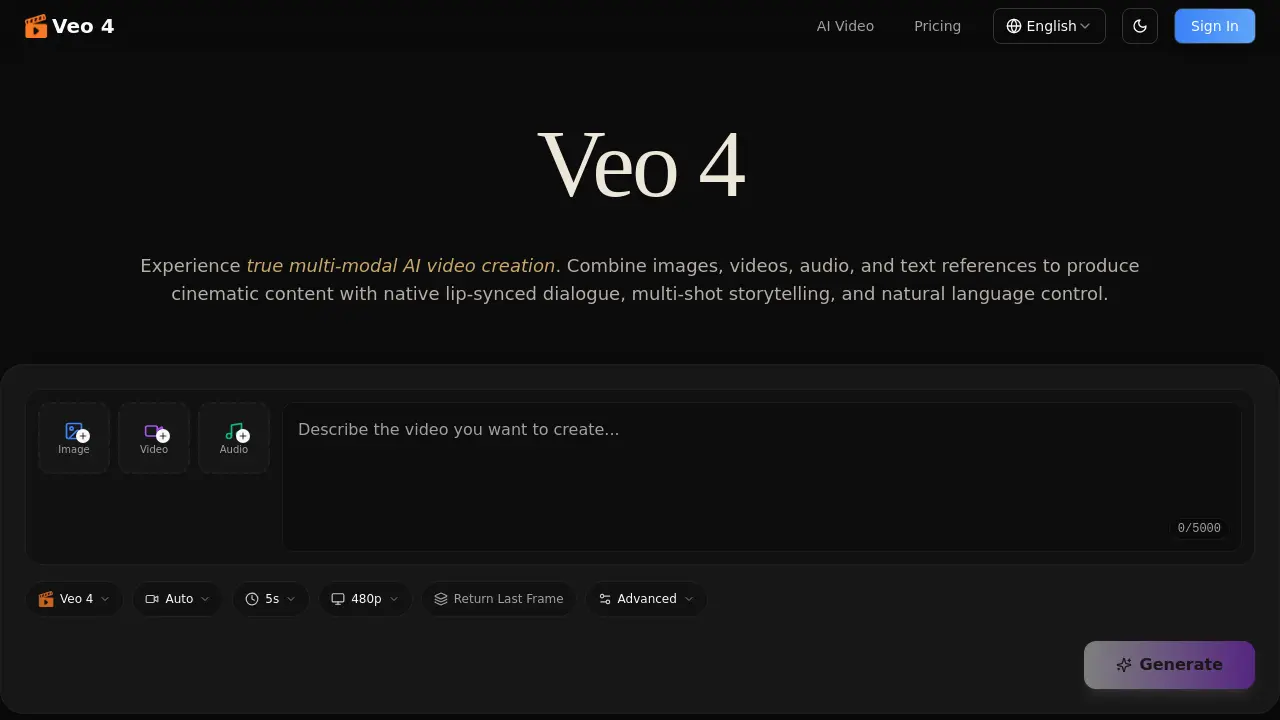
Veo 4 is a next‑generation multi‑modal AI video generator that accepts images, video clips, audio files, and natural‑language prompts in a single workflow. By referencing motion, camera moves, characters, scenes, or sound from any uploaded asset, the model produces cinematic multi‑shot sequences with consistent faces, clothing, and visual style. Native audio generation delivers lip‑synced dialogue, Foley effects, and background music without separate tooling, while the extension and editing features allow seamless lengthening or segment‑specific modifications. Supported resolutions range from landscape to portrait formats, and all outputs are watermark‑free and ready for professional use. Veo 4 thus streamlines content creation for advertising, education, social media, film pre‑visualization, and more, enabling creators to script, reference, and refine video projects entirely through intuitive, language‑driven control.
How does Veo 4 work
Veo 4 operates as a multi‑modal generative model that ingests images, video clips, audio files and natural‑language prompts in a single pass. Users upload reference assets, tag them, then describe the desired outcome; the system extracts motion, camera paths, character appearance and sound cues from the inputs, synchronising lip‑matched dialogue, Foley and background music while preserving visual consistency across frames. The model replicates choreography or cinematic camera moves, extends or edits existing footage, and outputs watermark‑free videos of 4‑15 seconds per shot in multiple aspect ratios, enabling seamless multi‑shot storytelling without manual stitching.
Benefits of Veo 4
Veo 4 delivers truly multi‑modal AI video generation, letting users combine images, video clips, audio files, and natural‑language prompts in a single workflow. The model replicates precise motion and camera moves from reference footage, while maintaining consistent faces, clothing, and visual style across 4‑15 second multi‑shot sequences. Native audio generation adds lip‑synced dialogue, Foley and background music without extra tools, and the video‑extension feature enables seamless lengthening or editing of existing clips. Outputs are watermark‑free, production‑grade cinematic quality in multiple aspect ratios, making Veo 4 suitable for advertising, education, social media, and professional film pre‑visualization.
Pros and Cons of Veo 4
Pros
- Multi‑modal inputs combine image, video, audio, and text.
- Native audio generation creates lip‑synced dialogue and music.
- Consistent characters and styles across multi‑shot sequences.
- Precise replication of camera moves and choreography from references.
- Watermark‑free exports ready for professional use.
Cons
- Maximum clip length limited to 15 seconds per shot.
- Requires high‑quality reference assets for best results.
- Complex pricing not disclosed in the provided context.
- Learning curve for natural‑language prompt construction.
- No mention of offline or on‑premise deployment options.
Core Features of Veo 4
Multi‑Modal Input
Accepts images, video clips, audio files, and text prompts in a single generation, enabling creators to blend diverse references and express complex visual ideas.
Reference Anything
Allows users to specify motion, effects, camera moves, characters, scenes, or sounds from uploaded assets, using natural‑language descriptions for precise content matching.
Native Audio Generation
Produces lip‑synced dialogue, Foley effects, and background music within the same pass as video, eliminating the need for external audio tools or manual syncing.
Multi‑Shot Storytelling
Combines multiple 4‑15 second shots into a coherent narrative, maintaining consistent characters, outfits, and lighting across cuts without manual stitching.
Superior Consistency
Ensures stable appearance of faces, clothing, text, and visual style throughout frames and across multi‑shot sequences, preventing character drift and style breaks.
Precise Motion & Camera Replication
Copies complex choreography, cinematic camera movements, and action sequences from a reference video, requiring only the upload of the source clip.
Video Extension & Editing
Extends existing footage, merges clips, or edits specific segments—replacing characters or actions—while preserving continuity and avoiding full‑clip regeneration.
Cinematic Quality Output
Delivers production‑grade video with multiple aspect‑ratio support, watermark‑free downloads, and synchronized audio suitable for both landscape and portrait formats.
Use Cases of Veo 4
- Marketing teams: Generate brand-aligned ad videos by referencing existing campaign assets and automating lip‑synced dialogue.
- Educators: Produce curriculum videos that combine textbook images, lecture audio, and scripted animations for interactive lessons.
- Filmmakers: Extend or edit short film clips, replicating camera moves and choreography while preserving character consistency.
- Social media creators: Build scroll‑stopping TikTok or Reels using multi‑modal inputs and native beat‑matched background music.
- Real‑estate agents: Transform property photos into immersive walkthrough videos with consistent lighting and seamless scene transitions.
FAQs of Veo 4
What is Veo 4?
Veo 4 is a next‑generation multi‑modal AI video generation platform that accepts images, video clips, audio files, and natural‑language text prompts. It enables creators to reference any visual or auditory element and produces cinematic multi‑shot stories with native, lip‑synced audio.
What inputs does Veo 4 support?
The system accepts four modalities in a single generation: still images (e.g., PNG, JPEG), video clips (e.g., MP4), audio files in MP3 format, and plain‑text prompts. Users can mix and match these references to guide the AI’s output.
What can I reference with Veo 4?
Creators can reference motion, choreography, camera moves, visual effects, character designs, scene layouts, clothing, text overlays, and any sound from uploaded assets. By tagging assets in the prompt (e.g., “@video1’s camera sweep”), the model reproduces those elements in the new video.
Does Veo 4 generate audio?
Yes. Veo 4 produces native audio alongside video, including lip‑synced dialogue, Foley sound effects, and background music. Users may also upload a custom audio track for beat‑synchronized video generation.
How does video extension work?
After uploading an existing clip, you specify the desired extension length (e.g., “extend 5 seconds”). Veo 4 generates additional frames that blend seamlessly with the original footage, preserving motion, lighting, and style for a fluid continuation.
Can I edit existing videos with Veo 4?
Absolutely. Veo 4 offers targeted editing: you can replace characters, alter specific actions, insert new objects, or remove unwanted segments while keeping the rest of the clip intact, eliminating the need to re‑render the entire video.
What video lengths and resolutions are supported?
Each generation produces shots ranging from 4 to 15 seconds. The platform supports multiple aspect ratios—including 21:9, 16:9, 4:3, 1:1, 3:4, and 9:16—providing both landscape and portrait outputs at cinematic quality.
How is character consistency maintained?
Veo 4 employs advanced consistency controls that lock facial features, clothing, text, and overall visual style across frames and shots. This prevents character drift and ensures a uniform look throughout multi‑shot narratives.
Can I replicate camera movements from other videos?
Yes. By uploading a reference video that contains the desired camera motion or choreography, Veo 4 can accurately imitate those movements in the generated content without requiring detailed textual description.
Are there watermarks on generated videos?
No. All videos exported from Veo 4 are watermark‑free, giving creators full ownership of clean, professional‑grade assets ready for distribution.
How do you ensure privacy and security?
Uploaded files and generated outputs are stored using industry‑standard encryption. aiveo4.ai does not share user data with third parties, and creators retain complete rights to their content.
How do I get started with Veo 4?
Sign up on the Veo 4 website, select a subscription plan, upload your reference assets, write a natural‑language prompt, and click “Generate.” The platform will produce a multi‑modal video ready for download.
What industries benefit most from Veo 4’s multi‑modal capabilities?
Marketing teams use it for ad template replication, educators create interactive lessons, filmmakers prototype cinematography, and social‑media creators produce viral short‑form videos—all leveraging the ability to combine text, images, video, and audio in a single workflow.
Is there a limit to how many assets I can combine in one prompt?
While Veo 4 supports multiple modalities, the practical limit is determined by the model’s processing capacity and the 5 KB prompt length. Typically, users combine up to three assets (e.g., one image, one video, one audio) for optimal results.
Can I use Veo 4 for real‑time video generation in live streams?
Veo 4 is designed for offline generation rather than real‑time streaming. Generation times depend on shot length and complexity, making it ideal for pre‑produced content such as ads, tutorials, and short films.
How to use Veo 4
Veo 4 serves as a multi‑modal AI video generator, allowing users to combine images, video clips, audio files, and natural‑language prompts to produce cinematic, lip‑synced videos with consistent characters and native sound.
Upload reference assets—images, video segments, or audio tracks—using the “Upload” interface; each file receives an @‑tag that can be referenced later in the text prompt.
Compose a descriptive prompt in plain English, tagging uploaded assets (e.g., “@image1 as opening frame, apply @video1 camera motion, voice from @audio1”), then click Generate to start processing.
Review the generated clip’s timeline, checking visual consistency, camera motion fidelity, and audio synchronization; the platform displays a preview and a downloadable, watermark‑free file.
Refine results by re‑uploading the output, editing specific segments, or adjusting the prompt; iterate until the video meets the desired narrative and quality goals.
Veo 4 Website Traffic Analysis
Latest traffic information
- Monthly Visits4.7K
- Bounce Rate34.36%
- Pages Per Visit1.85
- Visit Duration00:00:28
- Global Rank3.66M
- Country/Region Ranking1.14M
Top Keywords
| Keyword | Traffic | Volume | Cost Per Click |
|---|---|---|---|
| veo 4 | 40 | 1.71K | $2.4 |
| veo 4 gratuito | -- | 230 | -- |
| veo [i/v] | -- | 100 | -- |
Top Regions
| Region | Percentage |
|---|---|
| United States | 96.49% |
| India | 3.51% |
Veo 4 Alternatives
Seedance 3.0 preview page: planned multi-shot continuity, scene editing and audio-visual sync for AI video, while the on-page generator runs Seedance 2.5.
Browser workspace for AI image generation, reference photo editing, and short video drafts, aimed at creators, marketers, and product teams.
Black Forest Labs' multimodal model with a web generator for text-to-video, image-to-video and image editing with native audio, for creators and marketers.
Wan API is an independent platform for Wan and Seedance video models. Compare specs and rates, generate clips in the Playground, or call them through one API.
Seedance 3.0 turns text, images, video clips, and audio into videos with sound, and edits one part of a clip without regenerating the rest.
Scribix is an AI video clipper that cuts podcasts and interviews into captioned vertical shorts, then publishes them to YouTube, TikTok and LinkedIn.
Wery is a virtual AI studio that routes one goal to specialist agents for video, images, music and documents, keeping characters and project assets consistent.

AI video and image studio with text-to-video, image-to-video and keyframe control across Seedance, Kling, Wan and Vidu — all on one credit balance.
Browser studio for AI video, image and music generation with Grok Imagine, Kling and GPT Image models. Free daily credits, no sign-up required.
SeaMove AI is an AI video and image generation platform offering Seedance 2.0 and Seedance 2.5 models for text-to-video, image-to-video, and reference-based creation. Features multi-shot continuity, director-level control, and audio-visual sync for creators and studios.
Turns two separate portraits into a 15-second vertical rap duet video on an orange stage with a shared microphone and the original soundtrack. Free 480P preview available.
Katto turns long videos and podcasts into scored, captioned 9:16 clips. It ranks clips by viral potential and exports them to 7 platforms from one place.