
AI Audio Translator
AI Audio Translator – Voice Translation into 20+ Languages

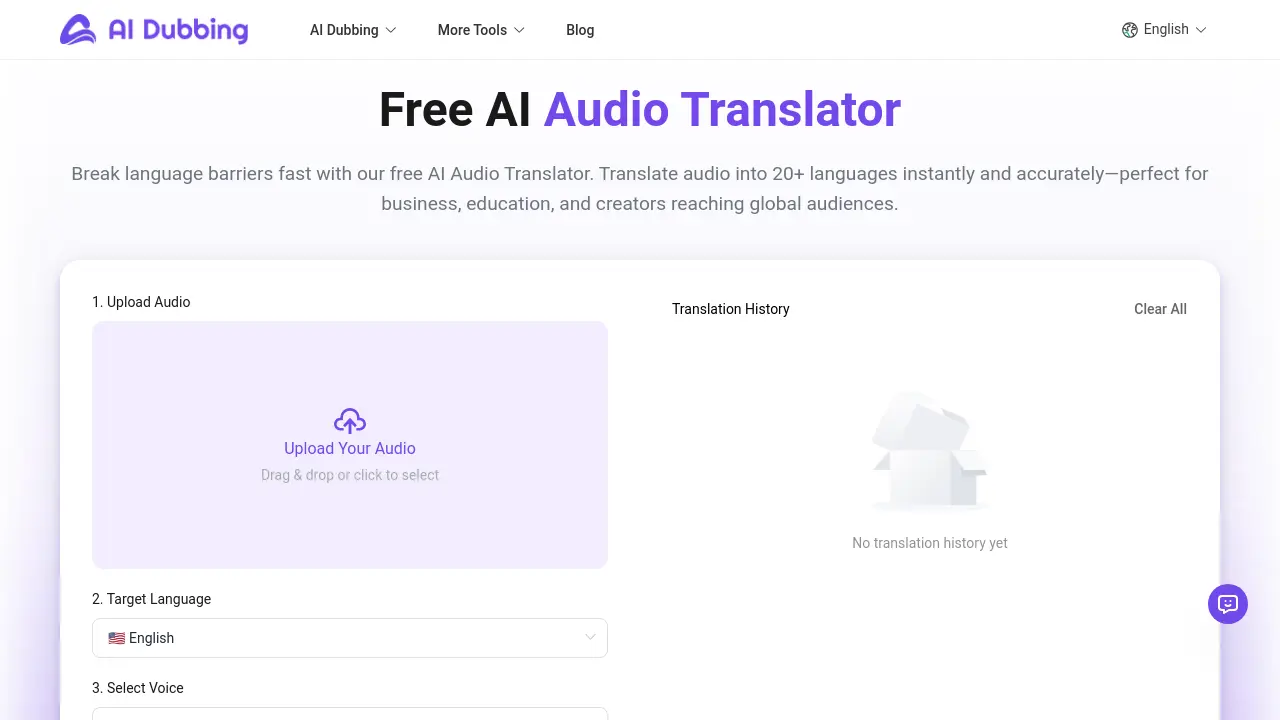
What is AI Audio Translator
AI Audio Translator is a free, browser‑based tool that instantly converts spoken language into more than 20 target languages. The platform accepts MP3 uploads of up to 30 MB and 300 seconds, translating audio with linguistic accuracy while preserving the original speaker’s tone or replacing it with one of 100+ natural AI voices. Content creators can embed the result in YouTube videos, podcasts, or educational materials, expanding reach without re‑recording. For educators, the service turns lectures into multilingual audio, while businesses can localize product demos and marketing clips. The tool operates without subscriptions or hidden fees, making it an ideal solution for anyone seeking a fast, reliable, and free AI audio translator online.
How does AI Audio Translator work
The AI Audio Translator processes user‑supplied MP3 files up to 300 seconds by first transcribing the audio with automatic speech recognition, then passing the text through a neural translation model that supports over 20 target languages. The resulting text is rendered back into speech using a selectable voice from a catalog of 100+ AI‑generated voices, allowing users to retain the same voice or switch to a different style such as a narrator or teacher. The entire workflow runs client‑side in a browser, so the free, online audio translation tool offers instant results without subscriptions or data upload.
Benefits of AI Audio Translator
AI Audio Translator lets students and creators upload short audio files and instantly translate them into 20+ languages, including Hindi and other Indian dialects, with no subscription. The browser‑based tool supports MP3 up to 30 MB, offers 100+ natural voices, and can preserve the original speaker’s tone. As an ai audio translator online and ai audio translator free tool, it eliminates credit‑card requirements. By generating translated audio in a new voice, users can repurpose podcasts, study materials, and YouTube content quickly. The workflow remains free, making it ideal for classrooms and global outreach projects.
Pros and Cons of AI Audio Translator
Pros
- Free, no subscription or credit card needed.
- Supports 20+ languages for instant audio translation.
- Offers 100+ lifelike AI voice options.
- Browser‑based workflow, no downloads required.
- Fast processing: 1 minute audio in 2‑3 minutes.
Cons
- Limited file size (30MB, 5 min).
- Only MP3 allowed format.
- No real‑time live translation feature.
- Requires internet connection, no offline mode.
- Voice preservation accuracy may vary.
Core Features of AI Audio Translator
Audio Upload and File Preparation
Users import MP3 files up to 30 MB and 5 minutes long via drag‑drop or file picker, triggering automatic format validation and instant processing readiness.
Target Language Selection
A dropdown of 20+ widely spoken languages allows instant setting of the desired output language, enabling rapid switching between regional dialects and global audiences.
Voice Selection Library
Choose from 100+ lifelike AI voices or retain the original speaker, providing tonal flexibility for marketing, education, or creative projects without re‑recording.
AI Translation Engine
The core algorithm converts spoken input into the chosen language, delivering high‑accuracy, natural‑sounding output while preserving context and semantics.
Result Preview and Download
After processing, users can listen to the translated audio in the browser, then download the final file directly, all within a few minutes.
Voice Preservation Option
An optional setting aligns the translated voice to match the original speaker’s timbre and rhythm, enhancing authenticity for professional audiences.
Free, Browser‑Based Workflow
All features run client‑side with no subscription, credit card, or hidden limits, allowing instant, cost‑effective translations directly from the user’s browser.
Use Cases of AI Audio Translator
- Content Creators: Translate podcast episodes into Spanish, French, and Arabic instantly, using AI audio translator online, preserving original voice style.
- Educators: Convert lecture recordings into Hindi or Mandarin for multilingual classrooms, using free AI audio translator app with high accuracy.
- Marketing Teams: Localize product audio ads into Japanese and Korean, leveraging free AI audio translator online, cutting studio costs.
- Travel Vloggers: Quickly translate travel commentary into English and Chinese, keeping voice identity, via AI audio translator app.
FAQs of AI Audio Translator
Is AI Audio Translator free to use?
AI Audio Translator is available for free, with no subscription, credit‑card requirement, or hidden usage limits. Users can translate, download, and test all core features without cost.
How many languages are supported in the AI Audio Translator?
The service supports translation into more than 20 widely‑used languages, including English, Chinese, Japanese, Korean, German, French, Spanish, Italian, Portuguese, Russian, Arabic, and Hindi. Expansion of the language library is ongoing.
How long does audio translation take?
Typical processing time for a one‑minute file is 2–3 minutes. Variables such as audio clarity, background noise, and target language complexity can slightly influence the duration.
Can I translate voice recordings into different AI voices?
Yes, the translator can generate output in a variety of AI voices or preserve the original speaker’s tone. The system maintains natural pronunciation while adapting to the chosen voice style.
What formats are supported for audio translation?
Currently only MP3 uploads are accepted. Each file must not exceed 30 MB and be 0–300 seconds long. Other audio formats are not supported at this time.
Do the AI voice translator support voice preservation?
The translator can maintain the speaker’s vocal characteristics in the translated output, offering a more authentic listening experience while ensuring message clarity.
Can the AI Audio Translator handle multi‑speaker recordings that switch languages mid‑session?
The model processes entire audio chunks uniformly; if speakers switch languages, the system may interpret the spoken language based on overall context, potentially causing occasional mismatches in translation.
Is there a daily or monthly usage limit for AI Audio Translator?
No explicit quota is enforced. Users can submit multiple files in sequence, but extremely high‑volume usage may experience temporary slowdown due to server load management.
How does the service protect user data during translation?
All audio files are processed in the browser. Once the translation is complete, the original file and generated output are deleted from the server, ensuring no long‑term storage of user data.
What accuracy can be expected for low‑resource languages such as Hindi or regional dialects?
Accuracy for major languages is high; for low‑resource languages, the model may still perform reasonably but may occasionally produce less fluent phrasing or misinterpret idiomatic expressions. Continuous updates aim to improve these cases.
How to use AI Audio Translator
- The AI Audio Translator converts spoken audio into another language, supporting over 20 languages and 100+ lifelike voices, and is available free online with no subscription.
- To begin, upload your MP3 file via the drag‑and‑drop area; the file must be 0‑300 seconds long and not exceed 30 MB.
- Next, select the target language from the list; popular options include Spanish, French, German, and Indian local languages like Hindi.
- Choose a voice: keep the original, pick a professional style, or emulate the original speaker using the ‘Original Voice’ setting for consistent tone.
- Click ‘Start Translation’; the browser processes the audio, typically 2‑3 min for a one‑minute clip, and renders a preview once finished.
- Use the preview slider to listen; verify intelligibility, pronunciation accuracy, and whether the chosen voice aligns with your audience or platform needs.
- If satisfied, hit ‘Download’; the file saves in MP3 format and can be added to YouTube, TikTok, or corporate training videos.
- Analyze the output by comparing it to the original transcript; use the built‑‑in ‘Transcription’ feature to confirm word‑for‑word accuracy.
- For YouTube localization, upload the translated audio as a separate track; the platform’s auto‑captioning will generate subtitles in the target language.
- Repeat the process for batch projects; the free AI Audio Translator’s web UI makes it efficient to localize multiple short clips without code.
AI Audio Translator Website Traffic Analysis
Latest traffic information
- Monthly Visits368.88K
- Bounce Rate42.03%
- Pages Per Visit2.29
- Visit Duration00:00:42
- Global Rank131.69K
- Country/Region Ranking51.75K
Top Keywords
| Keyword | Traffic | Volume | Cost Per Click |
|---|---|---|---|
| dubbing ai | 5.08K | 79.25K | $0.51 |
| ai audiobook | 3.37K | 20.89K | $3.59 |
| ai dubbing | 2.18K | 6.61K | $1.3 |
| dublar cenas de filmes | 740 | 2.56K | -- |
| text to anime voice ai | 680 | 720 | -- |
Top Regions
| Region | Percentage |
|---|---|
| United States | 8.09% |
| Brazil | 7.66% |
| India | 4.03% |
| South Korea | 3.97% |
| United Kingdom | 3.06% |
AI Audio Translator Alternatives
Translate raw manga, manhwa, manhua and webtoons into 50+ languages with AI, keeping artwork, speech bubbles and panel layout intact across full chapters.
LOVO AI turns scripts into MP3 voiceovers in the browser, with 21 voice previews, permission-based voice cloning, 74-language speech, and a video editor.

Play HT is a free AI voice generator that turns text into speech with 200+ public voices, streams previews in the browser, and exports MP3 files.
MixVio runs 21 video, image and audio models in one browser workspace, plus 11 creator tools, with exact credit cost shown before every generation.
Translate Now is a browser-based AI voice translator for real-time speech translation, live transcription, and replayable bilingual audio transcripts.
PodcastorAI turns PDFs, URLs, notes, and audio into studio-quality video podcasts with AI hosts, voices, and scripts for YouTube, Spotify, and TikTok.
OpenSubs is a free in-browser AI subtitle generator that transcribes speech with Whisper, translates into 20 languages and burns captions into video.
MeeLang is a Chrome extension that provides real-time AI translation subtitles for Google Meet, supporting over 30 languages with sub-second latency.
MenuForma turns any PDF, photo, or website menu into a digital QR menu with online ordering, 70+ languages, and AI food photos for restaurants.
Memo Card turns live or recorded lectures into AI lecture notes with transcription, real-time translation, bilingual captions, quizzes, and replay.
TranslateImage AI translates images to 70+ languages while preserving font, layout, and style. Free online AI image translator for photos and manga.
KidVoice is an AI kid voice generator that creates natural child and teen voice audio from text with multilingual support and voice cloning.