
Sora2 Studio FAQs
Sora2 Studio enables creators and marketing teams to produce watermark-free, commercial-ready videos in minutes using advanced AI technology for hyper-realistic visuals and synchronized audio.

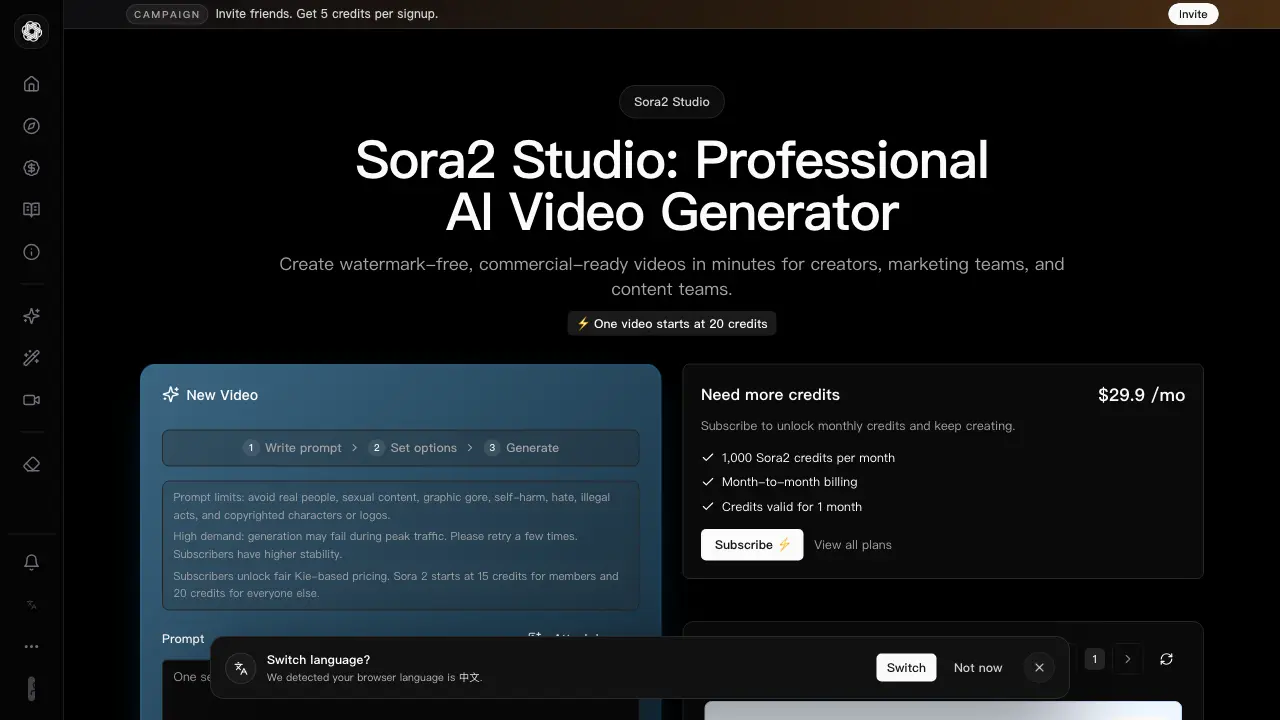
FAQs of Sora2 Studio
Do I need another workspace to access new models?
No, all models such as Kling 3, Seedance 2, and Sora 2 Pro are accessible within the Sora2 Studio interface. Users can select their preferred model directly from the generation options without requiring a separate workspace or additional account setup.
What makes Sora2 different?
Sora2 differentiates itself through a physics-aware rendering stack that ensures motion, light, and material consistency across shots. It combines hyper-realistic visuals with synchronized audio, where dialogue and effects align precisely with on-screen action, and offers granular control over composition, pacing, and performance for iterative refinement.
Can I use Sora2 videos commercially?
Yes, Sora2 generates watermark-free videos that are commercial-ready. The platform explicitly markets its output for creators, marketing teams, and content teams, allowing use in commercial projects without licensing restrictions attributed to the generated content itself.
How does Sora2 handle synchronized dialogue and effects?
Sora2 aligns audio, including dialogue, ambience, and sound effects, with visible motion to create believable timing. This synchronization ensures lips match speech, props interact audibly with the environment, and overall soundscapes reinforce the narrative without requiring extensive post-production editing.
How much control do I keep over style and pacing?
Users retain significant control through targeted adjustments for composition, camera movement, character performance, and lighting. Sora2 is designed for iteration, allowing creators to refine style and pacing while maintaining visual continuity between shots, supporting both high-level creative decisions and detailed tweaks.
Can Sora2 help me move faster without sacrificing quality?
Yes, Sora2 accelerates production by translating prompts into smart defaults and providing precise controls for refinement. Its workflow supports rapid iteration, version comparison, and community prompt sharing, enabling creators to explore ideas quickly while maintaining high visual and narrative standards.
What if I do not know how to prompt?
Sora2 provides access to a community library of prompts and techniques within its Explore section. Users can browse proven examples, remix lighting and lens choices, and learn effective phrasing to achieve strong scene coverage, reducing the learning curve for new users.
Does Sora2 produce realistic motion and interactions?
Sora2 generates realistic motion by respecting physical coherence, such as correct shadow wrapping, reflection tracking, and depth relationships. Materials react plausibly to contact and environmental factors, ensuring that action sequences and character interactions remain believable across frame transitions.
How do teams collaborate with Sora2?
Team collaboration is supported through subscription plans, particularly the Advanced Yearly tier, which is designed for teams and heavy production workloads. While specific collaboration features are not detailed, the plan allocation of 60,000 yearly credits suggests shared resource management for group projects.
What genres or formats work best with Sora2?
Sora2 is optimized for various formats including AI SaaS demo videos, AI product demo videos, commercials, social media clips, dynamic product demonstrations, and cinematic short films. Its use-case examples highlight applications where visual realism, audio sync, and controlled pacing are critical.
How does pricing relate to output scale?
Pricing is credit-based, where each video generation consumes credits. Standard generation starts at 20 credits per 10-second video, with costs increasing for longer durations (e.g., 15s requires the Pro model and 180 credits plus extras). Subscribers benefit from reduced credit costs (15 credits for Sora 2) and can batch up to 4 videos per request, scaling output according to their plan's monthly or yearly credit allocation.
How are credits consumed for each generated video?
Credit consumption depends on the model, video duration, and quantity. A standard 10-second video uses 20 credits for non-subscribers and 15 credits for members. The Pro model, required for 15-second videos, costs 180 credits plus additional extras, and batch generation multiplies the base credit cost by the quantity selected.
What are the differences between the Sora2 subscription plans?
The yearly subscription plans vary by credit allocation: Starter provides 12,000 credits per year, Standard offers 24,000 credits per year, and Advanced supplies 60,000 credits per year. All plans include month-to-month billing displayed as a monthly equivalent, with credits valid for the subscription period. Higher-tier plans are suited for increased production volume.
How do I use the Watermark Remover tool?
The Watermark Remover is listed as a separate tool in the Sora2 Studio interface under the Tools section. It is designed to remove watermarks from videos, but specific operational steps are not provided in the current context; users should consult the dedicated tool page for detailed instructions on its usage and limitations.
What should I do if video generation fails during peak traffic?
During periods of high demand, generation may fail. The platform advises users to retry the generation a few times. Subscribers are noted to have higher stability, suggesting that a subscription plan may reduce the frequency of such failures, though it does not guarantee immunity from traffic-related issues.
Are there content restrictions for prompts?
Yes, prompt guidelines restrict content involving real people, sexual material, graphic gore, self-harm, hate speech, illegal acts, and copyrighted characters or logos. These limits are in place to comply with platform policies and legal standards, and prompts violating these rules may be blocked or result in generation failures.
How to use Sora2 Studio
Sora2 Studio is an AI video generator that produces watermark-free, commercial-ready videos with hyper-realistic visuals and synchronized audio, offering users granular creative control through a credit-based system.
- Access the Sora2 Studio web platform and authenticate to manage your credit balance and generation history.
- Compose a detailed text prompt describing the scene, subject, and action while adhering to content restrictions.
- Choose a video model—Standard, Stable, or Pro—balancing output quality against credit cost for your project needs.
- Specify video duration (10s or 15s), quantity for batch requests, and orientation (landscape or portrait).
- Optionally enable sharing to the community Explore wall, then submit the request to deduct credits and start processing.
- If generation fails due to high demand, retry the submission; subscribers receive priority processing stability.
- Upon completion, review all generated video clips directly in the interface for visual and audio coherence.
- Download the final videos for commercial use or share them externally; subscriber plans allow larger batch sizes.
- Iterate by refining prompts and adjusting model settings to improve realism, motion continuity, and audio synchronization.
- Monitor credit consumption across your subscription tier to manage production scale and cost efficiency for campaigns.
