
Playlist Length Calc
Playlist Length Calc – Instant YouTube Playlist Duration Tool

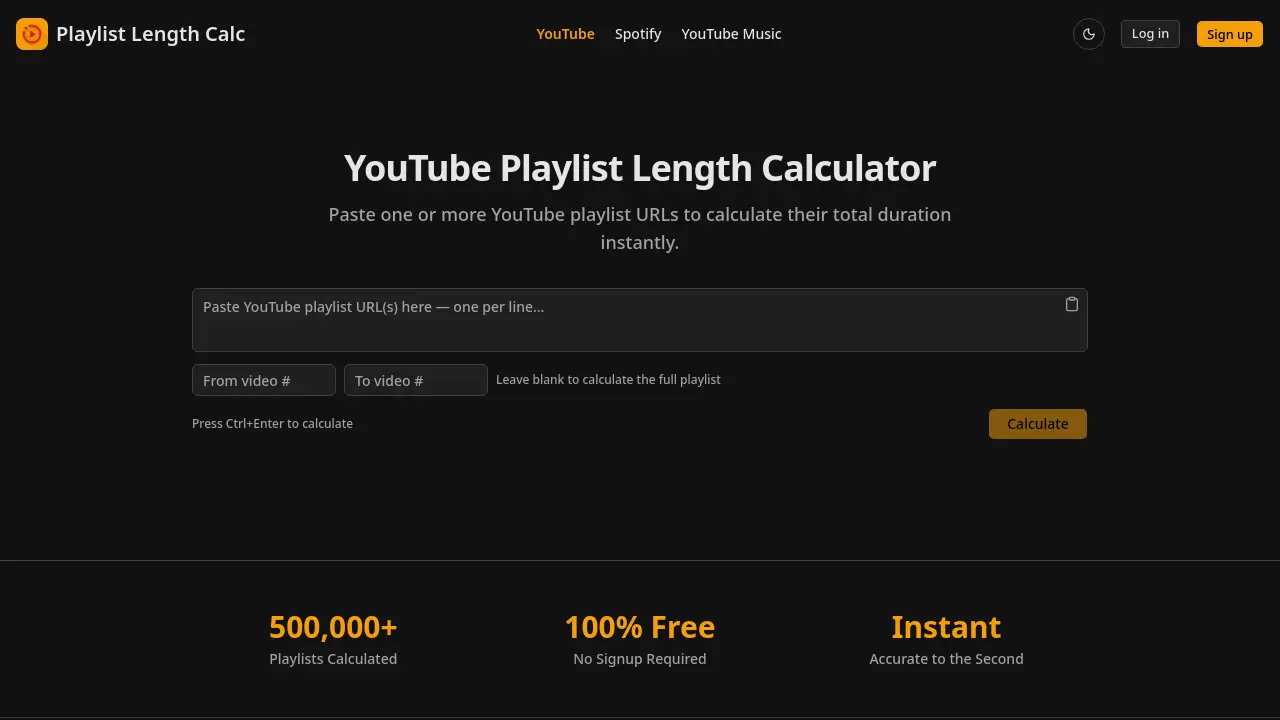
What is Playlist Length Calc
Playlist Length Calc is a free, instant YouTube playlist length calculator that extracts total watch time, video count, average duration, and playback‑speed breakdowns from one or multiple playlist URLs. Users paste any YouTube playlist link—or single video or short youtu.be link—and receive precise totals accurate to the second, with optional range selection for partial playlists. Built‑in features include a daily watch planner that converts total hours into a concrete finish date based on a user‑defined daily viewing goal, and speed calculations for 1.25x, 1.5x, 1.75x, and 2x playback. The tool requires no signup, API key, or email, making it ideal for students planning online courses, educators assigning video homework, creators monitoring tutorial series, and anyone needing to schedule binge‑watch sessions.
How does Playlist Length Calc work
Playlist Length Calc operates as a client‑side web tool that extracts video metadata from any YouTube playlist URL supplied by the user. After the user pastes one or more URLs into the input field, the script queries YouTube’s public data endpoints, retrieves each video’s duration, and aggregates the values to produce a total playtime, video count, and average length. Optional parameters let the user define a range of videos, apply common playback speeds (1.25x‑2x), or input a daily watch goal, after which the calculator derives a finish date. All calculations are performed instantly, without requiring an account, API key, or server‑side processing.
Benefits of Playlist Length Calc
Playlist Length Calc provides an instant, free way to determine the total duration of any YouTube playlist. Users can paste one or multiple playlist URLs—including single videos, short links, or raw IDs—and receive a precise time breakdown down to the second, along with average length and video count. The tool also calculates watch time at common playback speeds (1.25x‑2x) and offers a daily watch planner to project completion dates based on a chosen viewing schedule. Additional features include range calculation for partial playlists and no signup, API key, or email required, making it ideal for students, educators, and content creators planning their viewing commitments.
Pros and Cons of Playlist Length Calc
Pros
- Fully free, no signup required.
- Instant calculation for multiple playlists.
- Accurate to the second with speed breakdowns.
- Supports various YouTube URL formats.
- Daily watch planner estimates finish dates.
Cons
- Limited to YouTube; Spotify separate tool.
- No native mobile app mentioned.
- Requires manual URL paste, no browser extension integration.
- No export or sharing of results feature.
- Dependent on YouTube API availability for large playlists.
Core Features of Playlist Length Calc
Total Playlist Duration Calculation
Computes the combined hours, minutes, and seconds for one or more YouTube playlists instantly, providing an accurate overall watch time.
Multiple Playlist Support
Accepts several playlist URLs (one per line) and aggregates their durations, allowing users to evaluate large collections in a single step.
Video Range Calculator
Enables users to specify start and end positions within a playlist, calculating duration only for the selected subset of videos.
Playback Speed Breakdown
Displays watch time at 1.25x, 1.5x, 1.75x, and 2x speeds alongside the original duration, helping users estimate time savings when speeding up playback.
Daily Watch Planner
Allows entry of daily viewing limits and returns a projected completion date, assisting users in scheduling study sessions or entertainment blocks.
Universal URL Compatibility
Processes standard playlist URLs, single video links, short youtu.be links, and raw playlist IDs without requiring reformatting or API keys.
Use Cases of Playlist Length Calc
- Students: Estimate total study time for YouTube course playlists and generate daily watch plans.
- Educators: Verify homework video length, ensuring assignments fit within allotted class periods.
- Content creators: Assess tutorial playlist duration to balance beginner-friendly pacing.
- Binge‑watch viewers: Calculate total runtime of series playlists and compare speeds for time‑saving.
- Fitness enthusiasts: Confirm workout playlist length matches targeted session length before streaming.
FAQs of Playlist Length Calc
How do I find my YouTube playlist URL?
To locate the playlist URL, open the desired playlist on YouTube and copy the address from the browser’s address bar. The link typically follows the pattern youtube.com/playlist?list=PL.... This full URL can be pasted directly into Playlist Length Calc without any modification.
Is this YouTube playlist length calculator free?
Yes, Playlist Length Calc is completely free to use. There are no hidden fees, subscription charges, or premium tiers. Users can calculate playlist durations without creating an account, providing an instant, cost‑free service for any number of playlists.
How accurate is the calculation?
The calculator retrieves each video’s official duration from YouTube’s public data and sums them to the second. As a result, the total time displayed is accurate to the second, matching the platform’s reported lengths for all videos in the playlist.
Can I calculate only part of a playlist?
Absolutely. The Video Range Calculator feature lets you specify a start and end position within the playlist. By entering the desired range, the tool computes the combined duration for just those selected videos, helping you measure un‑watched or targeted segments.
Can I calculate multiple playlists at once?
Yes. You can paste several YouTube playlist URLs—one per line—into the input box. The tool processes all entries simultaneously and returns a combined total duration, as well as individual statistics for each playlist, simplifying bulk analysis.
Is there a limit on playlist size?
Playlist Length Calc handles playlists of any length, from a single video to thousands of entries. While very large playlists may take a few extra seconds to process, there is no imposed cap on the number of videos or total duration.
What playback speeds are shown?
The results include watch‑time breakdowns for the standard playback speed (1×) and four common accelerated speeds: 1.25×, 1.5×, 1.75×, and 2×. These figures help users estimate how much time they will save when viewing at faster rates.
Why does my calculated time differ from YouTube's estimate?
YouTube does not provide an official total duration for playlists, so any estimate you see on the platform is typically based on rough averages. Playlist Length Calc uses each video’s exact length, which can produce a more precise total that may differ from YouTube’s informal guesses.
Can I share my results?
After a calculation completes, you can copy the displayed summary or take a screenshot to share with others. The site does not currently offer a built‑in sharing link, but the plain‑text results are easy to paste into emails, messages, or documents.
Do I need a YouTube account or API key?
No account, API key, or authentication is required. The calculator accesses publicly available video metadata, so anyone can use the service without logging in or providing personal credentials.
How to use Playlist Length Calc
Identify the tool’s purpose: Playlist Length Calc instantly aggregates YouTube playlist URLs to display total duration, video count, average length, and speed‑adjusted watch times.
Open the calculator page, locate the input box, and paste one or more YouTube playlist URLs—each on a separate line—without modifying the link format.
Press Ctrl + Enter (or click the Calculate button); the system retrieves video metadata, sums durations, and presents results within seconds, accurate to the second.
Review the generated summary: total watch time, number of videos, average video length, and breakdowns for 1.25×, 1.5×, 1.75×, and 2× playback speeds.
Use the Daily Watch Planner field to enter desired daily viewing minutes; the calculator then estimates the exact number of days required to finish the playlist.
If only a segment of the playlist is needed, input start and end indices in the Video Range Calculator to obtain a partial‑playlist duration.
Interpret the speed‑adjusted times to decide optimal playback rates for study sessions, coursework planning, or entertainment scheduling.
Export or share the result via the provided share link or copy‑paste the summary into your notes for future reference.
Repeat the process for additional playlists or combine multiple URLs to compare total durations across courses, tutorials, or music collections.
Playlist Length Calc Website Traffic Analysis
Latest traffic information
- Monthly Visits1.98K
- Bounce Rate59.94%
- Pages Per Visit1.39
- Visit Duration00:00:08
- Global Rank8.45M
- Country/Region Ranking914.14K
Visits Over Time
Top Keywords
| Keyword | Traffic | Volume | Cost Per Click |
|---|---|---|---|
| spotify playlist length calculator | 50 | 110 | -- |
| youtube playlist length | -- | 24.37K | $0.2 |
| プレイリスト 長さ | -- | 400 | -- |
| how long is a long playlist | -- | 200 | -- |
| youtube music saying my playlist is only 5 and a half hours long | -- | 190 | -- |
Top Regions
| Region | Percentage |
|---|---|
| Türkiye | 100% |
