
Humata - ChatGPT for Your Data Files. Asking...
| Added on: | Apr 17, 2024 |
| Monthly Visits: | 84.32K |
| Social & Email: | -- |

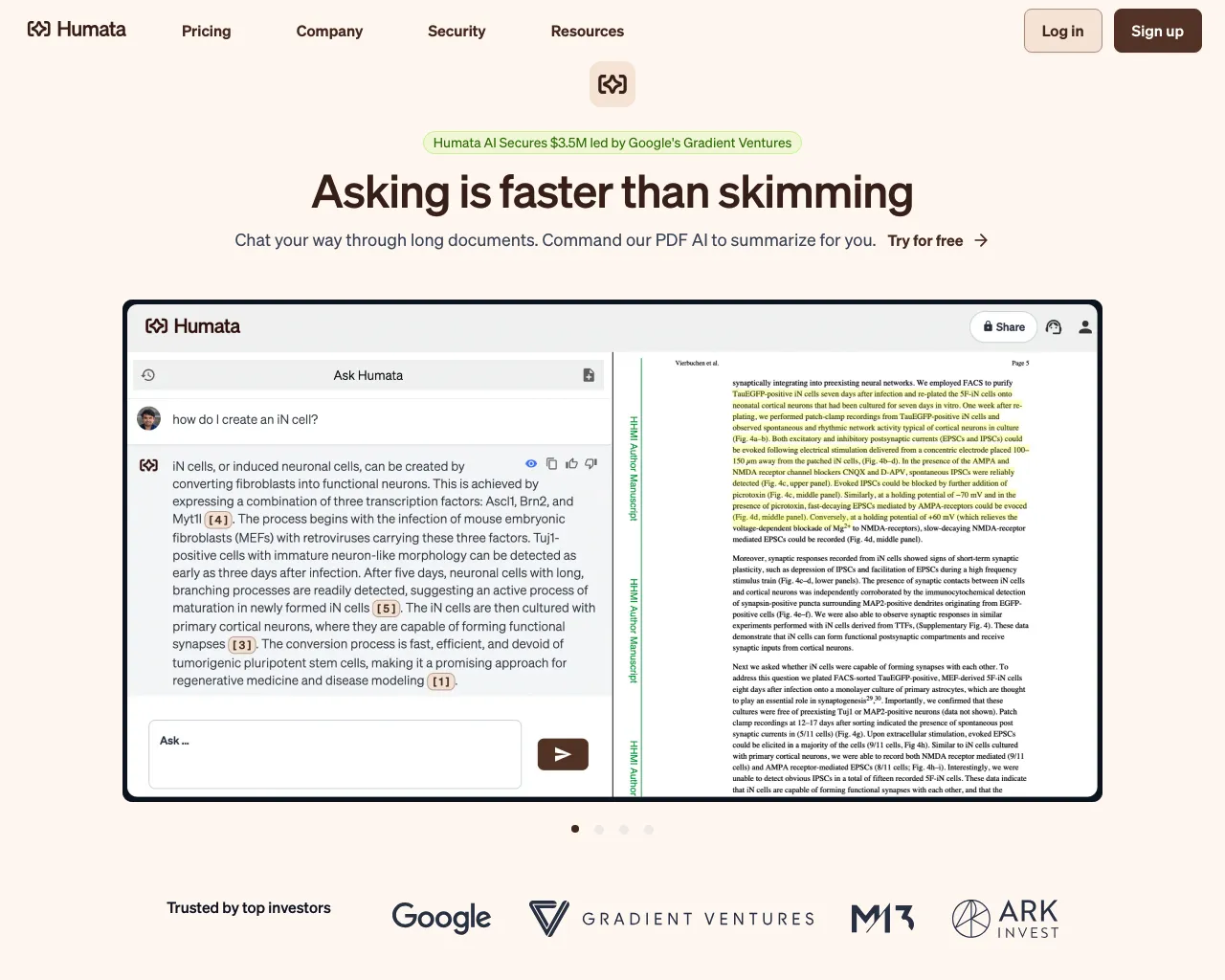
What is HUMATA
Humata is an AI tool designed for anyone who works with data files. Humata is like ChatGPT, but for your data files. Think about it this way, Humata lets you ask questions about your data and get answers instantly. Humata can help you extract data, learn from your files, and even help you find insights 10X faster, it's pretty neat. What makes Humata unique is its ability to process and understand various file types, including spreadsheets, documents, and even PDFs. This allows users to quickly find the information they need without having to manually search through countless files. Overall, Humata is a promising tool that has the potential to revolutionize how people interact with their data.
Core Features of HUMATA
Ask Questions and Get Answers
Humata allows users to ask questions about their data files and receive instant answers. This feature enables users to quickly access insights and information from their data without the need for manual analysis or data exploration.
Extract Data
Humata can extract specific data points from files, such as tables, lists, or key information. This feature streamlines data extraction, saving time and effort compared to manually searching through files.
Summarize Documents
Humata can provide concise summaries of documents, helping users quickly understand the main points of a document without having to read it in its entirety.
Analyze Data
Humata can analyze data within files to identify trends, patterns, and insights. This feature can be used to make data-driven decisions and gain a deeper understanding of the information contained within files.
FAQs of HUMATA
What is Humata?
Humata is an AI-powered tool that helps you unlock insights from your data files. It's like ChatGPT, but for your documents, spreadsheets, and other files.
How does Humata work?
Humata uses advanced AI to understand the content of your files, allowing you to ask questions, get summaries, and extract data in a more efficient way than traditional methods.
What types of files can Humata work with?
Humata can currently handle a variety of file types including: PDFs, Word documents, Excel spreadsheets, text files, and more.
How can Humata help me with my work?
Humata can help you with tasks like finding specific information in documents, getting quick summaries of long reports, analyzing data trends in spreadsheets, and much more.
What are the benefits of using Humata?
Humata can save you time by automating repetitive tasks and making data analysis easier and faster. It can also help you make better decisions by providing you with more comprehensive insights from your data.
Is Humata a good alternative to using a traditional search engine?
Humata can be a powerful tool for finding information within your own files. It's not a replacement for a traditional search engine, but it can complement your search process.
HUMATA Website Traffic Analysis
Latest traffic information
- Monthly Visits84.32K
- Bounce Rate34.34%
- Pages Per Visit3.97
- Visit Duration00:02:45
- Global Rank357.65K
- Country/Region Ranking101.25K
Top Keywords
| Keyword | Traffic | Volume | Cost Per Click |
|---|---|---|---|
| humata ai | 8.35K | 9.31K | $0.51 |
| humata | 3.5K | 4.71K | $0.63 |
| humata ia | 420 | 440 | -- |
| a ai which answers when pdf uploaded | 250 | 270 | -- |
| humanta | 220 | 250 | -- |
Top Regions
| Region | Percentage |
|---|---|
| India | 20.44% |
| Indonesia | 18.56% |
| Colombia | 18.55% |
| Czechia | 12.38% |
| United States | 6.34% |
HUMATA Alternatives
ScanPDF AI is a free online PDF scanner that turns photos and scans into clean PDFs, OCR searchable text, and receipt-to-Excel data in your browser.

AI-powered PDF to Markdown converter with OCR for scanned pages. Get clean, structured Markdown from any PDF in seconds online.
EnsembleData provides real-time social media scraping APIs for TikTok, Instagram, YouTube and more. Extract posts, profiles and analytics at scale.
Tenderbolt uses AI to automate RFP and tender responses. It analyzes documents, completes security questionnaires, and generates tailored proposals.
PixPin is a cross‑platform app for capturing screenshots, recordings and extracting text via OCR, with pinning and annotation features for developers, designers and support teams.
MiroFish is an AI simulation chat platform that converts text, PDF, MD or TXT inputs into graph building, scenario simulation, and structured reports, offering continuous chat‑driven prediction for analysts and decision‑makers.
DeepSeek OCR employs a 3B parameter AI vision model to convert PDFs, scans, and images to Markdown with 97% accuracy, supporting 100+ languages and preserving layouts for professionals.
echoloc uses AI to analyze job posts for hiring signals, providing sales teams with real-time, evidence-based company insights to find ready buyers.
GenPPT's free online PPTX to DOCX converter for professionals and students preserves PowerPoint formatting and provides an API for automation.
GenPPT's free online PPT to JPG converter provides high-resolution images for business, education, and development, with a developer API for automation.
GenPPT's free online PPTX compressor reduces PowerPoint file sizes by up to 90% with intelligent image compression, keeping quality intact for students and professionals.
PDFuck provides free online PDF tools for users to organize, convert, edit, and secure documents with maximum privacy via local browser processing.