
Happy Horse AI
Happy Horse AI creates videos from text, images, and audio

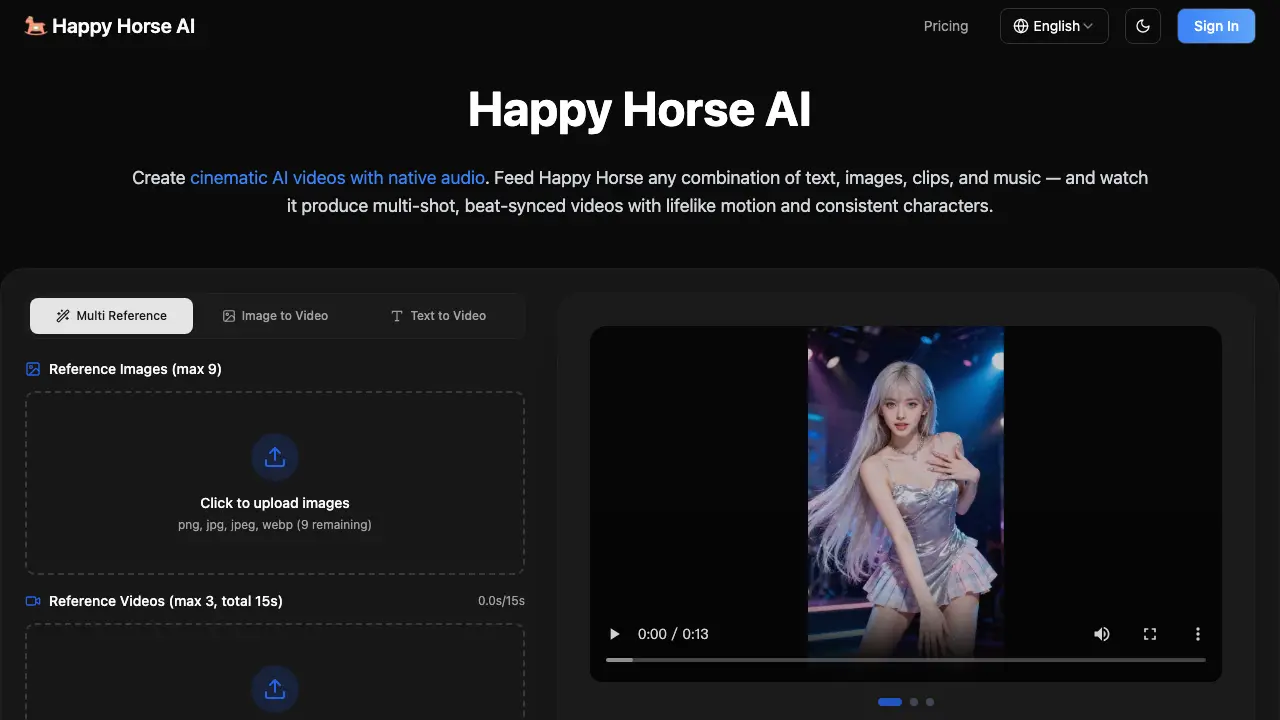
What is Happy Horse AI
Happy Horse AI is a multimodal video generation platform that produces cinematic videos with native audio. It accepts text, images, video clips, and audio inputs to generate multi-shot, beat-synced videos featuring consistent characters and realistic motion physics. The platform leverages a diffusion-based architecture to handle visuals, sound, and story structure simultaneously, providing users with an AI director for streamlined content creation.
How does Happy Horse AI work
Happy Horse AI is a multimodal video generation platform that transforms text, images, video clips, and audio into cinematic videos with native sound. It uses a diffusion-based architecture to process inputs in a single generation pass, ensuring realistic physics, lifelike motion, and rock-solid character consistency. Users upload reference materials—images, video clips, or audio—then describe the desired outcome in natural language, tagging specific assets for precise control. Happy Horse generates multi-shot videos with cinematic camera work, transitions, and beat-synced audio, eliminating the need for post-production layering. The platform offers resolution options, aspect ratios, duration choices, and advanced settings for tailored output, making it ideal for creators across advertising, education, entertainment, and e-commerce.
Benefits of Happy Horse AI
Happy Horse AI empowers creators with a revolutionary multimodal AI video generation platform. Combining text, images, video clips, and audio inputs, it produces cinematic videos with native audio, lifelike motion, and consistent characters in a single generation pass. Advanced physics simulation ensures realistic object interactions, while rock-solid consistency prevents character drift or style shifts. Native audio generation seamlessly produces sound effects, music, and dialogue synced to visuals, eliminating post-production needs. From ads and social media to education and film, Happy Horse adapts to diverse workflows with ease, delivering professional-quality content without watermarks. Experience cinematic video creation powered by AI.
Pros and Cons of Happy Horse AI
Pros
- Multimodal input flexibility.
- Native audio with lip-sync.
- Character consistency maintained.
- Cinematic camera modeling.
- Multi-shot video generation.
Cons
- Limited to 720p resolution.
- Credits required for videos.
- Shortest video length unclear.
- No free trial stated.
- Advanced features need payment.
Core Features of Happy Horse AI
Multimodal Input Pipeline
Combines images, video clips, audio tracks, and text prompts in a single generation pass, offering maximum creative control.
Cinematic Video Generation
Produces multi-shot, beat-synced videos with lifelike motion, consistent characters, and natural camera work.
Realistic Physics & Motion
Objects interact with real weight and momentum, ensuring collisions feel impactful and fast-moving subjects stay sharp.
Native Audio Generation
Generates sound effects, background music, and dialogue with accurate lip-sync, synchronized to video action.
Character & Scene Consistency
Maintains facial features, clothing details, on-screen text, and scene aesthetics across all frames without artifacts.
Multi-Shot Storyboarding
Creates videos with natural cuts, transitions, and shot changes in a single pass, avoiding static clip output.
Aspect Ratio & Resolution Flexibility
Supports multiple formats including 16:9, 9:16, and up to 720p resolution for diverse platform needs.
Iterative Editing & Extension
Allows users to extend, edit segments, or refine videos by feeding results back into the system for targeted adjustments.
Use Cases of Happy Horse AI
- Content Creators: Generate high-quality, watermark-free videos for social media by combining uploaded clips, images, and audio with text prompts.
- Marketing Teams: Produce branded ad variations by referencing existing templates and swapping in product imagery and brand assets.
- Film Students: Experiment with cinematic techniques by uploading reference shots and applying them to original scenes with consistent characters.
FAQs of Happy Horse AI
What input formats does Happy Horse AI accept?
Happy Horse AI accepts multiple input formats including PNG, JPG, JPEG, and WebP for images, as well as MP4 and MOV for video clips. For audio, Happy Horse AI supports MP3 and WAV file formats. Users can combine up to 9 images, 3 video clips (maximum 15 seconds each), and 3 audio tracks (maximum 15 seconds each) in a single generation.
How does Happy Horse AI generate native audio?
Happy Horse AI generates audio simultaneously with video in a single generation pass. The platform produces contextually appropriate sound effects, background music with cinematic depth, and even dialogue with accurate lip-sync. Users can also upload their own audio tracks to synchronize video actions to specific beats or rhythms.
What aspect ratios and resolutions are supported by Happy Horse AI?
Happy Horse AI supports various aspect ratios including Auto, 16:9, 9:16, 4:3, 3:4, 21:9, and 1:1. The platform generates videos in 480p and 720p resolutions, providing sharp quality suitable for both professional production and social media delivery.
How does Happy Horse AI maintain character consistency across frames?
Happy Horse AI uses advanced diffusion architecture that locks onto facial features, clothing details, on-screen text, and scene aesthetics throughout every frame. This technology eliminates common AI video artifacts such as character drift, style shifts, and detail degradation between shots, ensuring rock-solid consistency.
Are there watermarks on videos generated by Happy Horse AI?
No, videos generated by Happy Horse AI are completely watermark-free. The platform provides clean, professional outputs without any branding overlays, allowing users to download and use their creations anywhere for any purpose, whether personal or commercial.
How to use Happy Horse AI
- Navigate to the Happy Horse AI website and click "Sign In" to access your account.
- Once logged in, click "Get Started" to begin creating your first video.
- Upload reference images (up to 9), videos (up to 3, 15 seconds total), and audio files (up to 3, 15 seconds total) by dragging and dropping or clicking to select files.
- In the "Prompt" field, type a description of your desired video output. Use "@" followed by the reference name (e.g., "@Image1") to specify elements like opening frames or character appearance.
- Select your preferred resolution (480p or 720p), duration (up to 5 seconds), and aspect ratio (multiple options available).
- Click "Generate" to process your inputs. Happy Horse will synthesize the assets into a cohesive, multi-shot video with native audio, synced to your prompt.
- Review the generated video. If needed, use the extension or editing features to refine segments or add more content before exporting the final result without watermarks.
Happy Horse AI Website Traffic Analysis
Latest traffic information
- Monthly Visits292
- Bounce Rate40.74%
- Pages Per Visit2.67
- Visit Duration00:01:25
- Global Rank--
- Country/Region Ranking--
Visits Over Time
Top Keywords
| Keyword | Traffic | Volume | Cost Per Click |
|---|---|---|---|
| happyhorse 官网 | 240 | 490 | -- |
| happy horse官网 | 70 | 20 | -- |
| happyhorse | -- | 58.74K | $0.4 |
| happy horse ai | -- | 27.03K | -- |
| happyhorse ai | -- | 3.79K | -- |
Top Regions
| Region | Percentage |
|---|---|
| United States | 67.15% |
| Hong Kong | 32.85% |