
ClipTrend.ai: AI Image to Video Generator with 40+ Models

What is ClipTrend.ai
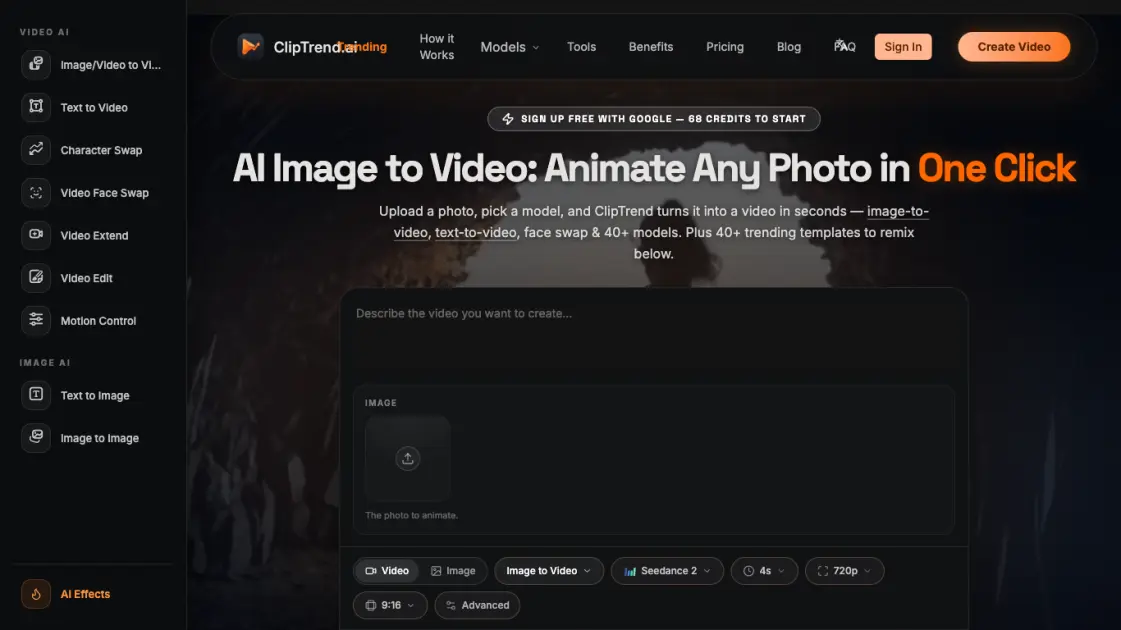
ClipTrend.ai is an all-in-one AI video and image generation platform built around trending viral content. Rather than offering a blank prompt box, it provides a gallery of trending AI video effect templates — users upload a photo or short clip, click Generate, and receive a viral-ready MP4 in 30 to 60 seconds. The platform routes each render to the best-fit model among 20+ engines including Seedance 2, Kling 3, Veo 3.1, and Wan 2.7, so users do not need to manage model selection themselves. ClipTrend tracks which AI video effects are gaining traction on TikTok and YouTube and wraps each trend into a one-click template, making it straightforward for content creators to participate in viral formats without technical expertise.
How does ClipTrend.ai work
ClipTrend.ai aggregates over 20 AI models behind a unified interface. When a user uploads a photo or enters a prompt, the platform selects the most suitable model for that specific task — Seedance 2 for image-to-video with face preservation, Kling 3 for cinematic motion, Veo 3.1 for native audio output, and so on. The system tracks trending templates from TikTok and YouTube, pre-configures the optimal settings for each viral effect, and renders an MP4 output within 30 to 60 seconds. Users pay per generation using credits, and failed renders are automatically refunded.
Benefits of ClipTrend.ai
ClipTrend.ai offers several practical advantages for content creators. It tracks real viral metrics — over 120 million views tracked across 50+ viral effects — so users can pick templates with proven engagement rather than guessing what might work. The platform eliminates prompt engineering by providing pre-tuned templates with a Surprise Me feature for quick alternatives. All 20+ AI models are accessible from a single workspace, removing the need to maintain accounts on multiple model-specific sites. The Seedance 2 integration supports real human faces without the censorship applied by some other platforms, making face swap use cases viable.
Pros and Cons of ClipTrend.ai
Pros
- Access to 20+ AI models in one platform
- Pre-tuned viral templates with real view counts
- Pay-as-you-go credits with auto-refund on failures
- Commercial license with watermark-free exports
- Seedance 2 with real-face support
Cons
- Credit-based pricing can be costly for heavy users
- No desktop application, browser-based only
- Limited to pre-defined template formats
Core Features of ClipTrend.ai
Image/Video to Video
Animate a photo or restyle a clip with motion-aware AI using models like Seedance 2 and Kling 3.
Text to Video
Type a scene description and get a finished AI video without needing any footage or recording equipment.
Video Face Swap
Swap a face into any video while preserving natural motion and expression across frames.
Character Swap
Drop a new character into an existing clip while keeping the original background and action intact.
Video Extend
Continue an existing video clip with AI-generated extra seconds that match the original style and motion.
Video Edit
Edit and retouch footage using prompt-driven AI commands instead of manual timeline editing.
Motion Control
Drive a character in your video using the motion captured from a separate reference clip.
Text to Image & Image to Image
Generate still images from text prompts or restyle and remix existing pictures with AI-powered editing.
Use Cases of ClipTrend.ai
- Social media creators: Remix trending TikTok and YouTube video effects with custom faces for viral content.
- Content marketers: Produce commercial-safe AI videos with watermark-free output and licensed usage rights.
- Video editors: Extend and edit existing clips using AI-driven motion control and prompt-based commands.
- Hobbyists: Generate AI videos from personal photos using face swap and character swap features.
FAQs of ClipTrend.ai
What is ClipTrend?
ClipTrend is a trend-first AI image to video generator that tracks viral AI video effects on TikTok and YouTube and wraps each one into a one-click template. Instead of a blank prompt box, it offers a gallery of trending templates — users upload a photo or clip, click Generate, and receive a viral-ready MP4 in 30 to 60 seconds.
How does ClipTrend pricing work?
ClipTrend uses a credit-based system. New users receive 68 free credits with Google signup. Monthly memberships cost $27.99 per month (first month at $14 with 50% off) and include 800 credits. Yearly memberships cost $6.99 per month billed annually and grant 9,600 credits upfront. Credit packs are also available for one-time purchase.
What is the best AI image to video generator?
ClipTrend aggregates over 20 AI models including Seedance 2, Kling 3, Veo 3.1, and Wan 2.7, and automatically routes each generation to the most suitable model. This means users get access to multiple state-of-the-art engines without managing separate accounts or subscriptions.
How do I turn a photo into an AI video?
Select an image-to-video template, upload a photo, choose a model such as Seedance 2 or Kling 3, and click Generate. The platform processes the input and returns an MP4 video within approximately one minute. Paid exports are watermark-free.
Does ClipTrend work for commercial use?
Yes. Every generation on a paid plan includes a commercial license and watermark-free output. Failed generations are automatically refunded, and support responds within two business days.
How to use ClipTrend.ai
- Sign up with Google to receive 68 free starter credits.
- Browse the gallery of trending AI video effect templates sorted by category and view count.
- Select a template and upload a photo or short clip, or enter a text prompt.
- Configure optional settings such as model, duration, resolution, and aspect ratio.
- Click Generate and wait 30 to 60 seconds for the MP4 output to complete.
- Download the result with no watermark and share it on social platforms.
ClipTrend.ai Website Traffic Analysis
Latest traffic information
- Monthly Visits1.9K
- Bounce Rate52.09%
- Pages Per Visit1.05
- Visit Duration00:00:00
- Global Rank9.97M
- Country/Region Ranking3.68M
Visits Over Time
Top Keywords
| Keyword | Traffic | Volume | Cost Per Click |
|---|---|---|---|
| cliptrend | 530 | 1K | -- |
| character swap online free | 150 | -- | -- |
| character swap free | 120 | 120 | -- |
| clip trending | 40 | 40 | -- |
| ai video editor | 20 | 108.63K | $0.76 |
Top Regions
| Region | Percentage |
|---|---|
| United States | 89.95% |
| India | 10.05% |
