
HappyHorse AI video generator for text and image to video creation.

What is HappyHorse
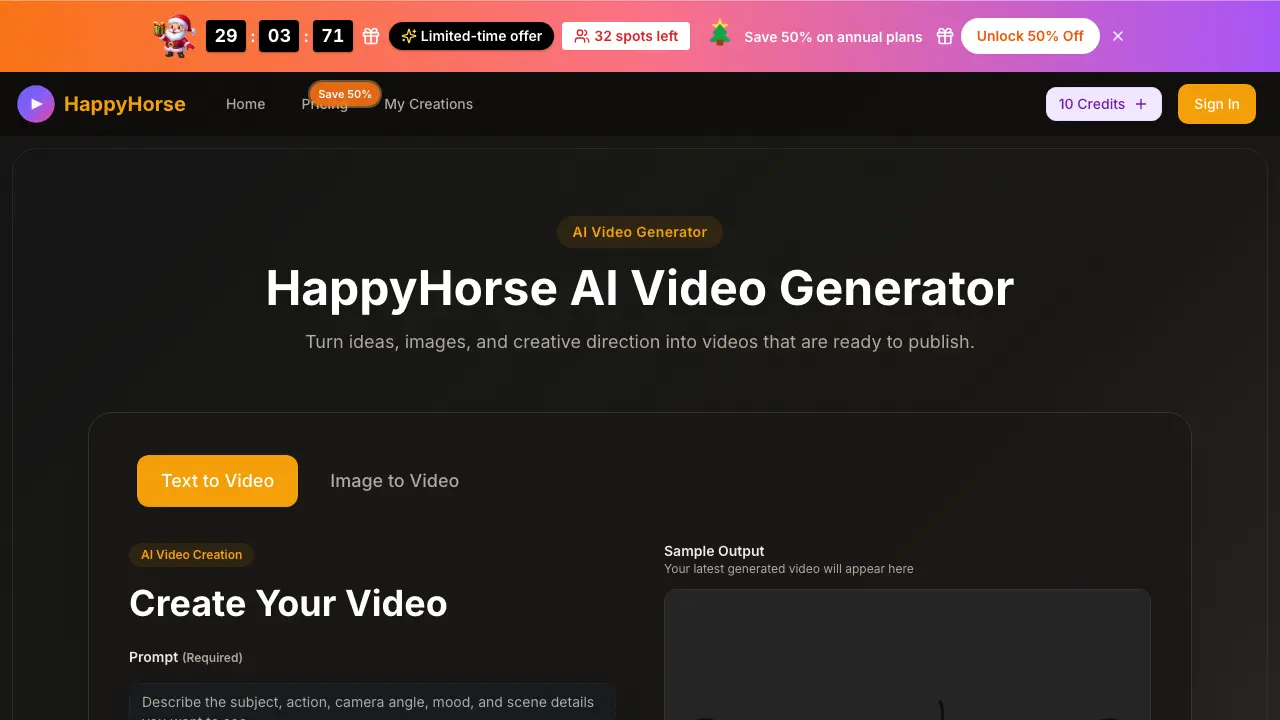
HappyHorse is an AI video generator that turns text prompts and reference images into short, publish-ready videos for marketing, product launches, and creative storytelling. It offers two creation modes: prompt-based video generation for exploring ideas from scratch, and image-to-video generation for animating existing assets like product photos or campaign visuals. With customizable settings for aspect ratio, quality, duration, and motion, HappyHorse supports fast iteration and clearer visual results. The platform works directly in the browser without requiring an app, and provides commercial-use licenses for exported content. Pricing plans include Basic, Professional, and Enterprise tiers, offering scalable credit capacity and high-volume generation for individuals, creators, and larger teams.
How does HappyHorse work
HappyHorse is an AI video generator designed to transform text prompts or reference images into short, polished videos optimized for content creation and marketing workflows. The process begins with users supplying detailed prompts that describe the desired subject, action, mood, and setting, or uploading a reference image when starting from an existing visual. Users can then shape the motion and style by adjusting camera movement, pacing, framing, aspect ratio, and quality settings, offering control over the final output without requiring technical expertise. Once configured, HappyHorse generates the video, which can be reviewed, refined, and downloaded for various use cases such as product demos, social media content, ads, and storytelling. The platform emphasizes speed, motion clarity, and scene consistency to ensure the output is usable and aligns closely with the creator’s intent. Multiple subscription tiers provide flexible credit-based pricing to support different production volumes.
Benefits of HappyHorse
HappyHorse is a powerful AI video generator designed for creators seeking speed and control in their video production. It transforms text prompts and images into polished short videos, ideal for marketing, storytelling, and content creation. Key features include text-to-video and image-to-video conversion, customizable aspect ratios and quality settings, and enhanced motion and scene consistency. The platform offers faster creative iteration, allowing users to test multiple ideas efficiently. With plans starting at $9.90 per month, HappyHorse provides flexible credit-based pricing, including commercial use licenses and priority customer support. It's perfect for producing product videos, social content, and ad concepts quickly and professionally.
Pros and Cons of HappyHorse
Pros
- Fast video generation from prompts.
- Supports text and image inputs.
- Multiple aspect ratios and quality settings.
Cons
- Limited video duration options.
- Potential wait times due to queue load.
- Pricing may be high for low-volume users.
Core Features of HappyHorse
AI Video Generation from Text
Convert natural language prompts into short, publish-ready videos, allowing creators to produce content quickly from ideas. This function enables fast iteration for marketing, storytelling, and demonstrations.
AI Video Generation from Images
Animate existing image assets—such as product photos or illustrations—by applying motion and style direction while preserving composition. Ideal for turning static visuals into dynamic clips for campaigns.
Prompt Assistance and Direction Control
Use an integrated prompt assist feature to refine descriptions for stronger subject focus, action, and visual intent. This ensures generated videos more closely match the intended creative direction.
Customization of Motion and Style
Adjust camera movements, pacing, framing, aspect ratios, and video quality to shape the look and feel of each clip. These options allow users to tailor outputs for different platforms and content types.
High-Quality Rendering and Compatibility
Produce videos in resolutions up to 1080p Full HD and formats suitable for social media, advertising, or brand storytelling. Outputs are export-ready without watermarks for immediate use.
Commercial Licensing and Multi-Platform Publishing
Access commercial licenses with all plans, allowing safe use in paid campaigns and client work. Export directly for product pages, ads, social posts, or other digital channels.
Use Cases of HappyHorse
- Marketing Teams: Create product launch videos and promotional content by converting text prompts into engaging short clips that capture audience attention and drive conversions.
- Content Creators: Produce visually appealing video content for social media platforms by animating images and generating unique scenes based on creative prompts to maintain audience engagement.
- Product Designers: Animate product photos into dynamic videos showcasing features and use cases, enhancing product presentations and marketing materials with professional-quality motion content.
- Social Media Managers: Generate multiple versions of video ads and campaign material for A/B testing, speeding up content production and enabling rapid social media marketing strategy implementation.
- Brand Storytellers: Create consistent brand video content by using text-to-video generation to craft scenes that align with brand messaging, ensuring visual storytelling that resonates with target audiences.
FAQs of HappyHorse
How do I start creating a video with HappyHorse?
To start creating a video with HappyHorse, describe the scene, action, and mood you want in the text prompt field (up to 800 characters), or upload an image if you already have a visual reference. Choose your preferred aspect ratio, video quality, and duration settings, then click "Start Generation" to render your first clip.
What video formats and qualities does HappyHorse support?
HappyHorse allows you to generate videos in multiple aspect ratios including 16:9, 9:16, 4:3, 3:4, 21:9, and 1:1. You can select either 720p HD or 1080p Full HD quality, with durations of 5 or 10 seconds per clip.
Can I use my own images to generate videos with HappyHorse?
Yes, HappyHorse offers an image-to-video feature. You can upload a still image and add motion direction text, and the platform will animate the scene while keeping the original visual as the starting reference.
What is the difference between text-to-video and image-to-video modes?
Text-to-video lets you generate an entirely new scene from a written prompt, offering more creative freedom. Image-to-video starts with an uploaded still image and adds motion while staying closer to the original composition, ideal when you already have specific product shots or visuals.
How to use HappyHorse
- Open the HappyHorse website and click on the "Sign In" button to create a new account or log into an existing one.
- Once logged in, select "Text to Video" or "Image to Video" depending on your source material for the AI video generation.
- If using text, input your prompt describing the scene, action, and mood. For images, upload the reference file to guide the video style.
- Choose the aspect ratio, video quality, and duration settings that suit your publishing platform and content needs.
- Review the settings preview and make adjustments to motion, pacing, and framing before initiating the generation process.
- After the video is generated, preview the output to ensure it matches your creative direction, then download the final clip.
- You can iterate by adjusting the prompt or settings to refine the result for higher-quality, conversion-focused content.
HappyHorse Website Traffic Analysis
Latest traffic information
- Monthly Visits508
- Bounce Rate36.83%
- Pages Per Visit1.02
- Visit Duration00:00:00
- Global Rank--
- Country/Region Ranking--
Visits Over Time
Top Keywords
| Keyword | Traffic | Volume | Cost Per Click |
|---|---|---|---|
| happy horse | 650 | 133.21K | $0.61 |
| happyhorse | 330 | 166.27K | $0.4 |
| happyhorse-1.0 | 150 | 27.56K | -- |
| ai影片 | 60 | 1.39K | -- |
| happy horse ai | 50 | 34.2K | -- |
Top Regions
| Region | Percentage |
|---|---|
| India | 100% |
