
AI Image Translator FAQs
AI Image Translator is an online AI tool that converts text in images to over 130 languages while maintaining original fonts, layout and background, ideal for marketers, designers and e‑commerce teams needing instant or batch visual localization.

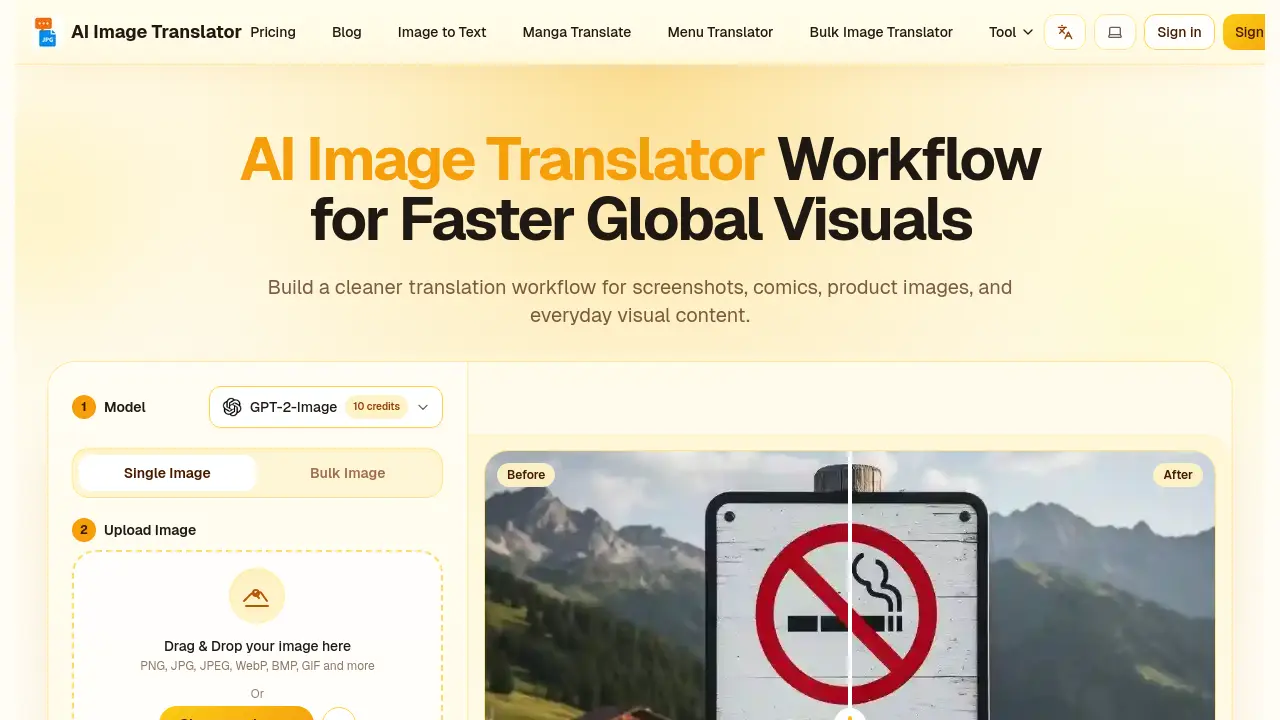
FAQs of AI Image Translator
What exactly is AI Image Translator?
AI Image Translator is an advanced online tool that translates text embedded in images into a target language. It goes beyond basic OCR by erasing the original text, reconstructing backgrounds, and preserving the original font, style, and layout. The service supports over 130 languages and works with common image formats such as PNG, JPG, JPEG, WebP, BMP, GIF, and PDF. It is intended for professional, academic, and personal use, enabling fast and accurate visual localization.
How do I get started with AI Image Translator?
To begin, users visit the AI Image Translator website, click the upload button, and select an image file. After the file is uploaded, they choose the source language (or enable auto‑detect) and the desired target language from the extensive list. The system then processes the image automatically; once completed, the translated image can be downloaded with a single click. No software installation or login is required for the free tier, making the workflow simple and accessible.
How fast and accurate are the translations?
Typical translations are completed in about 30 seconds for standard images, with more complex graphics taking up to one minute. The tool relies on a neural translation engine trained on large multilingual corpora, delivering natural, context‑aware output. It also matches the original font size, color, and spacing, ensuring visual consistency while maintaining high linguistic accuracy across professional terminology, idioms, and colloquial expressions.
Are there limits or costs for using AI Image Translator?
AI Image Translator offers a free plan that provides 20 daily credits (10 credits per image) and no watermark. Paid options include a one‑time 150‑credit pack for $3.99, a Pro subscription at $9.99 per month (5,000 credits), and a Premium subscription at $19.99 per month (12,000 credits). Higher‑tier plans grant larger file size allowances, priority processing, and batch translation capabilities. All pricing is transparent, with no hidden fees.
Is my image data secure?
Uploaded images are encrypted during transit and processed under a strict no‑trace policy: files are deleted immediately after translation and are never stored permanently. The service uses bank‑level encryption and regular security audits to protect data from unauthorized access. No user data is shared with third parties, and detailed processing rules are available in the privacy policy.
What if I am not satisfied or encounter a problem?
Customers can contact support through the website’s form; the support team operates 24/7 and typically replies within 1–2 hours. Subscribers may request a full refund within 10 days if usage is below 5 %. For translation quality concerns, users can submit feedback with the original image, receive a free re‑translation, and the team will adjust the model as needed.
How do I choose the right model for my translation?
AI Image Translator provides several AI models optimized for different priorities. The Aimslate model offers the highest translation accuracy, suited for academic or business documents. Models focused on layout preservation maintain visual fidelity, ideal for design‑heavy graphics, marketing materials, or comics. Users can test each model for free and select the one that best balances linguistic accuracy and visual quality for their specific use case.
How to use AI Image Translator
The AI Image Translator converts text within visual files into target languages, preserving layout, fonts, and background, while supporting single‑image and bulk processing for marketing, comics, and product visuals.
Users select the appropriate model and mode—high‑quality single‑image or efficient batch translation—aligning processing power with project scale and desired visual fidelity.
Images are uploaded via drag‑and‑drop or file chooser; supported formats include PNG, JPG, JPEG, WebP, BMP, GIF, and PDF, ensuring broad compatibility for any visual content.
After choosing source (auto‑detect) and target languages, the system runs AI‑powered OCR, translation, and inpainting, then displays before‑and‑after previews for rapid verification.
Results are downloaded with one click; users compare the translated output against the original layout, confirming accurate text, preserved design, and suitability for global audience deployment.
