
YAML Online Editor
Online YAML Editor and YAML to JSON Converter.
| Added on: | Oct 26, 2025 |
| Monthly Visits: | -- |
| Social & Email: | -- |

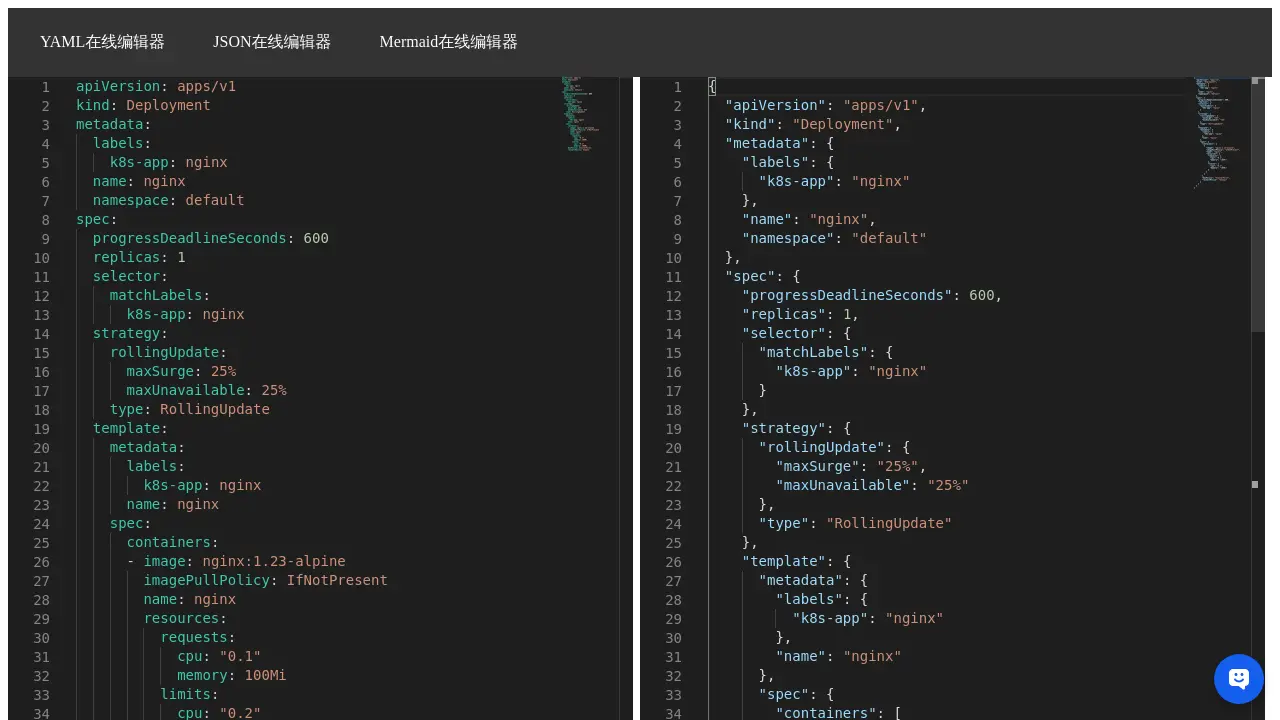
What is YAML Online Editor
The YAML Online Editor provides a free web-based platform for editing and validating YAML files. This online editor supports various use cases, including Kubernetes YAML and OpenAPI/Swagger YAML. Users can easily edit YAML code, convert YAML to JSON, and ensure correct syntax without requiring local installations. It serves as a convenient tool for developers and system administrators working with configuration files and API definitions.
How does YAML Online Editor work
The YAML Online Editor functions as a web-based tool for manipulating YAML files. Users can directly edit YAML code within the platform, facilitating tasks such as managing Kubernetes YAML configurations or OpenAPI/Swagger specifications. A key feature is its ability to convert YAML to JSON, presenting both formats side-by-side for comparison and validation. This online YAML code editor provides an accessible environment for users to create, modify, and validate YAML data structures efficiently, offering a convenient yaml file online editor experience.
Benefits of YAML Online Editor
The YAML Online Editor provides a free web-based platform for editing and converting YAML files. This online tool facilitates easy manipulation of YAML content, including common tasks like editing Kubernetes YAML online. Its integrated functionality also allows for efficient YAML to JSON online conversion, offering a comprehensive solution for managing structured data formats directly within your browser. Users can quickly edit and preview their YAML code.
Pros and Cons of YAML Online Editor
Pros
- Provides a free online YAML editor.
- Supports YAML to JSON conversion.
- Offers a related JSON editor.
- Includes line numbering for code.
Cons
- Limited features shown in context.
- No explicit validation or linting.
- Interface primarily in Chinese.
Core Features of YAML Online Editor
Online YAML Editing
Provides a web-based interface for users to edit YAML files directly, facilitating quick modifications and saving time. This is a primary function for managing Kubernetes or OpenAPI YAML online.
YAML to JSON Conversion
Offers a feature to convert YAML data into JSON format, which helps in interoperability and different data representation needs. This supports flexible data handling for developers.
Use Cases of YAML Online Editor
- Developers: Edit Kubernetes YAML online with this free web editor for configuration management.
- Engineers: Use the YAML online editor to convert YAML to JSON online for API specifications.
- DevOps Professionals: Quickly modify and validate YAML files online using the integrated online YAML code editor.
- Students: Learn to edit YAML files online for various projects using this accessible tool.
FAQs of YAML Online Editor
What is the YAML Online Editor?
The YAML Online Editor is a free web-based tool that allows users to create, view, and edit YAML files directly in their browser. It provides an intuitive interface for working with YAML, including capabilities for transforming YAML to JSON, making it a versatile online YAML code editor for various development tasks.
Can this online editor handle Kubernetes YAML files?
Yes, the YAML Online Editor is designed to be compatible with Kubernetes YAML configurations. Users can paste or type their Kubernetes YAML definitions, such as the example Deployment manifest, and perform edits or conversions. This makes it a useful kubernetes yaml online editor for developers managing containerized applications.
Does the YAML Online Editor support OpenAPI or Swagger specifications?
While not explicitly stated, as a general-purpose YAML web editor, it is capable of processing OpenAPI (formerly Swagger) specifications written in YAML. Users can utilize the platform to edit or validate their API definitions, serving as an openapi yaml online editor or swagger yaml online editor.
What are the main features of this YAML file online editor?
The main features include an interactive editing environment for YAML files, the ability to convert YAML to JSON, and vice-versa, as indicated by the presence of a JSON editor link. This functionality makes it a comprehensive tool for developers needing to edit, validate, and transform YAML data structures online.
Is there a cost associated with using the YAML Online Editor?
The YAML Online Editor is available for free, as indicated by the search keyword "yaml editor online free." This provides users with a cost-effective solution for their YAML editing and conversion needs without requiring software installation.
How to use YAML Online Editor
- Access the YAML online editor to begin editing or creating YAML files.
- Input your YAML code directly into the left-hand pane of the online YAML code editor.
- Observe the real-time conversion; the right-hand pane displays the corresponding JSON output, functioning as a YAML to JSON online editor.
- Utilize this feature to validate YAML syntax and understand its JSON representation.
- Edit YAML data in the left pane to instantly reflect changes in the JSON output, facilitating configuration management for applications like Kubernetes YAML.
- Leverage this tool as a convenient YAML web editor for tasks involving OpenAPI or Swagger YAML specifications.
YAML Online Editor Alternatives
SeedRouter puts image, video, language and audio models from OpenAI, Google and Anthropic behind one key, billing per request and never for failed calls.
Open-source AI coworker for Slack and Lark that runs Claude Code, Codex or Pi on your own machine with the plan or API key you already pay for.
AtAt runs Claude Code, Codex, or local models in the text field you are typing in, no app-switching. It adds TabTab autocomplete, screenshots, and clipboard history.
Play HT is a free AI voice generator that turns text into speech with 200+ public voices, streams previews in the browser, and exports MP3 files.

Jev is TypeSafe AI's System One model that returns typed decisions with calibrated confidence for automation. Fast, cheap, zero hallucinations.
Use GPT, Claude, Gemini and Grok through one OpenAI-compatible API. Compare model rates, create a key, and make your first request in minutes.
Git-native task management for AI coding agents: track intent, status, blockers, dependencies, history, and commit evidence in Git.
SJolt is an AI model API platform aggregating top image, video, and audio generation models behind one unified request flow for developers and teams.
Tokenhot is a unified LLM API gateway delivering OpenAI, Claude, Gemini and DeepSeek models through a single endpoint, cutting API costs by up to 90%.
DSH Hub catalogs verified DeepSeek Harness plugins and clients. Browse open-source repositories with source inspection before installation.
Always free browser that shares your logged-in Chrome state with AI agents like Claude Code and Codex, running browser automation up to 3.45x faster.
Formpost is a free contact form to email API delivering submissions to your inbox with AI spam filtering, webhooks, file uploads and a REST API.