
Seedance2 FAQs
Seedance2 AI transforms text and images into cinematic 1080p videos with multi-shot storytelling and native audio sync, powered by ByteDance's model.

FAQs of Seedance2
What is Seedance2 AI and how does it generate cinematic content?
Seedance2 AI is a cinematic generation platform built on ByteDance's Seedance 2.0 model. It uses temporal causal VAE and decoupled spatiotemporal transformer architecture to transform text prompts or images into 1080p cinematic content with consistent characters, natural motion, and optional audio sync.
Do I need editing skills to use Seedance2?
No technical skills are required. Simply write a text description of your desired scene or upload a reference image. Seedance2 handles all aspects of production including cinematography, lighting, character animation, and audio generation automatically.
How long does Seedance2 take to generate content?
A 5-second 1080p HD clip typically generates in under 60 seconds. Seedance2 uses multi-stage distillation technology for 10x faster inference compared to standard approaches, delivering production-ready results quickly.
Can I use Seedance2 output for commercial purposes?
Yes. Professional and Enterprise subscribers receive a full commercial use license. You can use Seedance2-generated content for social media marketing, advertising campaigns, product demos, educational material, and other business applications.
What makes Seedance2 different from other AI video tools?
Seedance2 offers native multi-shot storytelling with character consistency across scenes, built-in audio sync with multi-language lip sync support, and 10x faster generation speeds. Powered by ByteDance's research, it delivers cinematic quality at significantly lower cost than competitors.
What's your refund policy?
We offer a 7-day refund policy. If you've used less than 50% of your credits and are not satisfied with our AI video generation service, contact us within 7 days for a full refund.
What image formats can I upload as reference for video generation?
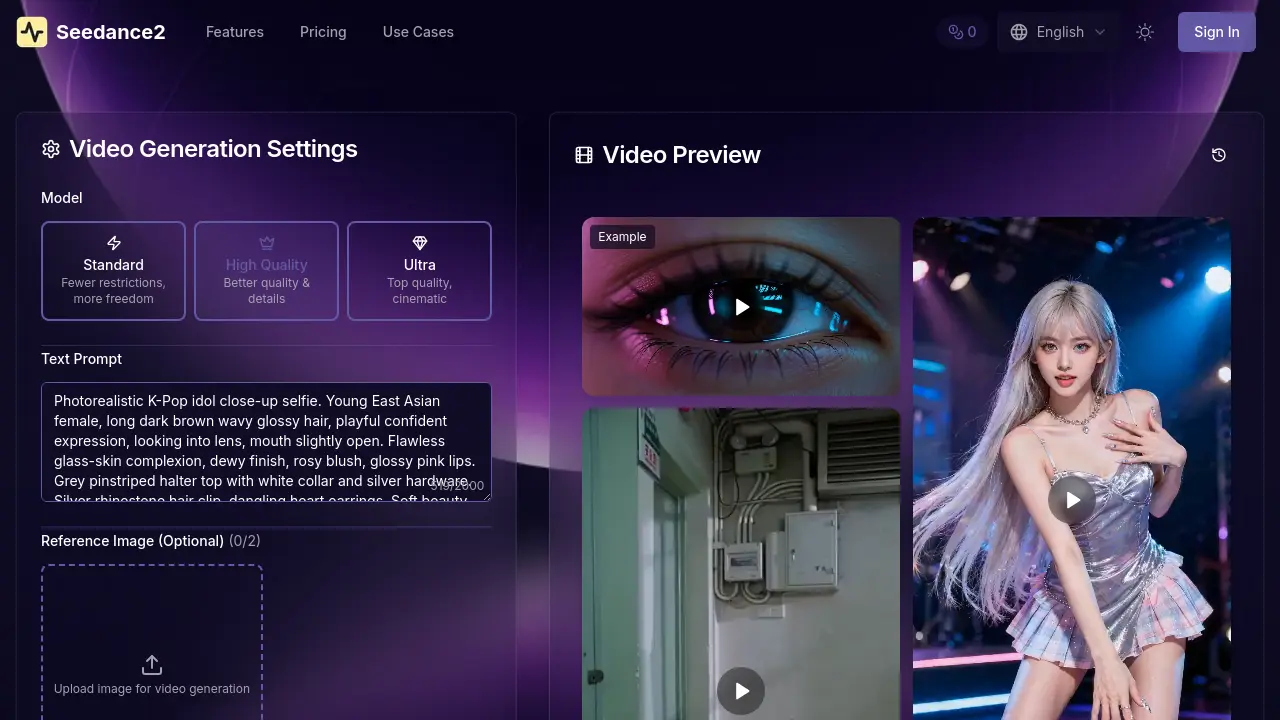
Seedance2 accepts JPG, PNG, and WebP file formats for reference image uploads. Each file should be under 35MB to maintain optimal processing speed and output quality. Supported formats cover most common image types, eliminating the need for conversion before upload.
What are the differences between Standard, High Quality, and Ultra generation models?
The Standard model provides fewer restrictions for increased creative freedom, suitable for experimental content. High Quality model enhances visual details and fidelity for polished results. Ultra model delivers top-tier cinematic quality ideal for professional projects. Each model tier affects credit consumption and generation time, with higher tiers requiring more resources but yielding superior output.
How does Seedance2's credit system work, and how many credits does a typical video generation use?
Credits are consumed per generation session based on the selected model and video duration. For example, a short clip in Standard mode uses fewer credits than a longer Ultra-quality video. Users can track credit usage in their account dashboard, and additional credits can be purchased or obtained through plan upgrades to sustain continuous creation.
What is the maximum video duration I can generate in a single session?
Seedance2 is optimized for short-form cinematic content, with typical generation lengths ranging from 5 to 10 seconds per session. The platform's multi-shot storytelling capability allows for coherent narratives within this timeframe, enabling complex scenes with character consistency. For extended projects, multiple generations can be combined in post-production.
Which languages are supported for native audio sync and lip-sync in Seedance2?
Seedance2's native audio sync supports multiple languages for accurate lip-sync, though the complete language list is not specified. The platform is engineered to handle major global languages, allowing dialogue scenes with natural mouth movements. This facilitates international content creation without requiring separate dubbing or audio post-production.
How to use Seedance2
- Seedance2 is an AI cinematic generation platform that transforms text prompts or images into 1080p video using ByteDance's Seedance 2.0 model, enabling multi-shot storytelling and native audio sync.
- Users access the platform through any standard web browser, with no software installation or specialized GPU hardware required for full functionality.
- The input mode is selected first: text-to-visual for prompt-based generation or image-to-motion to animate uploaded reference photos.
- For text-to-visual, users write detailed prompts describing scenes, characters, lighting, camera movement, and emotional tone to guide the AI.
- For image-to-motion, users upload reference images in JPG, PNG, or WebP format, keeping files under 35MB to ensure best results.
- Output parameters are configured, including resolution (720p or 1080p), aspect ratio (16:9, 9:16, 1:1), duration, and native audio options.
- Generation is initiated by clicking the generate button, with a typical 5-second 1080p clip processing in under 60 seconds.
- The generated video preview is reviewed within the interface, assessing initial visual quality, motion smoothness, and adherence to the prompt.
- If needed, users refine the prompt or parameters and regenerate to improve alignment with their creative vision before final download.
- The final output is evaluated for character consistency across shots, accuracy of lip-synced audio, and overall cinematic fidelity.
- Completed videos are downloaded in production-ready formats and applied to use cases like social media content, advertising, or film previsualization.
- Professional and Enterprise subscribers receive a commercial use license, with credit consumption tracked per generation session within the chosen plan.
