
NoteGPT: AI-powered summarizer, chat, and writing assistant.

What is NoteGPT
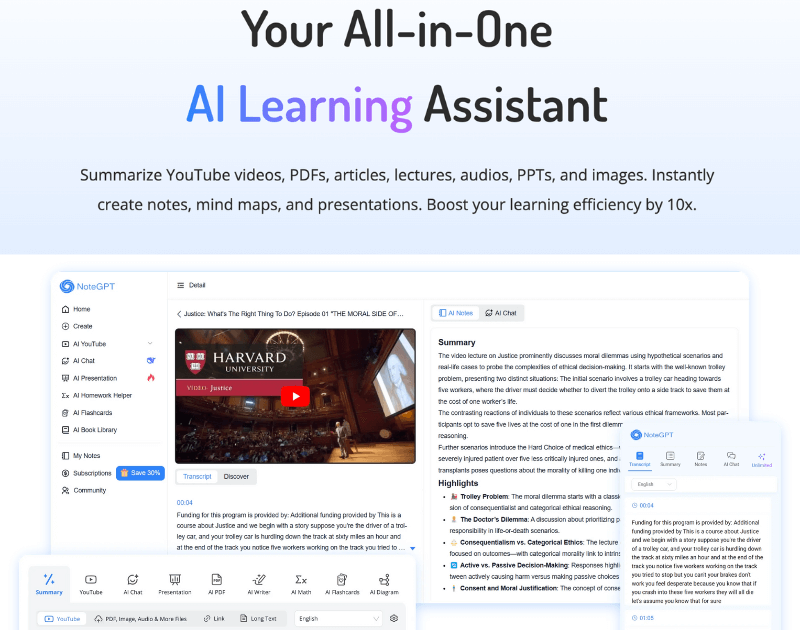
NoteGPT functions as an AI learning assistant, providing summarization capabilities for a diverse range of content, including YouTube videos, PDFs, articles, lectures, and audio. The platform also features AI tools for generating notes, mind maps, and presentations, aiming to enhance learning efficiency. Key features include a YouTube video summarizer, a PDF summarizer, an AI humanizer for text, and an AI detector. It also offers a text-to-speech function and a YouTube transcript generator, making it a comprehensive tool for students, researchers, educators, and professionals.
How does NoteGPT work
NoteGPT operates as an AI-powered learning assistant, offering extensive content summarization and generation capabilities. It functions as a notegpt YouTube video summarizer, processing videos to provide quick summaries, transcripts, and mind maps. The platform also features a notegpt text to speech converter, alongside an AI humanizer for refining text. Users can leverage notegpt AI for tasks like presentation creation, PDF interaction (summarizing, chatting), and utilizing a notegpt AI detector. Furthermore, it includes tools such as a notegpt math solver and notegpt flowchart generator, enhancing study and productivity across various media.
Benefits of NoteGPT
NoteGPT (notegpt.io) is an AI learning assistant designed to enhance study efficiency by 10x. It functions as a versatile youtube video summarizer and youtube transcript generator, alongside tools for PDF summarization and conversion, and AI presentation making. The platform also offers robust AI math solving capabilities, an AI humanizer, and an AI detector for writing assistance. These features, including text to speech functionality, help students, researchers, and professionals streamline various academic and professional tasks.
Pros and Cons of NoteGPT
Pros
- Comprehensive AI summarization for various media.
- Versatile AI tools for study and work.
- Offers multiple dedicated Chrome extensions.
- Caters to diverse user profiles.
- Provides a free trial with limited quotas.
Cons
- Free plan has very limited usage.
- No public study notes library yet.
- Requires subscription for full functionality.
- Customer support primarily through Discord/Twitter/Email.
Core Features of NoteGPT
AI Summarization for Diverse Media
Allows users to quickly summarize various content formats including YouTube videos, PDFs, audio, and articles, extracting key insights efficiently.
AI Content Generation and Creation
Enables the creation of presentations, flashcards, quizzes, diagrams, and written content such as essays and notes, boosting productivity across various tasks.
AI Study and Academic Assistance
Provides AI-powered tools for solving math problems, generating study guides, and assisting with homework, enhancing learning efficiency and comprehension for students.
AI Writing Enhancement and Detection
Offers functionalities like AI humanization, grammar checking, paraphrasing, and AI content detection to improve writing quality and authenticity.
Document Conversion and Management
Facilitates seamless conversion between different document formats like PDF to PPT or Word, and offers PDF translation and text extraction capabilities.
Use Cases of NoteGPT
- Students: Utilize the NoteGPT YouTube video summarizer and AI math solver for efficient study and homework assistance.
- Researchers: Summarize academic PDFs and generate mind maps with NoteGPT for streamlined research and proposal writing.
- Educators: Create engaging presentations, custom quizzes, and lesson summaries using NoteGPT's AI presentation maker and worksheet generator.
- Professionals: Leverage NoteGPT's PDF summarizer and AI humanizer for quicker report analysis and refined communication in various industries.
- Content Creators: Generate YouTube video summaries and AI scripts with NoteGPT, enhancing content creation and idea visualization.
FAQs of NoteGPT
What is NoteGPT?
NoteGPT is an AI-powered learning assistant designed for students, researchers, educators, professionals, and creators. It offers a comprehensive suite of tools for summarizing various content formats, including YouTube videos, PDFs, articles, and audio, and generating study aids such as notes, mind maps, and presentations, aiming to significantly boost learning and productivity.
How should I use NoteGPT?
Users can access NoteGPT's functionalities directly through its website workspace for summaries and generations. Additionally, NoteGPT offers dedicated Chrome extensions tailored for specific platforms like YouTube, Udemy, Coursera, Vimeo, BiliBili, and Google, providing flexible integration into existing workflows for efficient content processing.
What Summarizers does NoteGPT offer?
NoteGPT provides a diverse range of summarizers, catering to various content types. These include the YouTube Video Summarizer, PDF Summarizer, Word Summarizer, PPT Summarizer, Image Summarizer, Audio Summarizer, Text Summarizer, Book Summarizer, Podcast Summarizer, and Article Summarizer, enabling users to quickly extract key insights from different sources.
What Generators does NoteGPT offer?
NoteGPT features a comprehensive array of AI-powered generators for creating various content and study tools. These include the Music Generator, Lyrics Generator, Mindmap Generator, YouTube Transcript Generator, PPT Generator, Flashcard Generator, and more, facilitating efficient content creation and organization for academic and professional purposes.
What is the YouTube Video Summarizer in NoteGPT?
The YouTube Video Summarizer is a key tool within NoteGPT, enabling users to efficiently summarize YouTube videos. This feature provides comprehensive transcriptions, generates mind maps for visual learning, and supports AI-powered conversations to deepen understanding of the video content, making it an invaluable resource for content analysis.
Can I use the YouTube Video Summarizer to get a transcript of the video?
Yes, the YouTube Video Summarizer functionality includes the ability to generate a full transcript of any YouTube video. This feature allows users to review the video's content at their own pace, facilitate detailed analysis, and easily pinpoint specific information without needing to rewatch the entire video.
Can I use the PDF Summarizer for legal documents?
Indeed, the PDF Summarizer is highly effective for processing legal documents. It is designed to quickly analyze contracts and other legal texts, identifying and highlighting critical points. This capability significantly streamlines the review process for legal professionals and researchers, saving considerable time.
Could I see public study notes from NoteGPT?
NoteGPT is actively developing an AI Note Library. This upcoming feature aims to provide access to high-quality study notes and video summaries curated from selected users, fostering a collaborative learning environment and offering valuable resources to the entire community.
How much does a subscription to NoteGPT cost?
NoteGPT offers a free tier with limited usage, providing 15 quotas per month for accessing all AI services. To unlock unlimited access, receive more stable and faster service responses, and benefit from one-on-one customer support, users can upgrade to a paid plan. Detailed pricing information is available on NoteGPT's pricing page.
How do I cancel my subscription?
Subscribers can manage their NoteGPT account and cancel their subscription by logging into their personal workspace on the NoteGPT website. The cancellation option is typically located on the dedicated subscription page within the user's account settings, ensuring a straightforward process.
What should I do if I encounter issues while using the service?
For assistance with any issues encountered while using NoteGPT, users are encouraged to join the NoteGPT Discord Community for direct discussions and support. Alternatively, users can send a direct message on NoteGPT's Twitter account or send an email to notegpt@gmail.com for prompt customer service.
What AI tools does NoteGPT offer beyond summarization and generation?
NoteGPT extends its AI capabilities beyond core summarization and generation, offering a suite of other AI tools. These include an AI Humanizer for text, an AI Detector for identifying AI-generated content, an AI Grammar Checker, and tools for bypassing AI detection, which are useful for writers and content creators. The platform also provides an AI Math Solver and an AI Graphing Calculator for academic assistance.
Does NoteGPT support text-to-speech functionality?
Yes, NoteGPT includes a comprehensive text-to-speech feature, allowing users to convert written text into spoken audio. This functionality supports various applications, including PDF to Audio and Text to Speech, catering to users who prefer auditory learning or require accessible content formats. This is also useful for creating voiceovers and audio translations.
Can NoteGPT help with creating visual aids like flowcharts and mind maps?
Absolutely. NoteGPT offers advanced AI Diagram Generators, including an AI Mind Map Generator and an AI Flowchart Generator. These tools are designed to help users visualize complex information, organize ideas, and create clear, structured diagrams for presentations, study notes, and project planning, significantly enhancing comprehension and retention.
How to use NoteGPT
NoteGPT functions as an AI learning assistant, offering extensive tools for summarizing various content types and generating study aids. It aims to boost learning efficiency through features like AI YouTube video summarizer, PDF summarizer, AI presentation maker, AI math solver, and AI humanizer.
- Access the NoteGPT platform by visiting notegpt.io or installing a relevant Chrome extension.
- Log in to your account, which automatically activates the free plan with 15 monthly quotas for AI services.
- To summarize a YouTube video, navigate to the YouTube Video Summarizer, input the video URL, and initiate the summary generation.
- For document summarization, such as a PDF or PPT, upload the file to the respective summarizer tool within the NoteGPT workspace.
- Utilize AI generators like the AI Mind Map Generator or AI Flashcard Maker by providing the necessary text or topic.
- Engage with the ChatPDF or Ask AI features by uploading a document or posing questions to receive AI-powered responses.
- Explore AI writing tools, including the AI Humanizer or AI Essay Writer, by inputting your text or prompts for assistance.
- For math problems, access the AI Math Solver and input the problem for step-by-step explanations and solutions.
- Review the generated summaries, notes, or solutions, and use them to enhance your understanding or content creation.
- Consider upgrading to a paid plan for unlimited access, faster service responses, and dedicated customer support if your usage exceeds the free quotas.
NoteGPT Website Traffic Analysis
Latest traffic information
- Monthly Visits6.9M
- Bounce Rate42.92%
- Pages Per Visit4.25
- Visit Duration00:04:17
- Global Rank7.59K
- Country/Region Ranking2.12K
Top Keywords
| Keyword | Traffic | Volume | Cost Per Click |
|---|---|---|---|
| notegpt | 182.32K | 108.58K | $1.34 |
| youtube transcript | 41.03K | 630.61K | $0.36 |
| note gpt | 38.84K | 21.25K | $1.23 |
| youtube video summarizer | 26.27K | 40.27K | $0.81 |
| youtube summarizer | 26.26K | 32.7K | $0.84 |
Top Regions
| Region | Percentage |
|---|---|
| United States | 28.72% |
| India | 8.67% |
| Philippines | 6.79% |
| United Kingdom | 3.52% |
| Indonesia | 3.18% |
NoteGPT Alternatives
Free AI caption and subtitle generator that transcribes speech in 100+ languages, styles every word and exports MP4, SRT, VTT or TXT files in the browser.
Translate Now is a browser-based AI voice translator for real-time speech translation, live transcription, and replayable bilingual audio transcripts.

ToneBird is an AI reply assistant that drafts replies in Gmail, Slack and other apps using past conversations, relationship memory and connected documents.
OpenSubs is a free in-browser AI subtitle generator that transcribes speech with Whisper, translates into 20 languages and burns captions into video.
talat transcribes meetings, dictation and recordings locally on your Mac or Windows PC, with private AI notes, summaries and speaker identification.
Viblo AI YouTube MP3 Downloader inspects public videos and lists available M4A or WebM audio formats with size, duration, and temporary direct links.
Turn public Instagram Reels and videos into clean transcripts with NanoPhoto.AI. Copy, read, and download spoken text with one credit.
AI-powered IELTS writing checker that scores Task 1 and Task 2 essays against official band descriptors, with inline corrections and detailed reports in seconds.
VoiceScriber turns speech into text in 100+ languages using on-device AI on your iPhone. Works completely offline with no uploads for total privacy.
Free to start · Search any podcast, read full transcripts with timestamps, get AI summaries, key takeaways, mind maps and chat every episode.
This AI transcription tool converts video and audio files into text with speaker labels, timestamps, and support for 99 languages, ideal for subtitles, meetings, and content creation.
Blitzcut AI video editor removes silence and adds styled captions automatically for TikTok, Reels, and Shorts with full HDR export in minutes.