
MelodyCraft AI is a free AI music generator with 9 tools

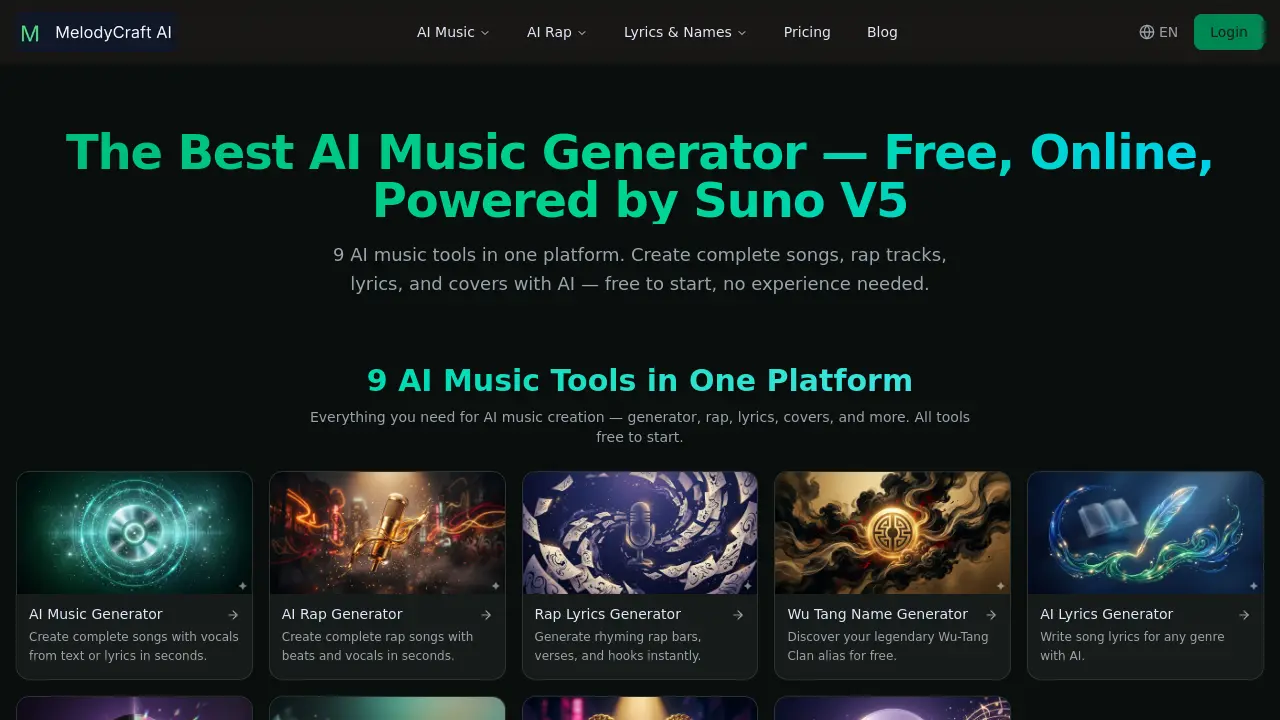
What is MelodyCraft AI
MelodyCraft AI is an online platform that consolidates nine AI‑driven music tools into a single workflow. Powered by Suno V5, the suite includes a text‑to‑song generator, lyrics‑to‑song converter, rap generator, rap‑lyrics writer, song‑cover transformer, and name generators for artists, tracks, and Wu‑Tang‑style aliases. Users can describe a musical idea or supply lyrics and receive a complete arrangement with high‑fidelity vocals in 30–60 seconds, choosing from more than 70 genres ranging from pop and rock to lo‑fi jazz and EDM. The service offers 15 free credits on signup and a daily replenishment of six credits, eliminating the need for a credit card. Paid plans provide commercial licensing, unlimited generations, and priority processing, enabling royalty‑free use of AI‑created tracks in videos, podcasts, ads, and streaming platforms.
How does MelodyCraft AI work
MelodyCraft AI operates as an integrated web‑based platform that combines nine specialized AI music tools into a single workflow. Users input plain text or pre‑written lyrics, select from more than 70 supported styles, and the Suno V5 model generates a full arrangement, melodic structure, and high‑fidelity vocal track within 30–60 seconds. The system routes the request through separate modules—text‑to‑song, rap generator, lyrics writer, and cover transformer—each processing the input, applying genre‑specific patterns, and synthesizing audio outputs. Free users receive daily credits, while paid accounts unlock unlimited generations and commercial licensing for royalty‑free use.
Benefits of MelodyCraft AI
MelodyCraft AI consolidates nine AI‑powered music tools into a single, browser‑based platform, allowing users to generate full songs, rap tracks, lyrics, and cover versions without installing software. Powered by Suno V5, the generator delivers high‑fidelity vocals across 70+ styles, handling both text‑to‑song and lyrics‑to‑song workflows in 30–60 seconds. New users receive 15 free credits and 6 daily credits, enabling casual creation at no cost. Paid plans add commercial licensing, unlimited generations, and priority output, making the service suitable for YouTube, podcasts, ads, and other royalty‑free productions.
Pros and Cons of MelodyCraft AI
Pros
- Generates full songs with vocals from text in seconds.
- Offers 9 AI music tools in a single platform.
- Free starter credits and daily free credits for casual use.
- Supports 70+ music styles across genres.
- Commercial licensing available for royalty‑free distribution.
Cons
- Advanced features require paid subscription.
- No mention of offline or desktop application.
- Limited to Suno V5 model; alternative models unavailable.
- Credit system may restrict high‑volume creators.
- Documentation and support details are sparse.
Core Features of MelodyCraft AI
AI Music Generator
Creates complete songs with vocals from user‑provided text or lyrics, supporting 70+ styles; delivers full arrangement, melody, and high‑fidelity vocals within one minute.
AI Rap Generator
Produces full rap tracks, including beats and vocal performances, from entered lyrics or concepts; offers genre‑specific styles such as trap, boom‑bap, and drill.
AI Lyrics Generator
Generates original song lyrics for any genre, providing verses, choruses, and hooks that match the selected musical style and mood.
Lyrics to Song
Transforms user‑written lyrics into a finished AI‑generated track, automatically composing melody, instrumentation, and vocal delivery around the provided text.
AI Song Cover
Re‑interprets an existing song in a new style or genre, preserving core elements while delivering fresh arrangement and vocal performance.
Rap Lyrics Generator
Creates rhyming rap bars, verses, and hooks instantly, tailored to selected flow patterns and thematic keywords.
Song Name Generator
Suggests unique, genre‑appropriate titles for new tracks, helping creators quickly identify compelling names for their releases.
Rap Name Generator
Produces distinctive rapper stage names, assisting artists in establishing memorable personal branding for their music career.
Wu‑Tang Name Generator
Generates playful Wu‑Tang Clan–style aliases, offering fans a fun way to adopt iconic hip‑hop personas.
Use Cases of MelodyCraft AI
- Student musicians: Produce fully arranged songs with vocals from brief text prompts in under a minute.
- Indie producers: Generate royalty‑free rap tracks with custom beats and AI vocals for quick project turnaround.
- Content creators: Convert written lyrics into complete, high‑fidelity songs for YouTube or podcast intros.
- Marketing teams: Create commercial‑license AI music samples across 70+ styles for advertisements without licensing delays.
FAQs of MelodyCraft AI
What's the best AI music generator?
MelodyCraft AI is positioned as a leading AI music generator because it combines nine specialized tools—including text‑to‑song, rap creation, lyric writing, and song‑cover functions—into a single online platform. The integration of Suno V5 models delivers high‑fidelity vocals across more than 70 music styles, making it a comprehensive choice for creators seeking versatile, free‑to‑start AI music production.
Is MelodyCraft the best free AI music generator?
According to the platform’s specifications, MelodyCraft AI offers the most extensive free tier among comparable services. New users receive 15 complimentary credits (enough for five song generations) plus six additional credits each day without requiring a credit‑card. This breadth of features, from rap generators to lyric creators, supports the claim of being the best free AI music generator for hobbyists and emerging musicians.
How to make AI music for free?
To make AI‑generated music at no cost on MelodyCraft AI, sign up (or continue as a guest) and claim the initial 15 free credits. Use those credits in any of the nine tools—such as the AI Music Generator or AI Rap Generator—to produce songs, verses, or covers. After the initial credits are exhausted, the system automatically adds six free credits each day, allowing continued experimentation without payment.
Can I use the AI music generator with lyrics?
Yes, MelodyCraft AI supports a “lyrics‑to‑song” mode where users paste pre‑written lyrics into the interface. The AI then composes a matching melody, arrangement, and vocal track in the selected style, delivering a complete song within 30–60 seconds. This feature is useful for creators who already have lyrical content but need musical accompaniment.
Does the AI music generator produce vocals?
The platform’s Suno V5 engine generates realistic vocal tracks alongside instrumental arrangements. Whether using the text‑to‑song or lyrics‑to‑song workflow, the output includes synthesized singing that aligns with the chosen genre, tempo, and emotional tone, providing a fully voiced track without external vocal recording.
Is Suno the best AI music generator?
Suno refers to the underlying model powering MelodyCraft AI’s vocal synthesis. While “best” can be subjective, Suno V5 is recognized for delivering high‑quality, expressive vocals that approach human performance. Its integration into MelodyCraft AI enables the creation of polished songs across diverse genres, which many users regard as a top‑tier solution within the AI music landscape.
Can I generate AI music from text?
MelodyCraft AI’s core feature is text‑to‑song generation. Users describe a song concept, mood, or specific lyrical snippets in plain language, select a desired style, and the system automatically composes melody, harmony, rhythm, and vocal performance. The entire process typically completes in under a minute, making it an efficient method for rapid prototyping.
Do I need an account or sign‑up?
While a full account is not mandatory for the initial free credits, creating an account streamlines credit management, saves generated tracks, and unlocks future subscription options for commercial licensing. Users can begin generating music instantly, but registering ensures access to additional features and credit tracking.
What music styles does MelodyCraft support?
The platform offers more than 70 distinct music styles spanning pop, rock, R&B, electronic, lo‑fi jazz, classical, trap, boom‑bap, drill, and many niche sub‑genres. Users select a style from a dropdown menu, and the AI adapts composition, instrumentation, and vocal timbre to fit the chosen genre.
Can I use AI‑generated music commercially?
Yes, commercial usage is permitted for paid subscribers who receive a royalty‑free commercial license. This license allows deployment of AI‑created tracks on platforms such as YouTube, Spotify, podcasts, advertisements, and client projects without additional fees. Free‑tier users must review the terms of service, as commercial exploitation may be restricted.
How does the AI Rap Generator differ from the regular music generator?
The AI Rap Generator focuses on hip‑hop production, providing genre‑specific beat patterns, lyrical flow structures, and vocal delivery styles like trap, boom‑bap, and drill. Unlike the broader music generator, it emphasizes rhythmic precision and rap‑centric vocal articulation, delivering complete rap tracks with verses, hooks, and instrumental backings in seconds.
What is the credit system and how can I earn more credits?
MelodyCraft AI assigns each song generation a credit cost, with the initial free package granting 15 credits. After consumption, users receive six additional credits daily automatically. Additional credits can be purchased through subscription plans, which also unlock unlimited generations and commercial licensing. This tiered system balances free accessibility with premium capabilities.
How to use MelodyCraft AI
MelodyCraft AI functions as an all‑in‑one AI music generator, offering text‑to‑song, lyrics‑to‑song, rap creation, cover transformation, and name generators powered by Suno V5.
Open the desired tool (e.g., AI Music Generator) in a browser, then enter either a descriptive text prompt or your pre‑written lyrics into the input field.
Select a music style from the 70+ options, adjust any optional parameters such as tempo or mood, and submit the request to start the generation process.
Wait 30–60 seconds while the platform synthesizes vocals, melody, and arrangement; a preview player and downloadable MP3 appear once processing completes.
Review the generated track’s structure, vocal quality, and genre alignment; compare the output with the original prompt to assess relevance and creativity.
Export the audio file for personal use, or, if holding a commercial subscription, apply the royalty‑free license for publishing on platforms like YouTube, Spotify, or podcasts.
MelodyCraft AI Website Traffic Analysis
Latest traffic information
- Monthly Visits4.52K
- Bounce Rate47.87%
- Pages Per Visit4
- Visit Duration00:09:48
- Global Rank3.11M
- Country/Region Ranking893.99K
Visits Over Time
Top Keywords
| Keyword | Traffic | Volume | Cost Per Click |
|---|---|---|---|
| wu tang name generator | -- | 5.53K | -- |
| playlist name ideas | -- | 1.02K | $0.29 |
| album title generator | -- | 400 | -- |
| song maker melodycraft | -- | 360 | $0.92 |
| melodycraft | -- | 290 | $0.91 |
Top Regions
| Region | Percentage |
|---|---|
| United States | 96.07% |
| India | 3.93% |
