
Imgoe AI Product Image Generator for E‑commerce Platforms
| Added on: | May 29, 2026 |
| Monthly Visits: | -- |
| Social & Email: | -- |

What is Imgoe
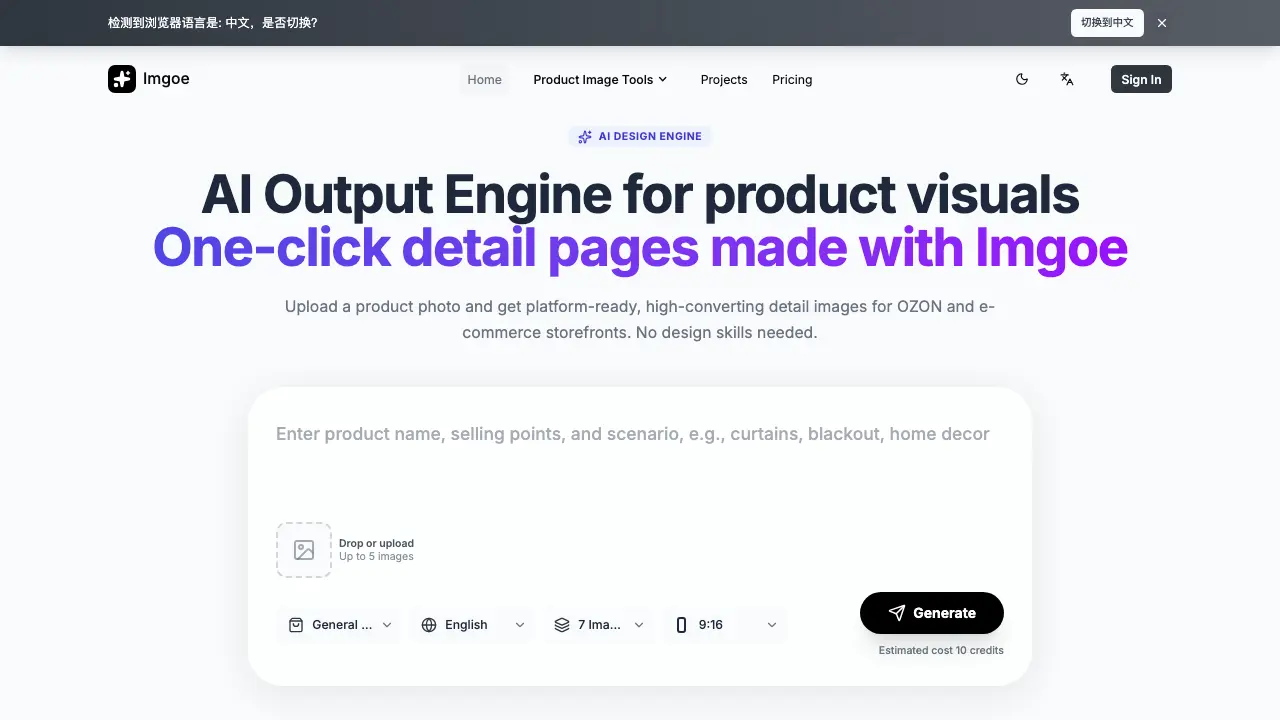
Imgoe is an AI‑driven output engine that creates ready‑to‑publish e‑commerce visuals from a single product photo. Users select a template—such as product images, marketing posters, or try‑on pages—and the system generates up to five platform‑compatible images in one click, eliminating the need for design expertise. The workflow supports multi‑language and multi‑variant assets, ensuring consistent style across detail pages, hero shots, and promotional graphics. By reusing predefined page structures, Imgoe reduces review cycles, lowers iteration costs, and speeds up launch timelines for brands, marketplace operators, and in‑house design teams. The service operates on a credit‑based model, delivering commercial‑ready assets that can be directly uploaded to storefronts like OZON.
How does Imgoe work
Imgoe functions as an AI‑driven design engine that converts a single product photograph into a complete set of e‑commerce visuals. Users upload up to five images, select a pre‑built template—such as product detail, marketing poster, or try‑on layout—and the platform’s output engine automatically generates platform‑ready assets in the required dimensions and aspect ratios. The system applies consistent style directives and selling‑point composition across all generated assets, allowing multilingual, multi‑variant outputs without manual design work. Credits manage usage, while the template‑first workflow ensures rapid iteration and coherent branding for online storefronts.
Benefits of Imgoe
Imgoe is an AI‑powered design engine that creates e‑commerce visuals in a single click. By uploading a product photo, users receive platform‑ready detail images, marketing posters, and try‑on mockups that match predefined templates for marketplaces such as OZON. The template‑first workflow ensures consistent style across multiple assets while supporting multi‑language and multi‑variant outputs, reducing review cycles and iteration costs. Teams can generate a full asset line—hero image, selling‑point pages, and scene visuals—without design expertise, streamlining production for both large brands and small operators.
Pros and Cons of Imgoe
Pros
- One‑click generation of e‑commerce detail images.
- Template library ensures consistent visual style.
- Supports multi‑language and multi‑variant asset creation.
- Reduces review cycles and production time.
- No design expertise required for basic outputs.
Cons
- Dependent on predefined templates; limited creative flexibility.
- Asset creation consumes credits, affecting cost control.
- Advanced customization may still need manual editing.
- Limited information on output resolution and quality.
- Primarily oriented toward OZON and similar marketplaces.
Core Features of Imgoe
AI-Powered Visual Generation
Generates platform‑ready product images and detail page assets from a single uploaded photo, eliminating manual design effort.
Template‑Based Workflow
Offers reusable e‑commerce templates (product, marketing poster, try‑on) that maintain consistent style across multiple assets and marketplaces.
Multi‑Language & Multi‑Variant Support
Creates localized visual sets for different languages and product variants, streamlining cross‑border catalog production.
One‑Click Detail Page Creation
Produces complete detail pages—including hero images, selling‑point sections, and scene visuals—with a single action.
Iterative Editing & Reference Management
Allows users to adjust templates, reference styles, and edit outputs collaboratively, supporting real‑design workflows.
Use Cases of Imgoe
- E‑commerce managers: Generate platform‑ready product detail images in seconds, reducing design cycle time and launch costs.
- Marketplace sellers: Create multilingual, multi‑variant visual assets from a single photo, ensuring consistent brand presentation.
- In‑house design teams: Utilize template‑first workflow to align hero images, promo posters, and detail pages across categories.
- Small‑scale vendors: Produce launch‑ready assets without hiring designers, accelerating product listing throughput.
- Cross‑border operators: Export AI‑generated visuals directly to OZON and other marketplaces, streamlining international expansion.
FAQs of Imgoe
What does Imgoe do now?
Imgoe is an AI‑powered output engine that creates e‑commerce visual assets such as product detail images, marketing posters, and try‑on visuals. Users upload a product photo, select a template, and the system generates platform‑ready graphics with a single click, eliminating the need for manual design work.
Who is it built for?
Imgoe targets brand owners, cross‑border e‑commerce managers, in‑house design teams, and content operators who need fast, consistent visual assets for marketplaces like OZON. It is especially useful for small to medium‑size teams that lack extensive design resources but require multilingual, multi‑variant product imagery.
What can I generate in one workflow?
A single workflow can produce up to five images, including product detail pages, marketing posters, model try‑on shots, and scene‑based lifestyle visuals. The platform supports various formats (e.g., 9:16) and automatically applies the selected template’s style, layout, and selling‑point composition.
What inputs lead to better results?
High‑resolution product photos with clear background and good lighting yield the most accurate AI output. Providing reference images that match the desired style or marketplace guidelines, as well as specifying language and target template, helps the engine generate assets that align with brand standards.
Can the page style stay consistent across multiple images?
Yes. Imgoe uses a template‑first approach, allowing the same style direction, typography, and visual hierarchy to be applied across all generated assets. This ensures a coherent look for hero images, detail pages, and marketing posters within a product line.
How do templates and credits work together?
Each generation consumes a predefined number of credits (e.g., 10 credits for a set of seven images). Users select a template first; the system then deducts the required credits when the AI renders the assets. Credits can be purchased or replenished through the Imgoe dashboard.
Can I use the generated assets commercially?
Assets produced by Imgoe are licensed for commercial use by the account holder. Users may upload the visuals to marketplace stores, advertising campaigns, or brand websites without additional royalties, provided they comply with Imgoe’s terms of service.
How long does it take to generate a full set of visuals?
Typical generation time ranges from a few seconds to a couple of minutes per set, depending on image complexity and current server load. The platform displays an estimated cost in credits before users confirm the request, allowing quick turnaround for time‑sensitive launches.
Is it possible to edit generated images after creation?
Imgoe offers iterative editing tools that let users adjust layout, text, and color schemes without restarting the entire workflow. Users can make minor tweaks directly in the interface, then regenerate only the modified components, saving credits and time.
What languages does Imgoe support for text overlays?
The engine currently supports English and Russian text overlays, with plans to add additional languages. Users can input multilingual copy in the template settings, and the AI will render the appropriate typography for each marketplace requirement.
How to use Imgoe
Imgoe serves as an AI‑powered design engine that creates platform‑ready e‑commerce visuals—including product images, marketing posters, and try‑on pages—without manual design effort.
Log in, select a suitable template from the library (e.g., product detail, marketing poster), and preview its structure to ensure alignment with the target marketplace.
Upload up to five product photos, choose output specifications (image count, aspect ratio, language), then click Generate; the system deducts the required credits automatically.
Review the automatically generated assets in the results pane; thumbnails link to high‑resolution files that can be downloaded individually or as a ZIP archive.
Compare generated visuals against brand guidelines, checking consistency of style, selling‑point phrasing, and image quality; adjust template or re‑upload photos if necessary.
Export the final assets to your e‑commerce platform (e.g., OZON) or integrate them into product listings to improve conversion rates and visual cohesion.
Imgoe Alternatives
Browser workspace for AI image generation, reference photo editing, and short video drafts, aimed at creators, marketers, and product teams.
Browser studio for AI video, image and music generation with Grok Imagine, Kling and GPT Image models. Free daily credits, no sign-up required.
Mareel is an all-in-one AI video and image generation workspace giving creators, marketers, and ecommerce teams 40+ leading models and one shared credit balance.
Pet to Art is a free AI pet portrait generator that turns one clear pet photo into custom digital artwork across 170+ styles, canvas ratios, and 2K downloads.

MixVio runs 21 video, image and audio models in one browser workspace, plus 11 creator tools, with exact credit cost shown before every generation.
Create and edit images with Image 2.5 by GPT. Sunburst for precision, Flare for speed, up to 4K, 6 quality modes, and transparent PNG/WebP output.
Generate and edit AI images with Nano Banana Pro. Blend up to 14 images, render crisp text, and create 4K visuals online with studio controls.
Browse curated AI image and video prompts with real results and creator attribution, copy-ready for GPT Image, Nano Banana, Midjourney, and more.
Koozee turns a single clothing image into AI product photos, model try-on images, and marketing videos for apparel sellers, cutting costs by up to 99%.
MenuForma turns any PDF, photo, or website menu into a digital QR menu with online ordering, 70+ languages, and AI food photos for restaurants.
SeiSei AI is a free, no-sign-up AI image generator turning text prompts into AI illustrations and realistic photos with no watermark, 5 free images daily.
Generate AI images for portraits, product visuals, social posts, and creative edits using Nano Banana Pro and GPT Image 2 models.