
Heyimg: AI Avatar & Portrait Generator

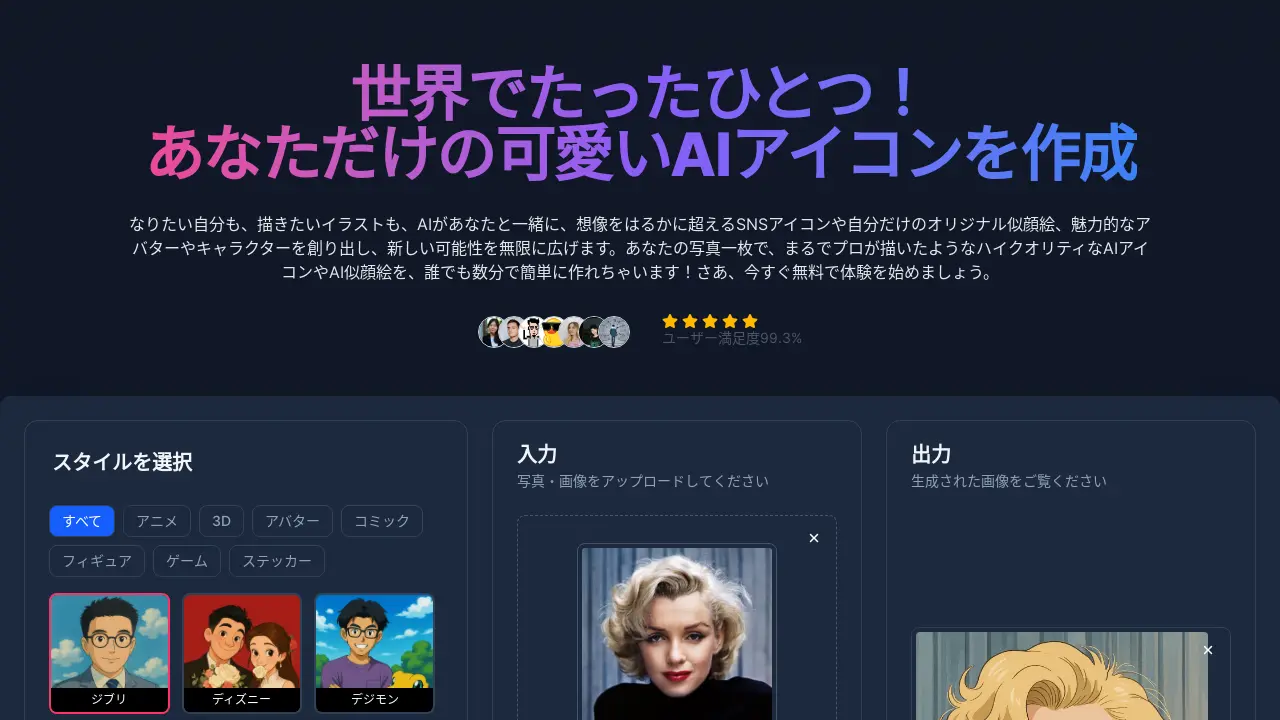
What is Heyimg
Heyimg is an AI-powered tool that allows users to create unique AI icons and AI portraits from uploaded photos. With Heyimg, users can transform ordinary photos into stylized images, mimicking various artistic styles such as Ghibli, Disney, and comic-book aesthetics.
The service offers a range of customizable options, including aspect ratio adjustments. Users can easily generate AI images, and the platform allows for fine-tuning through text prompts to achieve desired results. Heyimg stands out by making AI image generation accessible to everyone.
Heyimg can be utilized for personal use, by creators, and for marketing purposes, offering high-definition outputs suitable for social media, branding, and more.
How does Heyimg work
Heyimg is a service that utilizes AI to generate personalized images, including AI icons and AI avatars. Users upload a photo and select a style, such as anime, 3D, or a specific artistic theme like Ghibli or Disney. The AI then processes the image, creating a unique rendition in the chosen style. Customization options allow users to refine the output with text prompts. The service is designed for ease of use, offering quick generation and high-resolution downloads suitable for social media, marketing, or personal projects.
Benefits of Heyimg
Heyimg creates unique AI icons and avatars from your photos, offering endless possibilities for SNS profiles. Transform selfies into high-quality AI illustrations resembling various styles like Ghibli, Disney, or anime. No complex settings or expertise are needed, simply upload a photo and choose a style. Customize further with simple text prompts. Ideal for personalizing social media or creating marketing materials, Heyimg provides a fast, easy way to generate eye-catching visuals for your digital presence. Unleash your creativity and explore trending styles to create the perfect AI image.
Pros and Cons of Heyimg
Pros
- Generates AI icons and portraits quickly.
- Offers a wide variety of art styles.
- Simplifies AI image generation, no prompts needed.
- Allows customization through text instructions.
- Offers options for commercial use.
Cons
- Output quality relies on source photo quality.
- Results depend on chosen style.
- Free use may have limitations.
- Copyright of generated images unclear.
- Limited details on specific pricing plans.
Core Features of Heyimg
AI Icon and Avatar Generation
Heyimg allows users to generate unique AI icons, avatars, and digital portraits from uploaded photos, using various artistic styles and customization options. This includes diverse styles like anime, Disney, and more.
Image Style Transfer and Transformation
The platform transforms photos into various trending styles, like Ghibli-inspired art, AI figures, and cartoon characters; this enables users to create personalized images without complex editing.
Image Customization and Fine-Tuning
Users can refine generated images through simple text prompts, adjusting aspects like facial expressions and colors; this enables achieving desired results without requiring expert skills.
Commercial Use Licensing
Generated AI images, icons and avatars can be used for commercial purposes including marketing materials, branding, and merchandise, expanding their application beyond personal use.
Use Cases of Heyimg
- Social Media Users: Create unique AI avatars for Instagram, TikTok, and other platforms to enhance online presence.
- Graphic Designers: Generate initial character design concepts and visual drafts using AI illustrations for efficient project development.
- Marketing Teams: Produce eye-catching AI-generated images for social media campaigns and brand logos to boost engagement.
- Illustrators: Streamline the initial sketching phase by using AI to create visual references and accelerate the creative process.
- Website Owners: Create cute AI icons to enhance aesthetic appeal and engage site visitors with customized visuals.
FAQs of Heyimg
What is Heyimg?
Heyimg is a tool that allows users to create unique AI-generated icons and avatars from a single photograph. It offers various styles, including anime, 3D, and cartoon-like representations, providing users with a personalized social media presence.
Is it difficult to generate AI illustrations with Heyimg?
No, Heyimg is designed to be user-friendly. The process involves selecting a style, uploading a photo, and clicking a button to generate the AI illustration. No prior experience or complicated steps are needed.
Is it necessary to input prompts (instructions in text)?
No, providing text prompts is not mandatory. Heyimg allows users to generate AI images simply by uploading a photo and selecting a style. However, users have the option to use text prompts for further customization.
What kind of styles can I choose from?
Heyimg offers a wide variety of styles, including anime, 3D avatar, comic, figure, game, sticker, Ghibli, Disney, and more. The platform also regularly updates its style options with the latest trends.
How long does it take to generate an image?
Heyimg generates images rapidly. Typically, a high-quality AI illustration is completed within seconds, though the exact time may depend on the selected style and the photo uploaded.
Are the generated images high quality and suitable for printing?
Yes, the AI-generated images are high-definition, allowing for various uses such as SNS icons, business cards, posters, and original merchandise printing. The tool preserves the details and colors of the original photo.
Is commercial use allowed?
Yes, all AI images, icons, and avatars generated with Heyimg can be used commercially. This includes using them for business cards, advertisements, website visuals, and merchandise.
Is Heyimg free to use?
Heyimg offers a free trial to allow new users to evaluate the functionality of the product. Further usage may require a subscription, and a detailed pricing plan is available on the Heyimg website.
Are there any restrictions on the type of photos I can upload?
For the best results, Heyimg recommends using photos where the face is clearly visible. Photos of pets and two-shot photos are also suitable for creating pair-look images.
Can I customize if there is no style I want?
Yes, if the user is unsatisfied with the generated results, text prompts can be used to fine-tune and customize the image further.
Who owns the copyright of the AI-generated images?
Heyimg allows for commercial use of generated content, implying users have broad usage rights; however, users should review Heyimg's terms and conditions for complete details on copyright and usage rights.
How to use Heyimg
Heyimg is an AI-powered tool that lets users create unique AI avatars and illustrations from uploaded photos. It offers a variety of artistic styles and customization options for generating profile pictures, marketing materials, and more.
Begin by selecting a desired style for your AI avatar or illustration. Heyimg offers a variety of styles, including anime, Disney, and more.
Upload a photo or image to the Heyimg platform. Ensure the image clearly shows the face for optimal AI processing and results.
Select the desired output size for your generated image. Choose from options like 1:1, 3:2, or 2:3, or customize the dimensions to fit your needs.
Customize your image further by entering prompts in the text field. You can specify details to alter the output, within a 500-character limit.
Initiate the image generation process. Click the "Generate" button and wait for the AI to process your image according to the settings.
Review the generated image and make any necessary adjustments. If needed, use the customization options to refine the result closer to your vision.
Download the finalized AI image. Once satisfied, download the high-resolution image for use on social media, marketing, or other projects.
Utilize your AI-generated image across different platforms. The output is suitable for SNS profiles, marketing visuals, and various creative endeavors.
Heyimg Website Traffic Analysis
Latest traffic information
- Monthly Visits3.01K
- Bounce Rate40.61%
- Pages Per Visit2.33
- Visit Duration00:01:11
- Global Rank4.59M
- Country/Region Ranking305.95K
Top Keywords
| Keyword | Traffic | Volume | Cost Per Click |
|---|---|---|---|
| heylmg | 380 | -- | -- |
| アイコら | 190 | -- | -- |
| 写真をイラスト風に加工 無料 | 110 | -- | -- |
| 芸能人 アイ コラージュ | 110 | -- | -- |
| 写真をイラストにする方法 | 80 | -- | -- |
Top Regions
| Region | Percentage |
|---|---|
| Japan | 100% |
Heyimg Alternatives
Browser workspace for AI image generation, reference photo editing, and short video drafts, aimed at creators, marketers, and product teams.
Browser studio for AI video, image and music generation with Grok Imagine, Kling and GPT Image models. Free daily credits, no sign-up required.
Mareel is an all-in-one AI video and image generation workspace giving creators, marketers, and ecommerce teams 40+ leading models and one shared credit balance.
Upload one selfie to preview 120+ cuts, colors and bangs rendered on your own face in about 20 seconds, then take the reference sheet to your barber.
Pet to Art is a free AI pet portrait generator that turns one clear pet photo into custom digital artwork across 170+ styles, canvas ratios, and 2K downloads.

MixVio runs 21 video, image and audio models in one browser workspace, plus 11 creator tools, with exact credit cost shown before every generation.
Create and edit images with Image 2.5 by GPT. Sunburst for precision, Flare for speed, up to 4K, 6 quality modes, and transparent PNG/WebP output.
Generate and edit AI images with Nano Banana Pro. Blend up to 14 images, render crisp text, and create 4K visuals online with studio controls.
Browse curated AI image and video prompts with real results and creator attribution, copy-ready for GPT Image, Nano Banana, Midjourney, and more.
Koozee turns a single clothing image into AI product photos, model try-on images, and marketing videos for apparel sellers, cutting costs by up to 99%.
Create professional AI headshots from your selfies. Train a personal model, generate 7 to 20 styles, and download up to 2048×2048 photos.
SeiSei AI is a free, no-sign-up AI image generator turning text prompts into AI illustrations and realistic photos with no watermark, 5 free images daily.