
GenPPT AI converts PDF to PowerPoint with smart layouts.
| Added on: | Feb 17, 2026 |
| Monthly Visits: | 91 |
| Social & Email: | -- |

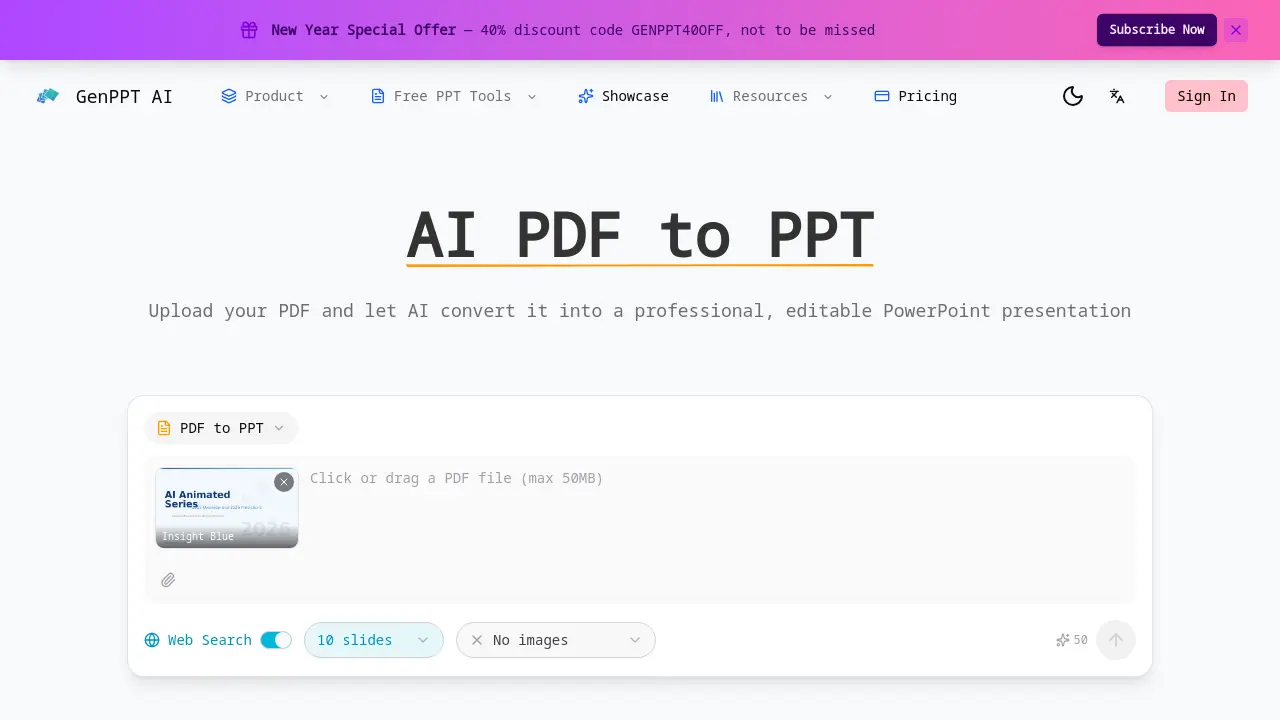
What is AI PDF to PPT
AI PDF to PPT is an online converter that transforms PDF documents into editable PowerPoint presentations within minutes. The system parses the entire PDF, extracting text, headings, tables, and structural elements to generate a slide deck that mirrors the original layout. Automatic slide layout selection assigns appropriate templates—title slides, bullet lists, or data visualizations—based on content type, enhancing readability. The output file is fully editable, allowing users to modify text, formatting, and slide order without re‑uploading. The tool preserves chapter and subsection hierarchy, maintaining logical flow. Optional web‑search enrichment can supplement slides with up‑to‑date statistics and context. No sign‑up is required, and the conversion process is free for documents of any length.
How does AI PDF to PPT work
GenPPT AI PDF to PPT converts PDFs into editable PowerPoint decks by parsing text, headings, tables, and structural elements, mapping them to slide hierarchies. The system employs natural language processing to identify content sections, then selects appropriate slide layouts—title, bullet, data visualization—ensuring readability. Output files are fully editable, allowing users to modify text, formatting, and slide order. The tool supports web‑search enrichment, fetching up‑to‑date data to supplement slides. Conversion completes within minutes for documents of any length, requiring no user registration.
Benefits of AI PDF to PPT
AI PDF to PPT converts any PDF into a fully editable PowerPoint deck in minutes. The tool extracts text, headings, tables, and structural elements, mapping chapters and sections into a logical slide hierarchy. Smart slide layouts are automatically chosen for titles, bullet lists, and data visualizations, enhancing readability. Web‑search enrichment can add up‑to‑date statistics and context. No sign‑up is required, and the output remains editable, allowing students to tweak formatting, rearrange slides, and customize content for presentations or reports. This streamlined workflow saves time compared to manual slide creation.
Pros and Cons of AI PDF to PPT
Pros
- AI-driven PDF to PPT conversion
- Fully editable PowerPoint output
- Smart slide layout selection
- Preserves document structure
- Fast, free conversion
Cons
- Limited to PDF input only
- No custom slide count control
- No customer support mentioned
Core Features of AI PDF to PPT
Intelligent Content Extraction
The AI scans the entire PDF, extracting text, headings, tables, and visual elements, ensuring each slide accurately reflects the source material.
Smart Slide Layouts
Automatically selects optimal slide templates—title, bullet, chart—based on content type, enhancing readability and visual appeal for presentations.
Fully Editable Output
Produces a native PowerPoint file where users can modify text, formatting, slide order, and graphics directly, unlike image‑based converters, for your needs.
Preserve Document Structure
Maps PDF chapters, sections, and subsections into a logical slide hierarchy, maintaining narrative flow and organizational integrity throughout the deck.
Web Search Enhancement
Optionally enriches slides with up‑to‑date data and statistics by querying the web, ensuring content remains current and contextually relevant for your presentation.
Fast & Free Conversion
Converts PDFs to PowerPoint within minutes without registration, supporting documents of any length and complexity for quick, cost‑free results and efficient workflow.
Use Cases of AI PDF to PPT
- Students: Convert academic PDFs into editable slide decks for presentations, preserving tables and headings.
- Business analysts: Transform quarterly reports into structured PowerPoint slides, maintaining data tables and hierarchy.
- Educators: Repurpose lecture PDFs into slide presentations with AI-selected layouts and editable content.
- Researchers: Convert conference papers into concise slide summaries, automatically extracting key figures and citations.
- Marketing teams: Convert product spec PDFs into pitch decks, preserving charts and design elements.
FAQs of AI PDF to PPT
How does AI PDF to PPT conversion work?
The AI PDF to PPT tool parses the entire PDF, extracting text, headings, tables, and images. It then maps these elements to appropriate slide layouts, preserving the document’s structure and formatting. The result is a fully editable PowerPoint file that reflects the original content while optimizing slide design for readability.
What types of PDFs can be converted?
The converter accepts standard PDF files, including scanned documents, PDFs with embedded images, and those containing tables or charts. It works best with PDFs that have clear text layers; OCR is applied automatically to scanned images to recover text, though complex layouts may require manual adjustment after conversion.
Is the converted presentation fully editable?
Yes. Unlike screenshot‑based converters, the output is a native PowerPoint file (.pptx). Users can modify text, change fonts, adjust layouts, rearrange slides, and edit embedded graphics directly within PowerPoint or the GenPPT editor.
Can I control the number of slides in the output?
The tool automatically generates slides based on the PDF’s structure, but users can manually delete or merge slides after conversion. There is no built‑in option to set a maximum slide count during the initial conversion; editing is performed post‑conversion.
Does the converter support web search for enrichment?
When enabled, the web search feature queries up‑to‑date online sources to supplement slide content. It can add recent statistics, images, or contextual information, ensuring that the presentation reflects current data while maintaining the original PDF’s narrative.
How long does the conversion process take?
Conversion time depends on file size and complexity. Typical PDFs convert within 1–3 minutes on the GenPPT platform. Larger documents or those with many images may take slightly longer, but the process remains fast compared to manual recreation.
Is AI PDF to PPT free to use?
The basic conversion service is free and requires no sign‑up. Users can upload PDFs and receive a downloadable PowerPoint file immediately. Premium features, such as advanced editing or batch processing, may be available under paid plans.
What makes this different from traditional PDF converters?
Traditional converters often produce static images or poorly formatted slides. GenPPT’s AI approach preserves text, hierarchy, and design, automatically selecting slide layouts and enabling full editability. It also offers optional web search enrichment and a streamlined, no‑sign‑up workflow.
What file size limits apply to uploads?
The free tier allows PDFs up to 50 MB. Larger files can be processed under the paid plans, which support up to 200 MB per document. Files exceeding these limits must be split or compressed before conversion.
Which languages are supported in the conversion process?
The AI engine supports English, Spanish, French, German, Chinese, Japanese, and Korean. It detects the language of the PDF and preserves character sets, ensuring accurate text extraction and slide rendering for multilingual documents.
How is my PDF data protected during conversion?
All uploads are transmitted over HTTPS and stored temporarily on secure servers. The data is deleted automatically within 24 hours after conversion, and no personal information is retained or shared with third parties.
Can I edit the output after conversion within the tool?
After conversion, users can download the PowerPoint file and edit it locally. The GenPPT web interface also offers basic editing tools—such as text replacement and layout adjustments—directly in the browser before downloading.
Does the tool support batch conversion of multiple PDFs?
Batch processing is available only in the paid subscription plans. Users can upload up to 10 PDFs simultaneously, and the tool will generate a separate PowerPoint file for each, preserving the order of uploads.
How to use AI PDF to PPT
- The AI PDF to PPT tool converts PDFs into editable PowerPoint decks, extracting text, headings, tables, and applying smart slide layouts automatically.
- The user navigates to the website, clicks the upload button, and selects the PDF file from local storage; the interface accepts various PDF formats without requiring registration.
- If desired, the web search option is toggled to allow the AI to supplement slide content with up‑to‑date data and statistics during conversion.
- The convert button is clicked, prompting the AI to process the document, extract structure, and generate slides within minutes, with a progress indicator displayed.
- The resulting .pptx file is downloaded, opened in PowerPoint, and headings, tables, and layouts are verified against the original PDF structure.
- PowerPoint’s editing tools are employed to modify text, adjust formatting, rearrange slides, or replace placeholders, ensuring alignment with presentation goals.
- Slide hierarchy and content fidelity are assessed; high alignment indicates successful extraction, while discrepancies suggest manual refinement or re‑uploading with different settings.
- After satisfaction, the final deck is exported, embedded in a webinar, or shared via email, leveraging the fully editable format for collaborative review.
AI PDF to PPT Website Traffic Analysis
Latest traffic information
- Monthly Visits91
- Bounce Rate37.19%
- Pages Per Visit1.07
- Visit Duration00:00:00
- Global Rank3.4M
- Country/Region Ranking--
Top Regions
| Region | Percentage |
|---|---|
| Spain | 100% |
AI PDF to PPT Alternatives
Free invoice maker for freelancers and small businesses on Web, iOS and Android. Create unlimited PDF invoices, manage clients and companies, and bill from AI assistants via MCP.

ScanPDF AI is a free online PDF scanner that turns photos and scans into clean PDFs, OCR searchable text, and receipt-to-Excel data in your browser.
Pi is an AI presentation generator that turns ideas into polished slides. One-click generation, smart layouts and templates make decks fast and easy.
Convert PPT to MP4 video online with AI. Upload slides, set duration, resolution and sound, then generate a polished cinematic video with narration and music.
Turn JPG, PNG, and WebP images into editable PowerPoint slides. Upload up to 10 images, set the order, and let AI rebuild each image as a real slide.
Gamma AI is an AI presentation generator that turns text, PDF, and Word into slides with structured outlines, in-browser editing, and editable PPTX export.
Fuu AI is an AI presentation maker that turns text, PDFs, and documents into professional PPT slides in minutes, powered by Claude Opus 4.7.
AI-powered PDF to Markdown converter with OCR for scanned pages. Get clean, structured Markdown from any PDF in seconds online.
Convert PPT to Keynote-ready PPTX online. Free PPT to Keynote converter for Apple Keynote imports with secure processing and no installs.
Tenderbolt uses AI to automate RFP and tender responses. It analyzes documents, completes security questionnaires, and generates tailored proposals.
PixPin is a cross‑platform app for capturing screenshots, recordings and extracting text via OCR, with pinning and annotation features for developers, designers and support teams.
PDF Translate is an AI PDF translator for professionals and students, providing free, fast multilingual translation of PDFs while keeping fonts, tables and images intact.