
Create Music AI
Create Music AI: AI-powered royalty‑free music generator

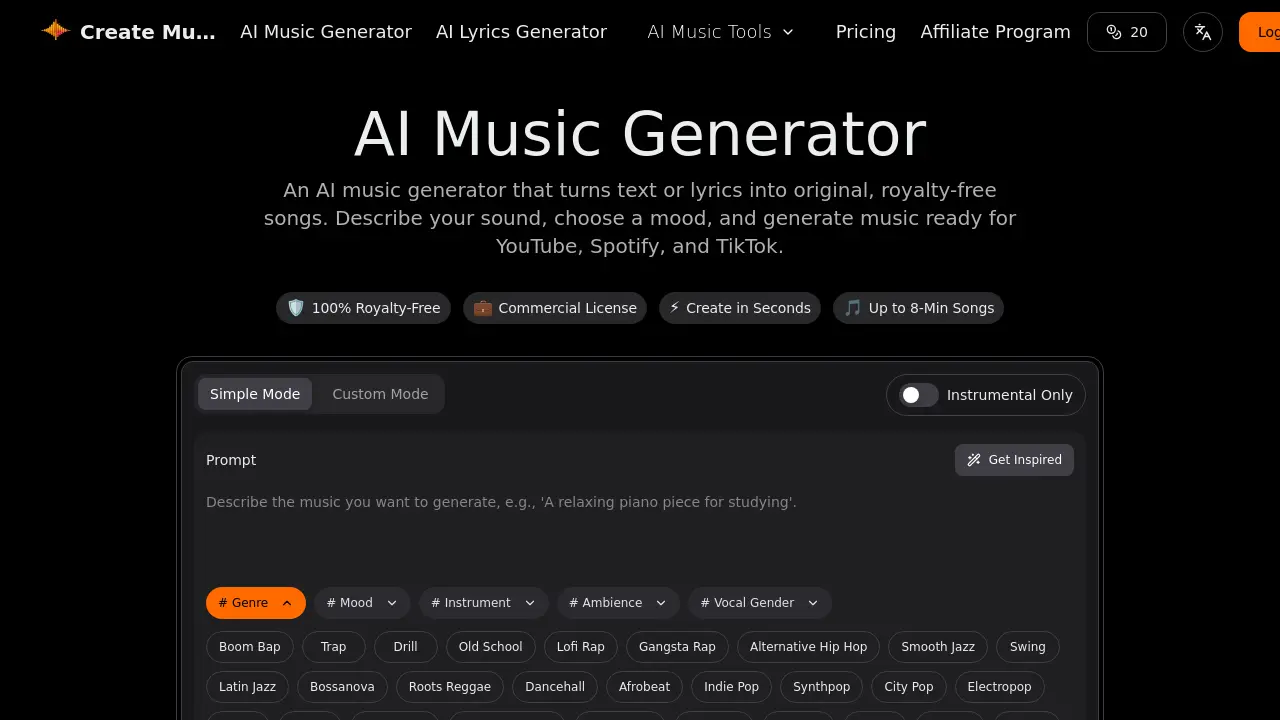
What is Create Music AI
Create Music AI is an online platform that transforms text or lyrics into full‑length, royalty‑free tracks up to eight minutes long. The service offers a free tier that allows users to generate music without signing up or downloading software, making it a convenient choice for creators seeking a quick, commercial‑ready soundtrack. By selecting genre, mood, and instrumentation, the AI produces studio‑quality audio in under a minute, supporting both vocal and instrumental outputs. Additional tools—lyrics generation, vocal removal, stem splitting, and MIDI editing—enable further customization within the same browser interface. All downloads come with a commercial license, allowing use on YouTube, Spotify, TikTok, and other platforms. The platform positions itself as one of the best AI solutions for producing background music, music videos, and original compositions. Users can access create music ai free online, generating tracks without sign‑up.
How does Create Music AI work
Create Music AI is a web‑based application that converts text or lyrics into royalty‑free tracks up to eight minutes long, offering a free tier. Users select genre, mood, instruments, then submit a prompt; the underlying model generates melody, harmony, and arrangement in under a minute. Platform bundles tools—vocal remover, stem splitter, MIDI editor, and BPM finder—so user can refine or remix output. All downloads come with a commercial license, allowing use on YouTube, Spotify, TikTok, and other streaming services without further clearance. The create music ai free tier allows one generation per month, and the app is accessible without login.
Benefits of Create Music AI
Create Music AI lets students turn text or lyrics into full‑length, royalty‑free tracks up to 8 minutes long, all with a commercial license for YouTube, Spotify, and TikTok. The web app generates music in under a minute, offering genre, mood, and instrument presets or custom prompts. Users can download WAV or MP3 files without signing up, and the free tier provides one generation per month. Additional tools—lyrics writer, vocal remover, stem splitter, MIDI editor, and key/BPM finder—enable editing and remixing in a single browser session. Students can also export stems for collaborative projects or integrate the tracks into video editing software.
Pros and Cons of Create Music AI
Pros
- 100% royalty‑free with commercial license.
- Generates up to 8‑minute tracks in under 60 seconds.
- Offers free tier with 2 songs/month.
- Includes AI lyrics, vocal remover, stem splitter.
- Browser‑based, no installation required.
Cons
- Free plan limited to 1 generation/month.
- No email support on free tier.
- Requires login for full features.
- Limited concurrent tasks on lower plans.
- Output quality may vary by genre.
Core Features of Create Music AI
AI Music Generation from Text or Lyrics
Generates full‑length, royalty‑free tracks up to 8 minutes by interpreting user prompts or lyrics, selecting genre, mood, instruments, and producing studio‑quality audio in seconds.
AI Lyrics Writing and Editing
Creates structured, original lyrics from prompts, and allows users to edit, refine, and integrate them into generated music, supporting full creative control over vocal content.
Vocal Removal and Stem Splitting
Separates vocal tracks from instrumentals and splits audio into individual stems, enabling remixing, learning, or isolated editing without external software.
AI Mastering and Remixing
Applies professional mastering to final tracks and offers remix & edit capabilities, ensuring polished sound quality and flexibility for creative adjustments.
AI MIDI Editing and Conversion
Provides a browser‑based MIDI editor and audio‑to‑MIDI converter, allowing users to modify melodies, harmonies, and structure directly within the platform.
Music Analysis Tools (Key & BPM Finder)
Detects key, tempo, and BPM of tracks, offering quick browser‑based analysis for reuse, remixing, or educational purposes, enhancing workflow efficiency.
Commercial License and Royalty‑Free Distribution
Provides a full commercial license with every download, allowing unrestricted use on YouTube, Spotify, TikTok, and other platforms without additional claims.
Use Cases of Create Music AI
- University students: Generate royalty‑free background music for academic presentations or study playlists using Create Music AI free online.
- Content creators: Produce commercial‑licensed tracks for YouTube videos in under a minute with Create Music AI app, no login required.
- Podcasters: Add custom‑mood intros and outros by converting text prompts into 8‑minute AI‑generated music with Create Music AI free.
- Indie game developers: Create immersive background scores for game levels using Create Music AI with lyrics and instrument selection, all royalty‑free.
- Advertisers: Generate short, mood‑specific jingles for TikTok ads via Create Music AI free online, ensuring commercial license compliance.
FAQs of Create Music AI
What are the differences between the free, Basic, Standard, and Premium plans?
Create Music AI offers a tiered pricing structure. The free plan allows 2 songs and 1 generation per month with basic tools and no email support. The Basic plan (≈$10.49/month) expands to 200 songs, 100 generations, 2 concurrent tasks, includes a commercial license, and provides email support. The Standard plan (≈$20.99/month) offers 500 songs, 250 generations, 5 concurrent tasks, unlimited downloads, 24/7 email support, and advanced analysis tools. The Premium plan (≈$34.99/month) delivers 1200 songs, 600 generations, 10 concurrent tasks, unlimited downloads, 24/7 email support, and the full suite of advanced features. All paid plans include a commercial license for YouTube, Spotify, TikTok, and other platforms.
Can I use the AI‑generated music for commercial advertising or marketing campaigns?
Yes. Every track generated by Create Music AI comes with a full commercial license, allowing use in advertisements, marketing videos, podcasts, films, games, and other paid media. The license covers distribution on YouTube, Spotify, TikTok, and other streaming services, and it includes a downloadable certificate for verification.
How do I obtain and use the license certificate for my generated tracks?
After downloading a track, a PDF license certificate appears in the same folder. The certificate lists the track ID, license type, and permitted uses. Keep the PDF for record‑keeping or to provide proof of rights when uploading to platforms or sharing with clients. The certificate is automatically attached to each download on all paid plans.
Is there an API or developer integration available for Create Music AI?
At present, Create Music AI does not offer a public API. Developers who need programmatic access can contact the support team to discuss custom solutions or future integration options. For now, the web interface and downloadable tools are the primary means of interaction.
Can I upload my own audio files for editing with the AI tools like vocal remover or stem splitter?
Yes. The platform allows users to upload existing audio files for processing. Once uploaded, you can apply the vocal remover, stem splitter, MIDI editor, or audio‑to‑MIDI converter. This feature is available on all paid plans and can be used to refine or remix pre‑existing tracks, making Create Music AI a versatile tool for background music creation and post‑production editing.
How to use Create Music AI
- Navigate to the AI Music Generator using the provided website link.
- Choose a creation mode (Simple, Custom, or Instrumental) to define the initial parameters.
- Enter a detailed text prompt describing your desired genre, mood, and instruments in the prompt box.
- Specify additional attributes using the hashtag selectors, such as vocal gender or ambience.
- Review the available example tracks if clarification is needed before generation.
- Initiate the process by selecting the "Generate AI Music Free" button.
- Wait for the platform to generate the song, a process that typically completes in under a minute.
- Preview the generated audio directly within the web interface.
- Download the final track as a WAV or MP3 file for personal use, which is royalty-free under the free plan.
- Upgrade to a paid plan if commercial licensing and higher generation volumes are required.
Create Music AI Website Traffic Analysis
Latest traffic information
- Monthly Visits89.81K
- Bounce Rate41.6%
- Pages Per Visit2.65
- Visit Duration00:00:46
- Global Rank374.6K
- Country/Region Ranking171.7K
Top Keywords
| Keyword | Traffic | Volume | Cost Per Click |
|---|---|---|---|
| guitar online | 370 | 13.87K | $0.84 |
| sitio web para cambiar la portada de un archivo mp3 | 300 | 320 | -- |
| ai翻唱 | 280 | 360 | -- |
| create music ai | 240 | 1.84K | $0.83 |
| ai music create | 240 | 180 | $2.93 |
Top Regions
| Region | Percentage |
|---|---|
| Colombia | 12.25% |
| United States | 9.44% |
| South Africa | 6.75% |
| Brazil | 5.1% |
| India | 4.64% |
Create Music AI Alternatives
Browser studio for AI video, image and music generation with Grok Imagine, Kling and GPT Image models. Free daily credits, no sign-up required.
SongScene turns any MP3, Suno, or Spotify track into an AI music video with beat-synced cuts and auto lyric captions, exporting 9:16, 16:9, or 1:1 clips.
SongFor creates AI-powered personalized songs with custom lyrics and studio-quality production for birthdays, anniversaries, weddings and more. Free preview, pay only if you love it.
MelodyCraft is an AI music generator that turns lyrics into songs, creates AI covers, and offers various music styles for content creators.
Viblo AI offers AI video generation, image creation, voice, and music tools with 250+ models. Compare quality and credit costs, then start free.

Invideo AI provides video, image, and audio generation through 200+ AI models with free credits and a unified workspace for content creators.
Musicaura turns mood, scene, or lyric prompts into original songs and background tracks for creator videos, podcasts, and games.
Create royalty-free AI music from text or lyrics with Free Music Creator. Generate songs and download high-quality audio for personal and commercial use.
CraftMusic AI, an AI music generator for creators, lets users write lyrics, generate songs or instrumentals from prompts, fine‑tune genre and mood, then download royalty‑free tracks for videos, podcasts, games or ads.
CAVN AI is an AI music platform for creators, offering text‑to‑song, voice cloning, stem separation, mastering and 4K video creation, free for commercial use.
AI Inspo is an AI creative platform that lets creators, marketers and designers generate images, videos and music from prompts in minutes, eliminating the need to switch between separate tools.
GoAISong is an AI music generation website for creators and marketers that produces complete, MP3‑ready songs with vocals, lyrics, beats and covers, delivering commercial‑licensable tracks in minutes.