
Cowork AI Leaderboard
Cowork AI Leaderboard: Compare AI Coworker Tools 2026

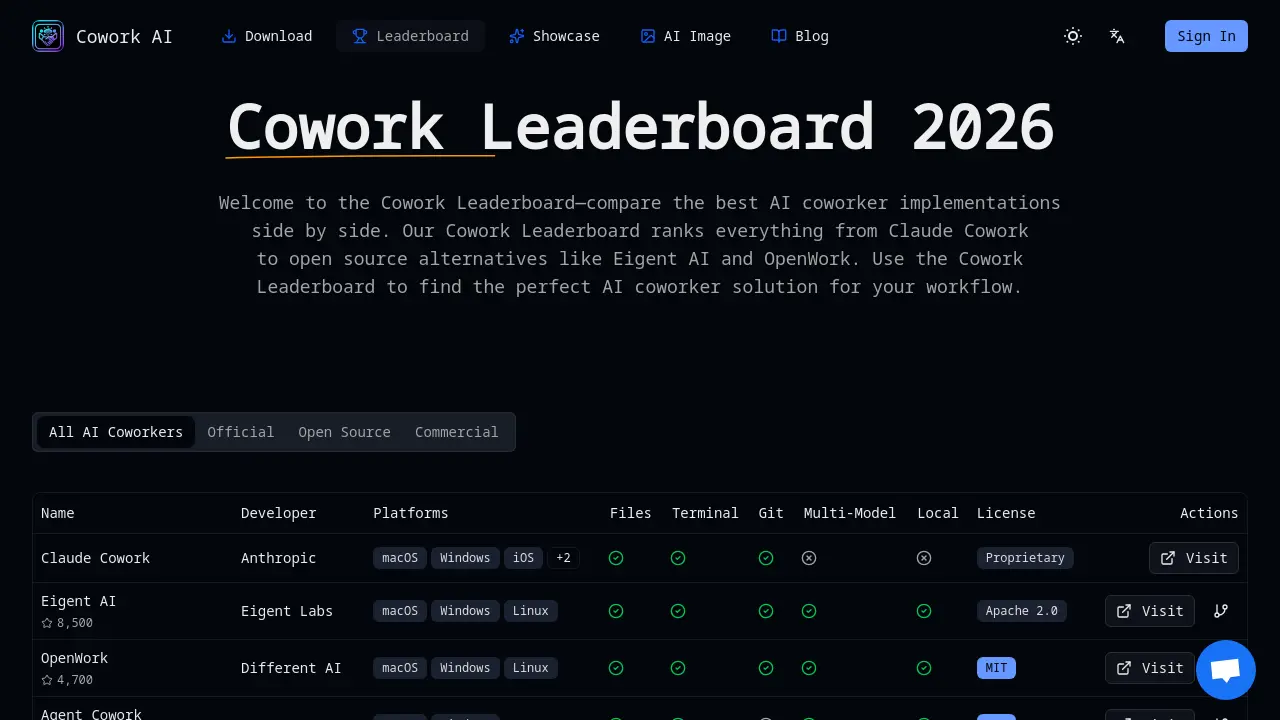
What is Cowork AI Leaderboard
The cowork ai leaderboards provide a structured comparison of AI coworker solutions, enabling developers, technical writers, and DevOps teams to evaluate tools such as Claude Cowork, Eigent AI, and OpenWork. The platform aggregates key criteria—file system access, terminal command execution, multi‑model support, local deployment options, and platform coverage—into a single, searchable table. By presenting open‑source and proprietary options side by side, the leaderboard helps users balance transparency, customization, and polish. The interface highlights each tool’s licensing, supported operating systems, and model flexibility, allowing teams to match the right AI coworker to specific workflow requirements. Cowork AI Leaderboards streamlines the selection process, reducing trial‑and‑error and accelerating productivity across software development, documentation, and data science projects.
How does Cowork AI Leaderboard work
The Cowork AI Leaderboard presents a structured comparison of AI coworker solutions, listing each tool’s developer, platform coverage, licensing model, and core capabilities such as file system access, terminal command execution, and autonomous task handling. By aggregating metrics like multi‑model support, local deployment options, and open‑source versus proprietary status, the leaderboard enables developers, technical writers, data scientists, and DevOps teams to evaluate which coworker best aligns with their workflow requirements. The platform updates regularly, ensuring that the cowork ai leaderboards reflect the latest releases and feature enhancements across the ecosystem.
Benefits of Cowork AI Leaderboard
The Cowork AI Leaderboard offers a side‑by‑side comparison of AI coworker implementations, from proprietary options like Claude Cowork to open‑source projects such as Eigent AI and OpenWork. It evaluates key factors—file system access, terminal command execution, autonomous task completion, multi‑model flexibility, local deployment, and platform support—helping developers, writers, data scientists, and DevOps teams choose the tool that best fits their workflow. Updated regularly, the leaderboard provides transparent rankings and links to source code or downloads, enabling users to assess privacy, customization, and vendor lock‑in trade‑offs. The cowork ai leaderboards serve as a reference for selecting the right AI coworker.
Pros and Cons of Cowork AI Leaderboard
Pros
- Comprehensive side‑by‑side AI coworker comparison.
- Regularly updated 2026 rankings.
- Includes open‑source and proprietary options.
- Highlights multi‑model and local deployment support.
- Platform coverage across macOS, Windows, Linux, iOS.
Cons
- Lacks in‑depth feature breakdown per tool.
- No transparent ranking methodology disclosed.
- Mobile support limited for open‑source entries.
- Proprietary options may restrict customization.
- Privacy concerns for non‑local deployments.
Core Features of Cowork AI Leaderboard
AI Coworker Ranking and Comparison
Provides side‑by‑side evaluation of AI coworker tools, scoring them on file access, terminal execution, autonomy, multi‑model support, local deployment, and platform coverage.
Feature‑Based Filtering and Search
Allows users to filter entries by open‑source status, multi‑model capability, local deployment, or operating system, enabling quick identification of suitable solutions.
Detailed Coworker Profiles
Displays comprehensive information for each entry, including developer, supported platforms, file and terminal access, Git links, license, and direct action buttons.
Regular Ranking Updates
Automatically refreshes the leaderboard with the latest releases and metrics, ensuring users see current performance and feature sets.
Educational Resources and Use‑Case Guides
Offers FAQs, developer, writer, data scientist, and DevOps use‑case explanations to help users understand how AI coworkers fit specific workflows.
Use Cases of Cowork AI Leaderboard
- Software Developers: Use cowork ai leaderboards to compare AI coworker file access and terminal execution for efficient coding.
- Technical Writers: Leverage cowork ai leaderboards to select AI coworkers that edit and organize large documentation sets.
- Data Scientists: Use cowork ai leaderboards to find AI coworkers that run scripts and manage Jupyter notebooks.
- DevOps Engineers: Consult cowork ai leaderboards to choose AI coworkers with robust terminal command execution for infrastructure automation.
FAQs of Cowork AI Leaderboard
What is Claude Cowork and how does the Cowork Leaderboard rank it?
Claude Cowork is a proprietary AI coworker developed by Anthropic that integrates Claude’s conversational model with file system and terminal access. The Cowork Leaderboard ranks it based on its comprehensive feature set, platform coverage, and user reviews, placing it near the top for polished, cross‑platform performance.
Which AI coworker in the Cowork Leaderboard is best for developers?
For developers seeking robust code‑editing, debugging, and automation, Claude Cowork and Eigent AI are top choices. Claude Cowork offers polished UI and multi‑platform support, while Eigent AI provides open‑source flexibility and local deployment, both scoring high on developer‑centric criteria.
Are open source options in the Cowork Leaderboard as capable as Claude Cowork?
Open‑source options like Eigent AI and OpenWork match Claude Cowork in many core functions—file manipulation, terminal execution, and multi‑model support—but may lack some polish or dedicated support. Their community‑driven nature allows customization that proprietary solutions cannot offer.
Can I run a Cowork Leaderboard AI coworker completely locally for privacy?
Yes. Several leaderboard entries, such as Eigent AI and OpenWork, support local deployment, enabling users to run the AI coworker entirely on their own infrastructure without sending data to external servers, which is ideal for privacy‑sensitive projects.
What does multi‑model support mean in the Cowork Leaderboard?
Multi‑model support refers to an AI coworker’s ability to switch between different language models—Claude, GPT‑4, Gemini, or local LLMs—within the same interface. This flexibility lets users choose the best model for a task and manage cost or performance trade‑offs.
How often is the Cowork Leaderboard updated?
The Cowork Leaderboard is refreshed monthly, with the latest update recorded on 2026‑01‑21. Updates include new releases, feature changes, and community feedback to keep rankings current and relevant.
Can I contribute to open source projects in the Cowork Leaderboard?
Yes. Projects such as Eigent AI and OpenWork are hosted on GitHub, allowing developers to submit pull requests, report issues, or add new features. Contributions are encouraged to improve functionality and expand model support.
What's the difference between a Cowork Leaderboard AI coworker and a coding assistant?
An AI coworker actively accesses files, runs terminal commands, and automates workflows, whereas a coding assistant typically answers questions or suggests snippets without direct system interaction. Cowork Leaderboard entries emphasize active participation in development tasks.
How does the Cowork Leaderboard evaluate AI coworker solutions?
The leaderboard assesses solutions across multiple dimensions: file system access, terminal execution, autonomous task completion, multi‑model flexibility, platform support, and licensing. Each criterion is weighted to reflect its importance to typical users.
What criteria are used to rank AI coworkers on the leaderboard?
Ranking criteria include feature completeness, ease of installation, performance, community activity, and privacy options. Scores are aggregated from user reviews, automated tests, and expert evaluations to produce a transparent ranking.
Are there any licensing restrictions for using open source AI coworkers from the leaderboard?
Open‑source entries such as Eigent AI (Apache 2.0) and OpenWork (MIT) are permissively licensed, allowing commercial use, modification, and redistribution. Proprietary options like Claude Cowork require a commercial license for enterprise deployment.
Can I integrate a leaderboard‑ranked AI coworker into my existing development environment?
Yes. Most leaderboard entries provide command‑line interfaces, APIs, or desktop applications that can be integrated into IDEs, CI/CD pipelines, or custom scripts, enabling seamless workflow automation.
How does the leaderboard handle updates to AI models or software versions?
When a new model or software version is released, the leaderboard re‑tests the affected solution, updates its feature score, and adjusts the overall ranking accordingly. Users are notified of significant changes via the website’s update log.
How to use Cowork AI Leaderboard
- The Cowork AI Leaderboard aggregates AI coworker implementations, ranking them by features such as file access, terminal execution, multi‑model support, and deployment options.
- Navigate to https://coworkai.app/cowork-leaderboard, view the table, filter by platform or license, and click the “Visit” link for each entry to explore detailed documentation.
- Screenshot: Leaderboard table shows columns for Name, Developer, Platforms, Files, Terminal, Git, Multi‑Model, Local, License, Actions, and quick action icons.
- Compare scores by reading the “Files” and “Terminal” columns; higher values indicate broader file system and command execution capabilities for development workflows.
- Select an AI coworker that matches platform, license, and model preferences, then download or clone the repository to integrate into your project.
- The Cowork AI Leaderboard provides a searchable, up‑to‑date list of coworker tools, making it a reliable resource for students researching AI coworker solutions.
Cowork AI Leaderboard Website Traffic Analysis
Latest traffic information
- Monthly Visits1.37K
- Bounce Rate35.77%
- Pages Per Visit2.16
- Visit Duration00:00:44
- Global Rank10.25M
- Country/Region Ranking4.05M
Top Keywords
| Keyword | Traffic | Volume | Cost Per Click |
|---|---|---|---|
| ai cowork free | 160 | 170 | -- |
| cowork ai | 60 | 1.6K | $10.04 |
| eigent | 10 | 5.91K | $3.94 |
| claude cowork download | 10 | 3.36K | $2.9 |
| claude cowork | -- | 314.57K | $1.61 |
Top Regions
| Region | Percentage |
|---|---|
| United States | 100% |
Cowork AI Leaderboard Alternatives
Wery is a virtual AI studio that routes one goal to specialist agents for video, images, music and documents, keeping characters and project assets consistent.

Relay App turns plain-language instructions into AI workflows that connect 200+ apps, run reliable automations, and pause for human approval.
Dash is an AI teammate in Slack and Microsoft Teams that connects 3,000+ tools, automates workflows and completes tasks in your channel.
Git-native task management for AI coding agents: track intent, status, blockers, dependencies, history, and commit evidence in Git.
Ritto AI learns from one real demonstration of your work, finds the repeated tasks, and completes them the same way. Join the beta for early access.
Aldena creates isolated rooms where AI agents handle client work with real roles, shared memory, and human approval gates.
AI project scheduling tool that generates editable Gantt charts from prompts, templates, or imported files, checking dependencies and revision impact.
Referent uses AI agents to automate legal practice operations - client intake, matter management, document filing, and billing prep. Built for solo and small law firms.
Loop Engineering is an AI-powered platform that automates SaaS maintenance through verified agent workflows, memory persistence, and independent verification for every product run.
Taskly is an AI-native task manager where teams describe work in plain English and Otto drafts, prioritizes, and organizes tasks with your approval every step.
Tenderbolt uses AI to automate RFP and tender responses. It analyzes documents, completes security questionnaires, and generates tailored proposals.
BidPacto is an RFP response automation platform for proposal teams, enabling rapid source-backed drafting, missing‑info alerts, review workflows, and export to Word, PDF or CSV formats.