
Folder Master
ChatGPT Folder Master - Organize and Save Your ChatGPT Chats
| Added on: | Jun 19, 2024 |
| Monthly Visits: | 207.83M |
| Social & Email: | -- |

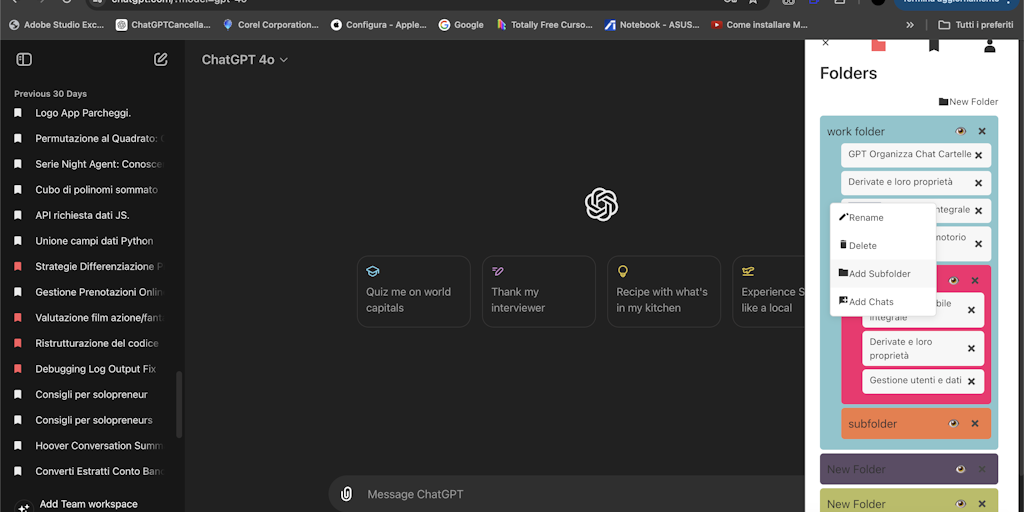
What is Folder Master
ChatGPT Folder Master is an AI-powered Chrome extension that helps users organize their ChatGPT conversations. It's designed for those who have many conversations, maybe even our friends who use ChatGPT every day 😄. The extension automatically creates folders based on the conversation topics, making it much easier to find the information you need. It also allows you to easily export and share conversations with others, so you can collaborate on projects or share your insights with colleagues. The extension is built using a sophisticated AI algorithm that analyzes the content of your conversations, tagging and categorizing them for easy retrieval. Overall, Folder Master is a valuable tool for anyone who wants to get the most out of their ChatGPT experience.
Core Features of Folder Master
Organize ChatGPT Conversations
Folder Master allows you to organize your ChatGPT conversations into folders for easier access and management. You can create new folders, move conversations between folders, and search for conversations within folders. This helps keep your chat history organized and searchable. 😄
Save Your Favorite Conversations
You can save your favorite conversations to a special "Favorites" folder. This allows you to quickly access important conversations without having to scroll through your entire chat history.
Share Conversations
Folder Master lets you share conversations with other users. This is useful for collaborating on projects, or simply sharing interesting or helpful conversations with friends.
Back up Conversations
You can export your ChatGPT conversations to a text file, which can be backed up on your computer or shared with others. This ensures that you will not lose your conversations, even if you accidentally delete them from the ChatGPT website.
FAQs of Folder Master
What is Folder Master?
Folder Master is a Chrome extension that helps you organize your ChatGPT conversations by letting you create folders to group them together. This can be helpful if you use ChatGPT for multiple projects or topics and want to keep your conversations separate.
How do I use Folder Master?
Once you install Folder Master, you can create folders by clicking the "Add Folder" button. You can then drag and drop conversations into the folders you have created. You can also rename folders and delete them.
Why should I use Folder Master?
Folder Master can help you stay organized and easily find the conversations you need. This is especially helpful if you use ChatGPT for multiple purposes or have a lot of conversations.
What are the benefits of using Folder Master?
Folder Master makes it easy to keep your ChatGPT conversations organized. You can easily find the conversations you need and keep your conversations from getting lost.
How does Folder Master compare to other ChatGPT organization tools?
Folder Master is a simple and easy-to-use tool that is specifically designed for organizing ChatGPT conversations. It does not have as many features as some other tools, but it is a good option if you are looking for a simple and effective way to organize your conversations.
Folder Master Website Traffic Analysis
Latest traffic information
- Monthly Visits207.83M
- Bounce Rate56.22%
- Pages Per Visit2.65
- Visit Duration00:01:49
- Global Rank--
- Country/Region Ranking--
Top Keywords
| Keyword | Traffic | Volume | Cost Per Click |
|---|---|---|---|
| chrome web store | 1.72M | 2.08M | $0.34 |
| google translate | 1.56M | 37.33M | $0.98 |
| chrome extensions | 821.12K | 1.39M | $0.28 |
| translate | 731.4K | 43.75M | $0.98 |
| stylish | 619.81K | 1.11M | $0.58 |
Top Regions
| Region | Percentage |
|---|---|
| United States | 21.98% |
| India | 8.45% |
| Brazil | 6.05% |
| Russia | 5.32% |
| Japan | 3.59% |
Folder Master Alternatives
SeedRouter puts image, video, language and audio models from OpenAI, Google and Anthropic behind one key, billing per request and never for failed calls.
Open-source AI coworker for Slack and Lark that runs Claude Code, Codex or Pi on your own machine with the plan or API key you already pay for.
AtAt runs Claude Code, Codex, or local models in the text field you are typing in, no app-switching. It adds TabTab autocomplete, screenshots, and clipboard history.
Play HT is a free AI voice generator that turns text into speech with 200+ public voices, streams previews in the browser, and exports MP3 files.

Jev is TypeSafe AI's System One model that returns typed decisions with calibrated confidence for automation. Fast, cheap, zero hallucinations.
Use GPT, Claude, Gemini and Grok through one OpenAI-compatible API. Compare model rates, create a key, and make your first request in minutes.
Git-native task management for AI coding agents: track intent, status, blockers, dependencies, history, and commit evidence in Git.
SJolt is an AI model API platform aggregating top image, video, and audio generation models behind one unified request flow for developers and teams.
Tokenhot is a unified LLM API gateway delivering OpenAI, Claude, Gemini and DeepSeek models through a single endpoint, cutting API costs by up to 90%.
DSH Hub catalogs verified DeepSeek Harness plugins and clients. Browse open-source repositories with source inspection before installation.
Always free browser that shares your logged-in Chrome state with AI agents like Claude Code and Codex, running browser automation up to 3.45x faster.
Formpost is a free contact form to email API delivering submissions to your inbox with AI spam filtering, webhooks, file uploads and a REST API.