
BeyondPDF - Intelligent PDF Search Engine
| Added on: | Jul 4, 2024 |
| Monthly Visits: | -- |
| Social & Email: | -- |

What is BeyondPDF
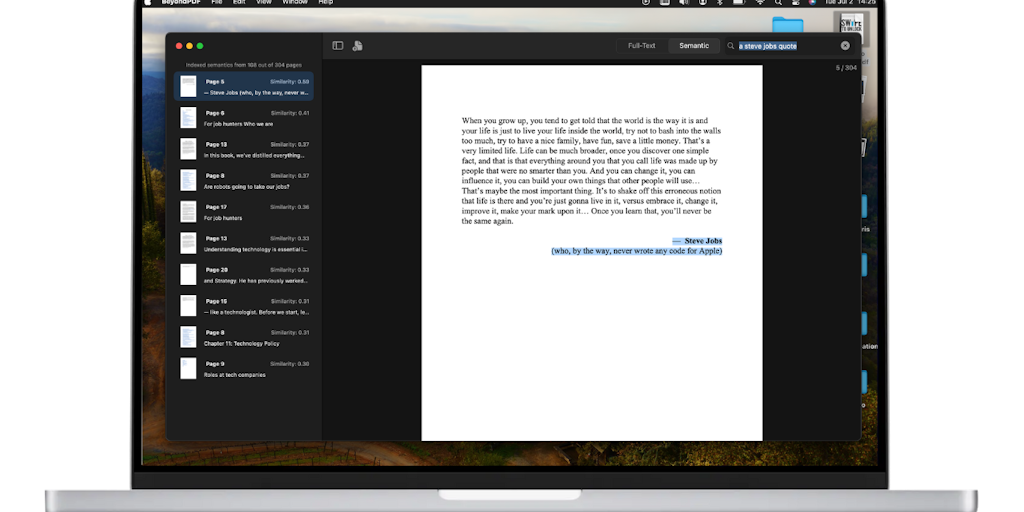
BeyondPDF is a unique AI-powered PDF search tool designed for professionals who need to quickly find specific information within large PDF documents. It's a powerful tool that goes beyond simple keyword searches. Imagine being able to search for "ideas about sustainability" within a PDF document; BeyondPDF uses its AI engine to understand the context of your search and pull up relevant sections, even if those sections don't explicitly contain the words you searched for. This allows users to find the information they need more quickly and efficiently, saving them time and frustration. BeyondPDF is available on Apple devices and is ideal for anyone who frequently works with large PDF documents, such as researchers, students, and business professionals.
Core Features of BeyondPDF
Search PDF with natural language
BeyondPDF allows users to search PDF documents with natural language queries. This is more intuitive and efficient than traditional keyword-based searches, as it understands the context of the query and can find relevant information even if it doesn't contain the exact keywords.
Highlight and organize findings
The tool allows you to highlight and annotate important information in the PDF document, helping you organize your research and keep track of key findings.
Export findings
You can export the highlighted text and annotations to other formats, like text files or spreadsheets, for further analysis or sharing.
Work with multiple PDFs at once
BeyondPDF allows you to open and search multiple PDFs simultaneously, making it easy to compare and contrast information from different sources.
Secure PDF viewing
BeyondPDF offers a secure way to view and manage PDF documents, providing features like password protection and encryption, making it a suitable option for users who handle sensitive information.
FAQs of BeyondPDF
What is BeyondPDF?
BeyondPDF is an AI-powered tool that helps you search through PDF documents using natural language. This means you can ask questions about the document in your own words, and BeyondPDF will understand what you're looking for.
How do I use BeyondPDF?
Just upload your PDF document to the BeyondPDF website. Then, type your question into the search bar. BeyondPDF will scan the document and find the relevant information.
What are the benefits of using BeyondPDF?
BeyondPDF can help you find information in your PDF documents quickly and easily. This is especially helpful if you have a lot of documents or if you need to find specific information.
How is BeyondPDF different from other PDF search tools?
BeyondPDF uses artificial intelligence to understand the context of your search query. This means you can ask more complex questions and get more relevant results. Other PDF search tools typically only look for exact matches, which can be limiting.
BeyondPDF Alternatives
Free invoice maker for freelancers and small businesses on Web, iOS and Android. Create unlimited PDF invoices, manage clients and companies, and bill from AI assistants via MCP.

ScanPDF AI is a free online PDF scanner that turns photos and scans into clean PDFs, OCR searchable text, and receipt-to-Excel data in your browser.
Gamma AI is an AI presentation generator that turns text, PDF, and Word into slides with structured outlines, in-browser editing, and editable PPTX export.
Fuu AI is an AI presentation maker that turns text, PDFs, and documents into professional PPT slides in minutes, powered by Claude Opus 4.7.
AI-powered PDF to Markdown converter with OCR for scanned pages. Get clean, structured Markdown from any PDF in seconds online.
Tenderbolt uses AI to automate RFP and tender responses. It analyzes documents, completes security questionnaires, and generates tailored proposals.
1Scholar is an AI academic toolbox for scholars and researchers, offering citation verification, source discovery, and AI‑generated text humanization to streamline manuscript preparation and reduce errors.
PixPin is a cross‑platform app for capturing screenshots, recordings and extracting text via OCR, with pinning and annotation features for developers, designers and support teams.
PDF Translate is an AI PDF translator for professionals and students, providing free, fast multilingual translation of PDFs while keeping fonts, tables and images intact.
PDF2Word is an online PDF to Word converter that creates editable DOCX files, preserves layout, supports scanned PDFs, and processes files securely with size limits for free and paid users.
MiroFish is an AI simulation chat platform that converts text, PDF, MD or TXT inputs into graph building, scenario simulation, and structured reports, offering continuous chat‑driven prediction for analysts and decision‑makers.
EZ-Estimates uses AI to generate line-item quotes, manage change orders, and collect e-signatures, helping contractors build professional estimates in under 60 seconds.