
AI Renamer
AI Renamer - Intelligent File Renaming with AI Models
| Added on: | Jul 20, 2024 |
| Monthly Visits: | 645.47M |
| Social & Email: | -- |

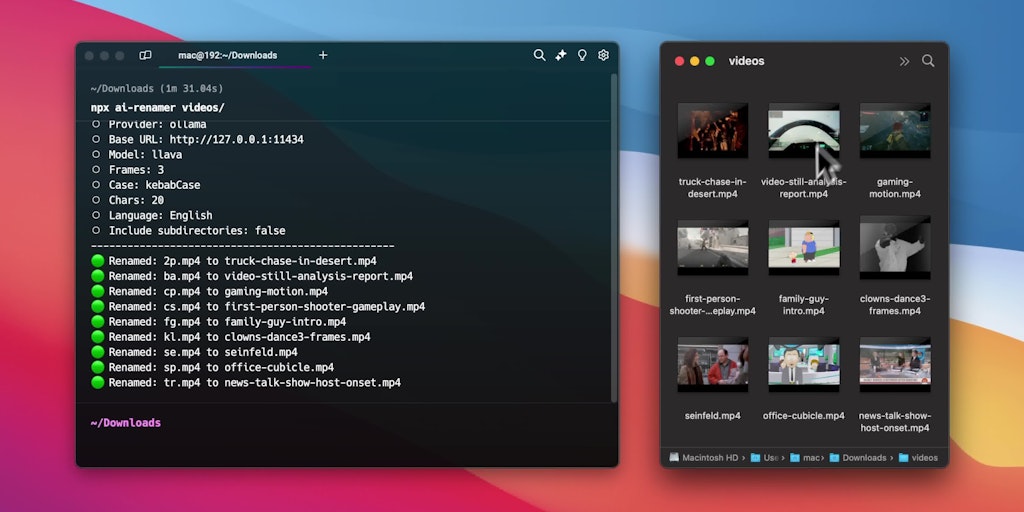
What is AI Renamer
AI Renamer is a command-line tool that uses AI models like Llava, Gemma, and Llama to intelligently rename files based on their content. It's useful for people who want to rename a large number of files quickly and accurately. AI Renamer achieves this by using large language models to understand the content of files and suggest descriptive names. For example, a file named "IMG_20230428_123456.jpg" could be renamed to "Sunset at the Beach.jpg" if the AI model detects a sunset scene in the image. The tool is built using Node.js and can be used with Ollama, LM Studio, or OpenAI models. AI Renamer supports a variety of file types, including images, text documents, and audio files.
How does AI Renamer work
The ai renamer is a Node.js CLI tool that intelligently renames files based on their content using AI models. It leverages Ollama, LM Studio, or OpenAI for content analysis, supporting models like Llava, Gemma, and Llama. The ai file renamer extracts content descriptions and generates relevant filenames. Users can specify providers, API keys, base URLs, and models via command-line parameters. It supports ai image renamer, ai pdf renamer and ai screenshot renamer functions. Configuration settings are stored locally for persistent use of the ai rename files feature.
Benefits of AI Renamer
AI Renamer is a Node.js CLI tool that leverages AI to intelligently rename files based on their content. Using Ollama and LM Studio models, such as Llava and Gemma, this ai file renamer analyzes files and suggests relevant names. It supports various file types, offering functionality as an ai image renamer and ai pdf renamer. For video files, it utilizes ffmpeg. The ai renamer is configurable with options for OpenAI API keys and custom prompts. Easily rename files on Windows with this tool.
Pros and Cons of AI Renamer
Pros
- Intelligently renames files using AI models.
- Supports Ollama, LM Studio, and OpenAI.
- Offers a desktop app version.
- CLI tool for various file renaming needs.
- Configurable case styling available.
Cons
- Requires Ollama or LM Studio installation.
- Requires ffmpeg for video renaming.
- Needs API key for OpenAI usage.
- Node.js CLI might not suit all users.
- No releases published, potentially unstable.
Core Features of AI Renamer
Rename files based on their content
AI Renamer can rename files based on their content using large language models.
Use various large language models
AI Renamer supports a variety of large language models, including Ollama, LM Studio, and OpenAI.
Use custom ports
AI Renamer allows users to specify custom ports for the large language models.
Define custom parameters
AI Renamer lets users define custom parameters for the large language models.
Contribute to the project
AI Renamer welcomes contributions from the community.
Use Cases of AI Renamer
- Photographers: Use the AI image renamer to batch rename image files based on content, improving organization.
- Video Editors: Utilize the AI renamer to rename video files according to their content, streamlining video production workflows.
- Office Workers: Employ the AI file renamer to automatically rename AI PDF files based on their textual content for easy search.
- Software Developers: Leverage the AI rename files tool to create descriptive filenames for screenshots, aiding in documentation efforts.
- Data Scientists: Implement the ai renamer to organize datasets, renaming files based on content identified by AI models.
FAQs of AI Renamer
What is AI Renamer?
AI Renamer is a tool that helps you rename files based on their content. It uses large language models to understand the content of your files and suggest appropriate names.
How do I use AI Renamer?
You can use AI Renamer by installing it from npm and running it in your terminal. You can either provide the path to the files you want to rename, or you can drag and drop the files into the terminal window. You can customize how AI Renamer works by using different AI models and adjusting the parameters for the model.
What AI models can I use?
You can use a variety of AI models with AI Renamer. You can use the models available on Ollama and LM Studio.
What are the advantages of using AI Renamer?
AI Renamer can help you rename files more efficiently and accurately than manually renaming them. It can also help you to come up with better names for your files. You can save time and avoid the frustration of trying to rename files that are difficult to understand.
What are some limitations of AI Renamer?
It can be difficult to predict how AI Renamer will rename your files. If you are unsure about a suggested rename, you can always review it before accepting it. You should make sure to back up your files before using AI Renamer.
How to use AI Renamer
AI Renamer is a Node.js CLI tool using AI models to intelligently rename files based on their content. It supports Ollama, LM Studio, and OpenAI. It offers features for ai file renamer windows use.
First, install AI Renamer globally using
npm install -g ai-renamer. This allows you to run the tool from any directory.Ensure you have either Ollama or LM Studio installed, along with a compatible LLM like Llava. FFmpeg is required for renaming videos; download and install it.
To use Ollama, simply run
npx ai-renamer /path. The tool attempts to auto-select Llava; specify the model using--modelif needed.For LM Studio, specify the provider with
npx ai-renamer /path --provider=lm-studio. The tool will use the currently loaded model in LM Studio.For OpenAI, use
npx ai-renamer /path --provider=openai --api-key=YOUR_API_KEY. The tool defaults to gpt-4o but allows specifying other models.Customize ports for Ollama or LM Studio using the
--base-urlparameter. For example:npx ai-renamer /path --provider=ollama --base-url=http://127.0.0.1:11434.The ai renamer saves flag values to
~/ai-renamer.json. Subsequent runs will use these saved configurations, simplifying future AI image renamer operations.Utilize parameters such as
--case,--chars, and--languageto control the naming style, maximum filename length, and output language for AI PDF renamer tasks.Use
--custom-promptto add a specific instruction to the LLM. For instance:npx ai-renamer /path --custom-prompt="Only describe the background".Interpret the results by examining the new filenames generated by the AI. Ensure they accurately reflect the file content using the AI screenshot renamer features.
AI Renamer Website Traffic Analysis
Latest traffic information
- Monthly Visits645.47M
- Bounce Rate36.44%
- Pages Per Visit5.69
- Visit Duration00:06:27
- Global Rank45
- Country/Region Ranking77
Top Keywords
| Keyword | Traffic | Volume | Cost Per Click |
|---|---|---|---|
| github | 11.46M | 10.09M | $1.62 |
| github login | 457.62K | 367.17K | $0.5 |
| dlss 5 swapper | 446.36K | 599.34K | -- |
| zapret | 415.51K | 377.14K | $0.86 |
| github desktop | 400.93K | 282.6K | $2.25 |
Top Regions
| Region | Percentage |
|---|---|
| United States | 18.73% |
| China | 11.83% |
| India | 10.32% |
| Russia | 7.84% |
| Germany | 4.15% |
AI Renamer Alternatives
SeedRouter puts image, video, language and audio models from OpenAI, Google and Anthropic behind one key, billing per request and never for failed calls.
Open-source AI coworker for Slack and Lark that runs Claude Code, Codex or Pi on your own machine with the plan or API key you already pay for.
AtAt runs Claude Code, Codex, or local models in the text field you are typing in, no app-switching. It adds TabTab autocomplete, screenshots, and clipboard history.
Play HT is a free AI voice generator that turns text into speech with 200+ public voices, streams previews in the browser, and exports MP3 files.

Jev is TypeSafe AI's System One model that returns typed decisions with calibrated confidence for automation. Fast, cheap, zero hallucinations.
Use GPT, Claude, Gemini and Grok through one OpenAI-compatible API. Compare model rates, create a key, and make your first request in minutes.
Git-native task management for AI coding agents: track intent, status, blockers, dependencies, history, and commit evidence in Git.
SJolt is an AI model API platform aggregating top image, video, and audio generation models behind one unified request flow for developers and teams.
Tokenhot is a unified LLM API gateway delivering OpenAI, Claude, Gemini and DeepSeek models through a single endpoint, cutting API costs by up to 90%.
DSH Hub catalogs verified DeepSeek Harness plugins and clients. Browse open-source repositories with source inspection before installation.
Always free browser that shares your logged-in Chrome state with AI agents like Claude Code and Codex, running browser automation up to 3.45x faster.
Formpost is a free contact form to email API delivering submissions to your inbox with AI spam filtering, webhooks, file uploads and a REST API.