
TTSynth.com FAQs
Convert text into natural-sounding speech effortlessly with TTSynth.com. Choose from multiple languages and voices. Generate and download high-quality TTS MP3 files. Perfect for audiobooks, presentations, and accessibility.

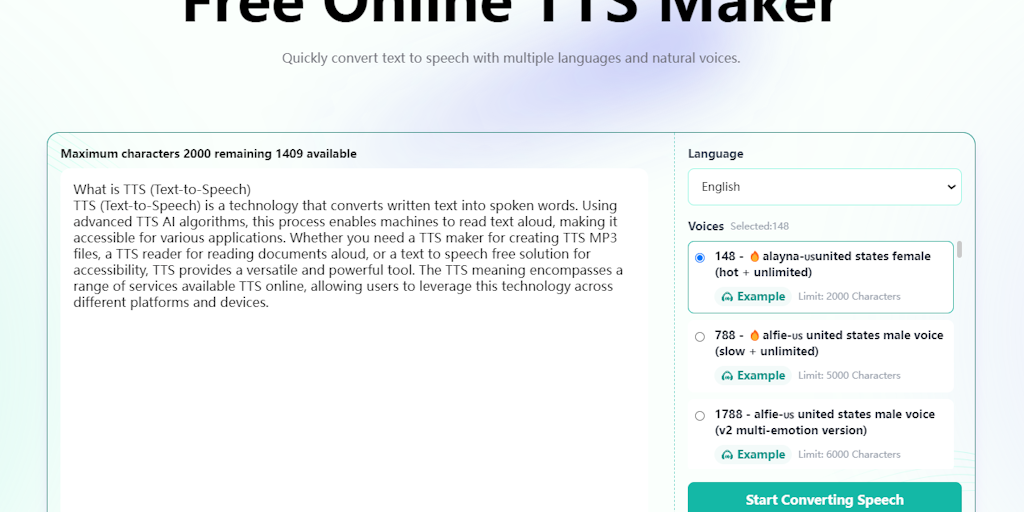
FAQs of TTSynth.com
What is TTSynth.com?
TTSynth.com is a free online text-to-speech (TTS) maker that allows you to convert text to natural-sounding speech. You can use it to create high-quality MP3 files in multiple languages.
How do I use TTSynth.com?
To use TTSynth.com, you simply need to enter your text in the text box, select the language and voice you want, and then click "Generate Audio". You can then download the MP3 file.
What are the advantages of using TTSynth.com?
TTSynth.com is free to use, so you don't have to pay for a subscription. It's also easy to use and has a wide variety of languages and voices to choose from. You can use it to create audio for different purposes, such as creating content for your website, social media, or videos.
How do I create a voice-over for a video using TTSynth.com?
Just paste your script into the text box, choose your desired voice and language, and click "Generate Audio." You can then download the MP3 and import it into your video editing software.
Is there a limit on the number of audio files I can create with TTSynth.com?
No, you can create as many audio files as you need, but there's a limit on the size of each file.
Can I use TTSynth.com to create audio for commercial purposes?
Yes, you can use TTSynth.com to create audio for commercial purposes. However, you must agree to the terms of service before using the service.
How to use TTSynth.com
TTSynth.com provides a free online TTS maker allowing users to convert text to speech using various languages and natural voices. It utilizes TTS AI to generate high-quality audio output in TTS MP3 format.
Begin by entering your desired text into the input box. The TTS maker has a character limit that varies based on the voice selected.
Choose the language and voice you prefer from the provided list. TTSynth.com supports multiple languages and voices for personalized output.
Click the "Generate" button. The system processes your text to speech online, converting it into spoken words.
Download the generated TTS MP3 file. The text to speech free service delivers high-quality audio for your use.
Utilize the TTS MP3 file for various applications. Examples include voiceovers, accessibility tools, or personalized audio content using TTS AI.
