
Nano Banana 2
Nano Banana 2: AI Image Generator with Web Search Grounding

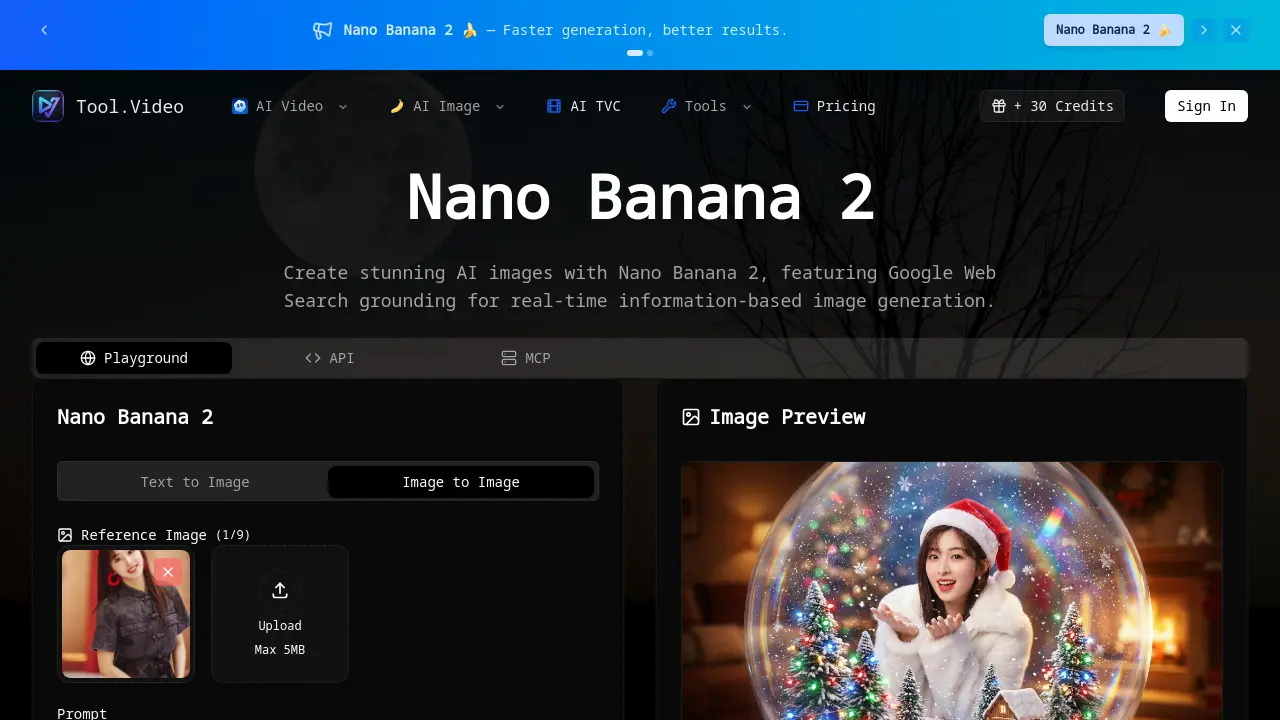
What is Nano Banana 2
Nano Banana 2 is an AI image generation platform that leverages Google Web Search grounding to produce visuals informed by real-time data. It supports both text-to-image and image-to-image workflows, enabling users to create high-resolution outputs up to 8K with specific stylistic control. The tool emphasizes accelerated generation and improved quality, featuring reference image upload for facial consistency and 4K upscaling for detail enhancement. Designed for efficiency, it accommodates diverse applications from surreal art to infographics, providing creators with a versatile solution for context-aware AI-generated imagery. Its integration of live information ensures relevance, while robust processing supports scalable creative projects.
How does Nano Banana 2 work
Nano Banana 2 operates as an AI image generator that utilizes Web Search grounding to incorporate real-time information into its creations. The tool supports both Text-to-Image and Image-to-Image generation modes, allowing users to provide detailed textual prompts specifying artistic styles like surrealism, technical requirements such as ray tracing, and composition details. Users can also upload a reference image to guide facial feature consistency. The system processes these inputs, leveraging its training to render outputs with specified aesthetics, resolutions up to 8k, and effects like refraction and bokeh, producing images based on the integrated prompt and search-derived context.
Benefits of Nano Banana 2
Nano Banana 2 accelerates AI image generation while enhancing output quality. Its Google Web Search grounding enables real-time, data-driven image creation for up-to-date relevance. The tool supports both Text-to-Image and Image-to-Image workflows, with reference image uploads to maintain consistency in complex scenes—such as preserving facial features under glass distortions. Technical strengths include ray-traced reflections, 8k resolution, and meticulous detail rendering, from snowflake bokeh to prismatic lighting. These capabilities allow creators to efficiently produce high-fidelity, ethereal visuals tailored to detailed artistic prompts.
Pros and Cons of Nano Banana 2
Pros
- Web search grounding uses real-time data.
- Detailed prompt control with critical tags.
- Batch image generation improves workflow efficiency.
- Scalable credit-based pricing model.
- Integration with Tool.Video AI suite.
Cons
- Empty FAQ section provides no user guidance.
- Credit system complexity not explained.
- Interface cluttered, lacks clear instructions.
- Promotional focus over technical specifications.
- No clear differentiation from Pro version.
Core Features of Nano Banana 2
Google Web Search Grounding
Integrates real-time web search data into image generation, allowing creation of images based on current events, locations, or specific live information.
Text-to-Image Generation
Converts detailed text prompts into high-quality, stylized AI-generated images, supporting a wide range of artistic styles and complex scene compositions.
Image-to-Image Generation
Transforms an uploaded reference image into a new image based on a text prompt, enabling modifications while maintaining key elements from the source.
Image Upscaling and Restoration
Enhances low-resolution or damaged images by upscaling to 4K resolution and restoring them with high fidelity to modern quality standards.
Location-Based Scene Generation
Creates visual depictions of specific geographic coordinates or places, generating scenes for particular times or events at those locations.
API Access and Integration
Provides programmatic access to its image generation capabilities through an API, allowing developers to integrate Nano Banana 2 into external applications and workflows.
Use Cases of Nano Banana 2
- Graphic Designers: Generate trend-responsive visuals using text prompts with real-time web search data integration.
- Marketing Professionals: Upload brand reference images to produce consistent campaign visuals in specific art styles.
- Digital Artists: Transform existing artwork into fantasy or macro photography pieces using image-to-image capabilities.
- Social Media Managers: Rapidly create themed content, such as holiday scenes, with detailed lighting and high resolution.
- Educators: Develop accurate visual aids by incorporating current information through web search grounding.
FAQs of Nano Banana 2
What is Nano Banana 2?
Nano Banana 2 is an AI image generation tool developed by Tool.Video. It creates visual content using text prompts or reference images, with enhanced speed and output quality. A key feature is Google Web Search grounding, which integrates real-time information to inform generated images, allowing for current events or location-specific details.
What is the Web Search feature?
The Web Search feature connects Nano Banana 2 to Google's search engine, enabling the AI to incorporate live data into image generation. This allows prompts to reference recent events, specific locations, or current trends. For example, users can generate visuals of a city's skyline with up-to-date landmarks or depict scenes based on news topics.
What's the difference between Text-to-Image and Image-to-Image modes?
Text-to-Image generates visuals solely from descriptive text prompts. Image-to-Image uses an uploaded reference image to influence style, composition, or specific elements. The reference image can guide facial features, as prompts may include instructions like keeping faces identical. Users can upload up to nine reference images per generation, with each file limited to 5MB.
How many credits does it cost?
Credit consumption varies based on generation complexity, resolution, and feature usage like Web Search or upscaling. The interface displays a credit balance (e.g., 1407 / 20000). Specific costs per operation are not publicly fixed; users should check their account dashboard or Tool.Video's pricing page for current rates and credit packages.
Can I use generated images commercially?
Commercial usage rights are defined by Tool.Video's terms of service. Generated images may be subject to licensing restrictions. Users intending commercial use should review the legal agreements on the Tool.Video website or contact support for clarification on permissible applications and attribution requirements.
What image formats are supported for upload?
For reference images in Image-to-Image mode, Nano Banana 2 accepts common formats such as JPEG and PNG. Uploads are limited to a maximum file size of 5MB per image. Supported output download formats typically include standard raster formats like PNG and JPEG, ensuring compatibility with most editing software and web platforms.
What resolutions and aspect ratios are available?
Nano Banana 2 supports high-resolution outputs up to 4K (4096 × 4096 pixels). Common aspect ratios like 16:9 and 1:1 are available. The tool can upscale lower-resolution inputs to 4K, as demonstrated by converting a 150 × 150 pixel image to a 4096 × 4096 pixel output while maintaining detail.
Can I generate multiple images at once?
The interface provides separate "Create Image" buttons, suggesting individual generations. Batch generation capabilities are not explicitly detailed. The Playground API may allow programmatic multiple requests, but rate limits and concurrent generation policies should be confirmed in the API documentation.
What art styles are supported?
Nano Banana 2 supports a wide range of art styles, from surrealism and fantasy to specific cultural aesthetics like ukiyo-e (浮世绘) and Cuphead-inspired visuals. It also handles isometric 3D, claymation, flat vector illustration, macro photography, and advertising-style photography. Users can combine styles in prompts for hybrid effects.
How do I use the API?
The Playground API and MCP (Model Context Protocol) are available for developers to integrate Nano Banana 2 into custom applications. Access requires an API key from Tool.Video's developer portal. Detailed endpoints, authentication methods, and usage examples are provided in the official API documentation on the Tool.Video website.
Are there API rate limits?
API rate limits are implemented to ensure fair usage but specific thresholds are not listed in the public context. Limits may vary by subscription tier. Users should consult the API documentation or their account settings for precise request quotas per minute or day.
How does Nano Banana 2 compare to Nano Banana Pro?
Nano Banana 2 emphasizes faster generation and improved base results. Nano Banana Pro appears to be a more advanced version, handling complex tasks like automated city poster generation with dynamic data, intricate infographics, and multi-step compositions. Pro likely offers greater control and specialized features for professional workflows.
What is the maximum number of reference images allowed per generation?
In Image-to-Image mode, users can upload up to nine reference images simultaneously. The interface indicates this with a counter (e.g., "Reference Image(1/9)"). This allows combining multiple visual inputs to guide the AI on composition, style, or specific elements while adhering to the 5MB per file size limit.
How do I upscale an image to 4K using Nano Banana 2?
To upscale, use the Image-to-Image mode and provide a low-resolution input image. Include a prompt specifying "Upscale to 4K" or similar instructions. The tool will process the image, enhancing details and resolution to 4096 × 4096 pixels, as shown in examples where a small input yields a high-fidelity 4K output.
What are the available output image formats?
Generated images can be downloaded in standard formats suitable for editing and sharing. Commonly supported formats include PNG for lossless quality and transparency support, and JPEG for smaller file sizes. The exact formats may be visible in the download options next to the generated preview.
What is the Playground API and MCP, and how can I access them?
The Playground API allows programmatic access to Nano Banana 2's generation capabilities. MCP (Model Context Protocol) likely refers to a standardized interface for interacting with AI models. Both are accessible via Tool.Video's developer dashboard after authentication. Documentation provides endpoints for text-to-image, image-to-image, and feature toggles like Web Search.
How to use Nano Banana 2
Nano Banana 2 is an AI image generation tool that utilizes Google Web Search grounding for real-time, information-based image creation. It supports both text-to-image and image-to-image workflows with precise prompt control.
- Navigate to the Nano Banana 2 interface at the provided source URL.
- Select either Text-to-Image or Image-to-Image as the generation mode.
- For Text-to-Image, enter a detailed descriptive prompt in the designated field.
- For Image-to-Image, upload a reference image, respecting the specified file size limit.
- Utilize the Web Search toggle to ground the generation in current real-world information.
- Configure optional parameters like style references, aspect ratio, or resolution if available.
- Initiate generation by clicking the Create Image button; the system will consume credits.
- Review the generated image previews in the output gallery.
- Download individual images or manage them through the gallery interface.
- Interpret results by assessing prompt adherence, style accuracy, and technical quality.
- Use the generated assets for creative projects, respecting the commercial usage terms.
- Monitor your remaining credit balance displayed near the generation controls.
Nano Banana 2 Website Traffic Analysis
Latest traffic information
- Monthly Visits2.48K
- Bounce Rate39.21%
- Pages Per Visit1.21
- Visit Duration00:00:04
- Global Rank7.09M
- Country/Region Ranking--
Visits Over Time
Top Keywords
| Keyword | Traffic | Volume | Cost Per Click |
|---|---|---|---|
| suno 5 | -- | 1.68K | $0.3 |
| suno5 | -- | 610 | $1.38 |
| videotrimmer | -- | 590 | -- |
| ai music generator v5.5 free | -- | 330 | -- |
| tvc ai ad generator | -- | 270 | -- |
Top Regions
| Region | Percentage |
|---|---|
| Brazil | 35.19% |
| Taiwan | 32.46% |
| India | 20.38% |
| Türkiye | 11.97% |
