
Seedance2 Pro FAQs
Seedance2 Pro generates cinematic 2K videos from text, image, video & audio inputs with multi-shot storytelling, 8+ language lip-sync, and character consistency for creators without a credit card.

FAQs of Seedance2 Pro
What is Seedance2 Pro?
Seedance2 Pro is an unofficial third-party platform that provides pay-as-you-go access to the Seedance 2.0 AI video generation model. It allows users to create short video clips using multimodal inputs like text, images, video, and audio references. The service leverages a pool of premium subscription accounts to route requests to the AI model, offering features such as director control, clip extension, and character consistency without requiring users to manage a local or Chinese account.
How is Seedance2 Pro different from Sora, Runway, or Kling?
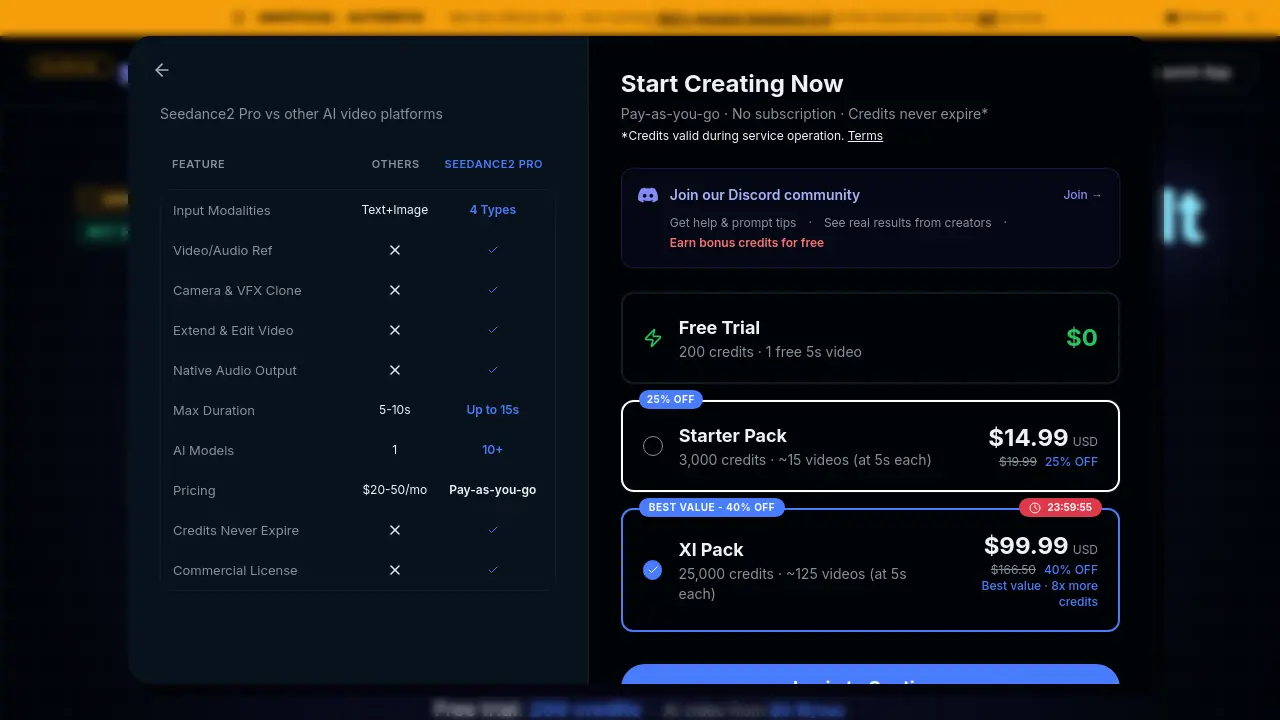
Seedance2 Pro distinguishes itself through its focus on reference-driven control and continuity. Unlike some competitors that may rely primarily on text prompts, it supports up to four input modalities—text, image, video, and audio—in a single generation. Key differentiators include the ability to mimic camera motion from a reference video, extend existing clips seamlessly, and edit specific segments of a video via natural language without full regeneration. The model is also noted for improved long-take coherence and beat-sync capabilities for rhythm-driven content.
What input modes does Seedance2 Pro support?
Seedance2 Pro supports two primary input workflows: First/Last Frame and All-in-One Reference. The First/Last Frame mode is used when providing a starting image and a text prompt. The All-in-One Reference mode allows the combination of multiple files—up to 9 images, 3 videos (total ≤15s), and 3 audio tracks (total ≤15s)—with a text prompt. Users tag each uploaded file with an @ symbol (e.g., @image1) within the prompt to assign specific roles like first frame, camera motion, or stylistic reference.
What resolution and duration can I generate?
The platform generates video clips with durations selectable between 4 and 15 seconds per generation. The specific output resolution is not explicitly stated in the provided context, but the model is designed for cinematic quality. Generation speed is described as under 5 seconds per clip, though actual time may vary based on server load and complexity. The model focuses on producing coherent motion and stable visuals within this short-form format suitable for social media and previsualization.
How does character consistency work across shots?
Character consistency is achieved through the model's ability to lock composition and identity using reference images. By uploading an image of a character or product as a visual reference (tagged with @), the AI attempts to preserve that subject's appearance, outfit, and details across multiple generated clips or when extending a video. This feature is highlighted as a key upgrade for series content, advertisements, and narrative continuity, reducing issues like facial drift or material changes between shots.
Does Seedance2 Pro generate audio automatically?
Seedance2 Pro does not automatically generate a new audio track from scratch. Instead, it offers audio precision features where users can upload a reference audio file (MP3, up to 15s) to guide the video's rhythm, timing, and mood. The model aligns motion, transitions, and action beats to the uploaded audio track. For voice and sound performance, it aims for better tone matching and realism based on the reference, but it does not synthesize original speech or sound effects independently.
Can I edit existing videos with natural language?
Yes, the Video Editing Usability feature allows for targeted modifications of an existing video clip. Users can upload a generated or existing video as a reference input and then use a text prompt with @ tags to describe specific changes, such as altering an action, extending the duration by a few seconds, or adjusting a segment's rhythm. This process regenerates only the specified portion while attempting to maintain continuity with the unedited parts of the original clip.
What camera controls are available?
Camera control is reference-locked, meaning users can upload a reference video to have the model replicate its camera path, lens behavior, and movement rhythm. The system interprets the motion language from the source clip and applies it to the new scene, allowing for complex moves like tracking shots, pans, or zooms. Users can also describe desired camera motion textually, but the reference video method provides more precise and accurate mimicry of professional cinematography techniques.
How fast is video generation?
The context states that generation speed is under 5 seconds per clip. This metric likely refers to the processing time on the server after a request is submitted, not including queue time. Actual user-perceived speed can depend on factors like current platform traffic, the complexity of the prompt, and the number of reference files used. The pay-as-you-go credit system deducts based on the final clip duration at rates starting from $0.20 per second.
Is Seedance2 Pro free to use?
Seedance2 Pro offers a free trial that provides 200 credits upon sign-up, which can be used to generate videos. There is no mandatory subscription; instead, users purchase credit packs (e.g., Starter Pack, XL Pack) on a one-time basis. The free trial credits allow users to test the core AI generation features with a limited initial budget. After exhausting free credits, users must purchase additional credits to continue generating videos.
Can I use generated videos for commercial projects?
Yes, generated videos can be used for commercial projects. The free trial includes a commercial license, and purchased credit packs (Starter and XL) also grant full commercial rights. The generated content comes without a watermark. Users are responsible for ensuring their final use complies with the platform's terms and any applicable laws, particularly regarding content restrictions and model licensing from the upstream provider.
Who is Seedance2 Pro designed for?
The platform is designed for content creators, marketers, filmmakers, and previsualization artists who need short, controlled AI-generated video clips. It suits users creating brand advertisements, music videos, storyboard completions, social media content, and character series where consistency and specific motion control are important. The workflow targets those familiar with director-level terminology and reference-based creation, moving beyond basic text-to-video tools.
Is this an official product?
No, Seedance2 Pro is explicitly stated to be an unofficial third-party platform and not the official website for the Seedance 2.0 model. It provides access by routing requests through a pool of premium subscription accounts held by the platform. The site notes that if the official API becomes publicly available, it will transition to using that API while maintaining affordable access. Users should be aware of the unofficial status and related content policies enforced by the upstream model provider.
What are the content restrictions for video generation?
The upstream AI model enforces strict content restrictions at the model level, not by the Seedance2 Pro site itself. Generation will fail for any non-compliant content. Specifically, all inputs containing real human faces (selfies, portraits, celebrities) are blocked. Violent and NSFW content is also rejected. Users can successfully generate videos using illustrations, anime characters, AI-generated faces, stylized artwork, or non-human subjects. These restrictions are attributed to recent policy tightening due to privacy controversies in China.
How does the credit system work for generating videos?
Video generation consumes credits based on the final clip duration. The base rate starts at $0.20 per second, with potential variations for different models or features. For example, generating a 5-second clip would cost 1,000 credits at that rate. Image generation uses a separate rate (from $0.06 per image, costing 6 credits). Users purchase credit packs (e.g., 3,000 credits for $14.99, 25,000 for $99.99) that never expire as long as the service operates. The free trial provides 200 credits to begin.
What file formats are supported for uploads?
The platform supports standard media formats for its reference inputs. Images should be common formats like JPEG or PNG. Videos must be in standard formats (e.g., MP4) with a total length of no more than 15 seconds when combining up to 3 video references. Audio files should be in MP3 format, with a combined total duration of up to 15 seconds for up to 3 audio tracks. Exact codec specifications are not detailed, but using widely compatible formats is recommended for reliable processing.
How do I extend or edit an existing video clip?
To extend a clip, users upload the original video as a reference, specify the desired additional duration (within the 4-15s total per generation limit), and provide a prompt describing the new action or beat. The model attempts to generate a seamless continuation matching the original's lighting, camera movement, and subject identity. For edits, the existing video is uploaded, and the prompt with @ tags directs which segment or aspect to modify, allowing partial regeneration without redoing the entire clip's context.
What is the relationship between this site and the official Seedance model?
Seedance2 Pro operates as an independent, unofficial service that does not affiliate with the official developers of the Seedance 2.0 model. It facilitates access by utilizing a pool of accounts with premium subscriptions to the official model. The site acts as an intermediary API wrapper, handling user requests and routing them through these accounts. This arrangement allows users to bypass the need for a Chinese phone number or direct registration with the official service, though it remains dependent on the upstream model's availability and policies.
How to use Seedance2 Pro
- Seedance2 Pro is an AI video generation platform that converts multimodal inputs—text, images, video, and audio—into 4–15 second cinematic clips with granular control over motion, style, and continuity.
- Users access the service through the provided URL, creating a free account to receive initial credits for testing text-to-video and image-to-video workflows without subscription commitments.
- Select an input mode: First/Last Frame for basic prompts with a starting image, or All-in-One Reference to combine multiple media types like video and audio references.
- Upload reference files adhering to limits—up to nine images, three videos, and three audio clips—to direct composition, camera movement, and rhythmic elements.
- In the prompt, tag each reference with
@filenameto assign specific roles, such as@image1for a keyframe or@video1for motion mimicry. - Compose a natural language prompt detailing desired actions, camera language, and visual style, seamlessly integrating the
@tags for precise AI interpretation. - Specify clip duration between 4 and 15 seconds, balancing creative requirements with credit consumption for efficient resource management.
- Initiate generation; the system routes requests through aggregated API subscriptions to the Seedance model, typically producing output within seconds.
- Evaluate the generated video for alignment with the prompt and references, assessing factors like character consistency, motion smoothness, and style adherence.
- Employ extension tools to prolong clips or editing functions to alter segments—such as actions or rhythm—without regenerating the entire video.
- Observe content restrictions automatically enforced by the model, which blocks real human faces, violence, and NSFW content at the generation level.
- Implement results in projects like brand advertisements, narrative storyboards, or music videos, leveraging features such as beat sync and emotion acting for professional output.
