
Seedance 2.0 FAQs
Seedance 2.0 transforms images and text into cinematic AI videos, featuring advanced motion synthesis, multi-shot narratives, and 1080p quality.

FAQs of Seedance 2.0
What is Seedance 2?
Seedance 2 is an advanced AI video generation model designed to transform text prompts and images into high-quality, cinematic videos. This technology leverages artificial intelligence to provide exceptional image-to-video conversion, seamless multi-shot narrative sequences, and precise instruction following capabilities for creators and businesses worldwide.
What makes Seedance 2's image-to-video feature special?
Seedance 2's image-to-video capabilities offer superior subject consistency, particularly in preserving facial features across frames. It generates natural and dynamic motion with smooth transitions, avoiding abrupt cuts. The pacing is also intelligently optimized to ensure content changes occur appropriately without awkward endings, enhancing the overall quality.
What aspect ratios and resolutions does Seedance 2 support?
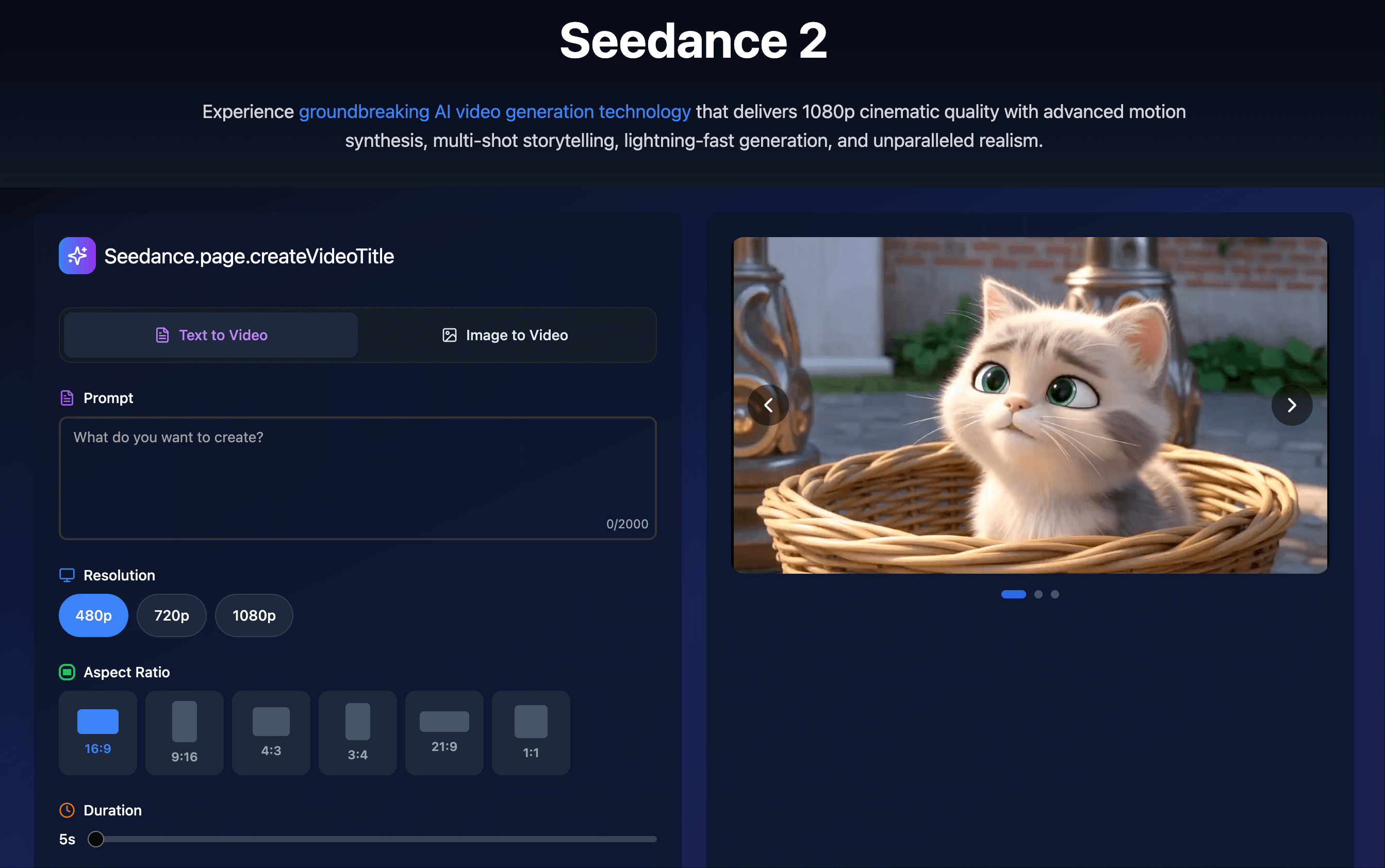
Seedance 2 supports a wide range of aspect ratios including 16:9, 9:16, 4:3, 3:4, 21:9, and 1:1. For image-to-video tasks, it can also automatically adapt to the input image's aspect ratio. The platform supports resolutions of 480p, 720p, and 1080p, and can generate videos from 5 to 12 seconds, delivering production-ready output for diverse platforms.
How precise is Seedance 2's instruction following?
Seedance 2 has undergone extensive training on diverse scenes, subjects, and action behaviors, enabling it to accurately respond to detailed user instructions. It can fluently generate complex video content, including multi-subject interactions, combined actions, and dynamic camera movements, providing creators with comprehensive control over their video vision.
Can Seedance 2 generate different visual styles?
Yes, Seedance 2 is highly versatile in generating various visual styles. It accurately responds to diverse style instructions to meet creative needs, whether it's photorealistic content, artistic styles, or specific aesthetic directions. The model adapts to match your creative vision while maintaining visual consistency throughout the video generation process.
What can be created with Seedance 2's image-to-video feature using two images?
When utilizing two images for Seedance 2's image-to-video generation, the model creates a smooth transition from the first provided image to the second. This functionality offers precise control over both the starting and ending states of the video, ensuring natural motion and consistent visual elements throughout the animated sequence.
How does Seedance 2 ensure user privacy and security?
Seedance 2 prioritizes user privacy and security by storing all uploaded content and generated videos securely with industry-standard encryption. User data remains private and is not shared with third parties. Users retain full ownership of their created content and have the option to delete their data at any time through their account settings.
Are generated videos from Seedance 2 watermarked?
No, all videos generated using Seedance 2 are completely watermark-free. Users can download clean, professional-quality videos without any branding or watermarks, making them immediately ready for use in professional projects, social media campaigns, or personal creative endeavors.
What are the optimal use cases for Seedance 2?
Seedance 2 is ideal for a broad spectrum of users including content creators, filmmakers, marketers, educators, and businesses. It is highly effective for professional advertising, social media content, product demonstrations, educational videos, pre-visualization in filmmaking, real estate tours, music videos, and game cinematics. This AI video generation tool significantly reduces production time and cost.
How does one begin creating videos with Seedance 2?
Getting started with Seedance 2 is straightforward. Users simply sign up for an account, select a suitable plan, and can immediately begin creating videos. This involves either utilizing text-to-video generation by describing the desired scene or employing image-to-video functionality by uploading one or two images to animate static visuals with natural motion and transitions.
How to use Seedance 2.0
Seedance 2.0 is an advanced AI video generation platform designed to transform text prompts and static images into high-quality, cinematic video content. This tool provides features like multi-shot narrative generation, enhanced image-to-video capabilities, and dynamic motion synthesis for various creative and professional applications.
- Navigate to the Seedance 2.0 website and sign in to access the video generation interface.
- Select either "Text to Video" or "Image to Video" based on your desired content creation method for the AI video.
- For "Text to Video," input a detailed prompt (up to 2000 characters) describing your ideal scene, including desired styles or actions.
- For "Image to Video," upload one or two images, which the AI will animate with natural motion and smooth transitions.
- Adjust video parameters by selecting your preferred resolution (480p, 720p, or 1080p) and aspect ratio (e.g., 16:9, 9:16, 1:1).
- Specify the desired video duration, typically ranging from 5 to 12 seconds, to align with platform requirements or project needs.
- Utilize advanced options like "Fix Camera" or "Seed" for greater control over camera movement and video consistency if required.
- Click "Generate" to initiate the AI video creation process; Seedance 2.0 will then synthesize your cinematic video.
- Review the generated video for quality and adherence to your prompt or image inputs, ensuring it meets your expectations.
- Download the watermark-free, production-ready output, which can be immediately used for marketing, social media, or creative projects.
