
Nana Banana AI FAQs
Use natural language to edit photos with Nana Banana AI, featuring AI background removal, style transfers, and commercial rights for professional image editing.

FAQs of Nana Banana AI
Can I try Nana Banana AI Photo Editor for free?
Yes, Nana Banana AI Photo Editor offers a free trial with no credit card required. Users can immediately start editing photos to experience the AI-powered features. Flexible subscription plans are available for individuals, professionals, and teams to access unlimited editing capabilities after the trial period.
How does Nana Banana AI Photo Editor work?
The editor uses advanced machine learning algorithms to interpret natural language editing instructions. Users describe desired changes in plain text, such as 'remove the background' or 'add a vintage filter.' The AI analyzes the request and applies professional-grade edits automatically, functioning like an expert photo editor that understands precise instructions.
What file formats does Nana Banana AI support?
Nana Banana AI Photo Editor supports all major image formats for upload, including JPG, PNG, WebP, GIF, BMP, and TIFF. Users can upload images up to 50MB each. Edited photos can be exported in any required format with customizable quality and resolution settings to suit different use cases.
What AI editing capabilities does Nana Banana offer?
The platform excels at background removal with 99% accuracy, AI-powered style transfers, object removal and replacement, color correction, face enhancement, artistic filters, and batch editing. Unique features include one-click background replacement with AI-generated scenes and intelligent object detection that fills gaps naturally.
Can I use Nana Banana AI edited photos for commercial purposes?
All images edited with Nana Banana AI come with full commercial usage rights. No attribution is required. Users, including freelancers and businesses, can apply edited photos to client work, marketing materials, social media, and any commercial venture. AI-generated elements are unique and royalty-free.
How does Nana Banana AI compare to traditional photo editors?
Unlike traditional editors that require technical skills and extensive learning, Nana Banana AI delivers professional results through simple text commands. Edits that might take over 30 minutes in software like Photoshop are completed in seconds. Many professionals use it for rapid editing before optional fine-tuning in other tools.
What special features does Nana Banana AI Photo Editor have?
Notable features include AI-powered background generation from text descriptions, smart object removal with natural gap filling, style transfer that preserves key details, and an exclusive 'Magic Enhance' that intelligently improves photos based on content type. Batch processing with consistent styling across multiple images is also supported.
How fast is Nana Banana AI Photo Editor?
Processing is extremely fast, with most edits completing in under 5 seconds. Complex operations like style transfers or AI background generation take 10-15 seconds. Batch editing can process 100 photos in minutes rather than hours. Each image is optimized individually for quality without significant speed compromise.
What are the differences between the Nano Banana and Nano Banana Pro models?
Nano Banana provides ultra-fast AI image generation with good quality, ideal for quick tasks. Nano Banana Pro offers high-quality text-to-image and image-to-image generation with additional controls for aspect ratio and resolution, allowing more precise output customization for professional projects requiring specific dimensions.
How do I use reference images in the AI photo editor?
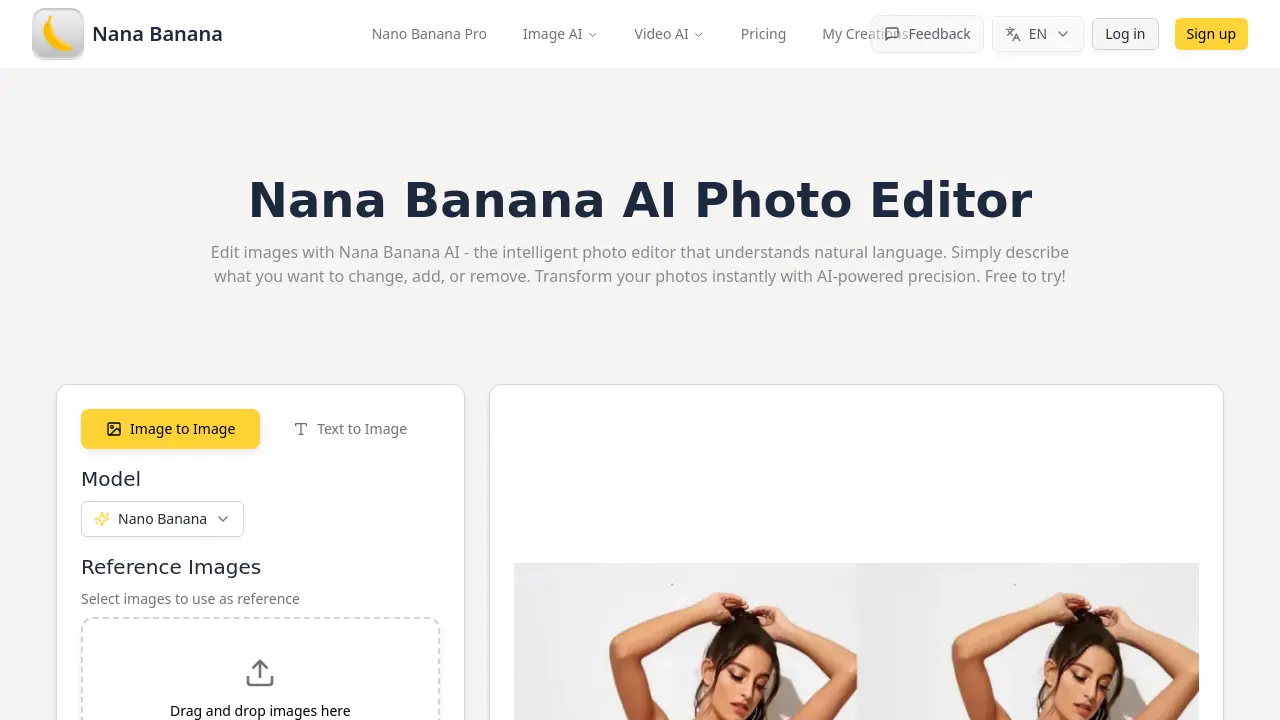
Users can drag and drop reference images into the designated area or click to browse files. Accepted formats include JPEG, PNG, WEBP, and GIF, with a maximum size of 10MB per image. Reference images guide the AI to replicate poses, styles, or elements during generation, enhancing control over the output.
What is the maximum prompt length and are there content guidelines?
The prompt field accommodates up to 3000 characters. Effective prompts should clearly describe the desired changes, additions, or removals in natural language. The system provides example prompts for inspiration, such as detailed scene recreations or specific color adjustments, to help users achieve optimal results.
Can I control the output resolution and aspect ratio?
Yes, particularly when using the Nano Banana Pro model. A dropdown menu offers preset aspect ratios including 1:1, 16:9, 9:16, 4:3, and more, with an 'Auto' option. Resolution can be adjusted within the model's settings, providing flexibility for different display or print requirements.
Does Nana Banana AI support batch processing for multiple images?
Batch processing is available through features like the Batch Color Variation Editor and Multi-Channel Asset Generator. These tools allow users to apply consistent edits or styles across multiple images simultaneously, significantly improving efficiency for tasks such as generating product color variants or creating uniform marketing assets.
What are the credit costs associated with using Nana Banana AI?
The interface indicates that generating images consumes credits, with a display showing remaining credits (e.g., "Credits2"). Specific credit allocation per operation depends on the complexity of the request, such as using reference images or selecting high-quality models. Users can monitor their credit balance within the editor.
How to use Nana Banana AI
- Nana Banana AI is an intelligent photo editor that uses natural language prompts to perform edits like background removal, style transfer, and image generation, with full commercial rights for all outputs.
- Access the editor at nanaimg.io, then upload an image via drag-and-drop or file browser. Supported formats include JPEG, PNG, WEBP, and GIF up to 10MB per file.
- Select an AI model: Nano Banana for ultra-fast generation or Nano Banana Pro for high-quality results with customizable aspect ratio and resolution controls.
- Enter a detailed text prompt describing the desired changes, such as object removal, color adjustments, or style conversions, to guide the AI processing accurately.
- Optionally, upload reference images to influence composition, style, or subject consistency, which is particularly useful for image-to-image transformations.
- Choose an output aspect ratio if needed, then click Generate Now. The system consumes credits, with typical processing times between 5 and 15 seconds.
- Review the generated images. If results are unsatisfactory, refine the prompt, swap reference images, or switch models to improve the outcome.
- Download the final image in JPG, PNG, or other available formats. All edited content includes full commercial rights for business or personal use.
- For multiple images, use the batch processing feature to apply consistent edits across a set, significantly reducing time for large-scale projects.
