
iPurix FAQs
Remove watermarks easily with iPurix, a free AI tool. Fast processing, no login needed. Get clean images instantly. Try iPurix now!

FAQs of iPurix
What is iPurix?
iPurix is an AI-powered tool designed to automatically remove watermarks from images within seconds. It's a useful tool for individuals or professionals seeking to remove watermarks for various personal or commercial applications, offering a quick and efficient solution.
Is iPurix free to use?
Yes, iPurix offers a free option that allows users to remove watermarks from images for personal use. For users with commercial needs or those who require bulk processing capabilities, iPurix provides subscription plans that enable watermark removal from multiple images.
How do I remove watermarks for free using iPurix?
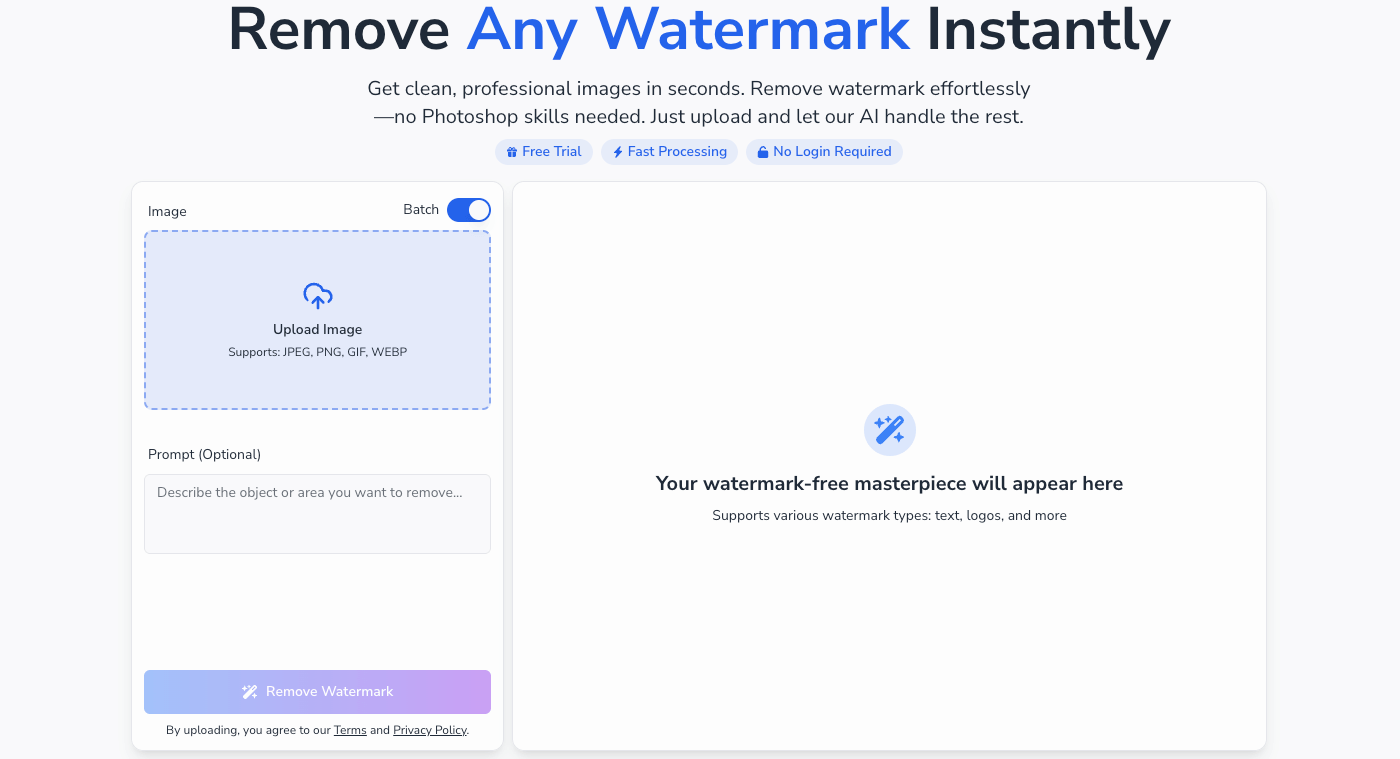
Removing watermarks with iPurix is a straightforward process. First, upload the image or paste its URL into the designated area. Next, iPurix's AI automatically detects and removes the watermark. Finally, download the new, watermark-free image to your device.
What is the best online tool to remove a watermark?
iPurix is often regarded as one of the best free online tools available for watermark removal. It stands out due to its speed, ease of use, and the fact that it doesn't require any specialized technical skills to achieve a clean, watermark-free image.
What image formats does iPurix support?
iPurix supports a range of common image formats, including PNG, JPG, JPEG, and WEBP. This ensures compatibility with a wide variety of images. The maximum image size that can be processed is 10 MB.
Is it safe to upload my files to remove watermarks?
Yes, iPurix prioritizes user security. The platform employs end-to-end encryption to protect uploaded files, ensuring that your data remains secure and private throughout the watermark removal process, providing peace of mind while you remove watermarks.
Can iPurix remove watermarks from any image?
While iPurix is capable of removing watermarks from most images, it's crucial to respect copyright laws. Users are strongly advised against using iPurix on copyrighted material without proper authorization. The tool is intended to be helpful, not to facilitate copyright infringement when you remove watermarks.
Is removing watermarks legally permissible?
The tool should only be utilized by users who possess the legal rights to the images they are processing. For example, photographers who have lost original files or users who have purchased images with watermarks. Removing watermarks from copyrighted images without permission may violate laws, and by using iPurix to remove watermarks, users acknowledge that they have the rights to the image and accept all legal responsibility.
How well does iPurix work to remove watermarks?
iPurix utilizes advanced AI to meticulously reconstruct the area behind the watermark when you remove watermark. This sophisticated reconstruction ensures a clean, high-quality result, making it appear as though the watermark was never present. The effectiveness results in professional-looking images.
Can iPurix remove different types of watermarks, such as text or logos?
Yes, iPurix is designed to handle various types of watermarks. Whether it's a text overlay, a complex logo, or a repeating pattern, the tool's technology is versatile enough to effectively remove the watermark. The process is optimized for all common watermark types.
Can I remove watermarks from multiple images at once using iPurix?
The free service allows users to remove watermarks from images one at a time. For users who require batch processing capabilities, iPurix offers paid plans with a feature that allows watermarks to be removed from multiple photos simultaneously, saving time and effort.
Can I remove watermarks using iPurix on my mobile device?
Yes, iPurix is fully optimized for use on mobile devices. Users can access the website through their smartphone or tablet's browser to remove watermarks without the need to install any additional applications. The experience is consistent across all platforms.
What is the turnaround time for customer support inquiries?
iPurix aims to respond to all customer support inquiries submitted to support@remove-watermark.org as quickly as possible. While the exact response time may vary depending on the volume of inquiries, the support team strives to provide timely and helpful assistance.
How to use iPurix
iPurix is an AI-powered tool designed to remove watermarks from images quickly and easily. It supports various image formats and offers both free and paid plans for individual and batch processing.
Begin by uploading your image directly or pasting the image URL into the designated area. iPurix supports JPEG, PNG, GIF, and WEBP formats, ensuring compatibility.
Optionally, provide a prompt describing the watermark to aid the AI. While not required, a prompt can improve the accuracy of the watermark removal.
Click the "Remove Watermark" button. The AI will analyze the image and automatically detect and remove the watermark.
Review the processed image displayed in the "Your watermark-free masterpiece will appear here" section. Evaluate the quality of the watermark removal.
Download the clean image. iPurix maintains the original resolution, providing a high-quality, watermark-free image for your use.
Consider upgrading to a paid plan for batch processing or commercial use. Paid plans offer more credits, faster processing, and additional features like unlimited cloud storage.
For free users, be mindful of the 2 credit limit. For professional use, subscriptions offer cost-effective solutions to remove watermark from multiple images.
Consult the FAQ section for common questions regarding iPurix functionality, like supported formats, safety measures, and effectiveness in removing watermarks.
Understand the terms of service and privacy policy, especially regarding copyright. iPurix emphasizes responsible use, urging users not to remove watermark from copyrighted material without permission.
