
Awesome Skills: Claude, Codex, and ChatGPT Agent Skills
| Added on: | Jan 16, 2026 |
| Monthly Visits: | 212.48K |
| Social & Email: | -- |

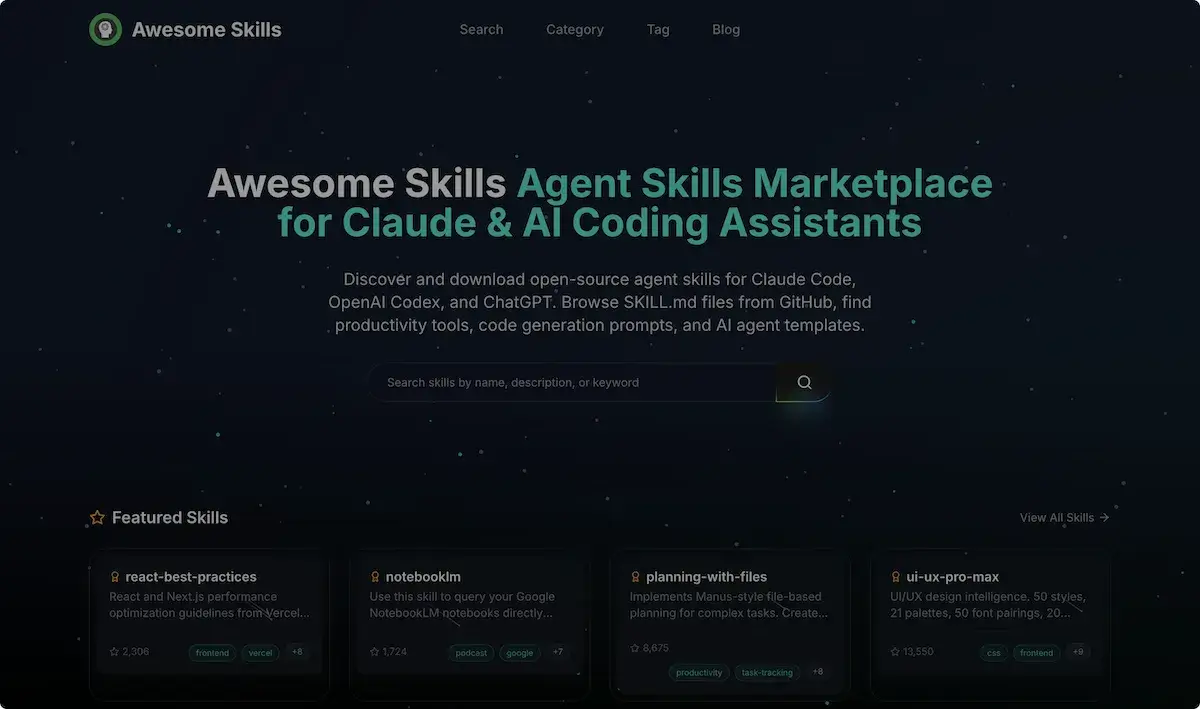
What is Awesome Skills
Awesome Skills is an open‑source marketplace that hosts agent skills for Claude, OpenAI Codex, and ChatGPT. Each skill is defined in a SKILL.md file and can be browsed by category, tag, or featured status. Users can search GitHub repositories, download ready‑to‑use prompts, and integrate skills directly into Claude Code or other AI coding assistants. The platform includes productivity tools, code‑generation templates, performance‑optimization guidelines, and domain‑specific utilities such as chemical‑research databases and LaTeX venue templates. The collection also offers graphic‑design utilities, PDF‑generation helpers, and audit tools for code quality. By leveraging the marketplace, developers can extend AI assistants with reusable, community‑maintained functionality, improving code quality, reducing hallucinations, and accelerating project workflows. The site also offers tutorials, FAQs, and a newsletter for continuous learning.
How does Awesome Skills work
Awesome Skills operates as a marketplace that hosts agent skills for Claude Code, OpenAI Codex, and ChatGPT. Users browse SKILL.md repositories on GitHub, filter by category or tag, and download skills that extend coding assistants with specialized prompts, browser automation, or domain‑specific data access. Each skill is a module that the assistant invokes via a tool interface, enabling tasks such as React performance optimization, notebook querying, or chemical database lookup. The platform offers graphics, PDF generation, and audit, and supports skill creation, sharing, and version control, making it a resource for developers to learn and deploy awesome skills in coding workflows.
Benefits of Awesome Skills
Awesome Skills is an open‑source marketplace that hosts agent skills for Claude, OpenAI Codex, and ChatGPT. Users can search, filter by category or tag, and download SKILL.md files directly from GitHub. The platform offers productivity tools, code‑generation prompts, and AI‑agent templates that integrate seamlessly with coding assistants. Features include performance‑optimization guidelines for React/Next.js, notebook querying, file‑based planning, and UI/UX design intelligence. By providing ready‑to‑use skills, developers can extend assistant capabilities without writing boilerplate code. The community shares tutorials and FAQs to keep users updated. These skills provide a catalog of tools to learn and apply.
Pros and Cons of Awesome Skills
Pros
- Open-source skills on GitHub.
- Supports Claude and other AI assistants.
- Extensive category and tag filtering.
- Frequent updates and community contributions.
- Free access to a wide skill library.
Cons
- Skill quality varies across contributors.
- Manual installation required for some skills.
- Limited documentation for certain skills.
- No built-in customer support.
- Not all skills support all assistants.
Core Features of Awesome Skills
Skill Discovery and Browsing
Allows users to search, filter, and view agent skills by category, tag, or featured status, facilitating quick identification of relevant tools.
Skill Documentation and Metadata
Provides detailed SKILL.md files and metadata for each skill, enabling users to understand functionality, prerequisites, and usage before installation.
Skill Installation and Integration
Enables seamless installation of selected skills into Claude Code, OpenAI Codex, or ChatGPT environments, ensuring compatibility and easy setup.
Skill Invocation and Execution
Supports invoking skills within conversations, automatically handling tool calls and clarifying questions to streamline workflow.
Skill Creation and Sharing
Offers tools and guidelines for developers to author new skills, publish them to the marketplace, and share with the community.
Community Updates and Support
Delivers blog posts, FAQs, and updates on new skills, fostering user engagement and knowledge sharing.
Use Cases of Awesome Skills
- AI Developers: Install awesome skills claude from GitHub to extend Claude Code with specialized agent functionalities.
- Resume Writers: Incorporate resume awesome skills to highlight expertise and improve job application effectiveness.
- Data Scientists: Use awesome skills to learn advanced data processing and visualization techniques for large datasets.
- Designers: Leverage awesome skills graphics to create polished UI/UX components and responsive layouts.
- Sports Analysts: Apply awesome skills in football to model player performance and generate tactical insights.
FAQs of Awesome Skills
What are AI Agent Skills and how do they work?
AI Agent Skills are modular, reusable code snippets that extend the capabilities of AI coding assistants such as Claude Code, OpenAI Codex, and ChatGPT. Each skill is defined in a SKILL.md file, which specifies metadata, required tools, and the logic that the assistant executes. When a user invokes a skill, the assistant loads the skill’s code, runs the defined functions, and returns the result, enabling tasks like code generation, data analysis, or workflow automation without manual prompt engineering.
What's inside a SKILL.md file?
A SKILL.md file contains structured information that the AI assistant uses to load and run a skill. Typical sections include a title, description, author, version, required tools, and a list of functions or actions. It may also reference external resources such as GitHub repositories, APIs, or data files. The file follows a YAML or Markdown format that the assistant parses to understand how to invoke the skill and what dependencies to install.
Which AI coding assistants support Agent Skills?
Agent Skills are supported by several popular AI coding assistants, including Claude Code, OpenAI Codex, and ChatGPT. The Awesome Skills marketplace is designed to be compatible with these platforms, allowing users to browse, install, and run skills directly within their preferred assistant. Compatibility is maintained through standardized skill definitions and tool invocation protocols.
How do I install a skill for Claude Code?
To install a skill for Claude Code, navigate to the Awesome Skills website and locate the desired skill. Click the “Install” button, which will add the skill’s repository to your Claude Code environment. The assistant automatically pulls the SKILL.md file, installs any listed dependencies, and registers the skill for use. You can then invoke the skill by referencing its name in a prompt or using the skill invocation command.
What types of skills are available on Awesome Skills?
Awesome Skills hosts a diverse range of skill categories, including developer tools, data science & ML, productivity & workflow, web development, testing & QA, and more. Skills cover tasks such as code optimization, UI/UX design, database queries, scientific computing, and even domain‑specific workflows like medical treatment planning or patent searches. Each skill is open‑source and can be customized or extended by the community.
Are all skills on Awesome Skills free to use?
Yes, all skills listed on Awesome Skills are open‑source and free to use. They are distributed under permissive licenses such as MIT or Apache 2.0, allowing users to modify, redistribute, or incorporate them into commercial projects without licensing fees. The marketplace encourages community contributions and transparency.
How do I create and share my own skill?
Creating a skill involves writing a SKILL.md file that defines the skill’s metadata and functions, then hosting the code on a public GitHub repository. Once the repository is ready, you can submit it to Awesome Skills via the “Submit a Skill” form. The team reviews the submission for quality and compatibility before publishing it to the marketplace, where it becomes available to all users.
What's the difference between skills and prompts?
Skills are executable code modules that perform specific tasks, while prompts are textual instructions that guide an AI model’s behavior. A skill can be invoked by a prompt, but it encapsulates logic, dependencies, and state that a plain prompt cannot. Skills enable repeatable, versioned, and shareable functionality, whereas prompts are transient and rely solely on the model’s internal knowledge.
How can I test a skill before publishing it on Awesome Skills?
Before publishing, clone the skill’s GitHub repository locally and run the provided test scripts or unit tests. Use the assistant’s local development mode to invoke the skill with sample inputs, verifying that outputs match expectations. Additionally, run linting and dependency checks to ensure compatibility with the target AI assistant’s runtime environment.
What licensing options are available for skills hosted on Awesome Skills?
Skills on Awesome Skills are typically released under permissive open‑source licenses such as MIT, Apache 2.0, or BSD. Contributors can choose a license that aligns with their project’s goals. The marketplace encourages clear licensing to facilitate reuse, modification, and commercial deployment without legal ambiguity.
Does Awesome Skills provide version control or update notifications for skills?
Yes, each skill’s GitHub repository tracks version history through tags and commits. Awesome Skills automatically monitors repository updates and displays the latest version number on the skill’s page. Users can subscribe to update notifications or use the assistant’s “Check for Updates” command to ensure they are running the most recent skill version.
Can I use Awesome Skills with other AI assistants besides Claude Code?
While Awesome Skills is optimized for Claude Code, the skill format is designed to be platform‑agnostic. Many skills can be adapted for use with OpenAI Codex, ChatGPT, or other assistants that support external tool invocation. Users may need to adjust the skill’s metadata or dependency declarations to match the target assistant’s environment.
How does Awesome Skills handle privacy and data security for skill execution?
Skills run in the user’s local or cloud environment, meaning data processed by a skill remains within the user’s control. The marketplace does not store or transmit user data. However, skills that access external APIs or services must adhere to the privacy policies of those services. Users should review each skill’s documentation for data handling practices before deployment.
How to use Awesome Skills
- The Awesome Skills platform serves as an agent skills marketplace for Claude and AI coding assistants, offering open-source SKILL.md files that enhance productivity, code generation, and AI templates for learning.
- Navigate to https://awesomeskill.ai/, locate the search bar, and type a skill name such as 'react-best-practices' to begin exploration and discover awesome skills.
- Use category filters like 'Developer Tools' or tags such as 'frontend' to narrow results; the interface displays thumbnails and short summaries for each skill.
- Click a skill card to open its detail page; a screenshot of the SKILL.md preview appears, showing code snippets and usage instructions.
- Press the 'Add to Claude' button; a modal confirms installation, requesting permission to access your Claude Code workspace and click 'Install' to complete the process.
- Open Claude Code, type the skill name in the prompt, and the assistant will automatically invoke the installed skill for awesome skills claude, displaying the generated output.
- Review the returned code or UI components; compare against project requirements, ensuring syntax correctness and adherence to best practices highlighted in the skill.
- Interpret results by checking for performance metrics, error messages, and documentation links; use these insights to refine code quality and project efficiency, learning new skills.
- If adjustments are needed, modify skill parameters via the skill configuration panel, re-run the skill, and iterate until output meets objectives.
- Document usage in a README, share the skill on GitHub, and contribute improvements back to the Awesome Skills community for broader benefit.
Awesome Skills Website Traffic Analysis
Latest traffic information
- Monthly Visits212.48K
- Bounce Rate46.99%
- Pages Per Visit2.28
- Visit Duration00:00:47
- Global Rank203.75K
- Country/Region Ranking250.48K
Top Keywords
| Keyword | Traffic | Volume | Cost Per Click |
|---|---|---|---|
| awesome skills | 1.17K | 2.04K | -- |
| grill me | 610 | 72.62K | $2.66 |
| java server diagnosis skill | 600 | 640 | -- |
| skill documentation design | 580 | 860 | -- |
| relationship therapist skill claude | 540 | 570 | -- |
Top Regions
| Region | Percentage |
|---|---|
| United States | 14.56% |
| India | 5.31% |
| Brazil | 4.57% |
| Vietnam | 4.04% |
| Germany | 3.6% |
Awesome Skills Alternatives
SeedRouter puts image, video, language and audio models from OpenAI, Google and Anthropic behind one key, billing per request and never for failed calls.
Open-source AI coworker for Slack and Lark that runs Claude Code, Codex or Pi on your own machine with the plan or API key you already pay for.
Wery is a virtual AI studio that routes one goal to specialist agents for video, images, music and documents, keeping characters and project assets consistent.

Relay App turns plain-language instructions into AI workflows that connect 200+ apps, run reliable automations, and pause for human approval.
AtAt runs Claude Code, Codex, or local models in the text field you are typing in, no app-switching. It adds TabTab autocomplete, screenshots, and clipboard history.
Play HT is a free AI voice generator that turns text into speech with 200+ public voices, streams previews in the browser, and exports MP3 files.
Dash is an AI teammate in Slack and Microsoft Teams that connects 3,000+ tools, automates workflows and completes tasks in your channel.
Jev is TypeSafe AI's System One model that returns typed decisions with calibrated confidence for automation. Fast, cheap, zero hallucinations.
Use GPT, Claude, Gemini and Grok through one OpenAI-compatible API. Compare model rates, create a key, and make your first request in minutes.
Git-native task management for AI coding agents: track intent, status, blockers, dependencies, history, and commit evidence in Git.
SJolt is an AI model API platform aggregating top image, video, and audio generation models behind one unified request flow for developers and teams.
Tokenhot is a unified LLM API gateway delivering OpenAI, Claude, Gemini and DeepSeek models through a single endpoint, cutting API costs by up to 90%.