
Cowork AI Leaderboard FAQs
Cowork AI Leaderboard is a web platform that lets users compare AI coworker tools, evaluating file access, terminal execution, and multi‑model support.

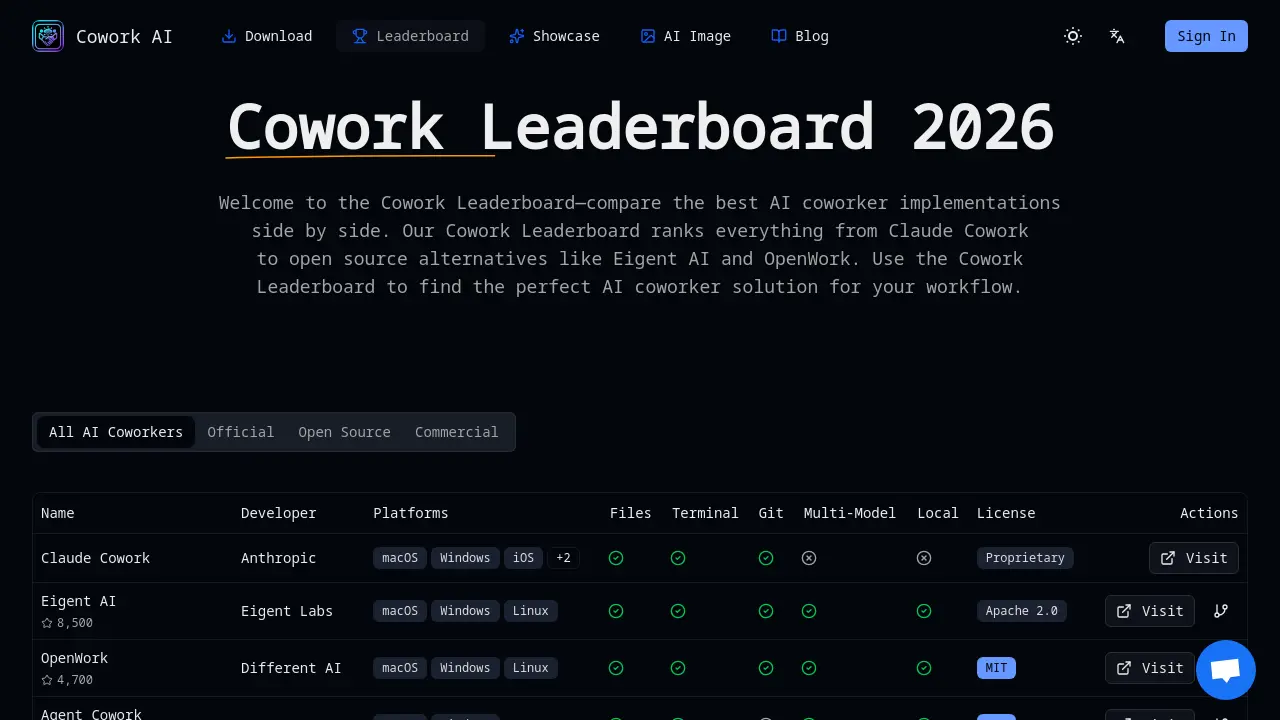
FAQs of Cowork AI Leaderboard
What is Claude Cowork and how does the Cowork Leaderboard rank it?
Claude Cowork is a proprietary AI coworker developed by Anthropic that integrates Claude’s conversational model with file system and terminal access. The Cowork Leaderboard ranks it based on its comprehensive feature set, platform coverage, and user reviews, placing it near the top for polished, cross‑platform performance.
Which AI coworker in the Cowork Leaderboard is best for developers?
For developers seeking robust code‑editing, debugging, and automation, Claude Cowork and Eigent AI are top choices. Claude Cowork offers polished UI and multi‑platform support, while Eigent AI provides open‑source flexibility and local deployment, both scoring high on developer‑centric criteria.
Are open source options in the Cowork Leaderboard as capable as Claude Cowork?
Open‑source options like Eigent AI and OpenWork match Claude Cowork in many core functions—file manipulation, terminal execution, and multi‑model support—but may lack some polish or dedicated support. Their community‑driven nature allows customization that proprietary solutions cannot offer.
Can I run a Cowork Leaderboard AI coworker completely locally for privacy?
Yes. Several leaderboard entries, such as Eigent AI and OpenWork, support local deployment, enabling users to run the AI coworker entirely on their own infrastructure without sending data to external servers, which is ideal for privacy‑sensitive projects.
What does multi‑model support mean in the Cowork Leaderboard?
Multi‑model support refers to an AI coworker’s ability to switch between different language models—Claude, GPT‑4, Gemini, or local LLMs—within the same interface. This flexibility lets users choose the best model for a task and manage cost or performance trade‑offs.
How often is the Cowork Leaderboard updated?
The Cowork Leaderboard is refreshed monthly, with the latest update recorded on 2026‑01‑21. Updates include new releases, feature changes, and community feedback to keep rankings current and relevant.
Can I contribute to open source projects in the Cowork Leaderboard?
Yes. Projects such as Eigent AI and OpenWork are hosted on GitHub, allowing developers to submit pull requests, report issues, or add new features. Contributions are encouraged to improve functionality and expand model support.
What's the difference between a Cowork Leaderboard AI coworker and a coding assistant?
An AI coworker actively accesses files, runs terminal commands, and automates workflows, whereas a coding assistant typically answers questions or suggests snippets without direct system interaction. Cowork Leaderboard entries emphasize active participation in development tasks.
How does the Cowork Leaderboard evaluate AI coworker solutions?
The leaderboard assesses solutions across multiple dimensions: file system access, terminal execution, autonomous task completion, multi‑model flexibility, platform support, and licensing. Each criterion is weighted to reflect its importance to typical users.
What criteria are used to rank AI coworkers on the leaderboard?
Ranking criteria include feature completeness, ease of installation, performance, community activity, and privacy options. Scores are aggregated from user reviews, automated tests, and expert evaluations to produce a transparent ranking.
Are there any licensing restrictions for using open source AI coworkers from the leaderboard?
Open‑source entries such as Eigent AI (Apache 2.0) and OpenWork (MIT) are permissively licensed, allowing commercial use, modification, and redistribution. Proprietary options like Claude Cowork require a commercial license for enterprise deployment.
Can I integrate a leaderboard‑ranked AI coworker into my existing development environment?
Yes. Most leaderboard entries provide command‑line interfaces, APIs, or desktop applications that can be integrated into IDEs, CI/CD pipelines, or custom scripts, enabling seamless workflow automation.
How does the leaderboard handle updates to AI models or software versions?
When a new model or software version is released, the leaderboard re‑tests the affected solution, updates its feature score, and adjusts the overall ranking accordingly. Users are notified of significant changes via the website’s update log.
How to use Cowork AI Leaderboard
- The Cowork AI Leaderboard aggregates AI coworker implementations, ranking them by features such as file access, terminal execution, multi‑model support, and deployment options.
- Navigate to https://coworkai.app/cowork-leaderboard, view the table, filter by platform or license, and click the “Visit” link for each entry to explore detailed documentation.
- Screenshot: Leaderboard table shows columns for Name, Developer, Platforms, Files, Terminal, Git, Multi‑Model, Local, License, Actions, and quick action icons.
- Compare scores by reading the “Files” and “Terminal” columns; higher values indicate broader file system and command execution capabilities for development workflows.
- Select an AI coworker that matches platform, license, and model preferences, then download or clone the repository to integrate into your project.
- The Cowork AI Leaderboard provides a searchable, up‑to‑date list of coworker tools, making it a reliable resource for students researching AI coworker solutions.
