
RewriteBar
RewriteBar - Improve your writing in any macOS app with AI assistance
| Added on: | Jul 17, 2024 |
| Monthly Visits: | 5.45K |
| Social & Email: | -- |

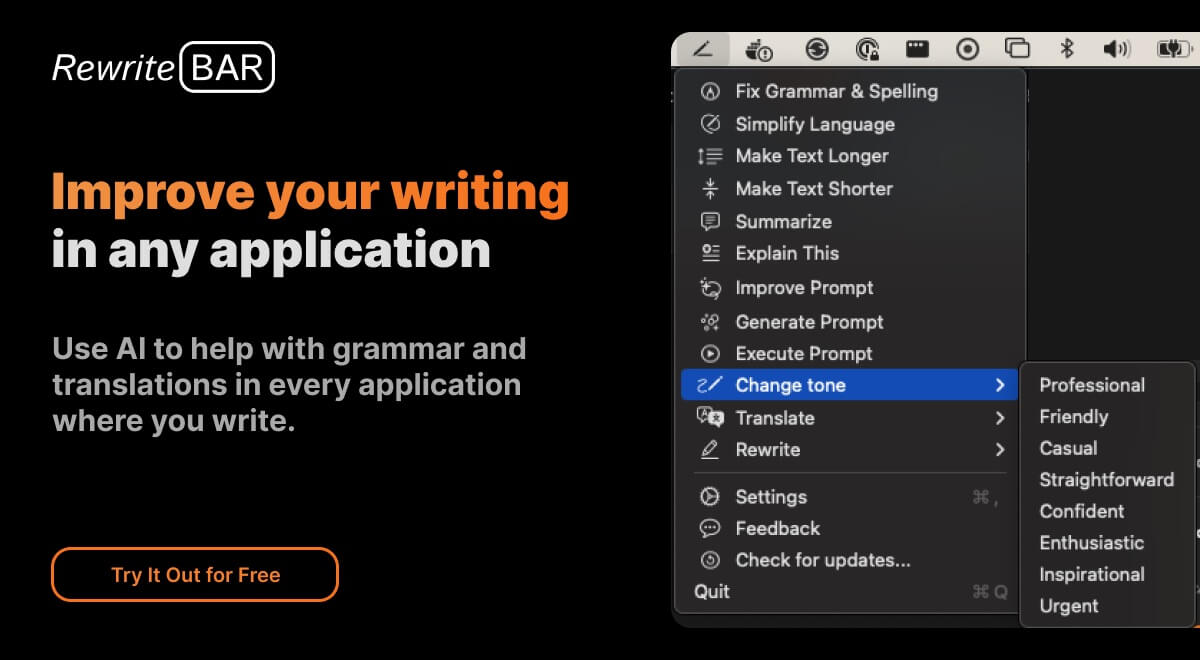
What is RewriteBar
RewriteBar is an AI-powered writing assistant for macOS that lives in your menubar. It's designed for anyone who wants to improve their writing, whether it's for work, school, or personal projects. RewriteBar can help you correct grammar mistakes, change writing styles, and even translate text, all within any application you're using. It's a pretty cool tool, and it's much cheaper and simpler to use than other AI writing assistants out there. Think of it as your friend who's always ready to give your writing a quick polish.
How does RewriteBar work
RewriteBar operates as an AI-powered writing assistant for macOS applications. It leverages the accessibility permissions to retrieve selected text, sends it to a large language model like OpenAI, Anthropic or other providers, for correction or rewriting, and then replaces the original text with the AI-processed version. Users can access features like grammar correction, style adjustment, and translation directly within various applications. RewriteBar aims to provide a plagiarism free experience and supports custom actions and prompt engineering for ChatGPT, enhancing overall writing productivity. The rewrite article tool offers both subscription and one-time license options.
Benefits of RewriteBar
RewriteBar enhances writing across macOS applications using AI. Correct grammar, adjust tone, or translate text without switching apps. The rewrite article ai tool integrates seamlessly with Slack, Notion, and more, accessed via simple keyboard shortcuts. Rewrite article plagiarism free by leveraging advanced AI models. Simplify complex writing or enhance ChatGPT prompts for better AI results. Rewritebar offers custom actions and supports multiple AI providers. Students can access a free trial, making it an accessible rewrite article ai free option to improve their writing.
Pros and Cons of RewriteBar
Pros
- Works in any macOS application.
- Offers grammar and spelling correction.
- Can simplify complex writing.
- Allows adjustment of writing tone.
- Translates text instantly.
Cons
- Requires macOS 13.0 or later.
- Limited free trial.
- One-time license needs OpenAI API key.
- No Windows version available.
- Requires accessibility permissions.
Core Features of RewriteBar
Grammar Correction
RewriteBar can help you correct grammar mistakes in any macOS application.
Style Changing
You can use RewriteBar to change your writing style. For example, you can make your writing more formal or informal, or you can make it more concise.
Text Translation
RewriteBar can translate text between different languages.
AI-Powered Writing Assistance
RewriteBar uses AI to help you improve your writing. You can use RewriteBar to get suggestions for how to improve your writing, or you can use it to generate text for you.
Works In Any Application
You can use RewriteBar in any macOS application. This includes apps like Pages, TextEdit, and even Slack.
Cheaper And Simpler To Use
RewriteBar is cheaper and simpler to use than other AI writing assistants.
Join Other Makers and Creators
RewriteBar is used by makers and creators around the world. It can help you take your writing to the next level.
Use Cases of RewriteBar
- Bloggers: Use RewriteBar to rewrite articles and improve content, ensuring articles are plagiarism free with AI assistance.
- Students: Employ the rewrite article AI tool to refine academic papers and essays for enhanced clarity.
- Non-native Speakers: Utilize RewriteBar to rewrite text and improve communication in English within any macOS application.
- Developers: Improve ChatGPT prompts within Xcode using RewriteBar to generate better AI responses directly in the IDE.
- Marketers: Adjust writing tone for social media posts using RewriteBar's AI to rewrite text for increased engagement.
FAQs of RewriteBar
What is RewriteBar?
RewriteBar is an AI-powered writing assistant that lives in your macOS menubar. It helps you improve your writing in any app by quickly correcting grammar mistakes, changing writing styles, or translating text.
How do I use RewriteBar?
You can use RewriteBar in any application by simply selecting the text you want to edit and then clicking on the RewriteBar icon in your menubar. From there, you can choose from a variety of AI-powered features, such as grammar correction, style changes, and translation.
What are the benefits of using RewriteBar?
RewriteBar can help you:
- Write more clearly and effectively
- Save time by avoiding the need to manually correct grammar errors
- Create different versions of your writing for different audiences
- Translate text into multiple languages
What makes RewriteBar different from other AI writing tools?
RewriteBar is designed to be simple and affordable. It’s cheaper than many other AI writing tools, and it’s easy to use. You don't need to pay for a subscription to use all of its features.
Who is RewriteBar for?
RewriteBar is for anyone who wants to improve their writing. Whether you're a student, a writer, a professional, or just someone who wants to write more effectively, RewriteBar can help you.
Where can I learn more about RewriteBar?
You can find more information about RewriteBar on the official website. You can also follow RewriteBar on Twitter for updates and news.
How to use RewriteBar
RewriteBar is a macOS application designed to improve writing across all applications using AI. It helps with grammar, style adjustments, translation, and custom actions.
Download RewriteBar from the official website, rewritebar.com, ensuring compatibility with macOS 13.0 (Ventura) or later and your Mac's chip (Intel or Apple Silicon).
Install the application, then grant the necessary accessibility permissions in macOS settings so RewriteBar can interact with other applications.
Select the text you want to rewrite within any application (e.g., Slack, Word, Chrome). Use the defined keyboard shortcut to activate RewriteBar's command menu.
Choose from the available actions, such as "Fix Grammar," "Simplify Writing," or "Translate Text," or create a custom action to rewrite article content.
Review the rewritten text provided by RewriteBar, utilizing AI models from providers like OpenAI, Anthropic, or using local models via Ollama.
If using the one-time license, configure your OpenAI API key within RewriteBar's settings to enable AI functionalities for plagiarism free rewritten articles.
Adjust RewriteBar settings to personalize the experience. Customize keyboard shortcuts, enable/disable commands, and arrange the menu bar to fit your workflow.
Utilize RewriteBar for various use cases: refining ChatGPT prompts, creating engaging social media posts, or translating text with its rewrite article AI features.
Evaluate the rewritten article against plagiarism detectors; RewriteBar assists in creating unique content and can help to rewrite article ai detector bypass issues.
Choose between subscription or one-time payment options. Consider the free trial with limited requests to assess RewriteBar's capabilities and rewrite article ai functionality.
RewriteBar Website Traffic Analysis
Latest traffic information
- Monthly Visits5.45K
- Bounce Rate41.87%
- Pages Per Visit1.56
- Visit Duration00:00:09
- Global Rank3.52M
- Country/Region Ranking1.6M
Visits Over Time
Top Keywords
| Keyword | Traffic | Volume | Cost Per Click |
|---|---|---|---|
| normal test to different tone text | 120 | 130 | -- |
| rewritebar | 50 | 60 | -- |
| rewritebar presonal | 50 | 50 | -- |
| remove quotation and commas ai | 40 | 470 | -- |
| shorten this text without cutting any details not blocked by securly | 20 | 370 | -- |
Top Regions
| Region | Percentage |
|---|---|
| United States | 59.71% |
| Brazil | 14.59% |
| India | 12.71% |
| Germany | 8.57% |
| Canada | 4.42% |
