
FineVoice
FineVoice Text to Speech: Realistic AI Voices Online

What is FineVoice
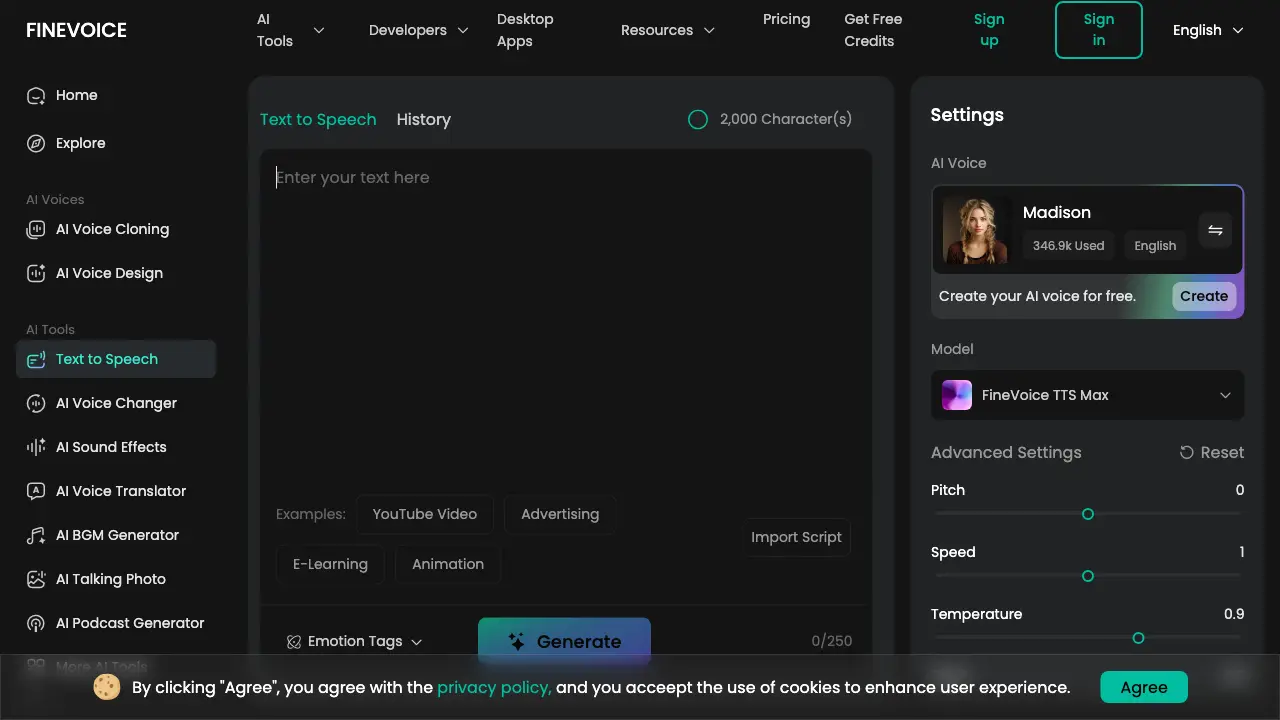
FineVoice is an AI-powered text-to-speech (TTS) platform that converts written content into natural-sounding, expressive audio. It supports over 154 languages and accents, providing access to a large library of AI voices. Key features include emotion tags (such as happy, sad, or whispering), adjustable pitch, speed, and vocal effects, allowing for detailed customization of tone and delivery. The TTS Max model offers advanced control for context-aware speech with nuanced emotional expression. The tool serves diverse use cases, including audiobook production, video voiceovers, e-learning modules, and marketing content. Developers can utilize the FineVoice API for integration into custom applications. With support for file imports like .txt and .docx, the platform streamlines workflow for content creators, educators, and businesses requiring efficient, high-quality voice synthesis.
How does FineVoice work
FineVoice Text to Speech operates as an AI-powered speech synthesis system that converts written text into natural, expressive audio. Users input text directly or import files such as .txt, .docx, or .srt, then select a voice from a library of over 1,500 AI models across 154 languages. The platform utilizes models like FineVoice TTS Max, which supports emotion tags (e.g., happy, whispering) and adjustable parameters—pitch, speed, temperature, and Top P—to finely control delivery. For developers, a RESTful API allows integration, using JSON payloads to specify voice, language, and speech parameters. This architecture enables dynamic, context-aware voice generation for applications ranging from content creation to accessibility solutions.
Benefits of FineVoice
FineVoice's text-to-speech tool uses AI to generate expressive audio with emotion tags across 154 languages. It offers 1500+ voice options and customizable parameters (pitch, speed, temperature) for tailored output in scenarios like audiobooks, e-learning, and marketing. Fast processing, studio-quality results, and support for .txt/.docx/.srt files improve efficiency. Security features include encryption and user data control, ensuring safe usage for diverse projects. The service provides a versatile, reliable solution for converting written content into natural-sounding speech.
Pros and Cons of FineVoice
Pros
- Supports 154 languages with 1500+ AI voices.
- Detailed emotion and vocalization tag control.
- Fast conversion producing studio-quality audio.
- Accepts .txt, .docx, and .srt file imports.
- Provides a developer-friendly API for integration.
Cons
- Pronunciation can be inaccurate for complex terms.
- Voice style diversity feels limited to some.
- Advanced customization requires a paid subscription.
- Output quality may vary with certain accents.
Core Features of FineVoice
Emotion-Controlled Text-to-Speech
Generates lifelike speech with adjustable emotion tags (e.g., happy, sad), style, and vocalizations for expressive audio output suitable for storytelling and branding.
Multilingual Speech Synthesis
Converts text to speech across 154 languages and accents, enabling content localization and global communication with accurate pronunciation and diverse voice models.
Customizable Voice Parameters
Allows fine-tuning of pitch, speed, temperature, and intensity to tailor voice output for specific project needs, from authoritative narration to gentle delivery.
Flexible Script Import
Supports direct input of text or importing .txt, .docx, and .srt files, streamlining workflow for users with pre-written scripts or existing content.
Developer API Integration
Provides a scalable, secure API for integrating FineVoice's TTS and voice cloning capabilities into custom applications, platforms, and enterprise workflows.
Data Security and Privacy
Employs TLS/AES-256 encryption and strict data handling protocols to protect user scripts and generated audio, ensuring confidentiality and user control over assets.
Use Cases of FineVoice
- Audiobook Producers: Generate immersive narration with emotion-controlled text-to-speech for engaging audiobook productions.
- E-learning Developers: Convert course materials to multilingual audio using FineVoice's accent-accurate TTS for educational content.
- Marketing Teams: Create professional ad voiceovers with customizable AI voices and studio-quality text-to-speech synthesis.
- Accessibility Coordinators: Transform documents into natural-sounding audio for visually impaired users via advanced speech generation.
- Software Developers: Integrate FineVoice's TTS API to add scalable, fine-tuned voice capabilities to applications.
FAQs of FineVoice
What is text to speech (TTS) and how does it work?
Text-to-speech (TTS) is an assistive technology that converts digital text into audible speech. It uses artificial intelligence to analyze linguistic structures, apply phonetic rules, and synthesize vocal output, producing natural-sounding voice audio from written content.
What is the best free text to speech tool?
FineVoice provides a free tier with initial credits, allowing users to evaluate its TTS capabilities without cost. The free plan includes access to multiple AI voices and basic features, making it a practical option for those seeking a no-charge text-to-speech solution.
Does FineVoice offer multilingual text to speech, and how many languages does it support?
Yes, FineVoice's text-to-speech service supports 154 languages and accents. This extensive multilingual capability enables users to generate speech in various linguistic contexts, catering to global audiences and diverse project requirements.
Can I add my own voice to TTS?
Users can incorporate custom voices into TTS by utilizing FineVoice's AI Voice Cloning feature. This allows creation of a personalized voice model from audio samples, which can then be selected as the AI voice in text-to-speech generation for custom audio output.
Can I customize the voice settings to match specific content needs?
FineVoice offers adjustable parameters including pitch, speed, temperature, and Top P. Additionally, emotion tags and vocalization effects can be applied to tailor the voice's tone, style, and expressiveness to suit different content types and audience expectations.
How can I add pauses in the text?
Pauses can be inserted using standard punctuation like commas and periods for natural breaks. For more controlled pauses, users can employ vocalization tags such as [breathe] or [sigh] within the text, which add non-speech elements and intentional gaps in the audio.
Can I use the generated audio for commercial purposes?
FineVoice's licensing permits commercial use of generated audio files. However, users should consult the Terms of Service for specific conditions, as some voice models may have separate licensing restrictions that could affect commercial application.
Does FineVoice offer a Text to Speech API for developers?
FineVoice provides a Text-to-Speech API that developers can integrate into applications. The API supports features like voice selection, parameter adjustment, and emotion control, with documentation and example code available on the developer portal.
How much does FineVoice Text to Speech cost? Is there a free plan?
FineVoice operates on a freemium model with a free plan that includes credits for initial use. Paid subscription plans offer additional features, higher character limits, and priority processing. Detailed pricing information is accessible on the FineVoice pricing page.
What is the best free text-to-speech app for PC and mobile?
FineVoice's TTS tool is web-based, functioning on any device with a browser, including PCs and mobile phones, without requiring installation. Additionally, desktop applications are available for download, providing offline access on Windows and macOS.
How does emotion control work in FineVoice TTS?
FineVoice TTS incorporates emotion tags such as [happy], [sad], [angry], etc., which users embed directly into the text script. These tags instruct the AI model to modulate vocal tone, pace, and inflection, producing speech with discernible emotional context and enhancing narrative expressiveness.
What is the difference between FineVoice TTS and FineVoice TTS Max?
FineVoice TTS Max is an advanced model that exclusively supports emotion tags and vocalization effects, enabling more nuanced and theatrical speech output. The standard FineVoice TTS model prioritizes high-quality, low-latency synthesis suitable for general-purpose applications without emotional modulation.
What file formats are supported for text import in FineVoice TTS?
FineVoice accepts text input via direct typing, pasting, or file upload in .txt, .docx, and .srt formats. This flexibility allows users to convert existing documents, subtitles, or scripts into speech efficiently, streamlining the content creation workflow.
How does FineVoice ensure data privacy and security for TTS requests?
FineVoice implements encryption via TLS for data transmission and AES-256 for storage, utilizing AWS and Cloudflare infrastructure. User scripts are processed solely for TTS generation and are not shared externally. Users maintain full ownership and control over their generated audio files and data.
What are common use cases for FineVoice Text to Speech?
FineVoice TTS is applied across various domains including audiobook narration, e-learning content creation, video voiceovers, advertising, accessibility services for the visually impaired, customer service automation, multimedia localization, and personal productivity tools like listening to articles or documents.
How to use FineVoice
FineVoice is an AI-powered text-to-speech tool that converts written text into expressive, multilingual speech with customizable emotions, voice settings, and support for various file formats.
- Access the FineVoice Text to Speech web interface to begin the conversion process for your project.
- Input your text by typing, pasting, or importing .txt, .docx, or .srt files directly into the tool.
- Select an AI voice from the extensive library, considering language, accent, and usage statistics for suitability.
- Choose the FineVoice TTS Max model to utilize emotion tags and advanced expressive capabilities effectively.
- Fine-tune voice parameters such as pitch, speed, temperature, and Top P for precise audio customization.
- Apply emotion tags like "happy" or "sad" and vocalizations such as "breathe" or "laugh" for emotional depth.
- Click "Generate" to process the text; conversion time varies based on input length and selected model complexity.
- Listen to the generated audio to assess clarity, emotional accuracy, and overall naturalness before finalizing.
- Download the output file in common formats like MP3 or WAV, ensuring secure storage and personal data control.
- Integrate the expressive audio into applications including audiobooks, e-learning content, marketing materials, or accessibility resources.
FineVoice Website Traffic Analysis
Latest traffic information
- Monthly Visits406.49K
- Bounce Rate44.81%
- Pages Per Visit3.31
- Visit Duration00:01:40
- Global Rank105.28K
- Country/Region Ranking110.68K
Top Keywords
| Keyword | Traffic | Volume | Cost Per Click |
|---|---|---|---|
| finevoice | 5.74K | 6.78K | $2.38 |
| finevoice ai | 2.06K | 2.12K | $0.45 |
| fine voice | 1.27K | 1.3K | $0.25 |
| ai voice generator | 990 | 125.24K | $0.75 |
| aunio | 720 | 8.39K | -- |
Top Regions
| Region | Percentage |
|---|---|
| United States | 27.21% |
| Brazil | 4.7% |
| India | 4.55% |
| Canada | 3.78% |
| Australia | 3.64% |
FineVoice Alternatives
LOVO AI turns scripts into MP3 voiceovers in the browser, with 21 voice previews, permission-based voice cloning, 74-language speech, and a video editor.

KidVoice is an AI kid voice generator that creates natural child and teen voice audio from text with multilingual support and voice cloning.
Miso One AI is an AI voice generator that lets creators and development teams produce expressive dialogue audio, test cloning, review prompts, and download speech samples with credit tracking.
CAVN AI is an AI music platform for creators, offering text‑to‑song, voice cloning, stem separation, mastering and 4K video creation, free for commercial use.
AnySpeech is a professional AI text to speech platform offering 100+ realistic voices across 50+ languages, designed for content creators, YouTubers, and podcasters worldwide.
DubVid provides AI-powered video dubbing into any language using stock or cloned voices with optional lip-sync for creators and teams to expand global audience reach affordably.
FineVoice AI Voice Generator lets creators convert text to speech with realistic AI voices and clone voices in any style or language easily.
Rekam AI is a free all‑in‑one voice platform providing text‑to‑speech, speech‑to‑text, voice cloning, and AI music with human‑like quality.
This platform utilizes AI voice cloning to create humorous prank calls featuring celebrity voices like Joe Biden, Donald Trump, and Elon Musk.
This platform provides AI voice cloning to generate lifelike voices from text or audio samples, suitable for videos, podcasts, and diverse content creation needs.
This platform provides AI-powered voice cloning, Text-to-Speech, and voice changer solutions for creators, supporting multilingual content with emotionally expressive AI speech.
This AI-powered tool offers video-to-audio synthesis, generating perfectly synchronized, high-quality soundtracks instantly across multiple video formats for diverse content needs.