
Subsvideo - Unlimited & Free Captions for Your Browser
| Added on: | May 9, 2024 |
| Monthly Visits: | -- |
| Social & Email: | -- |

What is Subsvideo
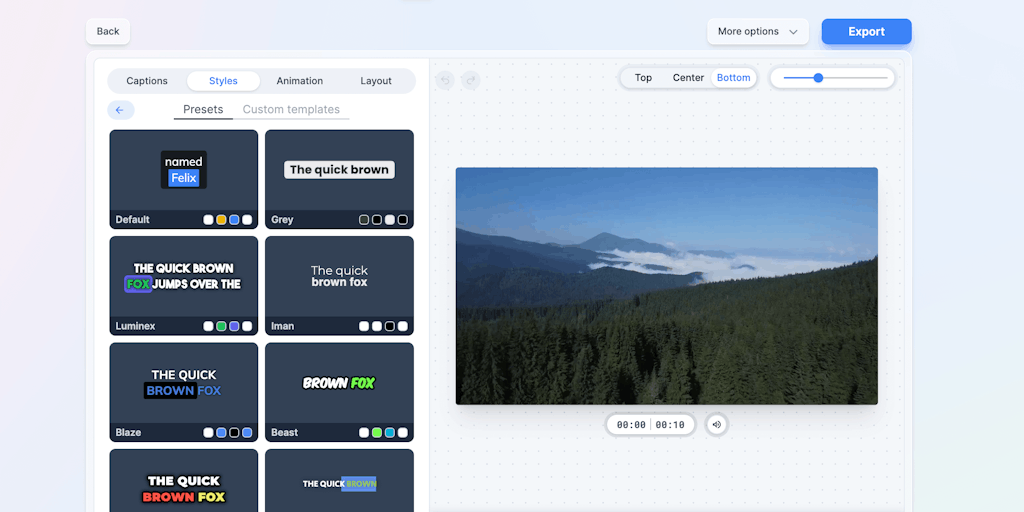
Subsvideo is an AI-powered video transcription tool that aims to help users create high-quality subtitles for their videos. It leverages advanced speech recognition technology to generate accurate and timely transcriptions. Subsvideo's primary function lies in its ability to automatically transcribe videos, which saves users significant time and effort. It also offers features like speaker identification and time-stamped transcripts, making it a versatile tool for various video editing and content creation needs. Whether you're a content creator, educator, or business professional, Subsvideo provides a convenient and efficient solution for creating subtitles and making your videos more accessible.
Core Features of Subsvideo
Subtitle Downloading
Subsvideo allows users to download subtitles for various videos. The platform supports a wide range of video sites, including YouTube, Vimeo, and Dailymotion. Subsvideo allows users to choose from different subtitle formats, including SRT, VTT, and TXT.
Subtitle Editing
After downloading the subtitles, users can edit them directly in Subsvideo's interface. This includes changing the text, adding or removing timestamps, and adjusting the font style.
Subtitle Conversion
Subsvideo offers the option to convert subtitles between different formats. For example, you can convert SRT to VTT, or VTT to TXT.
Subtitle Search
Subsvideo also includes a feature that allows users to search for subtitles. This can be helpful if you're looking for a specific subtitle file, or if you want to find subtitles in a different language.
Subtitle Uploading
Subsvideo allows users to upload their own subtitle files. Users can upload a variety of subtitle formats, and can share them with others.
Subtitle Syncing
Subsvideo also offers a subtitle syncing feature. This feature allows users to sync subtitles to a video file. Users can adjust the timing of the subtitles to make sure they match the video.
FAQs of Subsvideo
What is Subsvideo?
Subsvideo is a platform that helps you add subtitles to your videos. It can help you translate your videos into multiple languages, making them accessible to a wider audience. You can also use Subsvideo to add closed captions to your videos, which can help people with hearing impairments understand your content.
How does Subsvideo work?
Subsvideo works by using a combination of AI and human translators. You can upload your video to the platform, and Subsvideo will automatically generate subtitles for it. You can then edit and refine the subtitles, or you can have a professional translator do it for you. Once you are happy with the subtitles, you can download them in a variety of formats, such as SRT, VTT, and TXT.
What are the benefits of using Subsvideo?
There are many benefits to using Subsvideo, including:
- Increased accessibility: Subtitles make your videos accessible to people who are deaf or hard of hearing.
- Improved engagement: Subtitles can help people understand your videos better, even if they are watching them in a noisy environment.
- Global reach: By translating your videos into multiple languages, you can reach a wider audience.
- Enhanced SEO: Subtitles can help your videos rank higher in search results.
How much does Subsvideo cost?
Subsvideo offers a free trial, and then you can choose from a variety of paid plans. The price of each plan depends on the number of minutes of video you need to transcribe and the features you need.
How do I contact Subsvideo support?
You can contact Subsvideo support by email, phone, or live chat.
Subsvideo Alternatives
Run private OSINT searches for email addresses, usernames, and images across public sources, then review cited matches and evidence-grounded AI summaries.

Free unlimited image to prompt generator. Upload any image and get a detailed, accurate AI prompt for Midjourney, Stable Diffusion, FLUX and more in seconds.
Create professional AI headshots from your selfies. Train a personal model, generate 7 to 20 styles, and download up to 2048×2048 photos.
AI Gazou offers free AI-powered image upscaling to enhance photos, product images, and illustrations. Upscale 2x or 4x with natural detail preservation.
Omoggle offers private AI makeup analysis and 1v1 look comparisons focused on technique, finish, and theme fit.
Free AI hairstyle changer: upload a portrait and preview bobs, bangs, waves, pixie cuts, and buzz cuts while keeping your face, clothing, and lighting natural.
Upload 5‑20 selfies and receive 80‑180 AI‑generated, realness‑scored dating photos across 40+ scenes in about 20 minutes, optimized for Tinder, Bumble and Hinge.
Banana Prompt is an online marketplace for AI image prompts, letting creators and designers browse, copy, and reuse free or premium prompt pages with visual references and variable controls.
AI Image Translator is an online AI tool that converts text in images to over 130 languages while maintaining original fonts, layout and background, ideal for marketers, designers and e‑commerce teams needing instant or batch visual localization.
Yipara is an AI photo analysis tool for dog and cat owners. Upload a photo of any visible concern — skin, eye, ear, paw, wound, lump, insect bite, or unusual stool — and receive an instant analysis that helps you decide whether to monitor at home or seek veterinary care. Yipara is a triage aid and does not replace professional veterinary advice.
GPT Image 2 is an AI photo and image generator for designers and creators, offering photorealistic output, razor‑sharp text rendering, true color accuracy and 4K resolution.
This AI-powered tool transforms images into professional prompts for Flux, Midjourney, and Stable Diffusion, featuring multi-language support and advanced vision technology.