
Youtube to PPT
AI-Powered YouTube to PowerPoint Slides Converter by GenPPT

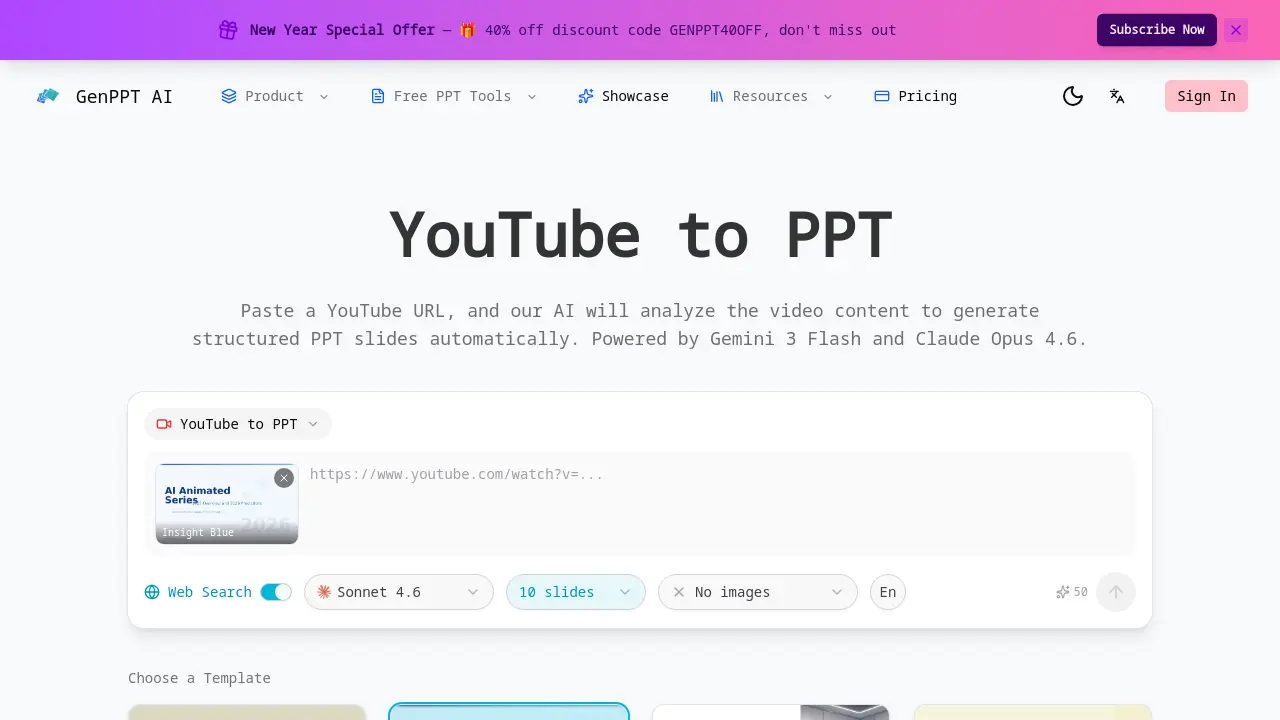
What is Youtube to PPT
YouTube to PPT is an AI-powered tool that automatically converts YouTube video content into structured PowerPoint presentations. By pasting a public YouTube URL, the system uses advanced AI models like Gemini 3 Flash and Claude Opus 4.6 to analyze the video, extract key points, and organize them into logical slide structures with titles and bullet points.
The tool offers significant customization, allowing users to control slide count (5-40), choose from multiple AI models, enable web search for enriched content, and add AI-generated illustrations. A real-time preview shows the generation process, and the final PPTX file downloads instantly for editing in PowerPoint or Google Slides.
A key differentiator is its native YouTube to PPT capability, providing direct video content analysis without requiring manual transcripts. Multi-language support for 31 languages, including English, Chinese, Spanish, and Japanese, broadens its utility for global users. Compared to alternatives like Gamma or Canva, this service uniquely specializes in transforming video media into polished presentation decks, saving substantial time for educators, marketers, and researchers needing to repurpose video content. The process requires credits but delivers a streamlined workflow from video link to editable slideshow.
How does Youtube to PPT work
YouTube to PPT operates by processing a public YouTube URL through integrated AI models, specifically Gemini 3 Flash and Claude Opus 4.6. The system performs AI video analysis to extract key narrative points and thematic content from the video. This information is then automatically structured into a coherent slide deck with titles and bullet points. Users can customize parameters including slide count (5-40), selection from 31 output languages, and template style. A real-time preview displays the generation progress, and the final output is exported as an editable PPTX file. The tool requires credit consumption for each conversion.
Benefits of Youtube to PPT
YouTube to PPT leverages AI to automatically convert YouTube videos into structured PowerPoint presentations. Users simply paste a video URL, and the tool—powered by models like Gemini 3 Flash—analyzes content to extract key points and organize them into slides with titles and bullet points. It supports 31 languages and offers customization, including slide count (5-40), web search, and AI model choice. Real-time preview shows progress, and instant downloads in PPTX format allow easy editing in PowerPoint or Google Slides, streamlining presentation creation for academic or professional projects.
Pros and Cons of Youtube to PPT
Pros
- Native YouTube URL integration for easy input.
- AI video analysis automatically extracts key points.
- Supports 31 languages for multi-language output.
- Customizable slide count and AI model selection.
- Real-time preview shows generation progress.
Cons
- Requires paid credits for each generation.
- Only processes public YouTube videos.
- Default template includes no AI-generated images.
- Slide count limited to a maximum of 40.
- Accuracy depends on AI model interpretation.
Core Features of Youtube to PPT
AI Video Content Analysis
Uses Gemini 3 Flash to analyze YouTube video content, intelligently extracting key points and main topics from the audio and visual data for presentation foundations.
Automated Slide Structuring
Organizes extracted video content into a logical slide sequence with auto-generated titles and bullet points, creating a coherent presentation outline without user formatting.
Multi-language Output Support
Generates complete PowerPoint presentations in 31 languages, including English, Chinese, Japanese, Korean, and Spanish, for international and localized content needs.
Customizable Generation Parameters
Allows users to control output by selecting slide count (5-40), enabling web search for additional context, choosing between AI models, and adding AI-generated illustrations.
Real-time Generation Preview
Provides a live, animated preview of slides being created during the generation process, showing progress updates and content layout before final export.
Instant PPTX Export
Exports the finished presentation directly to a standard .pptx file format with one click, ensuring immediate compatibility with Microsoft PowerPoint and Google Slides for editing.
Use Cases of Youtube to PPT
- Students: Convert educational YouTube lecture videos into structured study presentations using AI video analysis.
- Business Analysts: Transform industry trend YouTube content into market analysis slides with automated PPT generation.
- Marketing Teams: Repurpose product demonstration videos into client pitch decks via YouTube-to-PPT conversion tools.
- Researchers: Summarize academic conference talks into research presentation decks through video content extraction.
- Startup Founders: Create investor pitch decks from startup opportunity YouTube videos with multi-language AI support.
FAQs of Youtube to PPT
What YouTube URLs are supported?
The tool processes publicly available YouTube video URLs exclusively. Private, unlisted, or age-restricted videos are not supported due to access limitations. Ensure the video is set to public visibility before attempting to generate a presentation from its content.
How many slides can I generate?
Users can customize the slide count between 5 and 40 slides per presentation. This range allows adaptation to video length and content complexity, with the AI structuring key points into a coherent sequence within the selected limit.
How long does generation take?
Processing time depends on video duration and the chosen AI model. Typically, generation completes within a few minutes. The interface provides real-time progress updates, and the final PPTX file is available for instant download once processing finishes.
Can I edit the generated PPT?
Yes, the output is a standard PPTX file fully compatible with Microsoft PowerPoint and Google Slides. After downloading, you can modify all elements including text, layout, formatting, and design to suit specific presentation needs.
Does this work with private videos?
No, the service only functions with public YouTube videos. Private or unlisted videos cannot be accessed due to platform API restrictions and privacy policies, limiting usage to openly shared content.
How many credits does it cost?
Credit deduction varies based on your subscription plan, number of slides, and selected AI model. Specific credit pricing per generation is detailed on the pricing page, with costs applied each time a presentation is created.
What AI models are used?
The primary AI model is Gemini 3 Flash, which handles video content analysis and key point extraction. Users can also opt for Claude Opus 4.6 for enhanced language processing and slide structuring during the generation setup.
Can I add AI-generated images?
Yes, by enabling the "add illustrations" option during setup, the AI generates relevant images to complement slide content. Without this option, slides are produced with text-only formatting as specified in the customizable settings.
How to use Youtube to PPT
- The user begins by opening a web browser and navigating to the YouTube to PPT page at genppt.ai/youtube-to-ppt to access the conversion interface.
- A publicly accessible YouTube video URL is pasted into the designated input box; private or unlisted videos are not supported by the AI analyzer.
- From the template gallery, the user selects a design such as Insight Blue, Clarity Glass, or Sandstone Pro to define the slide aesthetics.
- In the settings panel, the user sets the desired number of slides (from 5 to 40), chooses one of 31 languages for output, and toggles web search for additional data if needed.
- The AI model selection is made: Gemini 3 Flash for quicker generation or Claude Opus 4.6 for more comprehensive video content analysis and detailed slide creation.
- To incorporate visual elements, the user enables the AI-generated images option, which adds illustrations to enhance the presentation's appeal and clarity.
- Upon clicking the generate button, the tool initiates the process, and a real-time preview shows each slide being built with structured titles and bullet points.
- After generation completes, the user examines the previewed slides to ensure key video insights are accurately extracted and logically organized for the intended audience.
- Using the built-in editor, the user can adjust slide text, reorder content, or modify bullet points directly in the preview interface before finalizing.
- The completed presentation is downloaded as an editable PPTX file, compatible with Microsoft PowerPoint and Google Slides for further editing or immediate use.
Youtube to PPT Website Traffic Analysis
Latest traffic information
- Monthly Visits91
- Bounce Rate37.19%
- Pages Per Visit1.07
- Visit Duration00:00:00
- Global Rank3.4M
- Country/Region Ranking--
Top Regions
| Region | Percentage |
|---|---|
| Spain | 100% |
Youtube to PPT Alternatives
Pi is an AI presentation generator that turns ideas into polished slides. One-click generation, smart layouts and templates make decks fast and easy.
Convert PPT to MP4 video online with AI. Upload slides, set duration, resolution and sound, then generate a polished cinematic video with narration and music.

Turn JPG, PNG, and WebP images into editable PowerPoint slides. Upload up to 10 images, set the order, and let AI rebuild each image as a real slide.
Gamma AI is an AI presentation generator that turns text, PDF, and Word into slides with structured outlines, in-browser editing, and editable PPTX export.
Fuu AI is an AI presentation maker that turns text, PDFs, and documents into professional PPT slides in minutes, powered by Claude Opus 4.7.
Convert PPT to Keynote-ready PPTX online. Free PPT to Keynote converter for Apple Keynote imports with secure processing and no installs.
SlidesGo is an AI-powered PPT generator for businesses, educators and content creators, offering instant slide creation, design beautification, format conversion and automatic speaker notes to streamline presentation development.
CartoMind is a free AI infographic generator that lets marketers, educators and creators turn text, documents or ideas into professional infographics in seconds, using automatic layout, typography and multi‑language design.
Gamma AI is a revolutionary AI PPT maker that transforms ideas into polished presentations, using cutting-edge artificial intelligence to handle design, layout, and content structure for professional results.
Gamma App is a free AI presentation generator for professionals, using Claude Opus to create and enhance slides from text, PDFs, or videos in minutes.
Dokie AI helps businesses and educators create professional presentations with AI, using Claude Opus 4.6 to transform ideas into polished slides.
Tome App AI uses AI to generate, beautify, and enhance PowerPoint presentations, leveraging Claude Opus 4.6 for professional results in minutes.