
Text to PPT
GenPPT AI Text to PPT Converter - Free Online Tool

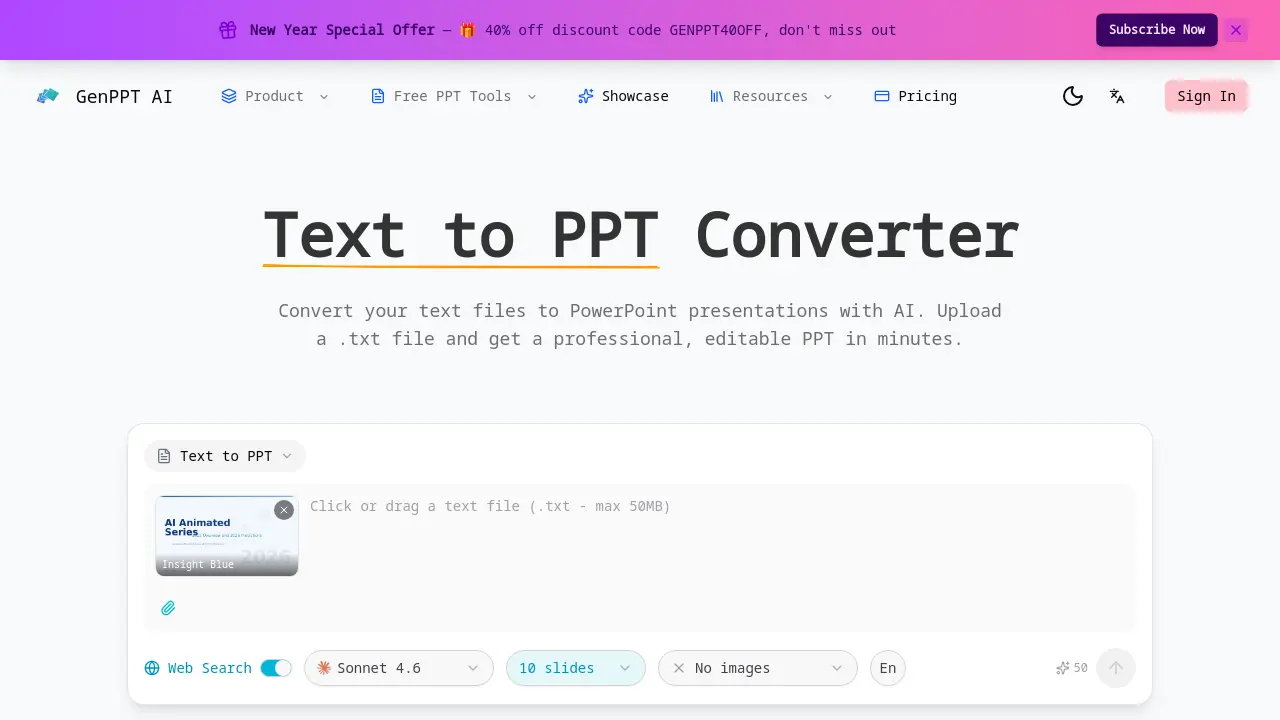
What is Text to PPT
Text to PPT is an AI-driven converter that transforms plain text files into professional PowerPoint presentations. The tool analyzes uploaded .txt content to identify key topics, logical sections, and content hierarchy, automatically generating well-structured slides. Users can choose from design templates such as Insight Blue and Clarity Glass for consistent visual appeal. Output is delivered as a fully editable PPTX file, enabling customization of text, layouts, and elements post-conversion. Web search integration supplements original text with current data and context, enhancing presentation relevance. The service processes files of any length quickly and is free to use, catering to students, educators, and professionals seeking efficient creation of polished slide decks from simple text inputs.
How does Text to PPT work
The Text to PPT converter operates by processing uploaded plain text files through an AI engine that performs smart content analysis. It automatically detects logical sections, key topics, and hierarchical structure within the text to generate a multi-slide outline. The AI then applies a selected professional design template, incorporating color schemes and typography to format the content into presentation slides. An optional web search feature can supplement the original text with current external data. The final output is a fully editable PPTX file, allowing users to modify all elements after conversion, enabling rapid transformation of raw text into polished presentations.
Benefits of Text to PPT
The Text to PPT converter from GenPPT AI efficiently transforms plain text files into professional, editable PowerPoint presentations. Its AI-powered engine analyzes content to automatically detect structure and key topics, generating well-organized slides with cohesive design. Users can enhance slides with web search for current data and choose from templates like Insight Blue. The service is fast, handles files of any length, and produces fully customizable PPTX outputs, streamlining presentation creation for academic and professional needs.
Pros and Cons of Text to PPT
Pros
- AI analyzes text for structured slides.
- Automatic professional design application.
- Fully editable PPTX output provided.
- Optional web search for current data.
- Fast, free conversion process.
Cons
- No image generation from text.
- Limited template selection available.
- Web search requires user activation.
- Only accepts plain .txt files.
Core Features of Text to PPT
AI-Powered Text to PPT Conversion
Converts uploaded plain text files into professional PowerPoint presentations using artificial intelligence, automating slide creation and formatting from simple text inputs.
Smart Content Analysis
Analyzes text to identify key topics, paragraphs, and logical sections, enabling the creation of well-structured slides from unstructured content through AI interpretation.
Automatic Structure Detection
Detects natural content sections and hierarchy within plain text, even without explicit formatting, to organize slides with clear logical flow and emphasis.
Professional Slide Design
Applies pre-designed templates, cohesive color schemes, and typography to transform basic text into visually consistent and aesthetically pleasing presentation slides.
Fully Editable PPTX Output
Generates a standard .pptx file that allows complete customization of all elements, including text, layouts, and imagery, after the initial conversion process.
Web Search Enhancement
Integrates real-time web search to supplement original text content with current data, statistics, and contextual information for more impactful and up-to-date slides.
Use Cases of Text to PPT
- Students: Convert lecture notes into study presentation slides using AI-powered text to PPT conversion.
- Business Professionals: Transform plain text reports into executive PowerPoint presentations with automatic formatting.
- Researchers: Summarize research papers into conference presentation slides using AI content analysis.
- Startup Founders: Create investor pitch decks from business plan text files with professional slide designs.
- Content Creators: Adapt blog content into webinar slides using the text to PPT converter's smart structure detection.
FAQs of Text to PPT
How does the text to PPT converter work?
The text to PPT converter utilizes AI to process uploaded plain text files. It analyzes the content to identify key topics, paragraphs, and logical sections, automatically structuring them into slides. The AI then applies professional designs, layouts, and typography to transform the text into a polished PowerPoint presentation, which is delivered as a fully editable PPTX file.
Can plain text really make a good presentation?
Yes, plain text can be effectively converted into a professional presentation using AI. The converter detects natural content hierarchy and sections, even without explicit formatting, and enhances it with consistent design elements like color schemes and typography. This ensures the final slides are visually appealing, well-organized, and suitable for various academic or professional contexts.
What text file formats are supported?
The text to PPT converter supports standard .txt files, which represent plain text formats. Users can upload any plain text file regardless of its length or content complexity. The AI processes these files to generate a PowerPoint presentation, making it versatile for different text-based inputs like notes, articles, or reports.
Is the text to PPT converter free?
The service offers a free tier for converting text to PPT, allowing basic conversions without cost. However, GenPPT AI also provides paid subscription plans with advanced features, as indicated by the pricing page and promotional offers. The free version may have limitations, while paid plans unlock additional capabilities such as enhanced templates or web search integration.
Can I specify how many slides to generate?
Yes, users can specify the number of slides during the conversion process. The interface includes options like 10 slides, and the AI adjusts the content distribution to fit the chosen slide count. This allows for customization based on presentation length needs, ensuring the output matches specific requirements for brevity or detail.
What templates are available for the text to PPT conversion?
The converter provides multiple template options, including Insight Blue, Clarity Glass, and Sandstone Pro. Users select a template before conversion to define the visual style, color palette, and layout of the slides. This choice influences the overall aesthetic, helping to align the presentation with specific themes or branding preferences.
How can I customize the generated PowerPoint presentation?
The output is a fully editable PPTX file compatible with Microsoft PowerPoint and similar software. Users can modify text content, adjust slide layouts, add or remove images, change design elements, and edit any component after conversion. This flexibility allows for personalization and refinement to meet exact presentation standards or preferences.
What is the web search enhancement feature?
Web search enhancement enables the AI to supplement the uploaded text with current data and context from the internet. This feature enriches the presentation content by integrating up-to-date information, statistics, or examples, making slides more relevant and impactful, especially for topics requiring recent insights or factual accuracy.
Are there any file size or text length limitations?
The converter handles plain text files of any length, with no specified restrictions on file size or text volume. However, extremely large files may increase processing time or require additional computational resources. Users should consider practical limits based on their device capabilities and internet speed for optimal performance.
Which AI model is used for the conversion?
The text to PPT converter employs the ClaudeSonnet 4.6 AI model for content analysis and generation. This model powers the smart content detection, structure organization, and design application processes. It ensures accurate interpretation of text and high-quality slide creation, leveraging advanced natural language processing capabilities.
How to use Text to PPT
GenPPT AI's Text to PPT converter is an AI-powered tool that transforms plain text files into professional PowerPoint presentations. It automatically analyzes text structure, applies design templates, and outputs fully editable PPTX files.
- The process begins by navigating to the GenPPT AI website and selecting the Text to PPT converter option from the product menu.
- A plain text file is uploaded using the provided interface; the tool accepts common text formats including .txt files.
- Users choose a design template from available options such as Insight Blue or Clarity Glass, and may enable web search or specify slide count.
- Conversion is initiated by clicking the generate button, which prompts the AI to analyze the text content and automatically create a slide structure.
- Upon completion, the generated PPTX file becomes available for download to the user's device for further use.
- The resulting slides should be reviewed to confirm that the AI has correctly segmented the content and applied the chosen template effectively.
- Further edits can be made in Microsoft PowerPoint or compatible software, modifying text, adjusting layouts, or adding images as needed.
- Finally, the customized presentation is ready for deployment in various scenarios, such as business pitches, academic defenses, or team meetings.
Text to PPT Website Traffic Analysis
Latest traffic information
- Monthly Visits4.83K
- Bounce Rate36.37%
- Pages Per Visit1.36
- Visit Duration00:00:07
- Global Rank4.1M
- Country/Region Ranking646.3K
Visits Over Time
Top Keywords
| Keyword | Traffic | Volume | Cost Per Click |
|---|---|---|---|
| html转ppt | 180 | 1.18K | -- |
| pdf转ppt ai | 170 | -- | -- |
| text to ppt generator | 110 | 180 | -- |
| genppt ai | 100 | 550 | -- |
| genppt | 10 | 3.71K | -- |
Top Regions
| Region | Percentage |
|---|---|
| India | 46.46% |
| United States | 21.95% |
| United Arab Emirates | 15.66% |
| Italy | 9.01% |
| Spain | 6.91% |
