
FineVoice FAQs
FineVoice offers text-to-speech with 1500+ AI voices across 154 languages. Customize emotion, speed, and pitch for professional audio in ads, e-learning, and more.

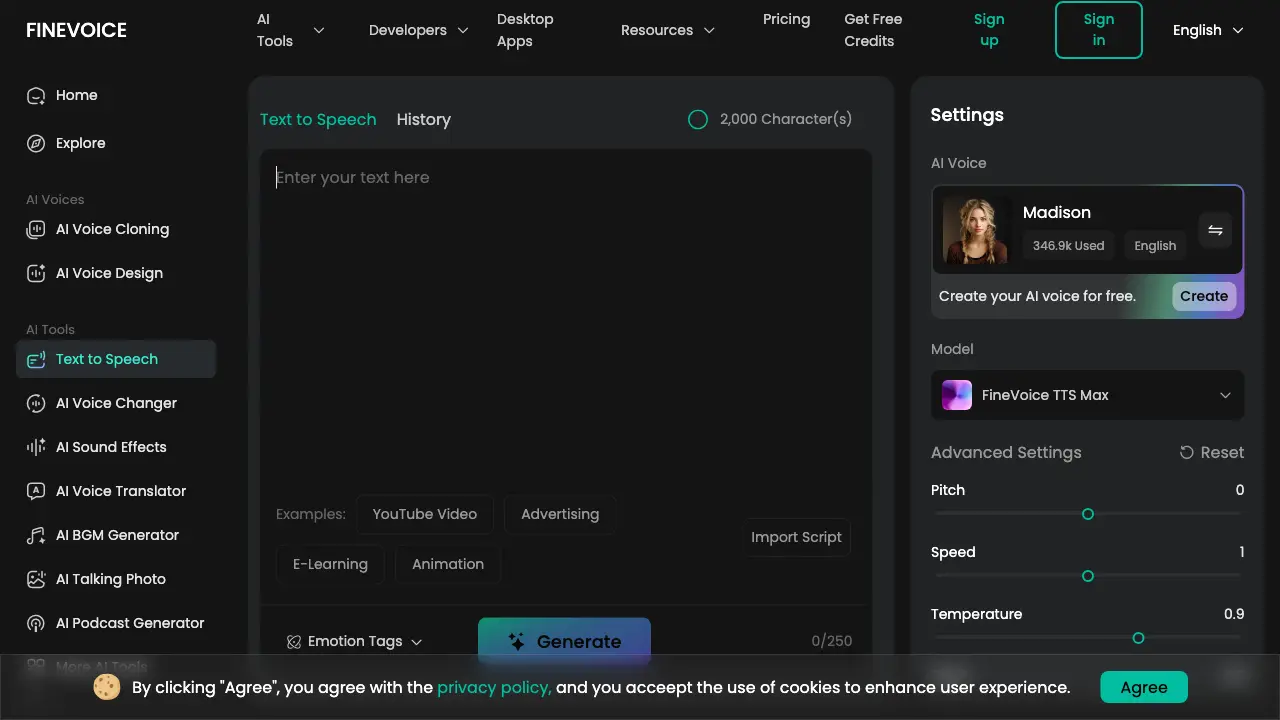
FAQs of FineVoice
What is text to speech (TTS) and how does it work?
Text-to-speech (TTS) is an assistive technology that converts digital text into audible speech. It uses artificial intelligence to analyze linguistic structures, apply phonetic rules, and synthesize vocal output, producing natural-sounding voice audio from written content.
What is the best free text to speech tool?
FineVoice provides a free tier with initial credits, allowing users to evaluate its TTS capabilities without cost. The free plan includes access to multiple AI voices and basic features, making it a practical option for those seeking a no-charge text-to-speech solution.
Does FineVoice offer multilingual text to speech, and how many languages does it support?
Yes, FineVoice's text-to-speech service supports 154 languages and accents. This extensive multilingual capability enables users to generate speech in various linguistic contexts, catering to global audiences and diverse project requirements.
Can I add my own voice to TTS?
Users can incorporate custom voices into TTS by utilizing FineVoice's AI Voice Cloning feature. This allows creation of a personalized voice model from audio samples, which can then be selected as the AI voice in text-to-speech generation for custom audio output.
Can I customize the voice settings to match specific content needs?
FineVoice offers adjustable parameters including pitch, speed, temperature, and Top P. Additionally, emotion tags and vocalization effects can be applied to tailor the voice's tone, style, and expressiveness to suit different content types and audience expectations.
How can I add pauses in the text?
Pauses can be inserted using standard punctuation like commas and periods for natural breaks. For more controlled pauses, users can employ vocalization tags such as [breathe] or [sigh] within the text, which add non-speech elements and intentional gaps in the audio.
Can I use the generated audio for commercial purposes?
FineVoice's licensing permits commercial use of generated audio files. However, users should consult the Terms of Service for specific conditions, as some voice models may have separate licensing restrictions that could affect commercial application.
Does FineVoice offer a Text to Speech API for developers?
FineVoice provides a Text-to-Speech API that developers can integrate into applications. The API supports features like voice selection, parameter adjustment, and emotion control, with documentation and example code available on the developer portal.
How much does FineVoice Text to Speech cost? Is there a free plan?
FineVoice operates on a freemium model with a free plan that includes credits for initial use. Paid subscription plans offer additional features, higher character limits, and priority processing. Detailed pricing information is accessible on the FineVoice pricing page.
What is the best free text-to-speech app for PC and mobile?
FineVoice's TTS tool is web-based, functioning on any device with a browser, including PCs and mobile phones, without requiring installation. Additionally, desktop applications are available for download, providing offline access on Windows and macOS.
How does emotion control work in FineVoice TTS?
FineVoice TTS incorporates emotion tags such as [happy], [sad], [angry], etc., which users embed directly into the text script. These tags instruct the AI model to modulate vocal tone, pace, and inflection, producing speech with discernible emotional context and enhancing narrative expressiveness.
What is the difference between FineVoice TTS and FineVoice TTS Max?
FineVoice TTS Max is an advanced model that exclusively supports emotion tags and vocalization effects, enabling more nuanced and theatrical speech output. The standard FineVoice TTS model prioritizes high-quality, low-latency synthesis suitable for general-purpose applications without emotional modulation.
What file formats are supported for text import in FineVoice TTS?
FineVoice accepts text input via direct typing, pasting, or file upload in .txt, .docx, and .srt formats. This flexibility allows users to convert existing documents, subtitles, or scripts into speech efficiently, streamlining the content creation workflow.
How does FineVoice ensure data privacy and security for TTS requests?
FineVoice implements encryption via TLS for data transmission and AES-256 for storage, utilizing AWS and Cloudflare infrastructure. User scripts are processed solely for TTS generation and are not shared externally. Users maintain full ownership and control over their generated audio files and data.
What are common use cases for FineVoice Text to Speech?
FineVoice TTS is applied across various domains including audiobook narration, e-learning content creation, video voiceovers, advertising, accessibility services for the visually impaired, customer service automation, multimedia localization, and personal productivity tools like listening to articles or documents.
How to use FineVoice
FineVoice is an AI-powered text-to-speech tool that converts written text into expressive, multilingual speech with customizable emotions, voice settings, and support for various file formats.
- Access the FineVoice Text to Speech web interface to begin the conversion process for your project.
- Input your text by typing, pasting, or importing .txt, .docx, or .srt files directly into the tool.
- Select an AI voice from the extensive library, considering language, accent, and usage statistics for suitability.
- Choose the FineVoice TTS Max model to utilize emotion tags and advanced expressive capabilities effectively.
- Fine-tune voice parameters such as pitch, speed, temperature, and Top P for precise audio customization.
- Apply emotion tags like "happy" or "sad" and vocalizations such as "breathe" or "laugh" for emotional depth.
- Click "Generate" to process the text; conversion time varies based on input length and selected model complexity.
- Listen to the generated audio to assess clarity, emotional accuracy, and overall naturalness before finalizing.
- Download the output file in common formats like MP3 or WAV, ensuring secure storage and personal data control.
- Integrate the expressive audio into applications including audiobooks, e-learning content, marketing materials, or accessibility resources.
