
SetlogHub FAQs
SetlogHub is an unofficial Japanese guide for Setlog app name verification, profile fields, setup flow, and notification and permission troubleshooting.

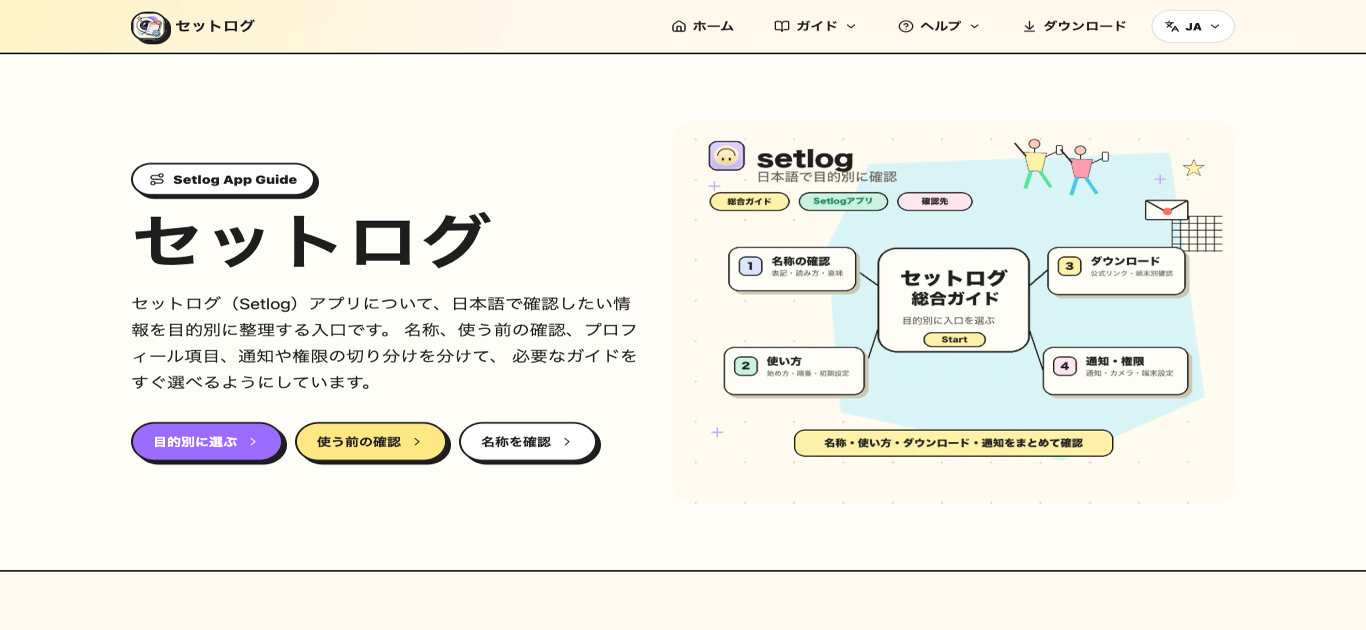
FAQs of SetlogHub
Where should a user look for Setlog information?
The user should first decide what they need on the SetlogHub main page. Name and reading questions lead to the name section, profile field confusion points to the profile page, and notification or permission issues go to the device settings page.
Can a visitor find everything about Setlog on this single page?
No. The main page serves as an entry point. Distribution status, supported devices, and official store information can change, so users need to check the official store and in-app display for the most current details.
Is SetlogHub an official website?
No. SetlogHub is an unofficial Japanese information organization site. For official account information, distribution status, support, and the latest app specifications, users should prioritize the official store and in-app display.
What topics does SetlogHub cover?
SetlogHub covers name notation and reading, profile field meanings (display name, real name, first and last name order), initial setup steps before first use, download sources for Android and iPhone, and troubleshooting for notifications, camera, and photo permissions.
How current is the information on SetlogHub?
The site organizes information that is generally stable, such as name conventions and profile field layouts. For up-to-date specifications like version numbers, supported devices, and distribution status, users should refer to the official app store or in-app display.
Is SetlogHub free to access?
Yes. SetlogHub is a freely accessible guide site. There is no registration or payment required to browse the name guides, profile explanations, setup flow, download links, or device troubleshooting pages.
What should a user do if the troubleshooting steps do not resolve the issue?
If the device-side checks for notifications, camera, or photo permissions do not solve the problem, the user should consult the official app store listing or contact Setlog's official support channels for further assistance.
How to use SetlogHub
- Go to the SetlogHub main page and pick the topic that matches what the user needs, such as name, profile, or device notifications.
- If unsure about the app name reading or notation, open the Name section to see how Setlog is written in English and katakana.
- When filling in registration fields, consult the Profile section to understand display name, real name, and the first or last name order.
- For initial setup before the first use, follow the Start section which covers registration, initial configuration, and the short recording flow.
- If notifications or camera permissions are not working, use the Device section to check iPhone and Android settings separately for each OS.
