
SetlogHub – Guide for Setlog App Name, Settings & Download

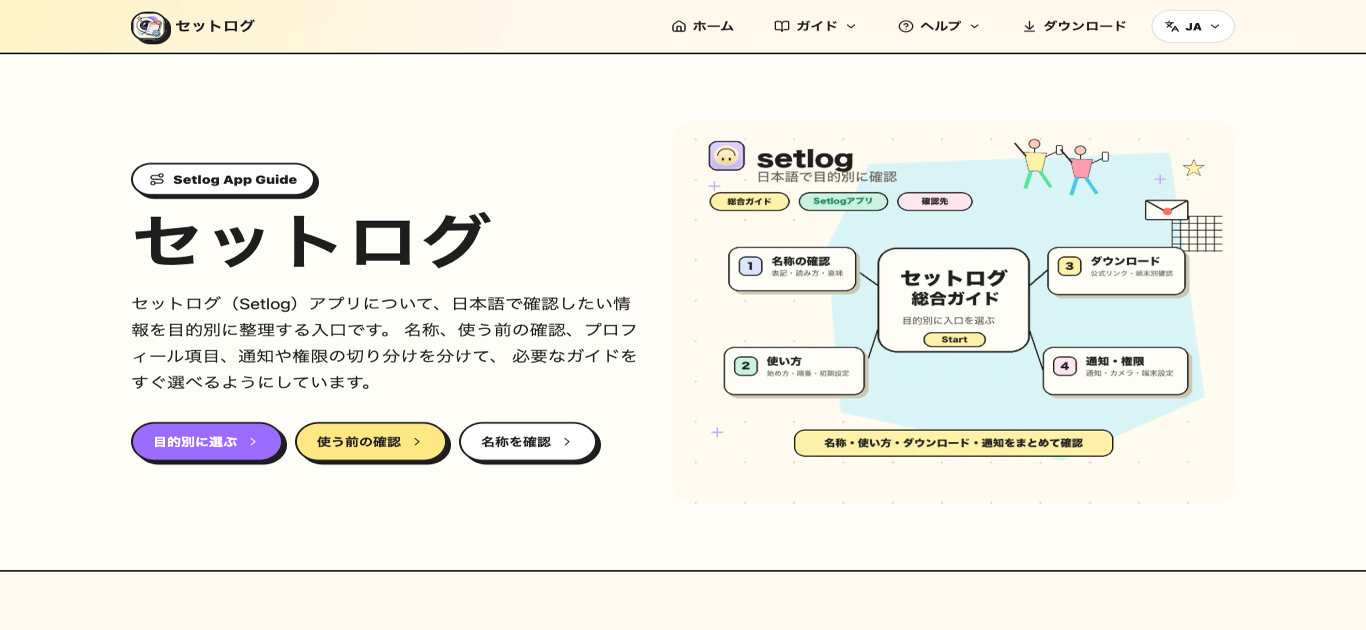
What is SetlogHub
SetlogHub is an unofficial Japanese-language guide site for Setlog, a social app centered around sharing daily moments and light vlogs with close friends. The site organizes information by purpose, covering areas such as app name reading and notation, profile field explanations, initial setup flow before first use, download sources for Android and iPhone, and notification or permission troubleshooting on the device side. Rather than diving into the app's internal features, SetlogHub focuses on the practical questions that come up when a Japanese speaker starts using Setlog, such as how display name and real name fields work or why notifications are not arriving. The site functions as a categorized entry point, helping users pick the right guidance without sifting through unrelated content.
How does SetlogHub work
SetlogHub organizes Setlog-related information into distinct categories so visitors can locate guidance based on their specific need. The main page lists topics such as name reading, profile fields, initial setup, download sources, and device notifications or permissions. Each category links to a dedicated page covering that topic in more detail. When a user encounters missing notifications or confusion over display name versus real name, they first identify the category and then follow the corresponding page. Device-side issues are treated separately from app-side questions because the troubleshooting path differs between iPhone and Android.
Benefits of SetlogHub
The main benefit of SetlogHub is that it separates Setlog information into clear categories so users do not have to read unrelated content. Name notation, profile fields, initial setup, and device notifications each have their own section, reducing confusion between app features and OS-level settings. For Japanese speakers, having guidance in Japanese around terms like display name, real name, and first or last name order removes a common point of friction. The site also distinguishes device-side troubleshooting from app-side questions, which helps users isolate notification or permission issues without guessing where the problem originates.
Pros and Cons of SetlogHub
Pros
- Information organized by purpose for quick access
- Japanese-language guidance for name and profile fields
- Device-side troubleshooting separated from app questions
- Covers both iPhone and Android notification settings
- Free to access without registration
Cons
- Unofficial site, not authoritative for latest specs
- Does not cover Setlog app internal features
- Limited to the Setlog app ecosystem only
Core Features of SetlogHub
Purpose-based Navigation
Visitors choose from clearly separated categories such as name verification, profile fields, initial setup, download info, and device notifications to quickly reach the relevant guidance.
Dedicated Guide Sections
Each topic receives its own page with focused content, so name-related questions, registration steps, or permission troubleshooting are handled independently rather than mixed into a single article.
Device-side Troubleshooting
Notification and permission issues are addressed from the device settings perspective, distinguishing between iPhone and Android to isolate whether the problem is on the app or the OS side.
Use Cases of SetlogHub
- Japanese speaker encountering Setlog for the first time: checking how the name is read and written in Japanese context.
- New user filling out the registration form: confirming whether to enter display name, real name, and the order of first and last name.
- User who cannot receive notifications: following the device-side checklist to isolate whether iPhone or Android settings are blocking alerts.
- User who wants to change name after registration: finding the profile edit path and understanding how display name updates are reflected.
- User looking for download links: locating the correct Android and iPhone store sources without searching in Japanese.
FAQs of SetlogHub
Where should a user look for Setlog information?
The user should first decide what they need on the SetlogHub main page. Name and reading questions lead to the name section, profile field confusion points to the profile page, and notification or permission issues go to the device settings page.
Can a visitor find everything about Setlog on this single page?
No. The main page serves as an entry point. Distribution status, supported devices, and official store information can change, so users need to check the official store and in-app display for the most current details.
Is SetlogHub an official website?
No. SetlogHub is an unofficial Japanese information organization site. For official account information, distribution status, support, and the latest app specifications, users should prioritize the official store and in-app display.
What topics does SetlogHub cover?
SetlogHub covers name notation and reading, profile field meanings (display name, real name, first and last name order), initial setup steps before first use, download sources for Android and iPhone, and troubleshooting for notifications, camera, and photo permissions.
How current is the information on SetlogHub?
The site organizes information that is generally stable, such as name conventions and profile field layouts. For up-to-date specifications like version numbers, supported devices, and distribution status, users should refer to the official app store or in-app display.
Is SetlogHub free to access?
Yes. SetlogHub is a freely accessible guide site. There is no registration or payment required to browse the name guides, profile explanations, setup flow, download links, or device troubleshooting pages.
What should a user do if the troubleshooting steps do not resolve the issue?
If the device-side checks for notifications, camera, or photo permissions do not solve the problem, the user should consult the official app store listing or contact Setlog's official support channels for further assistance.
How to use SetlogHub
- Go to the SetlogHub main page and pick the topic that matches what the user needs, such as name, profile, or device notifications.
- If unsure about the app name reading or notation, open the Name section to see how Setlog is written in English and katakana.
- When filling in registration fields, consult the Profile section to understand display name, real name, and the first or last name order.
- For initial setup before the first use, follow the Start section which covers registration, initial configuration, and the short recording flow.
- If notifications or camera permissions are not working, use the Device section to check iPhone and Android settings separately for each OS.
