
Native AI FAQs
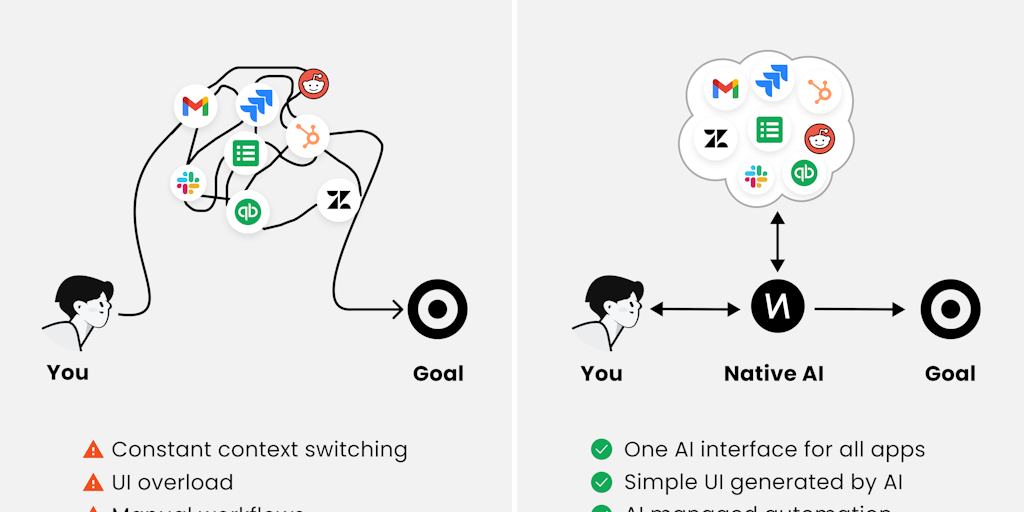
Native AI is your all-in-one companion for managing apps like Gmail, Slack, Jira, and more. Say goodbye to clunky interfaces and streamline your workflow with a simple UI. Get things done faster with effortless automations. Try Native AI now!

FAQs of Native AI
What is Native AI?
Native AI is an AI interface that allows you to interact with all your apps. It uses a single interface to access all your favorite applications, streamlining your workflow.
How does Native AI work?
Native AI uses a powerful AI engine to understand your requests and translate them into actions within your apps. It's like having a personal assistant who can help you get things done across all your different tools.
What are the benefits of using Native AI?
Native AI helps you save time and improve your productivity by simplifying how you interact with your apps. It also allows you to access information and complete tasks faster, regardless of where it's stored.
What kinds of apps can I use with Native AI?
Native AI supports a wide range of applications, including popular productivity tools, social media platforms, and more. You can find a list of supported apps on the Native AI website.
How can I get started with Native AI?
You can sign up for a free trial of Native AI on their website. Once you've signed up, you can start using it right away.
Is Native AI secure?
Yes, Native AI uses industry-standard security measures to protect your data and privacy. Your information is encrypted and stored securely.
What are the differences between Native AI and other AI tools?
Native AI is unique in that it provides a unified interface for interacting with all your apps. Other AI tools may focus on specific tasks or applications, while Native AI offers a more comprehensive approach.
